Office Pro saving glitch

Omnia X

New member
Local time
7:18 PM
Messages
19
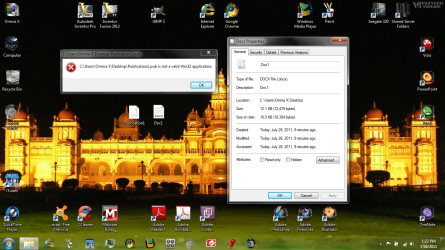
So I recently got a new laptop and later on I installed Office 2010 Professional (comes with Publisher, Visio, etc) However I believe it had 07 Office installed already as "activate with serial/purchase online" so that had to be uninstalled, by problem is though, whenever I save a file from office or transfer an office file to my laptop, it gives a weird ugly icon instead of a preview, and on default has "shell commadore" for the program to open with. Does anyone have suggestions to fix this? I have attached a screenshot for an example.
 

Attachments
  • Office Glitch.png
    Office Glitch.png
    447.3 KB · Views: 13

My Computer

Computer Manufacturer/Model Number
Toshiba Satellite L755-S5216
OS
Windows 7 Home Premium 64bit
Screen Resolution
1366x768
Just uninstall Office 2007 in Programs and features, then if required run a repair on Office 2010.
 

My Computer

Computer Manufacturer/Model Number
Too many to describe...
OS
Windows 7 x64 pro/ Windows 7 x86 Pro/ XP SP3 x86
Sorry if it wasn't clear, but i already had uninstalled office 07
 

My Computer

Computer Manufacturer/Model Number
Toshiba Satellite L755-S5216
OS
Windows 7 Home Premium 64bit
Screen Resolution
1366x768
yes, however though iot fixed the other ones, publisher and word files stil have the weird icons, ut on other users it is fixed
 

My Computer

Computer Manufacturer/Model Number
Toshiba Satellite L755-S5216
OS
Windows 7 Home Premium 64bit
Screen Resolution
1366x768
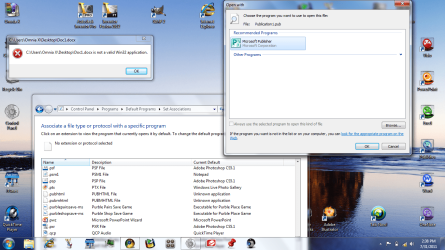
also it seems that there is an "invalid file extension or something:" However it still works fine on other users, so I am not sure if a registry thing needs fixing
 

Attachments

  • win32glitch.png
    win32glitch.png
    355.1 KB · Views: 12

My Computer

Computer Manufacturer/Model Number
Toshiba Satellite L755-S5216
OS
Windows 7 Home Premium 64bit
Screen Resolution
1366x768
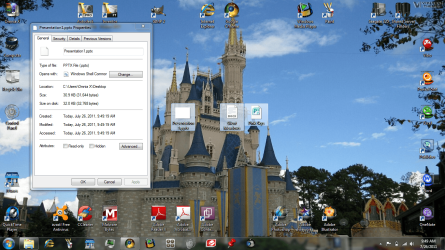
Looks like the file association is messed up. I suggest this after viewing the screen shot in your initial post.

Your screen shot shows the file type is a PowerPoint 2007 (or 2010) file but the "Opens with" program is incorrect. Click on the "Change" button in the Properties window - if PowerPoint is listed in the "Recommended Programs" select it (click on it) then click the OK button.

If PP is not listed, click the "Other Programs" drop list arrow (on the far right) - if PP is listed, click on it then click the OK button.

If PP isn't listed in "Other Programs" click the Browse... button and navigate to your Office installation. Select the PP executable POWERPNT, click the Open button, click the OK button, click the Apply button, click the OK button.

Clicking a .pptx file should now open in PowerPoint. Good luck.

Regards,
GEWB
 

My Computer

Computer type
PC/Desktop
Computer Manufacturer/Model Number
(7 different computers booting up to 10 systems)
OS
Linux Mint / XP / Win7 Home, Pro, Ultimate / Win8.1 / Win10
Other Info
Four desktops, two laptops, one notebook and one tablet
thats what I had initially did with the .pub and .docx files, but now as in the latter pic, I do not have a change option, as in an attempt to "restore to default" ie shell commor as a way to perhaps revert it to old state so I could fix with the repair option, it appear the tutorial I had looked up was inaccurate, so now I can not directly open the file while I am on that user acc. However the file associations and icons work perfectly fine on the admin acc and any other user acc, but the file extension doesn't even show up i the control panel for this user account.
 

My Computer

Computer Manufacturer/Model Number
Toshiba Satellite L755-S5216
OS
Windows 7 Home Premium 64bit
Screen Resolution
1366x768
PS Totally off topic, but Omnia X, I LOVE your background photos, like this one. Can you tell us where you get them, and is it possible to get a clean copy of this one? Thanks so much.


My Computer

Computer Manufacturer/Model Number
HP Pavillion dv5t (generation 1)
OS
Vista 64 bit and 32 bit (SP2)
CPU
Intel(R) Core(TM)2 Duo Processor T9400 (2.53 GHz
Memory
4GB DDR2 System Memory (2 Dimm)
Graphics Card(s)
512 MB NVIDIA GeForce 9600M GT
Monitor(s) Displays
15.4" diagonal WSXGA+ High-Definition HP BrightView Widescre
Screen Resolution
1680 x 1050
Hard Drives
320GB 5400RPM SATA Hard Drive with HP ProtectSmart Hard Drive Protection
Keyboard
Built-in HP
Mouse
Built in - Synaptics TouchPad V6.5 on PS/2 Port
Internet Speed
Max
Other Info
~ Intel Next-Gen Wireless-N Mini-card w/Bluetooth ~ Blu-Ray ROM DVD+/-R/RW ~ Integ. HDTV Hybrid Tuner ~ 12 Cell Battery ~ MS Office (Home Premium) 2007 ~
Gewb: As I have stated, for this user account the file extensions do not show up in the control panel, possibly due to some registry error, so sadly I cannot do that tutorial, as I have tried to goto control panel before.

Imperfect, thanks I try to make my main user acc desktop looking nice, I have compiled all the sample pics+country theme pics (Us, Au, Uk, etc) from vista and 7, as well as some from vikitech, I always get a new refreshing picture now. The icons can be found on wincustomize from authors such as mormegil or Dr. Arnaez in "themes" such as 2808 cryo64 or icon a day, so you can just goto misc icons for them
 

My Computer

Computer Manufacturer/Model Number
Toshiba Satellite L755-S5216
OS
Windows 7 Home Premium 64bit
Screen Resolution
1366x768
Another part of the issue is the chek box for always use as default program is greyed out
 

My Computer

Computer Manufacturer/Model Number
Toshiba Satellite L755-S5216
OS
Windows 7 Home Premium 64bit
Screen Resolution
1366x768
Gewb: As I have stated, for this user account the file extensions do not show up in the control panel, possibly due to some registry error, so sadly I cannot do that tutorial, as I have tried to goto control panel before.

Sorry, my bad. Log in as administrator and change the user account priviledges then try again. Not sure what else to suggest.

Regards,
GEWB
 

My Computer

Computer type
PC/Desktop
Computer Manufacturer/Model Number
(7 different computers booting up to 10 systems)
OS
Linux Mint / XP / Win7 Home, Pro, Ultimate / Win8.1 / Win10
Other Info
Four desktops, two laptops, one notebook and one tablet
well control panel itself is working fine, and while as admin I can access files stored on that user perfectly, its just when on that user the .pub and .docx dont work or register in control panel as shown in the second screenshot,
 

My Computer

Computer Manufacturer/Model Number
Toshiba Satellite L755-S5216
OS
Windows 7 Home Premium 64bit
Screen Resolution
1366x768
Does the following program mean anything to you:
Commodore brand game (like Radar Rat Race)?
 

My Computer

Computer type
PC/Desktop
Computer Manufacturer/Model Number
Packard Bell
OS
Windows 7 Home Premium 64bit
CPU
Intel(R) Core(TM) i3-2120 CPU @ 3.30GHz
Motherboard
Packard Bell IPISB-AG
Memory
3.00 GB
Graphics Card(s)
(1) Intel(R) HD Graphics (2) VNC Mirror Driver
Sound Card
Realtek High Definition Audio
Monitor(s) Displays
AIO LCD
Screen Resolution
1920 x 1080
Hard Drives
WDC WD10EADX-22TDHB0 ATA Device
Fixed hard disk media
4 partitions
931.51 GB
Keyboard
Wireless
Mouse
Wireless
Antivirus
Microsoft Security Essentials
Browser
IE; Firefox
Other Info
Also:
Samsung N220 Plus Netbook - Windows 7 Home
HP laptop
iPad 5
Pardon? I have never heard of that program before sorry, I'm not sure if you are asking if a game is trying to open the .pub or .docx files, but in that case, no
 

My Computer

Computer Manufacturer/Model Number
Toshiba Satellite L755-S5216
OS
Windows 7 Home Premium 64bit
Screen Resolution
1366x768

My Computer

Computer type
PC/Desktop
Computer Manufacturer/Model Number
Packard Bell
OS
Windows 7 Home Premium 64bit
CPU
Intel(R) Core(TM) i3-2120 CPU @ 3.30GHz
Motherboard
Packard Bell IPISB-AG
Memory
3.00 GB
Graphics Card(s)
(1) Intel(R) HD Graphics (2) VNC Mirror Driver
Sound Card
Realtek High Definition Audio
Monitor(s) Displays
AIO LCD
Screen Resolution
1920 x 1080
Hard Drives
WDC WD10EADX-22TDHB0 ATA Device
Fixed hard disk media
4 partitions
931.51 GB
Keyboard
Wireless
Mouse
Wireless
Antivirus
Microsoft Security Essentials
Browser
IE; Firefox
Other Info
Also:
Samsung N220 Plus Netbook - Windows 7 Home
HP laptop
iPad 5
thanks but that is only half the problem atm, if you look in the second screenshot there also is the issue of the default opening program for the .pub and .docx files, and those two extensions don't appear in the control panel for changing default programs, though it is only affecting that user account
 

My Computer

Computer Manufacturer/Model Number
Toshiba Satellite L755-S5216
OS
Windows 7 Home Premium 64bit
Screen Resolution
1366x768

My Computer

Computer type
PC/Desktop
Computer Manufacturer/Model Number
Packard Bell
OS
Windows 7 Home Premium 64bit
CPU
Intel(R) Core(TM) i3-2120 CPU @ 3.30GHz
Motherboard
Packard Bell IPISB-AG
Memory
3.00 GB
Graphics Card(s)
(1) Intel(R) HD Graphics (2) VNC Mirror Driver
Sound Card
Realtek High Definition Audio
Monitor(s) Displays
AIO LCD
Screen Resolution
1920 x 1080
Hard Drives
WDC WD10EADX-22TDHB0 ATA Device
Fixed hard disk media
4 partitions
931.51 GB
Keyboard
Wireless
Mouse
Wireless
Antivirus
Microsoft Security Essentials
Browser
IE; Firefox
Other Info
Also:
Samsung N220 Plus Netbook - Windows 7 Home
HP laptop
iPad 5
Sorry but the guide doesn't work, I've already tried that procedure before, basically the check box for changing default programs is greyed out, second on default it wont open, and in control panel the extension is missing:
 

Attachments

  • 3rd glitch.png
    3rd glitch.png
    202.9 KB · Views: 4

My Computer

Computer Manufacturer/Model Number
Toshiba Satellite L755-S5216
OS
Windows 7 Home Premium 64bit
Screen Resolution
1366x768
Back
Top