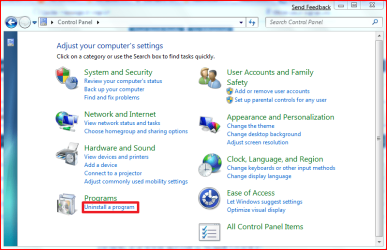
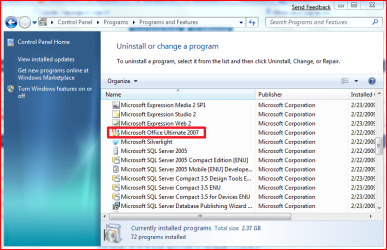
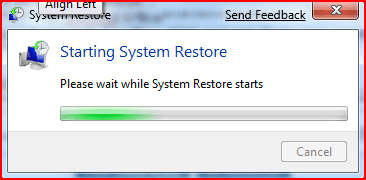
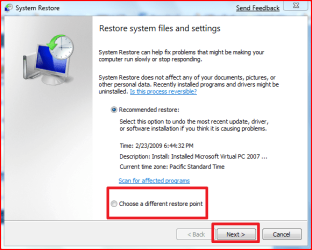
Did I do it right?
its ok the app automatically does this for you...
as you can see here you already have Office installed (or at least what the program is being told...************************************************************* ***************** Installed Applications ******************** ************************************************************* Microsoft Office Access MUI (English) 2007 - Location: C:\Program Files\Microsoft Office\ Microsoft Office Shared Setup Metadata MUI (English) 2007 - Location: C:\Program Files\Microsoft Office\ Microsoft Office Excel MUI (English) 2007 - Location: C:\Program Files\Microsoft Office\ Microsoft Office Access Setup Metadata MUI (English) 2007 - Location: C:\Program Files\Microsoft Office\ Microsoft Office PowerPoint MUI (English) 2007 - Location: C:\Program Files\Microsoft Office\ Microsoft Office Publisher MUI (English) 2007 - Location: C:\Program Files\Microsoft Office\ Microsoft Office Outlook MUI (English) 2007 - Location: C:\Program Files\Microsoft Office\ Microsoft Office Word MUI (English) 2007 - Location: C:\Program Files\Microsoft Office\ Microsoft Office Proofing (English) 2007 - Location: C:\Program Files\Microsoft Office\ Microsoft Office Shared MUI (English) 2007 - Location: C:\Program Files\Microsoft Office\ Microsoft Office Proof (English) 2007 - Location: C:\Program Files\Microsoft Office\ Microsoft Office Proof (Spanish) 2007 - Location: C:\Program Files\Microsoft Office\ Microsoft Office Proof (French) 2007 - Location: C:\Program Files\Microsoft Office\ Acrobat.com - Location: Adobe AIR - Location: Win7codecs - Location: C:\Program Files\Win7codecs\ Microsoft Silverlight - Location: C:\Program Files\Microsoft Silverlight\
are you sure you dont have any office shorcuts anywhere?
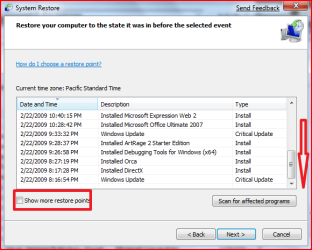
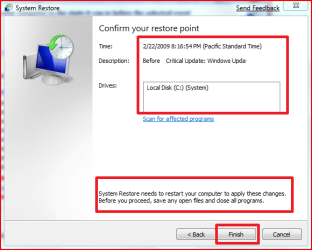
if not then we will begin first by using system restore (if you can)
to the point when office xp is installed...
remove it and then install 2007
My Computer
- Computer Manufacturer/Model Number
- Tx2500z Tablet Pc/Homemade Server
- OS
- Windows 7 Ult x64(x2), HomePrem x32(x4), Server 08 (+VM), 08 R2 (VM) , SuSe 11.2 (VM), XP 32 (VM)
- CPU
- Turion X2 ultra (oh well came with laptop)/P4 @3.2 (yes P4)
- Motherboard
- IDK HP Motherboard / Intel DG965SS
- Memory
- OCZ Dual Channel 4GB kit/ 1gb Dual Channel
- Graphics Card(s)
- HD 3200 graphics /GMA x3100 (yay for intergrated!!)
- Sound Card
- Realtek HD Audio(mic working, well sort of)/Siig IC-70012
- Monitor(s) Displays
- built-in Hp 12" laptop screen/ Acer 19"
- Screen Resolution
- 1280x800 /1440x900
- Cooling
- All Air Cooled
- Mouse
- Logi MX Rev. /MS Wheel Optical 1.1A /Logitech Optical Mouse
- Internet Speed
- College baby but its still routed through vpn to 1536k...
- Other Info
- love my wacom pen and pressure sensitivity...
wished it worked in 7, SUSE for that matter though