OH hell of an install help please

3doz

New member
Local time
1:48 AM
Messages
17
Gee what a screw up
first i over installed 7 on vista on c drive
it worked for a while but when I set the drive of the video card it failed to load , thats a strange one in it self
I then tried to run the install again from the disc but it would not repair or even go to a new install .on c:

But I could new install on B: and thats now working well
I removed the double boot without a problem and hoped to format c:
no joy it appears to be the first boot disc and redirects to B:

so the question is how do i redirect the boot only to B and not through c:
if thats not possible , what files and directories are required for the boot on c:
as I could remove the drive and put it in another computer and then delete the unwanted windows except these. saving space again on c:

can anyone assist please
 

My Computer My Computer

At a glance

7
Computer Manufacturer/Model Number
abit
OS
7
Gee what a screw up
first i over installed 7 on vista on c drive
it worked for a while but when I set the drive of the video card it failed to load , thats a strange one in it self
I then tried to run the install again from the disc but it would not repair or even go to a new install .on c:

But I could new install on B: and thats now working well
I removed the double boot without a problem and hoped to format c:
no joy it appears to be the first boot disc and redirects to B:

so the question is how do i redirect the boot only to B and not through c:
if thats not possible , what files and directories are required for the boot on c:
as I could remove the drive and put it in another computer and then delete the unwanted windows except these. saving space again on c:

can anyone assist please


Took almost 3-4 readings to understand ur language
If u want to change ur boot drive den u can use EASY BCD. and what how do i redirect the boot only to B and not through c means ? did u mean that u want to boot from B: and not from C:
 

My Computer My Computer

At a glance

Windows 7AMD Phenom II X2 550 BE Unlocked to X4Transcend 2 GB 800 MhzXFX Nvidia 8600 GT DDR 3
OS
Windows 7
CPU
AMD Phenom II X2 550 BE Unlocked to X4
Motherboard
Biostar TA790GXB A2+
Memory
Transcend 2 GB 800 Mhz
Graphics Card(s)
XFX Nvidia 8600 GT DDR 3
Screen Resolution
1152 x 864 @ 85Hz
Hard Drives
WD 500 GB SATA II
Case
iBall Gamerz
Keyboard
Microsoft
Mouse
Microsoft
Internet Speed
10 Mbps
thanks

used EASY BCD
if i remove c : it wont boot
so c: has a file that redirects the program to start in B: drive
I wnat to make the boot drirect from B: without going to C: first
 

My Computer My Computer

At a glance

7
Computer Manufacturer/Model Number
abit
OS
7
more info

it shows boot manager
device partition =c
path/ bootmgr

Boot loader partition =e

so which drive is operation the main program?

and if it cant be changed
what directories of 7 on the other drive can be removed with safty

please assist so i can save some space on one drive and not have two 7 :sarc:
 

My Computer My Computer

At a glance

7
Computer Manufacturer/Model Number
abit
OS
7
opps

boot loader =b

miss type
 

My Computer My Computer

At a glance

7
Computer Manufacturer/Model Number
abit
OS
7
Hello 3doz, welcome.

Can you boot into your W7 disc?

~Lordbob
 

My Computer My Computer

At a glance

Windows 7 Ultimate x64, Mint 9Intel i5-2500k2x 4Gb Corsair VENGEANCE DDR3-1600NVidia GeForce N260GTX Twin Frozr
Computer Manufacturer/Model Number
Hera
OS
Windows 7 Ultimate x64, Mint 9
CPU
Intel i5-2500k
Motherboard
ASUS P8P67 Pro
Memory
2x 4Gb Corsair VENGEANCE DDR3-1600
Graphics Card(s)
NVidia GeForce N260GTX Twin Frozr
Sound Card
Realtek HD OnBoard Audio
Monitor(s) Displays
ASUS 24" Monitor
Screen Resolution
1920x1080
Hard Drives
G.SKILL Phoenix Series 60GB SATA II MLC Internal Solid State Drive (SSD)
SAMSUNG Spinpoint F3R 1TB 7200 RPM 32MB Cache SATA II
PSU
Cooler Master Real Power Pro 750W
Case
Cooler Master Haf 932
Cooling
Fans
Keyboard
Razer Tarantula
Mouse
Razer Lachesis
Internet Speed
not fast enough
yes but that makes no difference to a repair it shows nothings wrong and boots the same it looks like it always going to boot from c then transfer to e for the mail program runningso what files must remain on c: always . then I can remove the rest of the second copy of windopws 7 using a different computer
 

My Computer My Computer

At a glance

7
Computer Manufacturer/Model Number
abit
OS
7
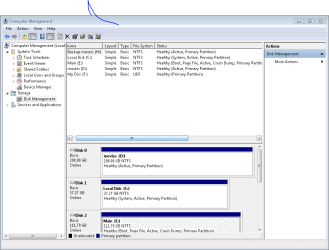
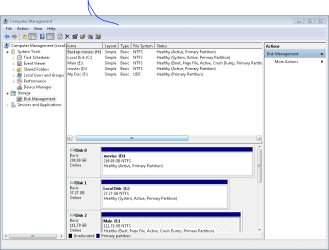
At this point, we can best advise you if you post a screenshot of your full Disk Management map.

Use the Snipping Tool in the Start Menu, attaching file using paper clip icon in reply box.

The normal procedure is to mark the WIndows 7 partition active, delete the XP partition holding the MBR, then boot into the Win 7 DVD and run Startup Repair 3 times to rewrite the MBR to Windows 7.

This can also be done using EasyBCD beta View attachment 40032 which can rebuild the Windows 7 MBR.

Whichever you choose, back up your files. And let us see a screenshot to be sure we are advising you correctly.
 
Last edited:
I suggest booting in to the disk, and deleting ALL your partitions and reinstalling completely.

~Lordbob
 

My Computer My Computer

At a glance

Windows 7 Ultimate x64, Mint 9Intel i5-2500k2x 4Gb Corsair VENGEANCE DDR3-1600NVidia GeForce N260GTX Twin Frozr
Computer Manufacturer/Model Number
Hera
OS
Windows 7 Ultimate x64, Mint 9
CPU
Intel i5-2500k
Motherboard
ASUS P8P67 Pro
Memory
2x 4Gb Corsair VENGEANCE DDR3-1600
Graphics Card(s)
NVidia GeForce N260GTX Twin Frozr
Sound Card
Realtek HD OnBoard Audio
Monitor(s) Displays
ASUS 24" Monitor
Screen Resolution
1920x1080
Hard Drives
G.SKILL Phoenix Series 60GB SATA II MLC Internal Solid State Drive (SSD)
SAMSUNG Spinpoint F3R 1TB 7200 RPM 32MB Cache SATA II
PSU
Cooler Master Real Power Pro 750W
Case
Cooler Master Haf 932
Cooling
Fans
Keyboard
Razer Tarantula
Mouse
Razer Lachesis
Internet Speed
not fast enough
just downloaded the latest ver easybcd
could be I am not running this correctly can you run me throught it as required
thanks
 

My Computer My Computer

At a glance

7
Computer Manufacturer/Model Number
abit
OS
7
picture

here is a screen shot of the drives
 

Attachments

  • Capture.PNG
    Capture.PNG
    18.2 KB · Views: 11

My Computer My Computer

At a glance

7
Computer Manufacturer/Model Number
abit
OS
7
here is the screen shot
 

My Computer My Computer

At a glance

7
Computer Manufacturer/Model Number
abit
OS
7
here is the screen shots
 

Attachments

  • Capture.PNG
    Capture.PNG
    18.2 KB · Views: 8

My Computer My Computer

At a glance

7
Computer Manufacturer/Model Number
abit
OS
7
I don't see B: drive you refer to, where you reinstalled Win7?

Looks like it is Disk2 which is labelled E: on screenshot, right?

The first problem is all of the other drives marked Active, even the movie drive.

EasyBCD won't work here because it will rewrite the MBR to where it is currently located on DISK1. You could unplug other drives and run EasyBCD from your Win7 desktop but the unplugging would have to be done while on the Win7 desktop and that is not advisable. And it will not boot back in to run EasyBCD if you shutdown to unplug those other drives.

You are going to need to mark those other drives inactive using free Partition Wizard bootable CD download below

Boot PWizard then rightclick on each of the other drives to Modify>Set Inactive, click OK.

Click Apply after all are done.

Reboot, enter BIOS setup and make sure Win7 drive is set as first HD to boot after DVD.

then reboot into the Win7 DVD and run Startup Repair 3 times to rewrite the MBR to Win7 drive.

-OR-

Unplug all drives except Windows 7 drive you want.

Consider moving it into first drive position, then enter BIOS and set that drive to boot first after DVD.

Boot into WIndows 7 DVD and run Startup Repair 3 times to rewrite the MBR to Win7.
 
Last edited:
please explain boot into the Win 7 DVD and run Startup Repair 3 times to rewrite the MBR to Windows 7.
why three times
 

My Computer My Computer

At a glance

7
Computer Manufacturer/Model Number
abit
OS
7
If you place the Win7 DVD in the DVD drive and reboot the computer, you should be prompted to "hit any key to boot from DVD." If not you need to enter the BIOS setup at bootup (given on the first screen, usually F2 key) and set the DVD drive to Boot first.

After booting up, Windows 7 DVD has a Repair My Computer link on the second screen. It takes you to a repair console with recovery tools used to fix issues including Startup Repair.

Startup Repair on a dual boot removal has to recover to Windows 7 the MBR which was on the first-installed OS. It has several issues to fix which is why it needs to be done several times, rebooting each time until Windows 7 starts up.

We have removed about 80+ of these dual boots since Win7 was released with a 90%+ success rate. The problems are when the steps are not followed, so please ask any questions as you are.
 
Finaly many many thanks it boots from the one drive and all other drives are primary part
now the next question how can I erase all the directories in C: being non used and I need the space and dont require two 7 installed
again thanks for staying with this one
 

My Computer My Computer

At a glance

7
Computer Manufacturer/Model Number
abit
OS
7
Are the other drives still marked Active, or only the Windows 7 drive you want?

Check this in Disk Management, then try to delete them and reformat there.

Report back. I am staying awake to hear.
 
Last edited:
the 7 drive is the only active
I cant format as there are to many great programs on it , so how can I just delete the win 7 directories
 

My Computer My Computer

At a glance

7
Computer Manufacturer/Model Number
abit
OS
7
You want to keep the C: old Windows 7 installed because of programs you use on it?

If you can't boot that drive now, what good are the programs? You cannot run them from the E: Windows 7.

I don't understand why you would save an OS that doesn't boot, for programs you cannot use?

What is the point of only deleting the Win7 directories on that drive?

If you want to copy the files from C: over to E: you can do so using explorer now.
 
Back
Top