

corbryant
New member
- Local time
- 7:15 AM
- Messages
- 20
Oh no, not the Dell/XP "Disappearing Wireless" issue with Windows 7?
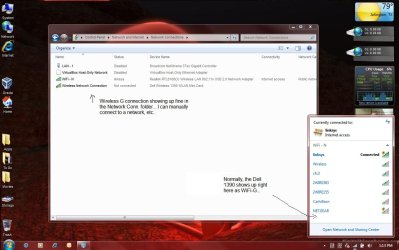
Okay, I'm having a little WiFi issue this morning. I just recieved my Clear HotSpot today and when I went to connect it, I noticed that my internal Dell WiFi (Dell 1390 WLAN adaptor) is not showing up in the Windows Connection Manager on the taskbar. Normally, it shows both the WiFi-G adaptor and it's available networks and my external USB WiFi-N adaptor and it's available networks.
Now I'm only seeing the Wireless-N adaptor. If I remove the USB N adaptor, the wireless connection manager shows "No devices present" or whatever. The Wireless G adaptor is showing up in the device manager and in the Network Connections folder, and I can manually add a network and it will connect.
What's up? This reminds me of the disappearing wireless issue I used to have with Dells (and sometimes other brands) and Windows XP. I know there were times that I just had to install additional software to manage the wireless networks, and deal with it, else re-install the OS to fix it.
Does anyone have any ideas on where I can start with this? I've done the obvious: Rolled back/updated/reinstalled drivers, etc..
The screenshot shows my Network Connections folder with both the N and the G adaptor working fine - and the Wireless Manager from the taskbar showing only the N adaptor.
Ideas?
(Sorry about the pic that I dumbed down - that was not for you guys, I made that up trying to explain to one of my hard headed friends what was going on.
Okay, I'm having a little WiFi issue this morning. I just recieved my Clear HotSpot today and when I went to connect it, I noticed that my internal Dell WiFi (Dell 1390 WLAN adaptor) is not showing up in the Windows Connection Manager on the taskbar. Normally, it shows both the WiFi-G adaptor and it's available networks and my external USB WiFi-N adaptor and it's available networks.
Now I'm only seeing the Wireless-N adaptor. If I remove the USB N adaptor, the wireless connection manager shows "No devices present" or whatever. The Wireless G adaptor is showing up in the device manager and in the Network Connections folder, and I can manually add a network and it will connect.
What's up? This reminds me of the disappearing wireless issue I used to have with Dells (and sometimes other brands) and Windows XP. I know there were times that I just had to install additional software to manage the wireless networks, and deal with it, else re-install the OS to fix it.
Does anyone have any ideas on where I can start with this? I've done the obvious: Rolled back/updated/reinstalled drivers, etc..
The screenshot shows my Network Connections folder with both the N and the G adaptor working fine - and the Wireless Manager from the taskbar showing only the N adaptor.
Ideas?
(Sorry about the pic that I dumbed down - that was not for you guys, I made that up trying to explain to one of my hard headed friends what was going on.
Attachments
My Computer
At a glance
Dell Desktops: XP Pro 32b/64b - Dell D430 Lap...Intel Core 2 Duo @ 1.33GHz (U7600)2.5GBMobile Intel 945
- Computer Manufacturer/Model Number
- Dell D430
- OS
- Dell Desktops: XP Pro 32b/64b - Dell D430 Laptop: Windows 7 Ultimate 32b
- CPU
- Intel Core 2 Duo @ 1.33GHz (U7600)
- Motherboard
- A08
- Memory
- 2.5GB
- Graphics Card(s)
- Mobile Intel 945
- Sound Card
- Sigmatel 9200
- Monitor(s) Displays
- 12.1" WXGA Display (1280x800)
- Hard Drives
- Int: 180GB SSD
Ext: 1TB NAS
- PSU
- N/A
- Case
- N/A
- Cooling
- "Inadequate" =)
