oh no- updated some drivers - to HD's turned unallocated !

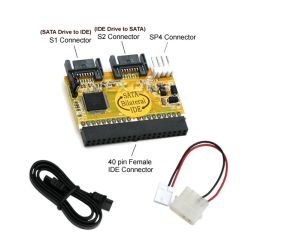
a good one IOMAX Bi-Directional IDE / SATA Converter: Amazon.co.uk: Electronics


Specifications & Features

- Allows SATA storage device to be used on an IDE motherboard or IDE storage device to be used on a SATA motherboard
- No drivers required
- 40 pin IDE Female connector
- 7 pin SATA Male connector
- LP4 (Male) to SP4 (Female) power cable
- Supports ATA 133/100/66 and ATAPI devices
- Compliant with Serial ATA 1.0 Specification
Package Contents
- Bi-Directional IDE / SATA Converter
- SATA Data Cable
- Power Cable (to power the converter)
- User Manual

Please Note:
Connect SATA drive to IDE motherboard
If you do not have a power supply that provides you with a SATA power cable, then you will need to purchase a SATA power cable.

Connect IDE drive to SATA motherboard
If you do not have a power supply that provides you with Molex power cables, then you will need to purchase SATA to Molex Power Adapters.
 

Attachments
  • idetosata2.PNG
    idetosata2.PNG
    76.8 KB · Views: 1
Last edited:

My Computer My Computer

At a glance

Operating System : Windows 7 Home Premium Edi...Processor : Intel Core 2 Quad Q8300 @ 2500 MHzPhysical Memory :8GB Corsair4x 2GB 800MHz C5 ...Video Card : XFX 6700 AMD
Computer Manufacturer/Model Number
packard bell IXTREME M5722
OS
Operating System : Windows 7 Home Premium Edition 6.01.7600 SP1 (x64)
CPU
Processor : Intel Core 2 Quad Q8300 @ 2500 MHz
Motherboard
Mainboard : Packard Bell (Acer EG43M )
Memory
Physical Memory :8GB Corsair4x 2GB 800MHz C5 DDR2
Graphics Card(s)
Video Card : XFX 6700 AMD
Monitor(s) Displays
Maestro 234DL - BenQ V2220 - BenQ VW2420H
Screen Resolution
Current Display :1920x1080p pixels at 60 Hz in HD LED
Hard Drives
Hard Disks : WDC (1000 GB)
Drive C: (Hard Disk) : 428 GB available on 491 GB
Drive D: (Hard Disk) : 426 GB available on 492 GB
SAMSUNG spinpoint HD103SJ 1000.2 GB
(X 2) KINGSTON SSD NOW V 30GB
PSU
XFX ProSeries 550W PSU
Case
PACKARD BELL IXTREME
Cooling
System Blower Current: 150mA Air Flow16CFM ;Akasa 90mm rear
Keyboard
Gigabyte Aivia K8100
Mouse
TRUST-Wireless Laser Mouse - Carbon edition MI-7770C
Internet Speed
TP-LINK > TL-WN951N / AV500 Gigabit Powerline Adapters
Browser
chrome dev
Other Info
EXTRA COOLING>(FAN CONTROLLER) PC Bay Cooler 3 x 40mm fans; Akasa AK-HD-BL Blue hard drive cooler 2 x 40 mm fan 4500 rpm 29.7 dBA
Bios> American Megatrends Inc.
Version : P01-A1
Date : 08/31/2009

My Computer My Computer

At a glance

Windows 10 ProIntel Core i7-4770K (3.5Ghz)32 gig Corsair Dominator Platinum (4x8Gig)Sapphire Tri-X R9 Fury
Computer type
PC/Desktop
Computer Manufacturer/Model Number
Custom built by me.
OS
Windows 10 Pro
CPU
Intel Core i7-4770K (3.5Ghz)
Motherboard
Gigabyte G1 Sniper 5 (F10 Bios)
Memory
32 gig Corsair Dominator Platinum (4x8Gig)
Graphics Card(s)
Sapphire Tri-X R9 Fury
Sound Card
Soundblaster ZXR
Monitor(s) Displays
NEC PA242W 24" LCD Monitor
Screen Resolution
1920 x 1200
Hard Drives
Primary - Samsung 850 Pro (512gig), Samsung 840 Pro (256gig), 2TB WD Caviar Black.
PSU
EVGA Supernova 1000 G2
Case
Cooler Master HAF X
Cooling
Corsair H100i with Corsair Air Series SP120 Quiet Fans
Keyboard
Logitech Wireless Wave
Mouse
Logitech Performance MX
Internet Speed
High Speed Cable
Antivirus
Norton Security
Browser
IE11
Other Info
Memory Timings - 1866MHz @ 9-9-9-27-1T @ 1.5 volts
how many sata drives i can connect?
on the MB i can see 6 sata plugs (forgive my ignorance) but the sata drive i have also have a power plug right?,
where does this go to?
 

My Computer My Computer

At a glance

windows 7 ultimate x64Intel(R) Core(TM)2 Quad Q6600 @ 2.40GHz8 GBNvidia GEforce 8600 GT
OS
windows 7 ultimate x64
CPU
Intel(R) Core(TM)2 Quad Q6600 @ 2.40GHz
Motherboard
Gigabyte GA-P35-Ds3p
Memory
8 GB
Graphics Card(s)
Nvidia GEforce 8600 GT
Sound Card
Realtec
Monitor(s) Displays
1- MAG DVI 2- Samsung 2450 DVI-HDMI
Screen Resolution
1- 1440x900 2- 19200x1080 HD
how many sata drives i can connect?
on the MB i can see 6 sata plugs (forgive my ignorance) but the sata drive i have also have a power plug right?,
where does this go to?

is the drives ide in the pic same as yours
 

Attachments

  • ide power.PNG
    ide power.PNG
    54.3 KB · Views: 0

My Computer My Computer

At a glance

Operating System : Windows 7 Home Premium Edi...Processor : Intel Core 2 Quad Q8300 @ 2500 MHzPhysical Memory :8GB Corsair4x 2GB 800MHz C5 ...Video Card : XFX 6700 AMD
Computer Manufacturer/Model Number
packard bell IXTREME M5722
OS
Operating System : Windows 7 Home Premium Edition 6.01.7600 SP1 (x64)
CPU
Processor : Intel Core 2 Quad Q8300 @ 2500 MHz
Motherboard
Mainboard : Packard Bell (Acer EG43M )
Memory
Physical Memory :8GB Corsair4x 2GB 800MHz C5 DDR2
Graphics Card(s)
Video Card : XFX 6700 AMD
Monitor(s) Displays
Maestro 234DL - BenQ V2220 - BenQ VW2420H
Screen Resolution
Current Display :1920x1080p pixels at 60 Hz in HD LED
Hard Drives
Hard Disks : WDC (1000 GB)
Drive C: (Hard Disk) : 428 GB available on 491 GB
Drive D: (Hard Disk) : 426 GB available on 492 GB
SAMSUNG spinpoint HD103SJ 1000.2 GB
(X 2) KINGSTON SSD NOW V 30GB
PSU
XFX ProSeries 550W PSU
Case
PACKARD BELL IXTREME
Cooling
System Blower Current: 150mA Air Flow16CFM ;Akasa 90mm rear
Keyboard
Gigabyte Aivia K8100
Mouse
TRUST-Wireless Laser Mouse - Carbon edition MI-7770C
Internet Speed
TP-LINK > TL-WN951N / AV500 Gigabit Powerline Adapters
Browser
chrome dev
Other Info
EXTRA COOLING>(FAN CONTROLLER) PC Bay Cooler 3 x 40mm fans; Akasa AK-HD-BL Blue hard drive cooler 2 x 40 mm fan 4500 rpm 29.7 dBA
Bios> American Megatrends Inc.
Version : P01-A1
Date : 08/31/2009
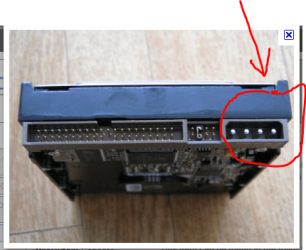
the sata power plug is different than the ide (molex)
 

My Computer My Computer

At a glance

Operating System : Windows 7 Home Premium Edi...Processor : Intel Core 2 Quad Q8300 @ 2500 MHzPhysical Memory :8GB Corsair4x 2GB 800MHz C5 ...Video Card : XFX 6700 AMD
Computer Manufacturer/Model Number
packard bell IXTREME M5722
OS
Operating System : Windows 7 Home Premium Edition 6.01.7600 SP1 (x64)
CPU
Processor : Intel Core 2 Quad Q8300 @ 2500 MHz
Motherboard
Mainboard : Packard Bell (Acer EG43M )
Memory
Physical Memory :8GB Corsair4x 2GB 800MHz C5 DDR2
Graphics Card(s)
Video Card : XFX 6700 AMD
Monitor(s) Displays
Maestro 234DL - BenQ V2220 - BenQ VW2420H
Screen Resolution
Current Display :1920x1080p pixels at 60 Hz in HD LED
Hard Drives
Hard Disks : WDC (1000 GB)
Drive C: (Hard Disk) : 428 GB available on 491 GB
Drive D: (Hard Disk) : 426 GB available on 492 GB
SAMSUNG spinpoint HD103SJ 1000.2 GB
(X 2) KINGSTON SSD NOW V 30GB
PSU
XFX ProSeries 550W PSU
Case
PACKARD BELL IXTREME
Cooling
System Blower Current: 150mA Air Flow16CFM ;Akasa 90mm rear
Keyboard
Gigabyte Aivia K8100
Mouse
TRUST-Wireless Laser Mouse - Carbon edition MI-7770C
Internet Speed
TP-LINK > TL-WN951N / AV500 Gigabit Powerline Adapters
Browser
chrome dev
Other Info
EXTRA COOLING>(FAN CONTROLLER) PC Bay Cooler 3 x 40mm fans; Akasa AK-HD-BL Blue hard drive cooler 2 x 40 mm fan 4500 rpm 29.7 dBA
Bios> American Megatrends Inc.
Version : P01-A1
Date : 08/31/2009
how many sata drives i can connect?
on the MB i can see 6 sata plugs (forgive my ignorance) but the sata drive i have also have a power plug right?,
where does this go to?

is the drives ide in the pic same as yours

i meant on my system drive. it's sata drive with sata power plug..
where does the power plug go on the MB? how many are there?
 

My Computer My Computer

At a glance

windows 7 ultimate x64Intel(R) Core(TM)2 Quad Q6600 @ 2.40GHz8 GBNvidia GEforce 8600 GT
OS
windows 7 ultimate x64
CPU
Intel(R) Core(TM)2 Quad Q6600 @ 2.40GHz
Motherboard
Gigabyte GA-P35-Ds3p
Memory
8 GB
Graphics Card(s)
Nvidia GEforce 8600 GT
Sound Card
Realtec
Monitor(s) Displays
1- MAG DVI 2- Samsung 2450 DVI-HDMI
Screen Resolution
1- 1440x900 2- 19200x1080 HD
the sata drive stays as it is the converter goes on the ide drive then into the sata plug on the motherboard
 

My Computer My Computer

At a glance

Operating System : Windows 7 Home Premium Edi...Processor : Intel Core 2 Quad Q8300 @ 2500 MHzPhysical Memory :8GB Corsair4x 2GB 800MHz C5 ...Video Card : XFX 6700 AMD
Computer Manufacturer/Model Number
packard bell IXTREME M5722
OS
Operating System : Windows 7 Home Premium Edition 6.01.7600 SP1 (x64)
CPU
Processor : Intel Core 2 Quad Q8300 @ 2500 MHz
Motherboard
Mainboard : Packard Bell (Acer EG43M )
Memory
Physical Memory :8GB Corsair4x 2GB 800MHz C5 DDR2
Graphics Card(s)
Video Card : XFX 6700 AMD
Monitor(s) Displays
Maestro 234DL - BenQ V2220 - BenQ VW2420H
Screen Resolution
Current Display :1920x1080p pixels at 60 Hz in HD LED
Hard Drives
Hard Disks : WDC (1000 GB)
Drive C: (Hard Disk) : 428 GB available on 491 GB
Drive D: (Hard Disk) : 426 GB available on 492 GB
SAMSUNG spinpoint HD103SJ 1000.2 GB
(X 2) KINGSTON SSD NOW V 30GB
PSU
XFX ProSeries 550W PSU
Case
PACKARD BELL IXTREME
Cooling
System Blower Current: 150mA Air Flow16CFM ;Akasa 90mm rear
Keyboard
Gigabyte Aivia K8100
Mouse
TRUST-Wireless Laser Mouse - Carbon edition MI-7770C
Internet Speed
TP-LINK > TL-WN951N / AV500 Gigabit Powerline Adapters
Browser
chrome dev
Other Info
EXTRA COOLING>(FAN CONTROLLER) PC Bay Cooler 3 x 40mm fans; Akasa AK-HD-BL Blue hard drive cooler 2 x 40 mm fan 4500 rpm 29.7 dBA
Bios> American Megatrends Inc.
Version : P01-A1
Date : 08/31/2009
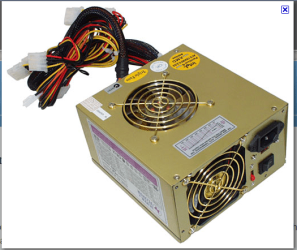
the power should be coming from the psu (power supply unit)
 

Attachments

  • psu.PNG
    psu.PNG
    85.4 KB · Views: 0

My Computer My Computer

At a glance

Operating System : Windows 7 Home Premium Edi...Processor : Intel Core 2 Quad Q8300 @ 2500 MHzPhysical Memory :8GB Corsair4x 2GB 800MHz C5 ...Video Card : XFX 6700 AMD
Computer Manufacturer/Model Number
packard bell IXTREME M5722
OS
Operating System : Windows 7 Home Premium Edition 6.01.7600 SP1 (x64)
CPU
Processor : Intel Core 2 Quad Q8300 @ 2500 MHz
Motherboard
Mainboard : Packard Bell (Acer EG43M )
Memory
Physical Memory :8GB Corsair4x 2GB 800MHz C5 DDR2
Graphics Card(s)
Video Card : XFX 6700 AMD
Monitor(s) Displays
Maestro 234DL - BenQ V2220 - BenQ VW2420H
Screen Resolution
Current Display :1920x1080p pixels at 60 Hz in HD LED
Hard Drives
Hard Disks : WDC (1000 GB)
Drive C: (Hard Disk) : 428 GB available on 491 GB
Drive D: (Hard Disk) : 426 GB available on 492 GB
SAMSUNG spinpoint HD103SJ 1000.2 GB
(X 2) KINGSTON SSD NOW V 30GB
PSU
XFX ProSeries 550W PSU
Case
PACKARD BELL IXTREME
Cooling
System Blower Current: 150mA Air Flow16CFM ;Akasa 90mm rear
Keyboard
Gigabyte Aivia K8100
Mouse
TRUST-Wireless Laser Mouse - Carbon edition MI-7770C
Internet Speed
TP-LINK > TL-WN951N / AV500 Gigabit Powerline Adapters
Browser
chrome dev
Other Info
EXTRA COOLING>(FAN CONTROLLER) PC Bay Cooler 3 x 40mm fans; Akasa AK-HD-BL Blue hard drive cooler 2 x 40 mm fan 4500 rpm 29.7 dBA
Bios> American Megatrends Inc.
Version : P01-A1
Date : 08/31/2009
listen- maybe the most sane solution for this:
buy tomorrow a 1TB sata drive to replace those.
BUT- suppose i'll find another pc for doing this, it all should go smoothly?
or another pc also won't recognize them?
 

My Computer My Computer

At a glance

windows 7 ultimate x64Intel(R) Core(TM)2 Quad Q6600 @ 2.40GHz8 GBNvidia GEforce 8600 GT
OS
windows 7 ultimate x64
CPU
Intel(R) Core(TM)2 Quad Q6600 @ 2.40GHz
Motherboard
Gigabyte GA-P35-Ds3p
Memory
8 GB
Graphics Card(s)
Nvidia GEforce 8600 GT
Sound Card
Realtec
Monitor(s) Displays
1- MAG DVI 2- Samsung 2450 DVI-HDMI
Screen Resolution
1- 1440x900 2- 19200x1080 HD
listen- maybe the most sane solution for this:
buy tomorrow a 1TB sata drive to replace those.
BUT- suppose i'll find another pc for doing this, it all should go smoothly?
or another pc also won't recognize them?

yes buy a new sata drive if you can then in the ubuntu live distro you can copy the files from the drive it sees? you are better off with sata for sure :D your files must be special to you :)
 

My Computer My Computer

At a glance

Operating System : Windows 7 Home Premium Edi...Processor : Intel Core 2 Quad Q8300 @ 2500 MHzPhysical Memory :8GB Corsair4x 2GB 800MHz C5 ...Video Card : XFX 6700 AMD
Computer Manufacturer/Model Number
packard bell IXTREME M5722
OS
Operating System : Windows 7 Home Premium Edition 6.01.7600 SP1 (x64)
CPU
Processor : Intel Core 2 Quad Q8300 @ 2500 MHz
Motherboard
Mainboard : Packard Bell (Acer EG43M )
Memory
Physical Memory :8GB Corsair4x 2GB 800MHz C5 DDR2
Graphics Card(s)
Video Card : XFX 6700 AMD
Monitor(s) Displays
Maestro 234DL - BenQ V2220 - BenQ VW2420H
Screen Resolution
Current Display :1920x1080p pixels at 60 Hz in HD LED
Hard Drives
Hard Disks : WDC (1000 GB)
Drive C: (Hard Disk) : 428 GB available on 491 GB
Drive D: (Hard Disk) : 426 GB available on 492 GB
SAMSUNG spinpoint HD103SJ 1000.2 GB
(X 2) KINGSTON SSD NOW V 30GB
PSU
XFX ProSeries 550W PSU
Case
PACKARD BELL IXTREME
Cooling
System Blower Current: 150mA Air Flow16CFM ;Akasa 90mm rear
Keyboard
Gigabyte Aivia K8100
Mouse
TRUST-Wireless Laser Mouse - Carbon edition MI-7770C
Internet Speed
TP-LINK > TL-WN951N / AV500 Gigabit Powerline Adapters
Browser
chrome dev
Other Info
EXTRA COOLING>(FAN CONTROLLER) PC Bay Cooler 3 x 40mm fans; Akasa AK-HD-BL Blue hard drive cooler 2 x 40 mm fan 4500 rpm 29.7 dBA
Bios> American Megatrends Inc.
Version : P01-A1
Date : 08/31/2009
listen- maybe the most sane solution for this:
buy tomorrow a 1TB sata drive to replace those.
BUT- suppose i'll find another pc for doing this, it all should go smoothly?
or another pc also won't recognize them?

yes buy a new sata drive if you can then in the ubuntu live distro you can copy the files from the drive it sees? you are better off with sata for sure :D your files must be special to you :)

why not? i don't care.. just a waste of two good ide's, but no matter.
but what about the drive ubuntu couldn't see ?? i absolutely must solve it's problem
 

My Computer My Computer

At a glance

windows 7 ultimate x64Intel(R) Core(TM)2 Quad Q6600 @ 2.40GHz8 GBNvidia GEforce 8600 GT
OS
windows 7 ultimate x64
CPU
Intel(R) Core(TM)2 Quad Q6600 @ 2.40GHz
Motherboard
Gigabyte GA-P35-Ds3p
Memory
8 GB
Graphics Card(s)
Nvidia GEforce 8600 GT
Sound Card
Realtec
Monitor(s) Displays
1- MAG DVI 2- Samsung 2450 DVI-HDMI
Screen Resolution
1- 1440x900 2- 19200x1080 HD
Internal hard disks

Internal hard disks connect to your computer's motherboard using an IDE interface or SATA interface. Most new hard drives come with either an IDE or SATA connection cable, depending on the type of drive.

Installing an internal hard disk takes a bit more work, especially if you plan to make the new disk your primary hard disk where you install Windows. To install an internal hard disk, you should be comfortable opening your computer case and connecting cables.

Most desktop computers have room for at least two internal hard disks. Laptops have room for only one hard disk. If you are replacing the primary hard disk rather than adding a secondary disk, you'll have to install Windows after you connect the disk.

Note

Many internal hard disks contain jumper pins that you must set to designate a hard disk as a primary (master) disk where you install Windows or as a secondary (subordinate) disk where you store programs and files. These jumpers are small plastic sleeves that you must place on the correct metal jumper pins. For additional instructions, check the information that came with the internal hard disk.


To remove and replace an internal hard disk

Turn off your computer, disconnect the power, and remove your computer’s cover. If you have a laptop, check the information from the manufacturer to find out if there is a panel you can remove to access the hard disk.

Unplug all cables connected to the hard disk, and then remove the hard disk. Pay attention to which cables you unplug, since you will plug the same cables into the new hard disk. If there are any screws holding in the hard disk, you'll need a small screwdriver to unscrew them. Many hard disks slide in and out of the case on rails. If you have questions, check the information that came with your computer.

Insert the new hard disk and connect it to the same cables that are in the same places as the hard disk you removed. One cable connects the disk to the computer’s power supply, and the other cable connects the disk to the computer’s motherboard.


To add a new internal hard disk (without removing an existing disk)

Turn off your computer, disconnect the power, and remove your computer’s cover. If you have a laptop, check the information from the manufacturer to find out if there is a panel you can remove to access the hard disk.

Insert the new hard disk into an empty hard disk bay in your computer case. You might need a small screwdriver to screw the disk into your case. Different cases have different ways of holding hard disks. Many slide in and out of the case on rails.

Connect one cable from the computer’s power supply to the power connector on the back of the hard disk.

Depending on what type of hard disk you have, connect the IDE cable or SATA cable from the back of the disk to the IDE or SATA connector on the computer’s motherboard. IDE cables are wide and flat with large connectors, while SATA cables are thin with small connectors. For more information, check the information that came with the hard disk.


Preparing to use a new hard disk

If you've installed your new hard disk correctly, your computer should recognize it. When you turn on your computer, the basic input/output system (BIOS) should automatically detect the new hard disk.

If you plan to use the new hard disk as the primary partition that contains Windows, then you'll have to install Windows on the disk before you can use your computer. You'll need a Windows 7 installation disc to do this. For more information, search Help and Support for "Installing and reinstalling Windows."

If you plan to use the new hard disk as a secondary disk (one that does not contain Windows), you should be able to see the new hard disk drive the next time you start your computer and log on to Windows. After Windows starts, click the Start button , click Computer, and then look for your new drive. The letter assigned to the drive will depend on your computer’s configuration. If you don't see the new hard disk drive, try looking for it in Computer Management.

Open Computer Management by clicking the Start button , clicking Control Panel, clicking System and Security, clicking Administrative Tools, and then double-clicking Computer Management.* If you're prompted for an administrator password or confirmation, type the password or provide confirmation.

In the left pane, under Storage, click Disk Management, and then look for the new drive.

You'll probably have to format the hard disk before you can use it. For instructions, see Formatting disks and drives: frequently asked questions. Follow these same instructions to format an old hard disk that contains data you want to erase.

If your computer doesn't recognize the new hard disk, double-check the installation instructions that came with the hard disk. If you have additional questions, go to the manufacturer's website.
 

My Computer My Computer

At a glance

Operating System : Windows 7 Home Premium Edi...Processor : Intel Core 2 Quad Q8300 @ 2500 MHzPhysical Memory :8GB Corsair4x 2GB 800MHz C5 ...Video Card : XFX 6700 AMD
Computer Manufacturer/Model Number
packard bell IXTREME M5722
OS
Operating System : Windows 7 Home Premium Edition 6.01.7600 SP1 (x64)
CPU
Processor : Intel Core 2 Quad Q8300 @ 2500 MHz
Motherboard
Mainboard : Packard Bell (Acer EG43M )
Memory
Physical Memory :8GB Corsair4x 2GB 800MHz C5 DDR2
Graphics Card(s)
Video Card : XFX 6700 AMD
Monitor(s) Displays
Maestro 234DL - BenQ V2220 - BenQ VW2420H
Screen Resolution
Current Display :1920x1080p pixels at 60 Hz in HD LED
Hard Drives
Hard Disks : WDC (1000 GB)
Drive C: (Hard Disk) : 428 GB available on 491 GB
Drive D: (Hard Disk) : 426 GB available on 492 GB
SAMSUNG spinpoint HD103SJ 1000.2 GB
(X 2) KINGSTON SSD NOW V 30GB
PSU
XFX ProSeries 550W PSU
Case
PACKARD BELL IXTREME
Cooling
System Blower Current: 150mA Air Flow16CFM ;Akasa 90mm rear
Keyboard
Gigabyte Aivia K8100
Mouse
TRUST-Wireless Laser Mouse - Carbon edition MI-7770C
Internet Speed
TP-LINK > TL-WN951N / AV500 Gigabit Powerline Adapters
Browser
chrome dev
Other Info
EXTRA COOLING>(FAN CONTROLLER) PC Bay Cooler 3 x 40mm fans; Akasa AK-HD-BL Blue hard drive cooler 2 x 40 mm fan 4500 rpm 29.7 dBA
Bios> American Megatrends Inc.
Version : P01-A1
Date : 08/31/2009
listen- maybe the most sane solution for this:
buy tomorrow a 1TB sata drive to replace those.
BUT- suppose i'll find another pc for doing this, it all should go smoothly?
or another pc also won't recognize them?

yes buy a new sata drive if you can then in the ubuntu live distro you can copy the files from the drive it sees? you are better off with sata for sure :D your files must be special to you :)

why not? i don't care.. just a waste of two good ide's, but no matter.
but what about the drive ubuntu couldn't see ?? i absolutely must solve it's problem

have you a friend that can help by putting it in there system?
 

My Computer My Computer

At a glance

Operating System : Windows 7 Home Premium Edi...Processor : Intel Core 2 Quad Q8300 @ 2500 MHzPhysical Memory :8GB Corsair4x 2GB 800MHz C5 ...Video Card : XFX 6700 AMD
Computer Manufacturer/Model Number
packard bell IXTREME M5722
OS
Operating System : Windows 7 Home Premium Edition 6.01.7600 SP1 (x64)
CPU
Processor : Intel Core 2 Quad Q8300 @ 2500 MHz
Motherboard
Mainboard : Packard Bell (Acer EG43M )
Memory
Physical Memory :8GB Corsair4x 2GB 800MHz C5 DDR2
Graphics Card(s)
Video Card : XFX 6700 AMD
Monitor(s) Displays
Maestro 234DL - BenQ V2220 - BenQ VW2420H
Screen Resolution
Current Display :1920x1080p pixels at 60 Hz in HD LED
Hard Drives
Hard Disks : WDC (1000 GB)
Drive C: (Hard Disk) : 428 GB available on 491 GB
Drive D: (Hard Disk) : 426 GB available on 492 GB
SAMSUNG spinpoint HD103SJ 1000.2 GB
(X 2) KINGSTON SSD NOW V 30GB
PSU
XFX ProSeries 550W PSU
Case
PACKARD BELL IXTREME
Cooling
System Blower Current: 150mA Air Flow16CFM ;Akasa 90mm rear
Keyboard
Gigabyte Aivia K8100
Mouse
TRUST-Wireless Laser Mouse - Carbon edition MI-7770C
Internet Speed
TP-LINK > TL-WN951N / AV500 Gigabit Powerline Adapters
Browser
chrome dev
Other Info
EXTRA COOLING>(FAN CONTROLLER) PC Bay Cooler 3 x 40mm fans; Akasa AK-HD-BL Blue hard drive cooler 2 x 40 mm fan 4500 rpm 29.7 dBA
Bios> American Megatrends Inc.
Version : P01-A1
Date : 08/31/2009
friends.. that's another problem ;)
but how come ubuntu refuse to admit the existence of the 2nd drive?
 

My Computer My Computer

At a glance

windows 7 ultimate x64Intel(R) Core(TM)2 Quad Q6600 @ 2.40GHz8 GBNvidia GEforce 8600 GT
OS
windows 7 ultimate x64
CPU
Intel(R) Core(TM)2 Quad Q6600 @ 2.40GHz
Motherboard
Gigabyte GA-P35-Ds3p
Memory
8 GB
Graphics Card(s)
Nvidia GEforce 8600 GT
Sound Card
Realtec
Monitor(s) Displays
1- MAG DVI 2- Samsung 2450 DVI-HDMI
Screen Resolution
1- 1440x900 2- 19200x1080 HD
i think its how it reads from how its set up in bios with ubuntu so what do you propose a new sata drive ? save what data you can?
 

My Computer My Computer

At a glance

Operating System : Windows 7 Home Premium Edi...Processor : Intel Core 2 Quad Q8300 @ 2500 MHzPhysical Memory :8GB Corsair4x 2GB 800MHz C5 ...Video Card : XFX 6700 AMD
Computer Manufacturer/Model Number
packard bell IXTREME M5722
OS
Operating System : Windows 7 Home Premium Edition 6.01.7600 SP1 (x64)
CPU
Processor : Intel Core 2 Quad Q8300 @ 2500 MHz
Motherboard
Mainboard : Packard Bell (Acer EG43M )
Memory
Physical Memory :8GB Corsair4x 2GB 800MHz C5 DDR2
Graphics Card(s)
Video Card : XFX 6700 AMD
Monitor(s) Displays
Maestro 234DL - BenQ V2220 - BenQ VW2420H
Screen Resolution
Current Display :1920x1080p pixels at 60 Hz in HD LED
Hard Drives
Hard Disks : WDC (1000 GB)
Drive C: (Hard Disk) : 428 GB available on 491 GB
Drive D: (Hard Disk) : 426 GB available on 492 GB
SAMSUNG spinpoint HD103SJ 1000.2 GB
(X 2) KINGSTON SSD NOW V 30GB
PSU
XFX ProSeries 550W PSU
Case
PACKARD BELL IXTREME
Cooling
System Blower Current: 150mA Air Flow16CFM ;Akasa 90mm rear
Keyboard
Gigabyte Aivia K8100
Mouse
TRUST-Wireless Laser Mouse - Carbon edition MI-7770C
Internet Speed
TP-LINK > TL-WN951N / AV500 Gigabit Powerline Adapters
Browser
chrome dev
Other Info
EXTRA COOLING>(FAN CONTROLLER) PC Bay Cooler 3 x 40mm fans; Akasa AK-HD-BL Blue hard drive cooler 2 x 40 mm fan 4500 rpm 29.7 dBA
Bios> American Megatrends Inc.
Version : P01-A1
Date : 08/31/2009
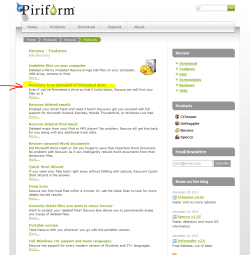
try this program :ar: Recuva Recuva - Features

Recovery from damaged or formatted disks

The dreaded hard drive crash. The file you forgot to backup before you reformatted a drive. The camera memory card with your holiday snaps that no longer works. Recuva can handle them too.
Windows (and other operating systems) uses a hidden index on hard drives, USB drives, and memory cards. Instead of having to search through the entire drive for a file you request, all it has to do is look it up in the index -- a much faster process.
Unfortunately, if the index is damaged, Windows can no longer find your files, even if the files themselves haven't been corrupted. That's where Recuva comes in.
Unlike Windows, Recuva scans all parts of a drive, looking for the bits that make up your files. If a drive's index has been damaged, chances are other parts of the drive may have been damaged too. Recuva will show you a list of files it has found on the drive, and give you an estimate of the likelihood of success of recovering them.
Similarly, when you format a drive (especially if you use the Quick Format option), Windows erases the hidden index but does not overwrite the existing files until you start saving new data to it. Recuva can still scan the drive's contents to find your files.

DOWNLOAD HERE :ar: http://www.piriform.com/recuva
 

Attachments

  • reccuva.PNG
    reccuva.PNG
    41.6 KB · Views: 0

My Computer My Computer

At a glance

Operating System : Windows 7 Home Premium Edi...Processor : Intel Core 2 Quad Q8300 @ 2500 MHzPhysical Memory :8GB Corsair4x 2GB 800MHz C5 ...Video Card : XFX 6700 AMD
Computer Manufacturer/Model Number
packard bell IXTREME M5722
OS
Operating System : Windows 7 Home Premium Edition 6.01.7600 SP1 (x64)
CPU
Processor : Intel Core 2 Quad Q8300 @ 2500 MHz
Motherboard
Mainboard : Packard Bell (Acer EG43M )
Memory
Physical Memory :8GB Corsair4x 2GB 800MHz C5 DDR2
Graphics Card(s)
Video Card : XFX 6700 AMD
Monitor(s) Displays
Maestro 234DL - BenQ V2220 - BenQ VW2420H
Screen Resolution
Current Display :1920x1080p pixels at 60 Hz in HD LED
Hard Drives
Hard Disks : WDC (1000 GB)
Drive C: (Hard Disk) : 428 GB available on 491 GB
Drive D: (Hard Disk) : 426 GB available on 492 GB
SAMSUNG spinpoint HD103SJ 1000.2 GB
(X 2) KINGSTON SSD NOW V 30GB
PSU
XFX ProSeries 550W PSU
Case
PACKARD BELL IXTREME
Cooling
System Blower Current: 150mA Air Flow16CFM ;Akasa 90mm rear
Keyboard
Gigabyte Aivia K8100
Mouse
TRUST-Wireless Laser Mouse - Carbon edition MI-7770C
Internet Speed
TP-LINK > TL-WN951N / AV500 Gigabit Powerline Adapters
Browser
chrome dev
Other Info
EXTRA COOLING>(FAN CONTROLLER) PC Bay Cooler 3 x 40mm fans; Akasa AK-HD-BL Blue hard drive cooler 2 x 40 mm fan 4500 rpm 29.7 dBA
Bios> American Megatrends Inc.
Version : P01-A1
Date : 08/31/2009
currently scanning the drives with testdisk.
this is weird- it does identifiy the drive with the name i gave him and amount of disk space left etc..
but still can't find the files
 

My Computer My Computer

At a glance

windows 7 ultimate x64Intel(R) Core(TM)2 Quad Q6600 @ 2.40GHz8 GBNvidia GEforce 8600 GT
OS
windows 7 ultimate x64
CPU
Intel(R) Core(TM)2 Quad Q6600 @ 2.40GHz
Motherboard
Gigabyte GA-P35-Ds3p
Memory
8 GB
Graphics Card(s)
Nvidia GEforce 8600 GT
Sound Card
Realtec
Monitor(s) Displays
1- MAG DVI 2- Samsung 2450 DVI-HDMI
Screen Resolution
1- 1440x900 2- 19200x1080 HD
currently scanning the drives with testdisk.
this is weird- it does identifiy the drive with the name i gave him and amount of disk space left etc..
but still can't find the files

try Recuva
 

My Computer My Computer

At a glance

Operating System : Windows 7 Home Premium Edi...Processor : Intel Core 2 Quad Q8300 @ 2500 MHzPhysical Memory :8GB Corsair4x 2GB 800MHz C5 ...Video Card : XFX 6700 AMD
Computer Manufacturer/Model Number
packard bell IXTREME M5722
OS
Operating System : Windows 7 Home Premium Edition 6.01.7600 SP1 (x64)
CPU
Processor : Intel Core 2 Quad Q8300 @ 2500 MHz
Motherboard
Mainboard : Packard Bell (Acer EG43M )
Memory
Physical Memory :8GB Corsair4x 2GB 800MHz C5 DDR2
Graphics Card(s)
Video Card : XFX 6700 AMD
Monitor(s) Displays
Maestro 234DL - BenQ V2220 - BenQ VW2420H
Screen Resolution
Current Display :1920x1080p pixels at 60 Hz in HD LED
Hard Drives
Hard Disks : WDC (1000 GB)
Drive C: (Hard Disk) : 428 GB available on 491 GB
Drive D: (Hard Disk) : 426 GB available on 492 GB
SAMSUNG spinpoint HD103SJ 1000.2 GB
(X 2) KINGSTON SSD NOW V 30GB
PSU
XFX ProSeries 550W PSU
Case
PACKARD BELL IXTREME
Cooling
System Blower Current: 150mA Air Flow16CFM ;Akasa 90mm rear
Keyboard
Gigabyte Aivia K8100
Mouse
TRUST-Wireless Laser Mouse - Carbon edition MI-7770C
Internet Speed
TP-LINK > TL-WN951N / AV500 Gigabit Powerline Adapters
Browser
chrome dev
Other Info
EXTRA COOLING>(FAN CONTROLLER) PC Bay Cooler 3 x 40mm fans; Akasa AK-HD-BL Blue hard drive cooler 2 x 40 mm fan 4500 rpm 29.7 dBA
Bios> American Megatrends Inc.
Version : P01-A1
Date : 08/31/2009
right away, sir

recuva couldn't even find those drives...

and testdisk found the drive but couldn't provide a file list - said it's may be damaged.
so how come i saw those same files on ubuntu? this is so confusing
 

My Computer My Computer

At a glance

windows 7 ultimate x64Intel(R) Core(TM)2 Quad Q6600 @ 2.40GHz8 GBNvidia GEforce 8600 GT
OS
windows 7 ultimate x64
CPU
Intel(R) Core(TM)2 Quad Q6600 @ 2.40GHz
Motherboard
Gigabyte GA-P35-Ds3p
Memory
8 GB
Graphics Card(s)
Nvidia GEforce 8600 GT
Sound Card
Realtec
Monitor(s) Displays
1- MAG DVI 2- Samsung 2450 DVI-HDMI
Screen Resolution
1- 1440x900 2- 19200x1080 HD
right away, sir

recuva couldn't even find those drives...

and testdisk found the drive but couldn't provide a file list - said it's may be damaged.
so how come i saw those same files on ubuntu? this is so confusing

run ubuntu again and copy the files you find on the other drive to a folder in the sata drive. maybe the drive is so damaged its unrecoverable, it does happen.
 

My Computer My Computer

At a glance

Operating System : Windows 7 Home Premium Edi...Processor : Intel Core 2 Quad Q8300 @ 2500 MHzPhysical Memory :8GB Corsair4x 2GB 800MHz C5 ...Video Card : XFX 6700 AMD
Computer Manufacturer/Model Number
packard bell IXTREME M5722
OS
Operating System : Windows 7 Home Premium Edition 6.01.7600 SP1 (x64)
CPU
Processor : Intel Core 2 Quad Q8300 @ 2500 MHz
Motherboard
Mainboard : Packard Bell (Acer EG43M )
Memory
Physical Memory :8GB Corsair4x 2GB 800MHz C5 DDR2
Graphics Card(s)
Video Card : XFX 6700 AMD
Monitor(s) Displays
Maestro 234DL - BenQ V2220 - BenQ VW2420H
Screen Resolution
Current Display :1920x1080p pixels at 60 Hz in HD LED
Hard Drives
Hard Disks : WDC (1000 GB)
Drive C: (Hard Disk) : 428 GB available on 491 GB
Drive D: (Hard Disk) : 426 GB available on 492 GB
SAMSUNG spinpoint HD103SJ 1000.2 GB
(X 2) KINGSTON SSD NOW V 30GB
PSU
XFX ProSeries 550W PSU
Case
PACKARD BELL IXTREME
Cooling
System Blower Current: 150mA Air Flow16CFM ;Akasa 90mm rear
Keyboard
Gigabyte Aivia K8100
Mouse
TRUST-Wireless Laser Mouse - Carbon edition MI-7770C
Internet Speed
TP-LINK > TL-WN951N / AV500 Gigabit Powerline Adapters
Browser
chrome dev
Other Info
EXTRA COOLING>(FAN CONTROLLER) PC Bay Cooler 3 x 40mm fans; Akasa AK-HD-BL Blue hard drive cooler 2 x 40 mm fan 4500 rpm 29.7 dBA
Bios> American Megatrends Inc.
Version : P01-A1
Date : 08/31/2009
Back
Top