

Hi, I posted this elsewhere a few days ago and got no replies. Maybe you guys can help.
I have a Samsung notebook Win 7 64 BIT. I used the Bluetooth a bit when I first got it, but I figured out I could quickly transfer my mp3's, pictures, etc from my cell to my NB by putting my SD card in my card reader, rather than go through all the steps to transfer wirelessly through Bluetooth.
I've been having some issues and when I run "Event Viewer", a lot of the errors include Bluetooth, so I'd like to eliminate bluetooth as a possible source of my issues. I just want to do it in a way which won't screw things up or create a scenario where I can't us Bluetooth if I ever want to.
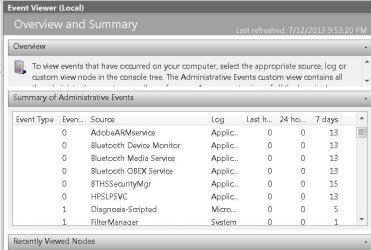
The errors are usually along the line of "Bluetooth Device Monitor", Bluetooth Media Service", "Bluetooth OBEX Service" BTHSSecurityMgr". I'll include a snip of what I'm seeing in "Event Viewer" also.
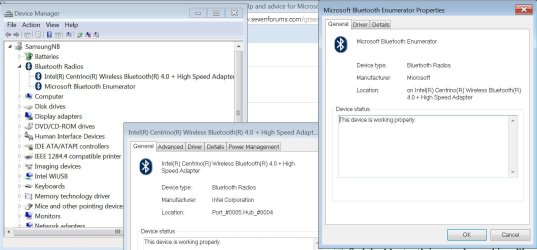
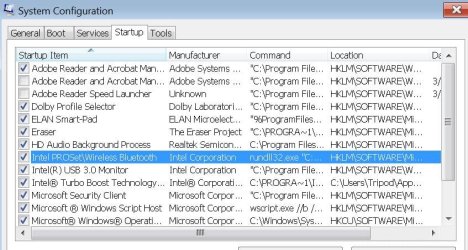
I'll include snips of what I'm looking at in Device manager, plus the entry in MSCONFIG which I'd like to know if it's ok to uncheck as a Startup item.
The specific item in MSCONFIG is "Intel PROSet\Wireless Bluetooth" By Intel Corp, and the Command path is exactly " rundll32.exe "C:\Program Files (x86)\Intel\Bluetooth\btmshell.dll",TrayApp "
and the Location is " HLKM\SOFTWARE\Microsoft\Windows\CurrentVersion\Run
If it is ok to turn off Bluetooth without affecting other abilities of the processors, then I'd like to know the best way to go about it, whether through MSCONFIG or somehow in device manager or Wireless Networking. If there is a reason not to mess with these, please advise. Thanks much! Eddie
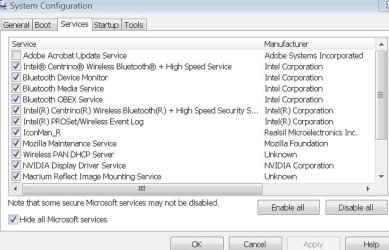
I just looked in the Svcs in MSCONFIG and I Found 5 more BT services which start every time, so that may be useful in a reply. Added a snip which shows them.
I have a Samsung notebook Win 7 64 BIT. I used the Bluetooth a bit when I first got it, but I figured out I could quickly transfer my mp3's, pictures, etc from my cell to my NB by putting my SD card in my card reader, rather than go through all the steps to transfer wirelessly through Bluetooth.
I've been having some issues and when I run "Event Viewer", a lot of the errors include Bluetooth, so I'd like to eliminate bluetooth as a possible source of my issues. I just want to do it in a way which won't screw things up or create a scenario where I can't us Bluetooth if I ever want to.
The errors are usually along the line of "Bluetooth Device Monitor", Bluetooth Media Service", "Bluetooth OBEX Service" BTHSSecurityMgr". I'll include a snip of what I'm seeing in "Event Viewer" also.
I'll include snips of what I'm looking at in Device manager, plus the entry in MSCONFIG which I'd like to know if it's ok to uncheck as a Startup item.
The specific item in MSCONFIG is "Intel PROSet\Wireless Bluetooth" By Intel Corp, and the Command path is exactly " rundll32.exe "C:\Program Files (x86)\Intel\Bluetooth\btmshell.dll",TrayApp "
and the Location is " HLKM\SOFTWARE\Microsoft\Windows\CurrentVersion\Run
If it is ok to turn off Bluetooth without affecting other abilities of the processors, then I'd like to know the best way to go about it, whether through MSCONFIG or somehow in device manager or Wireless Networking. If there is a reason not to mess with these, please advise. Thanks much! Eddie
I just looked in the Svcs in MSCONFIG and I Found 5 more BT services which start every time, so that may be useful in a reply. Added a snip which shows them.
Attachments
My Computer
- Computer Manufacturer/Model Number
- Samsung "Series 7 Gamer" Model: NP700G7C-S01US 17.3" Notebook
- OS
- Windows 7 Home Premium 64 bit SP1
- CPU
- Intel Core i7-3610QM CPU @ 2.30GHz Max 3.3Ghz
- Motherboard
- SAMSUNG_NP1234567890 SEC_SW_REVISION_1234567890ABCD
- Memory
- 16MB PC3-12800(1600MHz) DDR3 SODIMM 4 Modules of 4MB Each
- Graphics Card(s)
- NVIDIA GeForce GTX 675M 2048 MB GDDR5 Ram
- Sound Card
- NVIDIA Hi Def Audio(4x), Realtek Hi Def, DolbyVrs7.2.7000.7
- Monitor(s) Displays
- 17.3" LED full HD(1920 x 1080), HDMI to Philips47"TV Full HD
- Hard Drives
- Samsung 830 SSD 256GB MZ-7PC256N/AM - (drive 0) O.S. Drive:C
SanDisk iSSD P4 8GB (drive 1)- supposed to be for ExpresseCache, but EC is turned off, as I have an SSD, which is faster. I'll use the 8GB For Storage.
Hitachi Travelstar HDD 750GB 7K
- PSU
- NOTEBOOK
- Case
- NOTEBOOK
- Cooling
- NOTEBOOK Cooling Plus Cooling Stand W/2 Self Powered Fans


