Ok guys, let's see if any of YOU can figure this one out.

Innotime2

New member
Local time
3:45 PM
Messages
21
I seem to have the same problem quite a few people have online, but can't seem to find any of them solved.

I have a Acer 5734z laptop. Just did a factory restore from the built in partition. Win7 Home Prem. x64.

Everything works great EXCEPT the cam. I believe it is a BisonCam. A little more info on the device and hardware id is below. I have been trying to figure this out for over a week now with no luck.. all i get is a all black webcam screen instead of the photo.

I have tried the BisonCam NB pro or whatever, I have tried Acer Crystal eye. Test-my-cam .com All the same result, black cam box. Which leads me to believe it absolutely has to be the driver. Device driver says it's working fine.


Hardware ID:
USB\ VID_0402&PID_5608 &REV_0100&MI_00

On the actual webcam itself:
lts09p2sf119 fw 0009
 

My Computer My Computer

At a glance

Windows 7 Home Premium 32
Computer type
PC/Desktop
OS
Windows 7 Home Premium 32
BTW, I have tried installing all 3 drivers from the Acer website for my product.All same result. although the Liteon or whatever it was the only one that actually installed. Other 2 not recognized
 

My Computer My Computer

At a glance

Windows 7 Home Premium 32
Computer type
PC/Desktop
OS
Windows 7 Home Premium 32
I seem to have the same problem quite a few people have online, but can't seem to find any of them solved.

I have a Acer 5734z laptop. Just did a factory restore from the built in partition. Win7 Home Prem. x64.

Everything works great EXCEPT the cam. I believe it is a BisonCam. A little more info on the device and hardware id is below. I have been trying to figure this out for over a week now with no luck.. all i get is a all black webcam screen instead of the photo.

I have tried the BisonCam NB pro or whatever, I have tried Acer Crystal eye. Test-my-cam .com All the same result, black cam box. Which leads me to believe it absolutely has to be the driver. Device driver says it's working fine.


Hardware ID:
USB\ VID_0402&PID_5608 &REV_0100&MI_00

On the actual webcam itself:
lts09p2sf119 fw 0009

I am reading you can fix it one or two ways

and the other is this go to Start menu click on Computer then proceed to Device manager then look for the Webcam now you might want to right click on it to update driver then you select the driver that you are trying to install and it should complete and work from there
 

My Computer My Computer

At a glance

Windows 10 Home Premium 64bit sp1Intel I7-6700K @ 4.6 Ghz 1.344 volts everyday OC32GB G-Skill TridentZ 3200mhz 16-18-18-38 DDR4Sli Gigabyte Windforce GTX 980 G1
Computer type
PC/Desktop
Computer Manufacturer/Model Number
CoreI7-6700K MrFingerIII Special Builds
OS
Windows 10 Home Premium 64bit sp1
CPU
Intel I7-6700K @ 4.6 Ghz 1.344 volts everyday OC
Motherboard
Asrock Fatality K6 Z170 Socket 1151
Memory
32GB G-Skill TridentZ 3200mhz 16-18-18-38 DDR4
Graphics Card(s)
Sli Gigabyte Windforce GTX 980 G1
Sound Card
AC97 Creative Rage Tactic 3D Headphones Bluetooth
Monitor(s) Displays
27" Asus ROG Swift PG278Q G-Sync 48" Vizio Smart HD TV
Screen Resolution
2560x1440p 27"- 48" Currently Gaming at 2560x1440p Res 2K
Hard Drives
250GB Samsung Evo840SSD Seagate baracuda 500 GB WD Mybook 500Gb 1TB Seagate Barracuda
PSU
HX1050w Corsair Silver 80plus certified crosfire/sli
Case
Enthod Pro Full Tower
Cooling
Corsair H110i GT 280 mm High Performance WaterBlock
Keyboard
Logitech wireless keyboard
Mouse
Logitech wireless mouse
Internet Speed
Cox Cable 100+ mb
Antivirus
WebRoot Spysweeper with Antivirus
Browser
IE-10, Chrome, Opera
Other Info
My Other Rig is a AMD FX8320E @4.6Ghz 16GB Ballistic Sport Ram
Mobo Asrock Fatality 990FX 120GB OCZ SSD 1TB Seagate Barracuda Corsair H75 Cooling PSU Corsair CX750
GPU GTX Gigabyte 970G1
Thanks guys, going to give them a try and report back.
 

My Computer My Computer

At a glance

Windows 7 Home Premium 32
Computer type
PC/Desktop
OS
Windows 7 Home Premium 32
Jimbo, appreciate it but still nothing.. I tried running with the Bison NB Pro in my device manager and it's an all black box. I delete the Bison from Device menu and restart, Windows auto installs the generic usb2.0 drive and i run the program again and still black box instead of picture. At the bottom of the box it says both Bison cam installed or the usb2.0 installed, so the programs all recognize the cam just nothing but black..again IMO it has to be driver dang it! Thanks again, if you can think of anything please let me know.

Solar- Will now be trying your suggestions. Thanks
 

My Computer My Computer

At a glance

Windows 7 Home Premium 32
Computer type
PC/Desktop
OS
Windows 7 Home Premium 32
BTW solar for your 2nd suggestion in device menu, yeah tried that plenty but no matter which driver i have in, either the generic usb or bison it says it's up to date. so that one does not work, going to watch the video now though.
 

My Computer My Computer

At a glance

Windows 7 Home Premium 32
Computer type
PC/Desktop
OS
Windows 7 Home Premium 32
Nope. Tried it and same thing.
 

My Computer My Computer

At a glance

Windows 7 Home Premium 32
Computer type
PC/Desktop
OS
Windows 7 Home Premium 32
fwiw: I had a friend who had a piece of tape on his camera lens. same symptoms..

Rich
 

My Computer My Computer

At a glance

Windows 7 Pro x64 SP1Intel Core I716 GigsNVIDIA GeForce GTX 670M
Computer type
Laptop
Computer Manufacturer/Model Number
Toshiba Laptop Qosimo X870
OS
Windows 7 Pro x64 SP1
CPU
Intel Core I7
Motherboard
Toshiba Qosmio
Memory
16 Gigs
Graphics Card(s)
NVIDIA GeForce GTX 670M
Monitor(s) Displays
17.7" laptop
Screen Resolution
1600 x 900
Hard Drives
256 Gig SanDisk SSD for C
256 Gig Intel SSD for D
Internet Speed
50/25 FIOS
Antivirus
Vipre (all you can eat for 10 machines)
Browser
IE and FF
Other Info
I have dos 6.22, wfwg 3.11, win98, 2000 and xp VHD's available for testing. MS's Virtual PC works great.
BTW solar for your 2nd suggestion in device menu, yeah tried that plenty but no matter which driver i have in, either the generic usb or bison it says it's up to date. so that one does not work, going to watch the video now though.


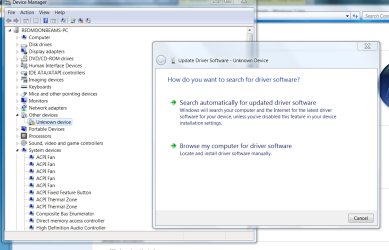
What you should do is uninstall the driver first restart

Then go through device manager again right click device hit update driver

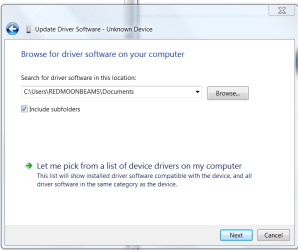
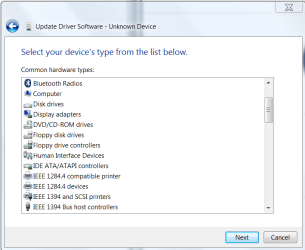
Browse location of the driver you want installed and assign it to the web cam it should work and that would be going around latest driver installed the screen I speak of looks like this when there is no driver


Now after going through the steps have to pinpoint the driver LET ME PICK FROM A LIST OF DRIVERS or Browse for the crystal cam /and hopefully it will complete with out error
 

Attachments

  • browse.PNG
    browse.PNG
    64.2 KB · Views: 0
  • browse1.PNG
    browse1.PNG
    21.1 KB · Views: 0
  • browse2.PNG
    browse2.PNG
    22.6 KB · Views: 0

My Computer My Computer

At a glance

Windows 10 Home Premium 64bit sp1Intel I7-6700K @ 4.6 Ghz 1.344 volts everyday OC32GB G-Skill TridentZ 3200mhz 16-18-18-38 DDR4Sli Gigabyte Windforce GTX 980 G1
Computer type
PC/Desktop
Computer Manufacturer/Model Number
CoreI7-6700K MrFingerIII Special Builds
OS
Windows 10 Home Premium 64bit sp1
CPU
Intel I7-6700K @ 4.6 Ghz 1.344 volts everyday OC
Motherboard
Asrock Fatality K6 Z170 Socket 1151
Memory
32GB G-Skill TridentZ 3200mhz 16-18-18-38 DDR4
Graphics Card(s)
Sli Gigabyte Windforce GTX 980 G1
Sound Card
AC97 Creative Rage Tactic 3D Headphones Bluetooth
Monitor(s) Displays
27" Asus ROG Swift PG278Q G-Sync 48" Vizio Smart HD TV
Screen Resolution
2560x1440p 27"- 48" Currently Gaming at 2560x1440p Res 2K
Hard Drives
250GB Samsung Evo840SSD Seagate baracuda 500 GB WD Mybook 500Gb 1TB Seagate Barracuda
PSU
HX1050w Corsair Silver 80plus certified crosfire/sli
Case
Enthod Pro Full Tower
Cooling
Corsair H110i GT 280 mm High Performance WaterBlock
Keyboard
Logitech wireless keyboard
Mouse
Logitech wireless mouse
Internet Speed
Cox Cable 100+ mb
Antivirus
WebRoot Spysweeper with Antivirus
Browser
IE-10, Chrome, Opera
Other Info
My Other Rig is a AMD FX8320E @4.6Ghz 16GB Ballistic Sport Ram
Mobo Asrock Fatality 990FX 120GB OCZ SSD 1TB Seagate Barracuda Corsair H75 Cooling PSU Corsair CX750
GPU GTX Gigabyte 970G1
The Cause

Just click on 'Options' and make sure 'Preview' is ticked, otherwise, yep you get a black screen if its unticked:party::eek::geek::o
 
Last edited:

My Computer My Computer

At a glance

windows 7 proACPI x86-based pcnvidia Ge Force G 105M
Computer type
PC/Desktop
Computer Manufacturer/Model Number
acer
OS
windows 7 pro
CPU
ACPI x86-based pc
Graphics Card(s)
nvidia Ge Force G 105M
Hard Drives
HitachiHTSS45032B9A300 ATA DEVICE
Antivirus
NORTON360
Back
Top