Solved Old Hard Disk now fitted into a caddy but it is not being recognised

stanferry

New member
Local time
7:25 AM
Messages
7
I took my old SATA hard disk & fitted it into a caddy. On caddy I am getting a green light indicating HDD is connected & the hard disk is idle, a red light should go on if hard disk is being accessed.

Although caddy is Plug & Play it is not being recognised. The old hard disk previously was my primary hard disk running VISTA while my computer is now running Windows 7.

I would appreciate any help as to how I can resolve!!
 

My Computer My Computer

At a glance

Windows 7 64Intel® Core™2 Duo Processor E7300 2.66 Ghz4GBNVIDIA® GEFORCE® 9500 GS graphics
Computer Manufacturer/Model Number
Median Akoya E4320 D
OS
Windows 7 64
CPU
Intel® Core™2 Duo Processor E7300 2.66 Ghz
Motherboard
with LAN and 8 Channel high definition Audio onboard
Memory
4GB
Graphics Card(s)
NVIDIA® GEFORCE® 9500 GS graphics
Monitor(s) Displays
Iiyama E2201W-B2
Hard Drives
Western Digital 1tb WD10000SRTL2
Case
Tower
Cooling
fan
Click start, right click computer, select manage, choose disk management in the left column and see if your hard drive is recognized. If it is, it will probably not have a drive letter, right click it, choose 'change drive letter or path' on the next screen click add then select a letter from the drop down menu. If it wants to initialize it, select no. It will format it and anything on it will be gone.
 

My Computers My Computers

  • At a glance

    Windows 11 ProRyzen 9 5900X32GB G Skill DDR4-3600EVGA RTX 3080 FTW 3 Ultra
    Computer type
    PC/Desktop
    Computer Manufacturer/Model Number
    ALWAYS UNDER CONSTRUCTION
    OS
    Windows 11 Pro
    CPU
    Ryzen 9 5900X
    Motherboard
    Asus X570 Crosshair Viii Hero
    Memory
    32GB G Skill DDR4-3600
    Graphics Card(s)
    EVGA RTX 3080 FTW 3 Ultra
    Sound Card
    On Board/Sennheiser PC37X Headset
    Monitor(s) Displays
    3 X Asus 27"
    Screen Resolution
    2560x1440
    Hard Drives
    2 X 1 TB NVME drives
    PSU
    EVGA 850
    Case
    Phanteks Eclipse P400A
    Cooling
    EVGA 280 AIO
    Keyboard
    Logitech G510s/ Logitech G13
    Mouse
    Logitech G502
    Internet Speed
    24/1
    Antivirus
    ESET/MBAM Pro/SAS Pro
    Browser
    Chrome/ Firefox/ Edge
  • At a glance

    Windows 11 ProIntel Ultra 9 288V32 GB LPDDR5X 8533
    Computer type
    Laptop
    System Manufacturer/Model Number
    Dell 16 Plus
    OS
    Windows 11 Pro
    CPU
    Intel Ultra 9 288V
    Memory
    32 GB LPDDR5X 8533
    Monitor(s) Displays
    16" Mini-LED HDR600 Touch 90 Hz
    Screen Resolution
    2560X1600
    Hard Drives
    1 TB NVME
Dear Essenbe,
Thank you for taking time to help me.
Sadly nothing changed when I changed designated letters. Other than C:/ & DVD Drive I do not know what the others are!

Under Disk Management I see:-

C:/ Main Hard disk Disc 0
F:/ Disc 1
G:/ Disc 2
H:/ Disc 3
D:/ DVD Drive
 

My Computer My Computer

At a glance

Windows 7 64Intel® Core™2 Duo Processor E7300 2.66 Ghz4GBNVIDIA® GEFORCE® 9500 GS graphics
Computer Manufacturer/Model Number
Median Akoya E4320 D
OS
Windows 7 64
CPU
Intel® Core™2 Duo Processor E7300 2.66 Ghz
Motherboard
with LAN and 8 Channel high definition Audio onboard
Memory
4GB
Graphics Card(s)
NVIDIA® GEFORCE® 9500 GS graphics
Monitor(s) Displays
Iiyama E2201W-B2
Hard Drives
Western Digital 1tb WD10000SRTL2
Case
Tower
Cooling
fan
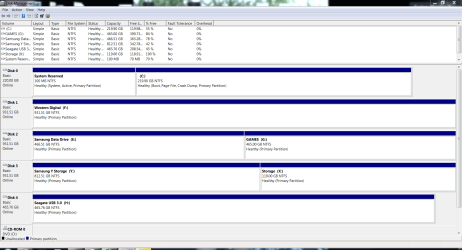
What I was trying to see is if you had a drive listed that had no drive letter assigned to it. Explorer cannot 'see' a drive with no letter. In the bottom portion of disk management the drives and drive letters are listed. If you do not have a drive letter assigned to one of them, assign one. It is not necessary to re assign letters. Below is a snip of my disk management. Notice the bottom portion and see each drive with a drive letter.

zz.PNG
 

My Computers My Computers

  • At a glance

    Windows 11 ProRyzen 9 5900X32GB G Skill DDR4-3600EVGA RTX 3080 FTW 3 Ultra
    Computer type
    PC/Desktop
    Computer Manufacturer/Model Number
    ALWAYS UNDER CONSTRUCTION
    OS
    Windows 11 Pro
    CPU
    Ryzen 9 5900X
    Motherboard
    Asus X570 Crosshair Viii Hero
    Memory
    32GB G Skill DDR4-3600
    Graphics Card(s)
    EVGA RTX 3080 FTW 3 Ultra
    Sound Card
    On Board/Sennheiser PC37X Headset
    Monitor(s) Displays
    3 X Asus 27"
    Screen Resolution
    2560x1440
    Hard Drives
    2 X 1 TB NVME drives
    PSU
    EVGA 850
    Case
    Phanteks Eclipse P400A
    Cooling
    EVGA 280 AIO
    Keyboard
    Logitech G510s/ Logitech G13
    Mouse
    Logitech G502
    Internet Speed
    24/1
    Antivirus
    ESET/MBAM Pro/SAS Pro
    Browser
    Chrome/ Firefox/ Edge
  • At a glance

    Windows 11 ProIntel Ultra 9 288V32 GB LPDDR5X 8533
    Computer type
    Laptop
    System Manufacturer/Model Number
    Dell 16 Plus
    OS
    Windows 11 Pro
    CPU
    Intel Ultra 9 288V
    Memory
    32 GB LPDDR5X 8533
    Monitor(s) Displays
    16" Mini-LED HDR600 Touch 90 Hz
    Screen Resolution
    2560X1600
    Hard Drives
    1 TB NVME
Thanks again for your diligence.
All the drives shown had a letter assigned to them other than the DVD Drive.
 

My Computer My Computer

At a glance

Windows 7 64Intel® Core™2 Duo Processor E7300 2.66 Ghz4GBNVIDIA® GEFORCE® 9500 GS graphics
Computer Manufacturer/Model Number
Median Akoya E4320 D
OS
Windows 7 64
CPU
Intel® Core™2 Duo Processor E7300 2.66 Ghz
Motherboard
with LAN and 8 Channel high definition Audio onboard
Memory
4GB
Graphics Card(s)
NVIDIA® GEFORCE® 9500 GS graphics
Monitor(s) Displays
Iiyama E2201W-B2
Hard Drives
Western Digital 1tb WD10000SRTL2
Case
Tower
Cooling
fan
I presume the hard drive is a 3.5" desktop hard drive. Does the caddy you put it into have it's own power source? When you installed Windows did you also install the motherbosrd drivers? If not, you can download them here if it is the computer in your specs. Especially the chipset drivers. If the caddy is USB and not self powered (has it's own power source) the USB port will not have enough power to run a 3.5" hard drive and will have problems with some 2.5" hard drives. From looking at your disk management description, I assume you have 4 internal hard drives and a DVD. Your system specs only list 1 internal hard drive. Could you post a screenshot of your expanded disk management like the one I posted of mine, showing the top and bottom half. Also tell us how many hard drives you have in your computer.
 

My Computers My Computers

  • At a glance

    Windows 11 ProRyzen 9 5900X32GB G Skill DDR4-3600EVGA RTX 3080 FTW 3 Ultra
    Computer type
    PC/Desktop
    Computer Manufacturer/Model Number
    ALWAYS UNDER CONSTRUCTION
    OS
    Windows 11 Pro
    CPU
    Ryzen 9 5900X
    Motherboard
    Asus X570 Crosshair Viii Hero
    Memory
    32GB G Skill DDR4-3600
    Graphics Card(s)
    EVGA RTX 3080 FTW 3 Ultra
    Sound Card
    On Board/Sennheiser PC37X Headset
    Monitor(s) Displays
    3 X Asus 27"
    Screen Resolution
    2560x1440
    Hard Drives
    2 X 1 TB NVME drives
    PSU
    EVGA 850
    Case
    Phanteks Eclipse P400A
    Cooling
    EVGA 280 AIO
    Keyboard
    Logitech G510s/ Logitech G13
    Mouse
    Logitech G502
    Internet Speed
    24/1
    Antivirus
    ESET/MBAM Pro/SAS Pro
    Browser
    Chrome/ Firefox/ Edge
  • At a glance

    Windows 11 ProIntel Ultra 9 288V32 GB LPDDR5X 8533
    Computer type
    Laptop
    System Manufacturer/Model Number
    Dell 16 Plus
    OS
    Windows 11 Pro
    CPU
    Intel Ultra 9 288V
    Memory
    32 GB LPDDR5X 8533
    Monitor(s) Displays
    16" Mini-LED HDR600 Touch 90 Hz
    Screen Resolution
    2560X1600
    Hard Drives
    1 TB NVME
Many thanks again:-

presume the hard drive is a 3.5" desktop hard drive. Yes

Does the caddy you put it into have it's own power source? Yes

When you installed Windows did you also install the motherbosrd drivers? If not, you can download them here (http://www.medion.com/gb/service/download/) if it is the computer in your specs. Especially the chipset drivers. I did not!!!!


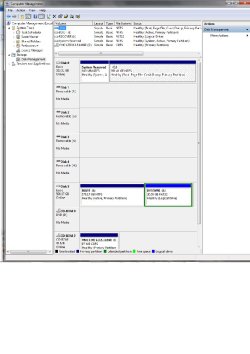
From looking at your disk management description, I assume you have 4 internal hard drives and a DVD. Your system specs only list 1 internal hard drive. Could you post a screenshot (http://www.sevenforums.com/tutorials/9733-screenshots-files-upload-post-seven-forums.html)of your expanded disk management like the one I posted of mine, showing the top and bottom half. I do not have 4 internal drives!!! Screenshot attached. I am puzzed about number shown!!!

Also tell us how many hard drives you have in your computer. Only one.

Since previous communictions I am now using a USB modem which shows up as VMC.


[FONT=Times New Roman, Times, serif]As you know I have been struggling to get my caddy working. I decided therefore to open up the caddy but keep the hard disk & end plate with the plug still connected & see if it works. When I took end off it was disconnected from the disk!! Realised that the caddy was 61/2” long, internally while the disk is 6”. What must have happened as the disk slid away from the end plate before I got the chance to screw disk in place. I fitted a 1/2” thick packing piece & refitted disk. SUCCESS.[/FONT]


Attachments

  • Disks info..jpg
    Disks info..jpg
    74.3 KB · Views: 17

My Computer My Computer

At a glance

Windows 7 64Intel® Core™2 Duo Processor E7300 2.66 Ghz4GBNVIDIA® GEFORCE® 9500 GS graphics
Computer Manufacturer/Model Number
Median Akoya E4320 D
OS
Windows 7 64
CPU
Intel® Core™2 Duo Processor E7300 2.66 Ghz
Motherboard
with LAN and 8 Channel high definition Audio onboard
Memory
4GB
Graphics Card(s)
NVIDIA® GEFORCE® 9500 GS graphics
Monitor(s) Displays
Iiyama E2201W-B2
Hard Drives
Western Digital 1tb WD10000SRTL2
Case
Tower
Cooling
fan
That's great news. Glad you have it working, well done. I also assume you have a memory card reader installed. If so, that is what the extra hard drives are. Windows assigns them a drive letter. You will notice the removable drive designation on the left column. Also, be sure to download and install all of the motherboard drivers from the manufacturers web site. They are much more current than the supplied driver DVD.
 

My Computers My Computers

  • At a glance

    Windows 11 ProRyzen 9 5900X32GB G Skill DDR4-3600EVGA RTX 3080 FTW 3 Ultra
    Computer type
    PC/Desktop
    Computer Manufacturer/Model Number
    ALWAYS UNDER CONSTRUCTION
    OS
    Windows 11 Pro
    CPU
    Ryzen 9 5900X
    Motherboard
    Asus X570 Crosshair Viii Hero
    Memory
    32GB G Skill DDR4-3600
    Graphics Card(s)
    EVGA RTX 3080 FTW 3 Ultra
    Sound Card
    On Board/Sennheiser PC37X Headset
    Monitor(s) Displays
    3 X Asus 27"
    Screen Resolution
    2560x1440
    Hard Drives
    2 X 1 TB NVME drives
    PSU
    EVGA 850
    Case
    Phanteks Eclipse P400A
    Cooling
    EVGA 280 AIO
    Keyboard
    Logitech G510s/ Logitech G13
    Mouse
    Logitech G502
    Internet Speed
    24/1
    Antivirus
    ESET/MBAM Pro/SAS Pro
    Browser
    Chrome/ Firefox/ Edge
  • At a glance

    Windows 11 ProIntel Ultra 9 288V32 GB LPDDR5X 8533
    Computer type
    Laptop
    System Manufacturer/Model Number
    Dell 16 Plus
    OS
    Windows 11 Pro
    CPU
    Intel Ultra 9 288V
    Memory
    32 GB LPDDR5X 8533
    Monitor(s) Displays
    16" Mini-LED HDR600 Touch 90 Hz
    Screen Resolution
    2560X1600
    Hard Drives
    1 TB NVME
Back
Top