
old HDD not detected when used as external drive

JSmith2011

New member
Local time
12:31 PM
Messages
28
Good afternoon guys.


I have a Lenovo V570 laptop with a 1TB HDD which was on the blink and was throwing errors about once a week. A very nice person on this forum suggested I swap out the old HDD for a new one - which I did. Using the same laptop, I'm now using the new HDD and it's working great with everything transferred over.


Problem is, when I attach the OLD HDD to the computer (also tried on 2 others) to try and get some old files off, it's not showing up when connected via the USB port. It will say "searching for drivers.....drivers could not be found".


Any ideas what else I could try? It's strange why it would run just fine as the primary HDD but not as an external drive.


Would appreciate any insight everyone might have. Thanks in advance.
 

My Computer My Computer

At a glance

Win7 SP16GB
Computer type
Laptop
Computer Manufacturer/Model Number
Lenovo
OS
Win7 SP1
Memory
6GB
Hello there,

What are you using to connect the HDD to a USB port? Are you using an external hard drive caddy or enclosure? If so, what make and model number is the enclosure?

Have you checked Disk Management to see if the HDD shows up there?

Had you checked Device Management. to see if there are any devices displaying exclamation marks within yellow triangles?
 

My Computer My Computer

At a glance

Windows 7 x64, Vista x64, 8.1 smartphoneIntel E8400 65W 64-bitDDR2 2 x 2GB, 1GB x 2XFX Radeon HD5750
Computer type
PC/Desktop
OS
Windows 7 x64, Vista x64, 8.1 smartphone
CPU
Intel E8400 65W 64-bit
Motherboard
Gigabyte EP45-UD3LR
Memory
DDR2 2 x 2GB, 1GB x 2
Graphics Card(s)
XFX Radeon HD5750
Sound Card
AMD High Definition Audio; Realtek High Definition Audio
Monitor(s) Displays
iiyama prolite X2377HDS
Screen Resolution
1920 x 1080
Hard Drives
500GB 7200 rpm Seagate ST3500413AS 16MB, 500GB 5400 rpm Toshiba MQ02ABF050H 32MB, 200GB 7200 rpm Seagate ST3200820AS 8MB, 2TB 7200 rpm Western Digital WD20EZRX 64MB
PSU
Enermax Liberty Modular
Case
Antec P193 Midi Tower
Keyboard
Mionix ZIBAL 60
Mouse
Razer USB 2.0 Diamondback Mouse or Huion Graphics Tablet
Browser
Internet Explorer, Lunascape, Firefox, Opera, Avast Safezone
Hi Iko - no, just a regular Apricorn file transfer cable. What's strange is that I can view the files on my home laptop the same way, but on this laptop I can't. (I'm on the computer using the old HDD right now)


Disk Management doesn't show it either.
 

My Computer My Computer

At a glance

Win7 SP16GB
Computer type
Laptop
Computer Manufacturer/Model Number
Lenovo
OS
Win7 SP1
Memory
6GB
Did the cable come with cloning software on CD? Perhaps the device drivers are on the CD.
 

My Computer My Computer

At a glance

Windows 7 x64, Vista x64, 8.1 smartphoneIntel E8400 65W 64-bitDDR2 2 x 2GB, 1GB x 2XFX Radeon HD5750
Computer type
PC/Desktop
OS
Windows 7 x64, Vista x64, 8.1 smartphone
CPU
Intel E8400 65W 64-bit
Motherboard
Gigabyte EP45-UD3LR
Memory
DDR2 2 x 2GB, 1GB x 2
Graphics Card(s)
XFX Radeon HD5750
Sound Card
AMD High Definition Audio; Realtek High Definition Audio
Monitor(s) Displays
iiyama prolite X2377HDS
Screen Resolution
1920 x 1080
Hard Drives
500GB 7200 rpm Seagate ST3500413AS 16MB, 500GB 5400 rpm Toshiba MQ02ABF050H 32MB, 200GB 7200 rpm Seagate ST3200820AS 8MB, 2TB 7200 rpm Western Digital WD20EZRX 64MB
PSU
Enermax Liberty Modular
Case
Antec P193 Midi Tower
Keyboard
Mionix ZIBAL 60
Mouse
Razer USB 2.0 Diamondback Mouse or Huion Graphics Tablet
Browser
Internet Explorer, Lunascape, Firefox, Opera, Avast Safezone
Nope, it's just a regular cable. One side is the USB side and the other fits into the back of the HDD.
 

My Computer My Computer

At a glance

Win7 SP16GB
Computer type
Laptop
Computer Manufacturer/Model Number
Lenovo
OS
Win7 SP1
Memory
6GB
:what: Oh dear. Perhaps it would be worth comparing the two device manager windows from both laptops. If the device is recognised on one laptop, then should show in device management. If so, what is the device driver id?
Are you sure the connectors are firmly pushed into the computer USB and SATA connector?
 

My Computer My Computer

At a glance

Windows 7 x64, Vista x64, 8.1 smartphoneIntel E8400 65W 64-bitDDR2 2 x 2GB, 1GB x 2XFX Radeon HD5750
Computer type
PC/Desktop
OS
Windows 7 x64, Vista x64, 8.1 smartphone
CPU
Intel E8400 65W 64-bit
Motherboard
Gigabyte EP45-UD3LR
Memory
DDR2 2 x 2GB, 1GB x 2
Graphics Card(s)
XFX Radeon HD5750
Sound Card
AMD High Definition Audio; Realtek High Definition Audio
Monitor(s) Displays
iiyama prolite X2377HDS
Screen Resolution
1920 x 1080
Hard Drives
500GB 7200 rpm Seagate ST3500413AS 16MB, 500GB 5400 rpm Toshiba MQ02ABF050H 32MB, 200GB 7200 rpm Seagate ST3200820AS 8MB, 2TB 7200 rpm Western Digital WD20EZRX 64MB
PSU
Enermax Liberty Modular
Case
Antec P193 Midi Tower
Keyboard
Mionix ZIBAL 60
Mouse
Razer USB 2.0 Diamondback Mouse or Huion Graphics Tablet
Browser
Internet Explorer, Lunascape, Firefox, Opera, Avast Safezone
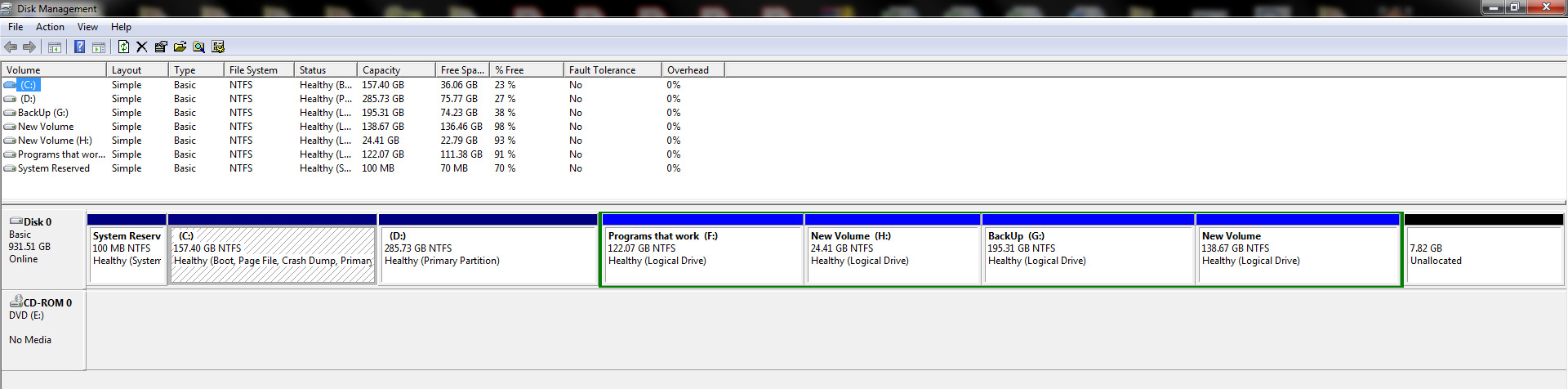
EUN9vu1.jpg


Cables are firmly in place and still nothing. Can't really feel it spin either which leads me to believe there isn't enough juice to power it. Do all HDD's require an external power source to power up or is the USB power enough?
 

My Computer My Computer

At a glance

Win7 SP16GB
Computer type
Laptop
Computer Manufacturer/Model Number
Lenovo
OS
Win7 SP1
Memory
6GB
That picture is of Disk Management. Do you have a picture of Device Manager, from the Home Laptop. Should look like this: Device Manager.PNG

You want to open up the IDE ATA/ATAPI controller tree, and the Universal Serial Bus controllers tree. Try this witht he cable plugged into the home laptop.


Yes, most External enclosures require their own power supply. Apricorn SATA-wire does not require separate power supply - if that is what you have got. But Apricorn SATA-wire comes with CD. What happens if you plug cable back into home laptop? Can you feel the drive running?
 

My Computer My Computer

At a glance

Windows 7 x64, Vista x64, 8.1 smartphoneIntel E8400 65W 64-bitDDR2 2 x 2GB, 1GB x 2XFX Radeon HD5750
Computer type
PC/Desktop
OS
Windows 7 x64, Vista x64, 8.1 smartphone
CPU
Intel E8400 65W 64-bit
Motherboard
Gigabyte EP45-UD3LR
Memory
DDR2 2 x 2GB, 1GB x 2
Graphics Card(s)
XFX Radeon HD5750
Sound Card
AMD High Definition Audio; Realtek High Definition Audio
Monitor(s) Displays
iiyama prolite X2377HDS
Screen Resolution
1920 x 1080
Hard Drives
500GB 7200 rpm Seagate ST3500413AS 16MB, 500GB 5400 rpm Toshiba MQ02ABF050H 32MB, 200GB 7200 rpm Seagate ST3200820AS 8MB, 2TB 7200 rpm Western Digital WD20EZRX 64MB
PSU
Enermax Liberty Modular
Case
Antec P193 Midi Tower
Keyboard
Mionix ZIBAL 60
Mouse
Razer USB 2.0 Diamondback Mouse or Huion Graphics Tablet
Browser
Internet Explorer, Lunascape, Firefox, Opera, Avast Safezone
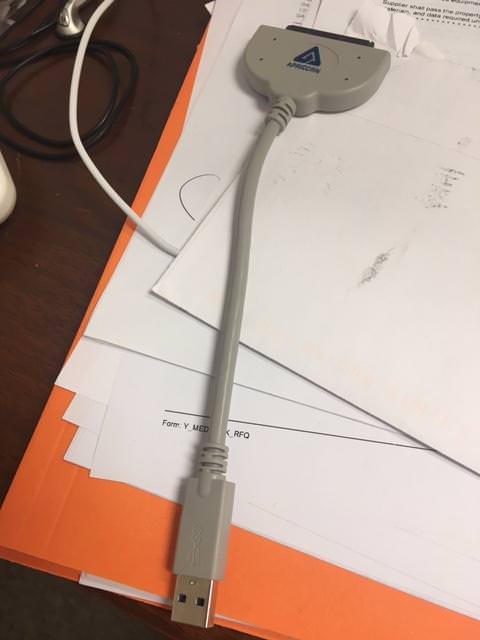
Apricorn SATA-wire only works on USB 3.0 connector - if that is the product that you have got.
 

My Computer My Computer

At a glance

Windows 7 x64, Vista x64, 8.1 smartphoneIntel E8400 65W 64-bitDDR2 2 x 2GB, 1GB x 2XFX Radeon HD5750
Computer type
PC/Desktop
OS
Windows 7 x64, Vista x64, 8.1 smartphone
CPU
Intel E8400 65W 64-bit
Motherboard
Gigabyte EP45-UD3LR
Memory
DDR2 2 x 2GB, 1GB x 2
Graphics Card(s)
XFX Radeon HD5750
Sound Card
AMD High Definition Audio; Realtek High Definition Audio
Monitor(s) Displays
iiyama prolite X2377HDS
Screen Resolution
1920 x 1080
Hard Drives
500GB 7200 rpm Seagate ST3500413AS 16MB, 500GB 5400 rpm Toshiba MQ02ABF050H 32MB, 200GB 7200 rpm Seagate ST3200820AS 8MB, 2TB 7200 rpm Western Digital WD20EZRX 64MB
PSU
Enermax Liberty Modular
Case
Antec P193 Midi Tower
Keyboard
Mionix ZIBAL 60
Mouse
Razer USB 2.0 Diamondback Mouse or Huion Graphics Tablet
Browser
Internet Explorer, Lunascape, Firefox, Opera, Avast Safezone
Here is the cable I'm using


UvnWu8O.jpg


I had to put the new HDD back in my machine to finish some work. Any idea why the old HDD won't come up in Disk Mgmt but will come up as the primary boot HDD?
 

My Computer My Computer

At a glance

Win7 SP16GB
Computer type
Laptop
Computer Manufacturer/Model Number
Lenovo
OS
Win7 SP1
Memory
6GB
What color is the plastic inside the USB connector? If the plastic inside is blue then it is USB 3 device, if the plastic is black then it is USB legacy.
 

My Computer My Computer

At a glance

Windows 7 x64, Vista x64, 8.1 smartphoneIntel E8400 65W 64-bitDDR2 2 x 2GB, 1GB x 2XFX Radeon HD5750
Computer type
PC/Desktop
OS
Windows 7 x64, Vista x64, 8.1 smartphone
CPU
Intel E8400 65W 64-bit
Motherboard
Gigabyte EP45-UD3LR
Memory
DDR2 2 x 2GB, 1GB x 2
Graphics Card(s)
XFX Radeon HD5750
Sound Card
AMD High Definition Audio; Realtek High Definition Audio
Monitor(s) Displays
iiyama prolite X2377HDS
Screen Resolution
1920 x 1080
Hard Drives
500GB 7200 rpm Seagate ST3500413AS 16MB, 500GB 5400 rpm Toshiba MQ02ABF050H 32MB, 200GB 7200 rpm Seagate ST3200820AS 8MB, 2TB 7200 rpm Western Digital WD20EZRX 64MB
PSU
Enermax Liberty Modular
Case
Antec P193 Midi Tower
Keyboard
Mionix ZIBAL 60
Mouse
Razer USB 2.0 Diamondback Mouse or Huion Graphics Tablet
Browser
Internet Explorer, Lunascape, Firefox, Opera, Avast Safezone
Yea it's blue
 

My Computer My Computer

At a glance

Win7 SP16GB
Computer type
Laptop
Computer Manufacturer/Model Number
Lenovo
OS
Win7 SP1
Memory
6GB
Back
Top