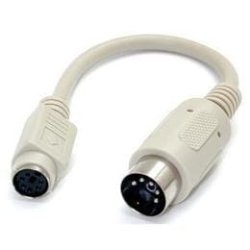
Old Keyboard converter?

Dixonater

New member
Local time
12:00 AM
Messages
13
Hello all!

I have an old Keyboard from a mid-90's PC that ran Windows 95. The connector is a circular shape with five pins. I recently ordered a converter, but I got the sides switched.

I have been searching the Internetz for a reverse converter, so that I could at least try using my old keyboard with my laptop. All I have been able to find are some ways to artificially tamper with the hardware (splicing the cables and whatnot).

Does anyone here have a link to a converter so that I can plug my old keyboard into a USB port on a new computer?

Thanks!
 

My Computer

OS
Windows 7 Home Premium 64 bit

My Computer

Computer type
Laptop
Computer Manufacturer/Model Number
HP ENVY 17-1150eg
OS
Windows 10 Pro x64 EN-GB
CPU
1.6 GHz Intel Core i7-720QM Processor
Memory
6 GB
Graphics Card(s)
ATI Mobility Radeon HD 5850 Graphics
Sound Card
Beats sound system with integrated subwoofer
Monitor(s) Displays
17" laptop display, 22" LED and 32" Full HD TV through HDMI
Screen Resolution
1600*900 (1), 1920*1080 (2&3)
Hard Drives
Internal: 2 x 500 GB SATA Hard Disk Drive 7200 rpm
External: 2TB for backups, 3TB USB3 network drive for media
Cooling
As Envy runs a bit warm, I have it on a Cooler Master pad
Keyboard
Logitech diNovo Media Desktop Laser (bluetooth)
Mouse
Logitech Performance Mouse MX
Internet Speed
50/10 Mbps VDSL
Antivirus
Windows Defender 4.3.9431.0
Browser
Maxthon 3.5.2., IE11
When I had a '95 box it used large audio type DIN, and I had an adapter. Google say still around . . .ah memories, but no help to the OP

old_din.jpg
 

My Computer

Computer type
PC/Desktop
Computer Manufacturer/Model Number
self build
OS
Windows 7 pro x64 SP1
CPU
Intel i7-2600k o/c to 4.6GHz
Motherboard
MSI Z68-GD80
Memory
8GB Mushkin 1866MHz
Graphics Card(s)
Nvidia GTX 750 Ti 2GB
Sound Card
integrated
Monitor(s) Displays
Liyama ProLite 27"
Screen Resolution
1920*1080 px
Hard Drives
Seagate 2TB
PSU
Coolermaster GX 750W
Case
Antec 300 case + 5 fans
Cooling
Dark Rock Pro
Internet Speed
62Mbit down 18Mbit up
Antivirus
MSE
Browser
Firefox
Other Info
Blackgold BGT3650 Quad HD TV card. Also have various 3770 + 4770K render boxes.
Hi Dixonater, welcome to the Seven Forums.

The connector you desrcribed is called PS/2, widely used before USB to connect mouse and keyboard to PC.

A simple Google search PS/2 to USB adapter gives for instance this: Amazon.com: Adesso PS/2 to USB Adapter, connects 2 PS/2 connectors to 1 USB port/hub (ADP-PU21 ): Electronics

Kari

To confirm, I can plug my keyboard into this cable no problem? Keep in mind that my old keyboard as the five spokes, as opposed to five holes for the spokes. The pictures on Amazon don't show this.
 

My Computer

OS
Windows 7 Home Premium 64 bit
I have keyboard I've been using continuously since 1986 (IBM Model M) that has the large DIN connector. You can adapt it to use the PS2 connector with one of these: Amazon.com: 5pin DIN Female to PS/2 Male Keyboard Cable Adapter - 6 1/2 inches long - 5 pin din female plug to ps2 port Male - basically - allows you to plug an older 5pin keyboard into a newer computer with a ps2 port: Electronics

My newest computer doesn't have a PS2 connector so I have one of these as well to adapt the PS2 to USB: Amazon.com: Adesso PS/2 to USB Adapter, connects 2 PS/2 connectors to 1 USB port/hub (ADP-PU21 ): Electronics
 

My Computer

Computer type
PC/Desktop
Computer Manufacturer/Model Number
Home Built desktop, Dell G15 5511 Gaming laptop,MS Surface Pro 7 tablet
OS
W10 Pro desktop, W11 laptop, W11 Pro tablet (all 64-bit)
CPU
3.7Ghz 8700K i7, i7-11800H, i7-1065G7
Motherboard
ASUS TUF Z370-Pro Gaming in desktop
Memory
16G desktop, 16G laptop, 4G tablet
Graphics Card(s)
AMD Radeon RX580, RTX 3060, Intel Iris Plus
Sound Card
High Definition Audio (Built-in to mobo)
Monitor(s) Displays
Samsung U32J59 32" (2x), 15.6", 12"
Screen Resolution
3840x2160, 3840x2160, 1920x1080, 2160x1440
Hard Drives
500G SSD for OS; 2T, 10T & 15T HDDs for Data on Desktop, 1TB SSD laptop, 128G SSD tablet.
PSU
Corsair CX 750M
Case
Antec 100
Cooling
CM 212+
Keyboard
IBM Model M - used continuously since 1986
Mouse
Microsoft Pro IntelliMouse
Internet Speed
400M down 8M up
Antivirus
Windows Defender
Browser
FireFox
Other Info
Built my first computer (8Mhz 8088cpu, 640K RAM, 20MB HDD, 2 360K floppy drives) in 1985 and have been building them for myself, relatives and friends ever since.
I have keyboard I've been using continuously since 1986 (IBM Model M) that has the large DIN connector. You can adapt it to use the PS2 connector with one of these: Amazon.com: 5pin DIN Female to PS/2 Male Keyboard Cable Adapter - 6 1/2 inches long - 5 pin din female plug to ps2 port Male - basically - allows you to plug an older 5pin keyboard into a newer computer with a ps2 port: Electronics

My newest computer doesn't have a PS2 connector so I have one of these as well to adapt the PS2 to USB: Amazon.com: Adesso PS/2 to USB Adapter, connects 2 PS/2 connectors to 1 USB port/hub (ADP-PU21 ): Electronics

The first one wouldn't work because I don't have either port on my laptop (the one with five or six pins).

That second one, though, could work...but it doesn't give me a clear picture. Does that cable in your second link connect with a keyboard with the five pins into a laptop with USB ports?
 

My Computer

OS
Windows 7 Home Premium 64 bit
I find keyboards (PS2 & USB) at thrift stores ( Like GoodWill) for $2 to $5 (some used some brand new) ;)
 

My Computer

Computer type
PC/Desktop
Computer Manufacturer/Model Number
Built them myself, Science Experiments !
OS
Win7 Enterprise, Win7 x86 (Ult 7600), Win7 x64 Ult 7600, TechNet RTM on AMD x64 (2.8Ghz)
CPU
AMD fx8350 4ghz, AMD-32 2400mhz, AMD-64 3200mhz, AMDx64 2.8G
Motherboard
SIS 755, ECS-K8M890M-M (Ult 7600), GigaByte & others
Memory
2gb, 4gb on the Ult 7600, 4gb on Technet RTM, 32gb on FX8350
Graphics Card(s)
Draw my own Graphics, several nVidia cards
Sound Card
on motherboard
Monitor(s) Displays
19" flat scr, 28" I-Inc widescr,22" Emprex Widescr, 23" Acer
Screen Resolution
1280 x 1024, 1440 x 900, 1920 x 1080
Hard Drives
6 pata Ide HD's & 2 Sata HD's
added 80gb external on Ult 7600 computer,
numerous extra 1tb, 2TB, 3Tb SATA HD's
A collection of ext HD Docks w/ HDs
PSU
430w, 550w, 600w, 700, 800, etc
Case
All Generic Full Towers
Cooling
Open Air & a few fans, some w/ colored LEDs
Keyboard
Compaq & Dell recycled from GoodWill
Mouse
Made in China Optical Wired Mouse
Internet Speed
Fast Cable InterNet
Antivirus
AVG Free on 24 different Desktops, NO Problems!
Browser
IE 8 is preferred, but use FireFox sometimes
Other Info
Linksys Routers, switches, & Hubs
Too Many USB Flash Drives to count, Biggest is 64GB !
Eight computers in my home network.
Sixteen computers at my business network.
Linked via TeamViewer !
Lots of old used spare computer parts everywhere!
As my esteemed fellow geeks have told you, it might also be a DIN connector.

Does it look like this:

images


or like this:

images
 

My Computer

Computer type
Laptop
Computer Manufacturer/Model Number
HP ENVY 17-1150eg
OS
Windows 10 Pro x64 EN-GB
CPU
1.6 GHz Intel Core i7-720QM Processor
Memory
6 GB
Graphics Card(s)
ATI Mobility Radeon HD 5850 Graphics
Sound Card
Beats sound system with integrated subwoofer
Monitor(s) Displays
17" laptop display, 22" LED and 32" Full HD TV through HDMI
Screen Resolution
1600*900 (1), 1920*1080 (2&3)
Hard Drives
Internal: 2 x 500 GB SATA Hard Disk Drive 7200 rpm
External: 2TB for backups, 3TB USB3 network drive for media
Cooling
As Envy runs a bit warm, I have it on a Cooler Master pad
Keyboard
Logitech diNovo Media Desktop Laser (bluetooth)
Mouse
Logitech Performance Mouse MX
Internet Speed
50/10 Mbps VDSL
Antivirus
Windows Defender 4.3.9431.0
Browser
Maxthon 3.5.2., IE11
As my esteemed fellow geeks have told you, it might also be a DIN connector.

Does it look like this:

images


or like this:

images

It is the first one. :P
 

My Computer

OS
Windows 7 Home Premium 64 bit
OK, it's DIN. I do not know if DIN to USB adapters exists, can not find on Google.

Theoretically it could work with connecting keyboard to DIN to PS/2 adapter, and then this adapter to a PS/2 to USB adapter, so first this and then this. However I refuse to take any responsibility if it does not work.

Worth to think is that those old keyboards might need more power than that a USB port can provide. Anyway, Why don't you just buy a new keyboard? You get a good USB keyboard with the price of adapters you would need with your old one.

Kari
 

My Computer

Computer type
Laptop
Computer Manufacturer/Model Number
HP ENVY 17-1150eg
OS
Windows 10 Pro x64 EN-GB
CPU
1.6 GHz Intel Core i7-720QM Processor
Memory
6 GB
Graphics Card(s)
ATI Mobility Radeon HD 5850 Graphics
Sound Card
Beats sound system with integrated subwoofer
Monitor(s) Displays
17" laptop display, 22" LED and 32" Full HD TV through HDMI
Screen Resolution
1600*900 (1), 1920*1080 (2&3)
Hard Drives
Internal: 2 x 500 GB SATA Hard Disk Drive 7200 rpm
External: 2TB for backups, 3TB USB3 network drive for media
Cooling
As Envy runs a bit warm, I have it on a Cooler Master pad
Keyboard
Logitech diNovo Media Desktop Laser (bluetooth)
Mouse
Logitech Performance Mouse MX
Internet Speed
50/10 Mbps VDSL
Antivirus
Windows Defender 4.3.9431.0
Browser
Maxthon 3.5.2., IE11
OK, it's DIN. I do not know if DIN to USB adapters exist, can not find on Google.

Theoretically it could work with connecting keyboard to DIN to PS/" adapter, and then this adapter to a PS/2 to USB adapter, so first this and then this. However I refuse to take any responsibility if it does not work.

Worth to think is that those old keyboards might need more power than that what a USB port can provide. Anyway, Why don't you just buy a new keyboard? You get a good USB keyboard with the price of adapters you would need with your old one.

Kari

Thanks for the info!

Yeah, at this point, I think that I will just invest in a new/used USB keyboard, given that it could be cheaper to do so, and because the double converter is not guaranteed to work (I read online that many of these converters are failing to actually convert).

Thanks!!
 

My Computer

OS
Windows 7 Home Premium 64 bit
Yes, a new keyboard would be your best bet, I'd only advise the adapter route if you have a keyboard you really like that you want to continue using. The 2 adapters I posted links to will and do work fine with my 1986 IBM Model M to adapt it to work with DIN, PS2 or USB.

There shouldn't be any reason why the adapters won't work since there is no "conversion" taking place. It's simply routing the correct wires to the correct pins, hence adapting, not converting.

If you were dealing with an older keyboard, from an IBM PC or XT, then you would need a converter because those older keyboards used different protocols then the newer keyboards starting with the IBM AT.
 

My Computer

Computer type
PC/Desktop
Computer Manufacturer/Model Number
Home Built desktop, Dell G15 5511 Gaming laptop,MS Surface Pro 7 tablet
OS
W10 Pro desktop, W11 laptop, W11 Pro tablet (all 64-bit)
CPU
3.7Ghz 8700K i7, i7-11800H, i7-1065G7
Motherboard
ASUS TUF Z370-Pro Gaming in desktop
Memory
16G desktop, 16G laptop, 4G tablet
Graphics Card(s)
AMD Radeon RX580, RTX 3060, Intel Iris Plus
Sound Card
High Definition Audio (Built-in to mobo)
Monitor(s) Displays
Samsung U32J59 32" (2x), 15.6", 12"
Screen Resolution
3840x2160, 3840x2160, 1920x1080, 2160x1440
Hard Drives
500G SSD for OS; 2T, 10T & 15T HDDs for Data on Desktop, 1TB SSD laptop, 128G SSD tablet.
PSU
Corsair CX 750M
Case
Antec 100
Cooling
CM 212+
Keyboard
IBM Model M - used continuously since 1986
Mouse
Microsoft Pro IntelliMouse
Internet Speed
400M down 8M up
Antivirus
Windows Defender
Browser
FireFox
Other Info
Built my first computer (8Mhz 8088cpu, 640K RAM, 20MB HDD, 2 360K floppy drives) in 1985 and have been building them for myself, relatives and friends ever since.
Back
Top