
Old Network Shares Still Appear In Windows Explorer

Philip

New member
Local time
5:18 PM
Messages
2
The title sums it up really. Shares that no longer exist are still showing up in other PCs connected to the LAN. Some of the shares have been gone for months now, but still are listed. I've deleted any Homegroups which I had been previously playing with and unshared all shares on the host PC.

Any idea how to get rid of these shares?
 

Attachments
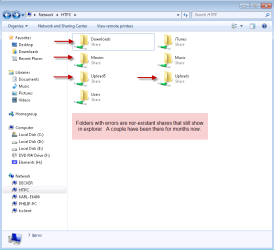
  • 8-20-2010 10-49-00 AM.png
    8-20-2010 10-49-00 AM.png
    19.5 KB · Views: 49

My Computer My Computer

At a glance

Windows 7 Professional x64 RTM
OS
Windows 7 Professional x64 RTM
start an administrative command prompt
Type net share "users" /d
replace "users" with the username the share is listed under... keep doing so on all your machines until the share list is current
 
Thanks for the suggestion Madtown. I would've tried that had I not already tried recreating the shares on the server and then unshare them which worked.

I figured out how to fix it. I recreated the shares using the same share name, then unshared them.

Edit: I should also add that when recreating the share it already shared as if it was never deleted on the server, although it was. I also get the following message when unsharing the folder:

Code:
[Window Title]
Sharing
 
[Content]
There are 1 file(s) open by 2 user(s) connected to Uploads. If you stop sharing Uploads, the files will close, which may cause these users to lose data. Do you want to continue?
 
[Yes] [No]
I just click yes, switch back to the client, refresh the network shares and the share will now be gone.
 

My Computer My Computer

At a glance

Windows 7 Professional x64 RTM
OS
Windows 7 Professional x64 RTM
Mad ... there is no user listed when I look at the shares on my Win 7 or XP systems. Where do you find this information?

I f I do a net share from a Command Prompt. the only data I get is:

Share name Resource Remark
 

My Computer My Computer

At a glance

Windows 10 Pro X64Intel Quad Core i7-4770 @ 3.4Ghz16.0GB PC3-12800 DDR3 SDRAM 1600 MHzIntel Integrated HD Graphics
Computer type
PC/Desktop
Computer Manufacturer/Model Number
Lenovo IdeaCenter 450
OS
Windows 10 Pro X64
CPU
Intel Quad Core i7-4770 @ 3.4Ghz
Memory
16.0GB PC3-12800 DDR3 SDRAM 1600 MHz
Graphics Card(s)
Intel Integrated HD Graphics
Sound Card
Realtek HD Audio
Monitor(s) Displays
HP 22" LCD
Screen Resolution
1680 x 1050
Hard Drives
250GB Samsung EVO SATA-3 SSD
2TB Seagate ST2000DM001 SATA-2
1.5TB Seagate ST3150041AS SATA
Keyboard
Dell USB
Mouse
Lenovo USB
Internet Speed
Cable via Road Runner 3MB Upload, 30MB Download
Antivirus
Windows Defender, MBAM Pro, MBAE
Browser
Seamonkey
Other Info
UEFI/GPT
PLDS DVD-RW DH16AERSH
Back
Top