Old restore points not showing up

Barnum

New member
Member
VIP
Local time
4:57 PM
Messages
149
Was having problems with my PC freezing up so I opted to do a system restore. When I tried to do this I could only find two restore points, both from today. What happened to the older ones and is there a way to recover them? Feel like I am now stuck with a PC that cannot be trusted.
 

My Computer My Computer

OS
Windows 7
Welcome to our forum Barnum.

What program do you use for defragging?

What cleanup, tuneup or registry cleaners do you use.

Do you use Advanced System Care?

You can run this in cmd prompt with admin privileges and it will list the restore points that Windows 7 is saving.

Vssadmin List Shadows

Let us know how many restore point it shows and we will go from there.
 

My Computer My Computer

Computer type
PC/Desktop
Computer Manufacturer/Model Number
Home made Desktop
OS
Windows 10 Pro. 64/ version 1709 Windows 7 Pro/64
CPU
Intel i7-6800K @ 4.3
Motherboard
ASUS X-99 Deluxe II
Memory
Corsair Platinum 16 gig @2400
Graphics Card(s)
EVGA GTX 1070 OC
Monitor(s) Displays
Asus 27" LED LCD/VE278Q
Screen Resolution
1920-1080 or 1280-720 HDMI
Hard Drives
INTEL SSD 730-240 Gb Sata 3.0/
PSU
EVGA Platium 1200W
Case
Phanteks Luxe Tempered Glass 8 fans/ one radiator
Cooling
XSPC/ Water Cooled CPU
Keyboard
Das 4 Professional
Mouse
Logitech M705/MX Anywhere 2-S
Internet Speed
100 mbits
Antivirus
Microsoft Security Essentials/ Malwarebytes Premium 3.0/ SAS
Browser
I.E. 11 default/Firefox/ ISP Time Warner Cable/Spectrum
Other Info
LG BluRay Burner/
Sound system-KLipsch-THX/
Icy Dock ssd Hot Swap bays.
Psychic powers says the Bear hit the nail dead center with this. Don't drive it through the wood bear. Go easy. :)

@Barnum: perhaps you can describe the underlying "freezing" issues and we can help with that. But if you're using a cleanup utility, unless you instruct it not to touch your old restore points they're being deleted.
 

My Computer My Computer

Computer type
Laptop
Computer Manufacturer/Model Number
HP
OS
Dual Boot Win 8.1 x64; Win 7 SP1 x64
CPU
i7-3610QM @ 2.3 GHz
Motherboard
Hewlett-Packard 181C (U3E1)
Memory
8 GB Dual-Channel DDR3 @ 798MHz
Graphics Card(s)
Intel HD Graphics 4000
Hard Drives
Hitachi HTS547575A9E384 SCSI Disk Device;
WD Elements 1042 USB Device
Antivirus
Microsoft Security Essentials; Comodo Firewall w/ Defense +
The reason I asked about defrag program is some have had problems with 3rd party defrag hiding the restore points where Windows 7 can't find them.
 

My Computer My Computer

Computer type
PC/Desktop
Computer Manufacturer/Model Number
Home made Desktop
OS
Windows 10 Pro. 64/ version 1709 Windows 7 Pro/64
CPU
Intel i7-6800K @ 4.3
Motherboard
ASUS X-99 Deluxe II
Memory
Corsair Platinum 16 gig @2400
Graphics Card(s)
EVGA GTX 1070 OC
Monitor(s) Displays
Asus 27" LED LCD/VE278Q
Screen Resolution
1920-1080 or 1280-720 HDMI
Hard Drives
INTEL SSD 730-240 Gb Sata 3.0/
PSU
EVGA Platium 1200W
Case
Phanteks Luxe Tempered Glass 8 fans/ one radiator
Cooling
XSPC/ Water Cooled CPU
Keyboard
Das 4 Professional
Mouse
Logitech M705/MX Anywhere 2-S
Internet Speed
100 mbits
Antivirus
Microsoft Security Essentials/ Malwarebytes Premium 3.0/ SAS
Browser
I.E. 11 default/Firefox/ ISP Time Warner Cable/Spectrum
Other Info
LG BluRay Burner/
Sound system-KLipsch-THX/
Icy Dock ssd Hot Swap bays.
Restore points come and go and you really have no control over them. If you want solid system backups that you can control yourself, make images - preferably with free Macrium.

If you want to check which restore points are left, run this command:

vssadmin list shadows

Shadow is another name for restore point. This list is dated.
 

My Computer My Computer

Computer Manufacturer/Model Number
HP, Dell, Gateway, Toshiba - 4 laptops and 2 desktops
OS
Vista, Windows7, Mint Mate, Zorin, Windows 8
CPU
from 1.6GHz Duo to i7
Monitor(s) Displays
2x HP w2207
Hard Drives
5x HDD, 7x SSD, 12x Externals
Keyboard
with trackball - no mices
Mouse
Trackball mice
Internet Speed
DSL 6000
Okay, let me try this again. When I tried to connect to websites My PC would freeze to the point where control/alt/delete would not even open for me to shut down the problem site. I then had to manually turn off my PC (on/off button). When it came up it would not go beyond the "starting Windows" logo. Eventually Iwas able to get a startup repair going which eventually told me that it could not fix some problems.

It then started normally and I decided to do a system restore. The only restore point that showed up was one from about two hours earlier when I had updated Windows (IE update). Beginning to wonder if that update might have been the problem. In any case my PC is running okay at present but I am concerned there's more going on and I will be face with this once again. I also do not like the idea that my system restore option is not working. I am using Windows 7, IE11 and have been a Norton 360 user for years. The vssadmin list shadows listed above tells me nothing. It flashes so fast it's impossible to read anything.

I am not a PC guru but will try whatever suggestions you may offer (within reason). System restore is very important to me in that it allows me to put the computer back to a time when it was working well. Not being able to do that really concerns me. Thanks.
 

My Computer My Computer

OS
Windows 7
This was the update I installed. MS14-080: Cumulative security update for Internet Explorer: December 9, 2014. The restore point that shows does not list this however (as used to be the case)
 
Last edited:

My Computer My Computer

OS
Windows 7
@Barnum, honestly, if system restore is important to you you need to learn to use Macrium.
Time for a new approach. System Restore is sort of like the old shotgun hanging on the rifle rack in grand-dad's study. Well-made, powerful, slow, but no one really uses it so as a consequence no one is ever really sure it'll fire if you take it down off the wall and pull the trigger. When it does work we're happy, but when it doesn't no one is really surprised.

I do informal tech support for approaching 50 people at this point. I'm the resident geek in my neighborhood. I literally don't know anyone who uses Internet Explorer. I know, I know, PC's are supposed to be this gigantic universe of possibility and choice and largely it is. However, our preferences have consequences. Software won't work well just because we prefer it.

I don't know any of the guys on this forum. Never met them, just joined up here last week and I'm willing to bet none of the advanced guys use IE as their daily browser. (Except I suppose there has to be one old codger who's retired from IT and hardened his system and uses IE since he's not doing anything more interesting than surfing to 7 forums).

I mention this because you said you rely on three inefficient, buggy, outdated pieces of software: Norton, IE, and System Restore.

If you want system restore you can rely on, that's going to work every time like it's supposed to it's hard to look past Macrium. Tried and true by people more knowledgeable than you and I. Once there is a geek consensus you're shooting yourself in the foot by being an iconoclast, unless of course you know more than they do.

@whs suggested this tutorial with free Macrium. That's really good. I had to learn Macrium without a tutorial or other guide. Macrium hasn't let me down yet. Been more than a year. See post here.

In brief (and closing) if what you're looking for is reliable system restore you need to learn imaging and Macrium free is a pretty good place to start. And if I were you, I'd evaluate the software I use and determine if I can obtain freeware or open source substitutes that better serve my needs.


Okay, let me try this again. When I tried to connect to websites My PC would freeze to the point where control/alt/delete would not even open for me to shut down the problem site.
If you're surfing to websites that are shutting down your system you probably need sandboxie.

I thought I was going to pretty grimy places on the web but I've never had this happen to me.
Would be interesting to see your list of installed software.

 
Last edited:

My Computer My Computer

Computer type
Laptop
Computer Manufacturer/Model Number
HP
OS
Dual Boot Win 8.1 x64; Win 7 SP1 x64
CPU
i7-3610QM @ 2.3 GHz
Motherboard
Hewlett-Packard 181C (U3E1)
Memory
8 GB Dual-Channel DDR3 @ 798MHz
Graphics Card(s)
Intel HD Graphics 4000
Hard Drives
Hitachi HTS547575A9E384 SCSI Disk Device;
WD Elements 1042 USB Device
Antivirus
Microsoft Security Essentials; Comodo Firewall w/ Defense +
Platypus, thanks for the reply and recommendation. I am 73, and use the PC for email/social media and I have a website/blog. Otherwise I prefer my PC to work as intended or as promised. Have I tried other browsers? Sure, but I am just more "comfortable" with IE. Anyway System restore has always been there for me and now it's not. I am hoping someone can help me with a fix.....

Thank you again. Guess I am just one of those old farts opposed to change.
 

My Computer My Computer

OS
Windows 7
In my post #2 I asked three questions and got answers of Zero (0).

I gave instructions that Command Prompt had to be run as a administrator.
Or it will buzz by and you will not be able to read it.

As I and whs have posted vssadmin list shadows from the cmd. prompt. There is a reason.
When done it will let us know if for sure you do or do not have restore points.

Sometimes restore points will be there but Windows 7 can't find them because some 3rd party programs that are installed and used have messed things up and won't let Windows 7 find them.
Sometimes you restore point settings have been changed by some 3rd party programs.

So in my opinion the first step is to use vssadmin list shadows so we know exactly what Windows can see as restore points (shadows)

***Now how to use Command (cmd) Prompt as a administrator. (admin)

Type cmd in the Start Orb search.
At the top you should see CMD
Right tick on it and select Run as administrator.

When it opens run this command. vssadmin list shadows count how many restore points are there and the dates.Let us know the amount and dates and we can go from there.

Note:
1. whs and I are no spring chickens either.
2. I use Restore Points and free Macrium.
3. Browsers are like the ladies. Choose the one you like the best or better yet choose 2 or 3 and use them the way you desire.
 

My Computer My Computer

Computer type
PC/Desktop
Computer Manufacturer/Model Number
Home made Desktop
OS
Windows 10 Pro. 64/ version 1709 Windows 7 Pro/64
CPU
Intel i7-6800K @ 4.3
Motherboard
ASUS X-99 Deluxe II
Memory
Corsair Platinum 16 gig @2400
Graphics Card(s)
EVGA GTX 1070 OC
Monitor(s) Displays
Asus 27" LED LCD/VE278Q
Screen Resolution
1920-1080 or 1280-720 HDMI
Hard Drives
INTEL SSD 730-240 Gb Sata 3.0/
PSU
EVGA Platium 1200W
Case
Phanteks Luxe Tempered Glass 8 fans/ one radiator
Cooling
XSPC/ Water Cooled CPU
Keyboard
Das 4 Professional
Mouse
Logitech M705/MX Anywhere 2-S
Internet Speed
100 mbits
Antivirus
Microsoft Security Essentials/ Malwarebytes Premium 3.0/ SAS
Browser
I.E. 11 default/Firefox/ ISP Time Warner Cable/Spectrum
Other Info
LG BluRay Burner/
Sound system-KLipsch-THX/
Icy Dock ssd Hot Swap bays.
It lists only one restore point..."contains one shadow copies creation time 1/9/2015 5:07 42"
 

My Computer My Computer

OS
Windows 7
Thank you.

Now could you answer these question from my post #2


What program do you use for defragging?

What cleanup, tuneup or registry cleaners do you use?

Do you use Advanced System Care?

My reason for these questions are simple like me.

No sense in checking and saving settings for restore points if their are 3rd party programs that are going to just have their way with the settings.

Remember you are our eyes and ears. We only know from where we sit what you tell us with your post.
 

My Computer My Computer

Computer type
PC/Desktop
Computer Manufacturer/Model Number
Home made Desktop
OS
Windows 10 Pro. 64/ version 1709 Windows 7 Pro/64
CPU
Intel i7-6800K @ 4.3
Motherboard
ASUS X-99 Deluxe II
Memory
Corsair Platinum 16 gig @2400
Graphics Card(s)
EVGA GTX 1070 OC
Monitor(s) Displays
Asus 27" LED LCD/VE278Q
Screen Resolution
1920-1080 or 1280-720 HDMI
Hard Drives
INTEL SSD 730-240 Gb Sata 3.0/
PSU
EVGA Platium 1200W
Case
Phanteks Luxe Tempered Glass 8 fans/ one radiator
Cooling
XSPC/ Water Cooled CPU
Keyboard
Das 4 Professional
Mouse
Logitech M705/MX Anywhere 2-S
Internet Speed
100 mbits
Antivirus
Microsoft Security Essentials/ Malwarebytes Premium 3.0/ SAS
Browser
I.E. 11 default/Firefox/ ISP Time Warner Cable/Spectrum
Other Info
LG BluRay Burner/
Sound system-KLipsch-THX/
Icy Dock ssd Hot Swap bays.
I use Norton 360 for defrag, registry cleaner and I do not use Advance system care.
 

My Computer My Computer

OS
Windows 7
I know little about Norton 360 but with a short Google I see it does registry cleaning and defraging and a system tuneup. It just might be your problem.

To me this is worry some. I didn't know Norton 360 did all this.


PC Tuneup
xfeaturesix.jpg.pagespeed.ic.ESrnMVMAxL.jpg

– Finds and fixes problems that slow your computer
xcheck.jpg.pagespeed.ic.e-aFvNtFco.jpg
– Speeds up the computer's startup time
xcheck.jpg.pagespeed.ic.e-aFvNtFco.jpg
– Cleans and repairs Windows registry
xcheck.jpg.pagespeed.ic.e-aFvNtFco.jpg
– Removes Internet clutter such as cookies and temporary files
xcheck.jpg.pagespeed.ic.e-aFvNtFco.jpg
Support


Lets look at some other things.

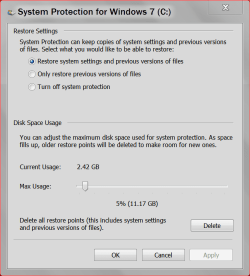
On the keyboard use the Windows Flag key and the Pause key

On the left column you will see System Protection tick on it.

Make sure Windows 7 is selected then select configure. You should see something like this.

Please post a picture of your system.

This tutorial by Brink will show you how to post a snap shot (picture)

http://www.sevenforums.com/tutorials/9733-screenshots-files-upload-post-seven-forums.html

system protection today.PNG
 

My Computer My Computer

Computer type
PC/Desktop
Computer Manufacturer/Model Number
Home made Desktop
OS
Windows 10 Pro. 64/ version 1709 Windows 7 Pro/64
CPU
Intel i7-6800K @ 4.3
Motherboard
ASUS X-99 Deluxe II
Memory
Corsair Platinum 16 gig @2400
Graphics Card(s)
EVGA GTX 1070 OC
Monitor(s) Displays
Asus 27" LED LCD/VE278Q
Screen Resolution
1920-1080 or 1280-720 HDMI
Hard Drives
INTEL SSD 730-240 Gb Sata 3.0/
PSU
EVGA Platium 1200W
Case
Phanteks Luxe Tempered Glass 8 fans/ one radiator
Cooling
XSPC/ Water Cooled CPU
Keyboard
Das 4 Professional
Mouse
Logitech M705/MX Anywhere 2-S
Internet Speed
100 mbits
Antivirus
Microsoft Security Essentials/ Malwarebytes Premium 3.0/ SAS
Browser
I.E. 11 default/Firefox/ ISP Time Warner Cable/Spectrum
Other Info
LG BluRay Burner/
Sound system-KLipsch-THX/
Icy Dock ssd Hot Swap bays.
Thanks. Have already allotted more space for restore..... will give the registry a shot next.
 

My Computer My Computer

OS
Windows 7
Thanks. Have already allotted more space for restore..... will give the registry a shot next.

I'm not sure what this means.
 

My Computer My Computer

Computer type
PC/Desktop
Computer Manufacturer/Model Number
Home made Desktop
OS
Windows 10 Pro. 64/ version 1709 Windows 7 Pro/64
CPU
Intel i7-6800K @ 4.3
Motherboard
ASUS X-99 Deluxe II
Memory
Corsair Platinum 16 gig @2400
Graphics Card(s)
EVGA GTX 1070 OC
Monitor(s) Displays
Asus 27" LED LCD/VE278Q
Screen Resolution
1920-1080 or 1280-720 HDMI
Hard Drives
INTEL SSD 730-240 Gb Sata 3.0/
PSU
EVGA Platium 1200W
Case
Phanteks Luxe Tempered Glass 8 fans/ one radiator
Cooling
XSPC/ Water Cooled CPU
Keyboard
Das 4 Professional
Mouse
Logitech M705/MX Anywhere 2-S
Internet Speed
100 mbits
Antivirus
Microsoft Security Essentials/ Malwarebytes Premium 3.0/ SAS
Browser
I.E. 11 default/Firefox/ ISP Time Warner Cable/Spectrum
Other Info
LG BluRay Burner/
Sound system-KLipsch-THX/
Icy Dock ssd Hot Swap bays.
Otherwise I prefer my PC to work as intended or as promised. Have I tried other browsers? Sure, but I am just more "comfortable" with IE. Anyway System restore has always been there for me and now it's not. I am hoping someone can help me with a fix.....

Thank you again. Guess I am just one of those old farts opposed to change.

No offense to @Barnum but I think he already indicated an unwillingness to change his habits, and an intention to cherry pick whatever advice he deems to be helpful and ignore the rest even in situations where he clearly isn't qualified to say what's helpful.

As evidenced by the post here where be expresses a belief that it is more likely his system issues are attributable to a bad Windows update as opposed to hard resetting his PC after probably being the victim of a drive-by malware attack on the web.

Plus this thread here where he seemingly assumes that msconfig contains the definitive list of every program set to start with Windows and clearly ignores the assistance being extended to him.

Thanks. Have already allotted more space for restore..... will give the registry a shot next.

I'm not sure what this means.

I suspect what happened here is he assumed that increasing the amount of drive space allotted to System Restore will allow more Restore Points to be created and lessen the chances of them randomly disappearing in future. You and I may understand that this is not how it works but ... what are you going to do? :banghead:
 
Last edited:

My Computer My Computer

Computer type
Laptop
Computer Manufacturer/Model Number
HP
OS
Dual Boot Win 8.1 x64; Win 7 SP1 x64
CPU
i7-3610QM @ 2.3 GHz
Motherboard
Hewlett-Packard 181C (U3E1)
Memory
8 GB Dual-Channel DDR3 @ 798MHz
Graphics Card(s)
Intel HD Graphics 4000
Hard Drives
Hitachi HTS547575A9E384 SCSI Disk Device;
WD Elements 1042 USB Device
Antivirus
Microsoft Security Essentials; Comodo Firewall w/ Defense +
  • Like
Reactions: whs
Hmm, well thanks for your help. Sorry I wasted your time.
 

My Computer My Computer

OS
Windows 7
Hmm, well thanks for your help. Sorry I wasted your time.

Not at all @Barnum. You taught, I learned. (I am not being sarcastic here at all and I apologize in advance if it comes across that way.)

Thank you. Good luck to you sir.
 

My Computer My Computer

Computer type
Laptop
Computer Manufacturer/Model Number
HP
OS
Dual Boot Win 8.1 x64; Win 7 SP1 x64
CPU
i7-3610QM @ 2.3 GHz
Motherboard
Hewlett-Packard 181C (U3E1)
Memory
8 GB Dual-Channel DDR3 @ 798MHz
Graphics Card(s)
Intel HD Graphics 4000
Hard Drives
Hitachi HTS547575A9E384 SCSI Disk Device;
WD Elements 1042 USB Device
Antivirus
Microsoft Security Essentials; Comodo Firewall w/ Defense +

My Computer My Computer

Computer type
PC/Desktop
Computer Manufacturer/Model Number
Home made Desktop
OS
Windows 10 Pro. 64/ version 1709 Windows 7 Pro/64
CPU
Intel i7-6800K @ 4.3
Motherboard
ASUS X-99 Deluxe II
Memory
Corsair Platinum 16 gig @2400
Graphics Card(s)
EVGA GTX 1070 OC
Monitor(s) Displays
Asus 27" LED LCD/VE278Q
Screen Resolution
1920-1080 or 1280-720 HDMI
Hard Drives
INTEL SSD 730-240 Gb Sata 3.0/
PSU
EVGA Platium 1200W
Case
Phanteks Luxe Tempered Glass 8 fans/ one radiator
Cooling
XSPC/ Water Cooled CPU
Keyboard
Das 4 Professional
Mouse
Logitech M705/MX Anywhere 2-S
Internet Speed
100 mbits
Antivirus
Microsoft Security Essentials/ Malwarebytes Premium 3.0/ SAS
Browser
I.E. 11 default/Firefox/ ISP Time Warner Cable/Spectrum
Other Info
LG BluRay Burner/
Sound system-KLipsch-THX/
Icy Dock ssd Hot Swap bays.
Back
Top