Old Sony Vaio with Windows 7 64 bit and Recovery Partition

Rhothgar

New member
Local time
4:56 PM
Messages
61
I have two old Sony Vaio laptops which are brand new and never been used. Got them from an auction house who probably used KillWhatever to wipe data even though they are new. It was part of their contract I seem to recall.

One is a Core i3 and the other is a Core i5. Managed to get the latter up and running from its recovery partition. The one on the i3 seems corrupt. I got so far and then received Error 12 in Sony Vaio Care Rescue programme.

So it got me thinking.

Can I clone the recovery partition from the other i5 working PC onto a USB stick and somehow get the i3 up and running?

Moreover, if not, can I somehow clean install Win7 x 64. I do not have the recovery discs but have the sticker on the underside of the laptop and create a recovery partition and build a new image into the .wim or .iso or whatever and then get that to launch if needs be (Sony uses F10 as the recovery key). Is this somehow programmed into a boot loader or something?

The drives are currently SATA 5400 IDE drives but I would like to switch to SSD if possible. It needs Win 7 as I want to be able to run a diagnostics programme for cars from it.

Thanks in advance of some guidance.

IGNORE Profile now as these are on Windows 7 Home Premium OA.

- - - Updated - - -

I have two old Sony Vaio laptops which are brand new and never been used. Got them from an auction house who probably used KillWhatever to wipe data even though they are new. It was part of their contract I seem to recall.

One is a Core i3 and the other is a Core i5. Managed to get the latter up and running from its recovery partition. The one on the i3 seems corrupt. I got so far and then received Error 12 in Sony Vaio Care Rescue programme.

So it got me thinking.

Can I clone the recovery partition from the other i5 working PC onto a USB stick and somehow get the i3 up and running?

Moreover, if not, can I somehow clean install Win7 x 64. I do not have the recovery discs but have the sticker on the underside of the laptop and create a recovery partition and build a new image into the .wim or .iso or whatever and then get that to launch if needs be (Sony uses F10 as the recovery key). Is this somehow programmed into a boot loader or something?

The drives are currently SATA 5400 IDE drives but I would like to switch to SSD if possible. It needs Win 7 as I want to be able to run a diagnostics programme for cars from it.

Thanks in advance of some guidance.

IGNORE Profile now as these are on Windows 7 Home Premium OA.

I forgot to ask whether it is possible for me to somehow view the factory recovery iso or wim file in the Recovery Partition. If so, is there a tutorial on how to access it.

I am thinking along the lines of whether it is possible to find the wim file, access it, edit it to remove bloatware (in accordance with bloateare tutorial) and re-insert the wim or iso back into the recovery partition.

I tried also plugging in the i3 drive. It spins up but I reckon it is knackered. Hasleo couldn’t find it but it is for personal use and I plugged the drives into a business PC has 4 drives in it already so it left me thinking that Haskeo might be restricted to 5 drives?
 

My Computer My Computer

At a glance

Windows 7 Ultimate x64 SP1Intel Q9550 from memory8192MbMatrox Millenium
Computer type
PC/Desktop
Computer Manufacturer/Model Number
HP xw4600 Workstation
OS
Windows 7 Ultimate x64 SP1
CPU
Intel Q9550 from memory
Motherboard
HP
Memory
8192Mb
Graphics Card(s)
Matrox Millenium
Hard Drives
Western Digital WD5000-AAKS (Blue Caviar?)
Antivirus
None
Browser
Firefox 48
I forgot to ask whether it is possible for me to somehow view the factory recovery iso or wim file in the Recovery Partition

I think they are proprietary image format.
 
Last edited:

My Computers My Computers

  • At a glance

    7 X64i5 84002x8gb 3200mhz
    Computer type
    PC/Desktop
    OS
    7 X64
    CPU
    i5 8400
    Motherboard
    gigabyte b365m ds3h
    Memory
    2x8gb 3200mhz
    Hard Drives
    various
    PSU
    pure power 11 400w cm
    Case
    Coolermaster
    Cooling
    cryorig m9i
  • At a glance

    7x64g54008gb ddr4 2400
    Computer type
    PC/Desktop
    OS
    7x64
    CPU
    g5400
    Motherboard
    ga b365m ds3h
    Memory
    8gb ddr4 2400
    PSU
    xfx pro 450w
I forgot to ask whether it is possible for me to somehow view the factory recovery iso or wim file in the Recovery PartitionI think they are proprietary image format.

Thank you. I managed to find it and it is a boot.wim file.

It seems that the drive I am looking to recover, whilst not dead, is not recognised by a repair disc.

The BIOS on these machines is shocking. It only supports optical drive, hard drive, network drive but no boot from usb is possible.

I can obviously get into the repair disc using DVD drive so now I am wondering how I could access this boot.wim if I copied it to a DVD because I am unsure whether the WinRE guff is loaded into memory?

What would happen if I copied the working drive recovery partition to a DVD? Will I be able to boot and install or should I use WinRE disc and load USB drivers and have boot.wim on a USB?

I tried searching earlier for a clean install of Win6 x 64 OEM on the net but the only one I could find was in Polish on internet archive?

I have no idea what the best way forward is from here.

The BIOS won't even tell you if it has recognised a hard drive. I have never seen such a basic BIOS. It is an InsydeH20 BIOS.
 

My Computer My Computer

At a glance

Windows 7 Ultimate x64 SP1Intel Q9550 from memory8192MbMatrox Millenium
Computer type
PC/Desktop
Computer Manufacturer/Model Number
HP xw4600 Workstation
OS
Windows 7 Ultimate x64 SP1
CPU
Intel Q9550 from memory
Motherboard
HP
Memory
8192Mb
Graphics Card(s)
Matrox Millenium
Hard Drives
Western Digital WD5000-AAKS (Blue Caviar?)
Antivirus
None
Browser
Firefox 48
What is
Win6 x 64 OEM

- - - Updated - - -

I think the things on the recovery partition are .sny files

Not sure what you are looking for. What is the exact model of the sony
can I somehow clean install Win7 x 64

Yes. get the installation media for example

Windows 7 Professional x64 English

en_windows_7_ultimate_with_sp1_x64_dvd_u_677332.iso

SHA1: 36AE90DEFBAD9D9539E649B193AE573B77A71C83

or

X17-59465.iso

They are the same file with different names . either will do
 

My Computers My Computers

  • At a glance

    7 X64i5 84002x8gb 3200mhz
    Computer type
    PC/Desktop
    OS
    7 X64
    CPU
    i5 8400
    Motherboard
    gigabyte b365m ds3h
    Memory
    2x8gb 3200mhz
    Hard Drives
    various
    PSU
    pure power 11 400w cm
    Case
    Coolermaster
    Cooling
    cryorig m9i
  • At a glance

    7x64g54008gb ddr4 2400
    Computer type
    PC/Desktop
    OS
    7x64
    CPU
    g5400
    Motherboard
    ga b365m ds3h
    Memory
    8gb ddr4 2400
    PSU
    xfx pro 450w
What is

- - - Updated - - -

I think the things on the recovery partition are .sny files

Not sure what you are looking for. What is the exact model of the sony


Yes. get the installation media for example

Windows 7 Professional x64 English

en_windows_7_ultimate_with_sp1_x64_dvd_u_677332.iso

SHA1: 36AE90DEFBAD9D9539E649B193AE573B77A71C83

or

X17-59465.iso

They are the same file with different names . either will do
Typo! Sorry. Thought I had corrected it.

It’s definitely a .wim file. That is in sources folder. I’ll have to have another look and see if I can see these .sny files you mention.

I want to be able to copy that recovery partition to another drive and then hopefully rebuild from that.

am looking for home premium please! The Win 7 Ultimate is on another PC.

This is for a Vaio VPCEH2N1E. It also says model number PCG-71911M. I think it was a cheapo model for Currys.
 

My Computer My Computer

At a glance

Windows 7 Ultimate x64 SP1Intel Q9550 from memory8192MbMatrox Millenium
Computer type
PC/Desktop
Computer Manufacturer/Model Number
HP xw4600 Workstation
OS
Windows 7 Ultimate x64 SP1
CPU
Intel Q9550 from memory
Motherboard
HP
Memory
8192Mb
Graphics Card(s)
Matrox Millenium
Hard Drives
Western Digital WD5000-AAKS (Blue Caviar?)
Antivirus
None
Browser
Firefox 48
Even if you could use the recovery partition it is very old and probably doesnt even have the service pack1

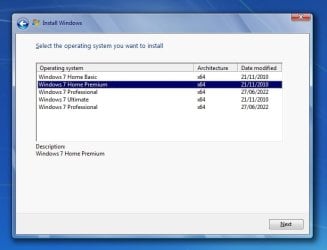
remove the ei.cfg file and all editions are available

http://code.kliu.org/misc/winisoutils/eicfg_removal_utility.zip

win7-all-editions.jpg

- - - Updated - - -

here are the drivers: Sony VAIO VPCEH3N6E

click the arrow next to each and download the zip file .


- - - Updated - - -

Why not use the 7updater
Update your Win 7 installation media


unzip those drivers into the DRIVERS\installx64 folder

use the extract-iso.cmd to extract the iso file

then rt click and run as admin on the 7updater.cmd and browse to the extracted-iso folder
 

My Computers My Computers

  • At a glance

    7 X64i5 84002x8gb 3200mhz
    Computer type
    PC/Desktop
    OS
    7 X64
    CPU
    i5 8400
    Motherboard
    gigabyte b365m ds3h
    Memory
    2x8gb 3200mhz
    Hard Drives
    various
    PSU
    pure power 11 400w cm
    Case
    Coolermaster
    Cooling
    cryorig m9i
  • At a glance

    7x64g54008gb ddr4 2400
    Computer type
    PC/Desktop
    OS
    7x64
    CPU
    g5400
    Motherboard
    ga b365m ds3h
    Memory
    8gb ddr4 2400
    PSU
    xfx pro 450w
Even if you could use the recovery partition it is very old and probably doesnt even have the service pack1

remove the ei.cfg file and all editions are available

http://code.kliu.org/misc/winisoutils/eicfg_removal_utility.zip

View attachment 425272

- - - Updated - - -

here are the drivers: Sony VAIO VPCEH3N6E

click the arrow next to each and download the zip file .


- - - Updated - - -

Why not use the 7updater
Update your Win 7 installation media


unzip those drivers into the DRIVERS\installx64 folder

use the extract-iso.cmd to extract the iso file

then rt click and run as admin on the 7updater.cmd and browse to the extracted-iso folder
FANTASTIC! That’s amazing. What a star! Thank you.

I’ll give that a shot.

Can I use your updater? I read about it earlier and wasn’t entirely sure. Probably need to read up on it when I have more time.

- - - Updated - - -

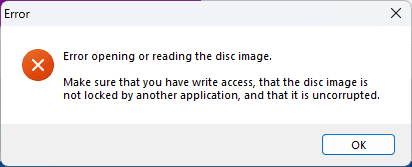
Have tried to remove ei.cfg file but it is giving an error:-

Screenshot 2026-01-25 093208.png

I read the readme file first and the iso is not mounted (although I did mount it to see if I could just delete the file), it is not set to read-only and I have full control. I have even viewed effective access and it shows I have all permissions. All this suggests that the file is corrupt though I cannot imagine that to the case.

Can I copy contents to USB, delete file and re-create ISO? It's a faff but I can leave it running in the background.
 

My Computer My Computer

At a glance

Windows 7 Ultimate x64 SP1Intel Q9550 from memory8192MbMatrox Millenium
Computer type
PC/Desktop
Computer Manufacturer/Model Number
HP xw4600 Workstation
OS
Windows 7 Ultimate x64 SP1
CPU
Intel Q9550 from memory
Motherboard
HP
Memory
8192Mb
Graphics Card(s)
Matrox Millenium
Hard Drives
Western Digital WD5000-AAKS (Blue Caviar?)
Antivirus
None
Browser
Firefox 48
Sure you can delete it using an isohandler
.
anyburn free should do Download AnyBurn
 

My Computers My Computers

  • At a glance

    7 X64i5 84002x8gb 3200mhz
    Computer type
    PC/Desktop
    OS
    7 X64
    CPU
    i5 8400
    Motherboard
    gigabyte b365m ds3h
    Memory
    2x8gb 3200mhz
    Hard Drives
    various
    PSU
    pure power 11 400w cm
    Case
    Coolermaster
    Cooling
    cryorig m9i
  • At a glance

    7x64g54008gb ddr4 2400
    Computer type
    PC/Desktop
    OS
    7x64
    CPU
    g5400
    Motherboard
    ga b365m ds3h
    Memory
    8gb ddr4 2400
    PSU
    xfx pro 450w
- - - Updated - - -

here are the drivers: Sony VAIO VPCEH3N6E

click the arrow next to each and download the zip file .

I managed to install Windows 11 last week as a tester but couldn't get Windows 7 to do what I need it to do in a VM environment so I have now reverted back to reinstall of Windows 7 Pro 32 bit for what I need it for for the end usage.

However, I have an old Win 7 disk with all editions on. Installs fine but there are no drivers so I have come back to this thread to find the drivers but when I click on download on the link you provided it says Virus Detected and the file is in .HTA format which is not right.

I cannot afford to have any issues with the PC I am downloading them on. Perhaps this HTA file is an installer but that is no use unless it contains all those files because without being able to get the network adapter working on the Vaio my hands are tied.

I've read up a bit about it and it seems there is a nuance which I don't think anyone has overcome because Sony do not support it.

When I type "netsh wlan show interfaces" in CMD, it says "State: Disconnected" and there is NO Fn key combo to switch it on. From memory it is an Atheros AR9285 of sorts.

Hope you can think of a workaround.


- - - Updated - - -

Why not use the 7updater
Update your Win 7 installation media


unzip those drivers into the DRIVERS\installx64 folder

use the extract-iso.cmd to extract the iso file

then rt click and run as admin on the 7updater.cmd and browse to the extracted-iso folder[/QUOTE]
 

My Computer My Computer

At a glance

Windows 7 Ultimate x64 SP1Intel Q9550 from memory8192MbMatrox Millenium
Computer type
PC/Desktop
Computer Manufacturer/Model Number
HP xw4600 Workstation
OS
Windows 7 Ultimate x64 SP1
CPU
Intel Q9550 from memory
Motherboard
HP
Memory
8192Mb
Graphics Card(s)
Matrox Millenium
Hard Drives
Western Digital WD5000-AAKS (Blue Caviar?)
Antivirus
None
Browser
Firefox 48

My Computers My Computers

  • At a glance

    7 X64i5 84002x8gb 3200mhz
    Computer type
    PC/Desktop
    OS
    7 X64
    CPU
    i5 8400
    Motherboard
    gigabyte b365m ds3h
    Memory
    2x8gb 3200mhz
    Hard Drives
    various
    PSU
    pure power 11 400w cm
    Case
    Coolermaster
    Cooling
    cryorig m9i
  • At a glance

    7x64g54008gb ddr4 2400
    Computer type
    PC/Desktop
    OS
    7x64
    CPU
    g5400
    Motherboard
    ga b365m ds3h
    Memory
    8gb ddr4 2400
    PSU
    xfx pro 450w
Back
Top