A problem with Windows Update on Windows 7 64 bit and error 80092004

rfe777

New member
Member
VIP
Local time
8:35 PM
Messages
103
Location
Israel
I've just installed Windows 7 64 bit, but I think I have a problem with the Windows Update module. I think it's corrupted or something. During downloading of Windows updates it has also downloaded an updated version of this module, and since then it takes a LOT of time for it to search for available updates, very slow.

And also, there is an update that cannot be downloaded, a cumulative security update for IE 11. Gives an "Error 80092004" message.


Anyway to fix this?

TIA
 

My Computer My Computer

Computer type
PC/Desktop
OS
Windows 7 Home Premium 64 bit
CPU
Intel core i5 2400 quad 6mb 3.1 GHz
Motherboard
Gigabyte H67M-D2-B3
Memory
KVR Kingston 4GB DDR3 1333MHZ
Graphics Card(s)
ATI Radeon R7 200
Sound Card
5.1 on-board
Monitor(s) Displays
Dell U2410
Screen Resolution
1900 x 1200
Hard Drives
Internal HD Western Digital 1 terabyte 7200 SATA3
Samsung SSD 850 EVO 250 GB
PSU
INWIN power man 450W A.PFC
Internet Speed
100 mb
Sorry I didn't follow the instructions

I've tried the Readiness tools (4 times), the SFC tool (5 times), nothing helped.

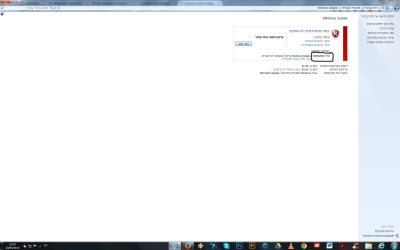
Screenshot attached (It's in Hebrew so I've marked the error number).

And, how can I send the CBS zip file? it's more than 100mb.
 

Attachments

  • 20.jpg
    20.jpg
    63.4 KB · Views: 6

My Computer My Computer

Computer type
PC/Desktop
OS
Windows 7 Home Premium 64 bit
CPU
Intel core i5 2400 quad 6mb 3.1 GHz
Motherboard
Gigabyte H67M-D2-B3
Memory
KVR Kingston 4GB DDR3 1333MHZ
Graphics Card(s)
ATI Radeon R7 200
Sound Card
5.1 on-board
Monitor(s) Displays
Dell U2410
Screen Resolution
1900 x 1200
Hard Drives
Internal HD Western Digital 1 terabyte 7200 SATA3
Samsung SSD 850 EVO 250 GB
PSU
INWIN power man 450W A.PFC
Internet Speed
100 mb
Hebrew? (irrelevant!)
We really only need the CBS.log, CheckSUR.log, and latest CBSPersistxxxxxxxx.cab files - the rest are likely to be superfluous.
 

My Computer My Computer

Computer type
Laptop
Computer Manufacturer/Model Number
Asus K52F or Lenovo B51-80
OS
Win 7 x64 Home Premium (and x86 VirtualBox VM)/Win10
CPU
i3 370M/i7 6500U
Motherboard
Asus/Lenovo
Memory
8GB - finally :)/8GB
Graphics Card(s)
it's an i3, dude!/dual Intel&nVidia
Sound Card
onboard
Monitor(s) Displays
15.6" built-in
Screen Resolution
1366x768/1920x1080
Hard Drives
750GB Seagate internal
Sundry external drives attached to other computers on the local network
1TB SSD on the Lenovo
PSU
n/a
Internet Speed
as much as I can get - usually on a dongle/phone, so <1MB/s
Antivirus
MSE/Defender
Browser
IE11/12/Edge/Chrome/FF(if I must)
Hebrew? (irrelevant!)
We really only need the CBS.log, CheckSUR.log, and latest CBSPersistxxxxxxxx.cab files - the rest are likely to be superfluous.
It is relevant as I'm from Israel.

What I meant is that maybe you'll be confused so I've marked the error number.

And, the CBS.log file alone is as big as the entire zip file, about 118mb.
 

My Computer My Computer

Computer type
PC/Desktop
OS
Windows 7 Home Premium 64 bit
CPU
Intel core i5 2400 quad 6mb 3.1 GHz
Motherboard
Gigabyte H67M-D2-B3
Memory
KVR Kingston 4GB DDR3 1333MHZ
Graphics Card(s)
ATI Radeon R7 200
Sound Card
5.1 on-board
Monitor(s) Displays
Dell U2410
Screen Resolution
1900 x 1200
Hard Drives
Internal HD Western Digital 1 terabyte 7200 SATA3
Samsung SSD 850 EVO 250 GB
PSU
INWIN power man 450W A.PFC
Internet Speed
100 mb
Compressed, it should come down to less than 5MB
 

My Computer My Computer

Computer type
Laptop
Computer Manufacturer/Model Number
Asus K52F or Lenovo B51-80
OS
Win 7 x64 Home Premium (and x86 VirtualBox VM)/Win10
CPU
i3 370M/i7 6500U
Motherboard
Asus/Lenovo
Memory
8GB - finally :)/8GB
Graphics Card(s)
it's an i3, dude!/dual Intel&nVidia
Sound Card
onboard
Monitor(s) Displays
15.6" built-in
Screen Resolution
1366x768/1920x1080
Hard Drives
750GB Seagate internal
Sundry external drives attached to other computers on the local network
1TB SSD on the Lenovo
PSU
n/a
Internet Speed
as much as I can get - usually on a dongle/phone, so <1MB/s
Antivirus
MSE/Defender
Browser
IE11/12/Edge/Chrome/FF(if I must)

My Computer My Computer

Computer type
PC/Desktop
OS
Windows 7 Home Premium 64 bit
CPU
Intel core i5 2400 quad 6mb 3.1 GHz
Motherboard
Gigabyte H67M-D2-B3
Memory
KVR Kingston 4GB DDR3 1333MHZ
Graphics Card(s)
ATI Radeon R7 200
Sound Card
5.1 on-board
Monitor(s) Displays
Dell U2410
Screen Resolution
1900 x 1200
Hard Drives
Internal HD Western Digital 1 terabyte 7200 SATA3
Samsung SSD 850 EVO 250 GB
PSU
INWIN power man 450W A.PFC
Internet Speed
100 mb
??That implies that uncompressed it's about 2 GB!!
No wonder you're having problems.
Boot to Safe Mode, and then back to Normal Mode- with any luck that will kcik it to put that file into a Persist, and start a new one - I don't have a reader that can cope with a file that size anyhow :(
 

My Computer My Computer

Computer type
Laptop
Computer Manufacturer/Model Number
Asus K52F or Lenovo B51-80
OS
Win 7 x64 Home Premium (and x86 VirtualBox VM)/Win10
CPU
i3 370M/i7 6500U
Motherboard
Asus/Lenovo
Memory
8GB - finally :)/8GB
Graphics Card(s)
it's an i3, dude!/dual Intel&nVidia
Sound Card
onboard
Monitor(s) Displays
15.6" built-in
Screen Resolution
1366x768/1920x1080
Hard Drives
750GB Seagate internal
Sundry external drives attached to other computers on the local network
1TB SSD on the Lenovo
PSU
n/a
Internet Speed
as much as I can get - usually on a dongle/phone, so <1MB/s
Antivirus
MSE/Defender
Browser
IE11/12/Edge/Chrome/FF(if I must)
??That implies that uncompressed it's about 2 GB!!
No wonder you're having problems.
Boot to Safe Mode, and then back to Normal Mode- with any luck that will kcik it to put that file into a Persist, and start a new one - I don't have a reader that can cope with a file that size anyhow :(
The uncompressed file is 230mb.
 

My Computer My Computer

Computer type
PC/Desktop
OS
Windows 7 Home Premium 64 bit
CPU
Intel core i5 2400 quad 6mb 3.1 GHz
Motherboard
Gigabyte H67M-D2-B3
Memory
KVR Kingston 4GB DDR3 1333MHZ
Graphics Card(s)
ATI Radeon R7 200
Sound Card
5.1 on-board
Monitor(s) Displays
Dell U2410
Screen Resolution
1900 x 1200
Hard Drives
Internal HD Western Digital 1 terabyte 7200 SATA3
Samsung SSD 850 EVO 250 GB
PSU
INWIN power man 450W A.PFC
Internet Speed
100 mb
Odd - the normal compression ratio for the CBS.log is 95%, but you're only getting 50%?
Hmm I must admit to curiosity here - please upload it to a fileshare site, and post a link (preferably Dropbox or SkyDrive)
 

My Computer My Computer

Computer type
Laptop
Computer Manufacturer/Model Number
Asus K52F or Lenovo B51-80
OS
Win 7 x64 Home Premium (and x86 VirtualBox VM)/Win10
CPU
i3 370M/i7 6500U
Motherboard
Asus/Lenovo
Memory
8GB - finally :)/8GB
Graphics Card(s)
it's an i3, dude!/dual Intel&nVidia
Sound Card
onboard
Monitor(s) Displays
15.6" built-in
Screen Resolution
1366x768/1920x1080
Hard Drives
750GB Seagate internal
Sundry external drives attached to other computers on the local network
1TB SSD on the Lenovo
PSU
n/a
Internet Speed
as much as I can get - usually on a dongle/phone, so <1MB/s
Antivirus
MSE/Defender
Browser
IE11/12/Edge/Chrome/FF(if I must)
??That implies that uncompressed it's about 2 GB!!
No wonder you're having problems.
Boot to Safe Mode, and then back to Normal Mode- with any luck that will kcik it to put that file into a Persist, and start a new one - I don't have a reader that can cope with a file that size anyhow :(

OK, I've done that, and now it's even bigger. Uncompressed - 347mb (The whole folder, the file itself is 228mb), compressed - 134mb.

Still want me to upload it to an external host?
 

My Computer My Computer

Computer type
PC/Desktop
OS
Windows 7 Home Premium 64 bit
CPU
Intel core i5 2400 quad 6mb 3.1 GHz
Motherboard
Gigabyte H67M-D2-B3
Memory
KVR Kingston 4GB DDR3 1333MHZ
Graphics Card(s)
ATI Radeon R7 200
Sound Card
5.1 on-board
Monitor(s) Displays
Dell U2410
Screen Resolution
1900 x 1200
Hard Drives
Internal HD Western Digital 1 terabyte 7200 SATA3
Samsung SSD 850 EVO 250 GB
PSU
INWIN power man 450W A.PFC
Internet Speed
100 mb
Yes please! this is definitely intriguing. ;)
 

My Computer My Computer

Computer type
Laptop
Computer Manufacturer/Model Number
Asus K52F or Lenovo B51-80
OS
Win 7 x64 Home Premium (and x86 VirtualBox VM)/Win10
CPU
i3 370M/i7 6500U
Motherboard
Asus/Lenovo
Memory
8GB - finally :)/8GB
Graphics Card(s)
it's an i3, dude!/dual Intel&nVidia
Sound Card
onboard
Monitor(s) Displays
15.6" built-in
Screen Resolution
1366x768/1920x1080
Hard Drives
750GB Seagate internal
Sundry external drives attached to other computers on the local network
1TB SSD on the Lenovo
PSU
n/a
Internet Speed
as much as I can get - usually on a dongle/phone, so <1MB/s
Antivirus
MSE/Defender
Browser
IE11/12/Edge/Chrome/FF(if I must)

My Computer My Computer

Computer type
PC/Desktop
OS
Windows 7 Home Premium 64 bit
CPU
Intel core i5 2400 quad 6mb 3.1 GHz
Motherboard
Gigabyte H67M-D2-B3
Memory
KVR Kingston 4GB DDR3 1333MHZ
Graphics Card(s)
ATI Radeon R7 200
Sound Card
5.1 on-board
Monitor(s) Displays
Dell U2410
Screen Resolution
1900 x 1200
Hard Drives
Internal HD Western Digital 1 terabyte 7200 SATA3
Samsung SSD 850 EVO 250 GB
PSU
INWIN power man 450W A.PFC
Internet Speed
100 mb
The oldest CBSPersist file there is 89MB (1.6GB uncompressed)- which is what's causing the bloat.

The CBS.log has the following error in it...
Code:
2015-04-24 07:47:57, Info                  CSI    00000081 Component change list: 
2015-04-24 07:47:57, Info                  CSI    00000082 Couldn't find the hash of component: Microsoft-Windows-IE-InternetExplorer-Optional, Version = 11.2.9600.17728, pA = PROCESSOR_ARCHITECTURE_AMD64 (9), Culture neutral, VersionScope = 1 nonSxS, PublicKeyToken = {l:8 b:31bf3856ad364e35}, Type neutral, TypeName neutral, PublicKey neutral in the catalog [l:192{96}]"\SystemRoot\WinSxS\Catalogs\8279850e727389f06786a2e520a840ebb7f2a24f18cf3c65c99d80b0a44ede35.cat".
2015-04-24 07:47:57, Error                 CSI    00000083@2015/4/24:04:47:57.355 (F) d:\win7sp1_gdr\base\wcp\componentstore\csd_winners.cpp(1302): Error 80092004 [Warning,Facility=FACILITY_NTSSPI,Code=8196 (0x2004)] originated in function CCSDirectTransaction::AddImplicationsToCatalogsAndVerifyComponentHashes expression: (null)
[gle=0x80004005]
2015-04-24 07:47:57, Error                 CSI    00000084 (F) 80092004 [Warning,Facility=FACILITY_NTSSPI,Code=8196 (0x2004)] #89032# from CCSDirectTransaction::PrepareForCommit(...)[gle=0x90092004]
2015-04-24 07:47:57, Error                 CSI    00000085 (F) 80092004 [Warning,Facility=FACILITY_NTSSPI,Code=8196 (0x2004)] #89031# from CCSDirectTransaction::ExamineTransaction(...)[gle=0x90092004]
2015-04-24 07:47:57, Error                 CSI    00000086 (F) 80092004 [Warning,Facility=FACILITY_NTSSPI,Code=8196 (0x2004)] #89030# from CCSDirectTransaction_IRtlTransaction::ExamineTransaction(...)[gle=0x90092004]
2015-04-24 07:47:57, Error                 CSI    00000087 (F) CRYPT_E_NOT_FOUND #88145# from Windows::COM::CPendingTransaction::IStorePendingTransaction_Analyze(...)[gle=0x80092004]
2015-04-24 07:47:57, Error                 CSI    00000088 (F) CRYPT_E_NOT_FOUND #85770# from Windows::ServicingAPI::CCSITransaction::ICSITransaction_Commit(Flags = 38 (0x00000026), pSink = NULL, disp = 0, coldpatching = FALSE)[gle=0x80092004]
2015-04-24 07:47:57, Error                 CSI    00000089 (F) CRYPT_E_NOT_FOUND #85769# 729212 us from Windows::ServicingAPI::CCSITransaction_ICSITransaction::Commit(flags = 0x00000026, pSink = NULL, disp = 0)
[gle=0x80092004]
2015-04-24 07:47:57, Error                 CBS    Exec: Failed to commit CSI transaction to resolve execution chain. [HRESULT = 0x80092004 - CRYPT_E_NOT_FOUND]
2015-04-24 07:47:57, Info                  CSI    0000008a@2015/4/24:04:47:57.395 CSI Transaction @0x28a1a0 destroyed
2015-04-24 07:47:57, Info                  CBS    Perf: Resolve chain complete.
2015-04-24 07:47:57, Info                  CBS    Failed to resolve execution chain. [HRESULT = 0x80092004 - CRYPT_E_NOT_FOUND]
2015-04-24 07:47:57, Error                 CBS    Failed to process single phase execution. [HRESULT = 0x80092004 - CRYPT_E_NOT_FOUND]
2015-04-24 07:47:57, Info                  CBS    WER: Generating failure report for package: Package_for_KB3038314~31bf3856ad364e35~amd64~~11.2.1.0, status: 0x80092004, failure source: Resolve, start state: Absent, target state: Staged, client id: WindowsUpdateAgent

Please find the file
C:\Windows\WinSxS\Catalogs\8279850e727389f06786a2e520a840ebb7f2a24f18cf3c65c99d80b0a44ede35.cat

double-click on it and it should open the Catalog. If not, then we know where the problem is ;)


Both CheckSUR and SFC scans are clear of errors.
 
Last edited:

My Computer My Computer

Computer type
Laptop
Computer Manufacturer/Model Number
Asus K52F or Lenovo B51-80
OS
Win 7 x64 Home Premium (and x86 VirtualBox VM)/Win10
CPU
i3 370M/i7 6500U
Motherboard
Asus/Lenovo
Memory
8GB - finally :)/8GB
Graphics Card(s)
it's an i3, dude!/dual Intel&nVidia
Sound Card
onboard
Monitor(s) Displays
15.6" built-in
Screen Resolution
1366x768/1920x1080
Hard Drives
750GB Seagate internal
Sundry external drives attached to other computers on the local network
1TB SSD on the Lenovo
PSU
n/a
Internet Speed
as much as I can get - usually on a dongle/phone, so <1MB/s
Antivirus
MSE/Defender
Browser
IE11/12/Edge/Chrome/FF(if I must)
The oldest CBSPersist file there is 89MB (1.6GB uncompressed)- which is what's causing the bloat.

The CBS.log has the following error in it...
Code:
2015-04-24 07:47:57, Info                  CSI    00000081 Component change list: 
2015-04-24 07:47:57, Info                  CSI    00000082 Couldn't find the hash of component: Microsoft-Windows-IE-InternetExplorer-Optional, Version = 11.2.9600.17728, pA = PROCESSOR_ARCHITECTURE_AMD64 (9), Culture neutral, VersionScope = 1 nonSxS, PublicKeyToken = {l:8 b:31bf3856ad364e35}, Type neutral, TypeName neutral, PublicKey neutral in the catalog [l:192{96}]"\SystemRoot\WinSxS\Catalogs\8279850e727389f06786a2e520a840ebb7f2a24f18cf3c65c99d80b0a44ede35.cat".
2015-04-24 07:47:57, Error                 CSI    00000083@2015/4/24:04:47:57.355 (F) d:\win7sp1_gdr\base\wcp\componentstore\csd_winners.cpp(1302): Error 80092004 [Warning,Facility=FACILITY_NTSSPI,Code=8196 (0x2004)] originated in function CCSDirectTransaction::AddImplicationsToCatalogsAndVerifyComponentHashes expression: (null)
[gle=0x80004005]
2015-04-24 07:47:57, Error                 CSI    00000084 (F) 80092004 [Warning,Facility=FACILITY_NTSSPI,Code=8196 (0x2004)] #89032# from CCSDirectTransaction::PrepareForCommit(...)[gle=0x90092004]
2015-04-24 07:47:57, Error                 CSI    00000085 (F) 80092004 [Warning,Facility=FACILITY_NTSSPI,Code=8196 (0x2004)] #89031# from CCSDirectTransaction::ExamineTransaction(...)[gle=0x90092004]
2015-04-24 07:47:57, Error                 CSI    00000086 (F) 80092004 [Warning,Facility=FACILITY_NTSSPI,Code=8196 (0x2004)] #89030# from CCSDirectTransaction_IRtlTransaction::ExamineTransaction(...)[gle=0x90092004]
2015-04-24 07:47:57, Error                 CSI    00000087 (F) CRYPT_E_NOT_FOUND #88145# from Windows::COM::CPendingTransaction::IStorePendingTransaction_Analyze(...)[gle=0x80092004]
2015-04-24 07:47:57, Error                 CSI    00000088 (F) CRYPT_E_NOT_FOUND #85770# from Windows::ServicingAPI::CCSITransaction::ICSITransaction_Commit(Flags = 38 (0x00000026), pSink = NULL, disp = 0, coldpatching = FALSE)[gle=0x80092004]
2015-04-24 07:47:57, Error                 CSI    00000089 (F) CRYPT_E_NOT_FOUND #85769# 729212 us from Windows::ServicingAPI::CCSITransaction_ICSITransaction::Commit(flags = 0x00000026, pSink = NULL, disp = 0)
[gle=0x80092004]
2015-04-24 07:47:57, Error                 CBS    Exec: Failed to commit CSI transaction to resolve execution chain. [HRESULT = 0x80092004 - CRYPT_E_NOT_FOUND]
2015-04-24 07:47:57, Info                  CSI    0000008a@2015/4/24:04:47:57.395 CSI Transaction @0x28a1a0 destroyed
2015-04-24 07:47:57, Info                  CBS    Perf: Resolve chain complete.
2015-04-24 07:47:57, Info                  CBS    Failed to resolve execution chain. [HRESULT = 0x80092004 - CRYPT_E_NOT_FOUND]
2015-04-24 07:47:57, Error                 CBS    Failed to process single phase execution. [HRESULT = 0x80092004 - CRYPT_E_NOT_FOUND]
2015-04-24 07:47:57, Info                  CBS    WER: Generating failure report for package: Package_for_KB3038314~31bf3856ad364e35~amd64~~11.2.1.0, status: 0x80092004, failure source: Resolve, start state: Absent, target state: Staged, client id: WindowsUpdateAgent
Please find the file
C:\Windows\WinSxS\Catalogs\8279850e727389f06786a2e520a840ebb7f2a24f18cf3c65c99d80b0a44ede35.cat

double-click on it and it should open the Catalog. If not, then we know where the problem is ;)


Both CheckSUR and SFC scans are clear of errors.

I've browsed through that folder twice but couldn't find that file.
 

My Computer My Computer

Computer type
PC/Desktop
OS
Windows 7 Home Premium 64 bit
CPU
Intel core i5 2400 quad 6mb 3.1 GHz
Motherboard
Gigabyte H67M-D2-B3
Memory
KVR Kingston 4GB DDR3 1333MHZ
Graphics Card(s)
ATI Radeon R7 200
Sound Card
5.1 on-board
Monitor(s) Displays
Dell U2410
Screen Resolution
1900 x 1200
Hard Drives
Internal HD Western Digital 1 terabyte 7200 SATA3
Samsung SSD 850 EVO 250 GB
PSU
INWIN power man 450W A.PFC
Internet Speed
100 mb
Try copying this into the Address bar in Windows Explorer....

C:\Windows\WinSxS\Catalogs\8279850e727389f06786a2e520a840ebb7f2a24f18cf3c65c99d80b0a44ede35.cat

if you then hit the Enter key, it should just open the file - or say 'Not found'
 

My Computer My Computer

Computer type
Laptop
Computer Manufacturer/Model Number
Asus K52F or Lenovo B51-80
OS
Win 7 x64 Home Premium (and x86 VirtualBox VM)/Win10
CPU
i3 370M/i7 6500U
Motherboard
Asus/Lenovo
Memory
8GB - finally :)/8GB
Graphics Card(s)
it's an i3, dude!/dual Intel&nVidia
Sound Card
onboard
Monitor(s) Displays
15.6" built-in
Screen Resolution
1366x768/1920x1080
Hard Drives
750GB Seagate internal
Sundry external drives attached to other computers on the local network
1TB SSD on the Lenovo
PSU
n/a
Internet Speed
as much as I can get - usually on a dongle/phone, so <1MB/s
Antivirus
MSE/Defender
Browser
IE11/12/Edge/Chrome/FF(if I must)
Try copying this into the Address bar in Windows Explorer....

C:\Windows\WinSxS\Catalogs\8279850e727389f06786a2e520a840ebb7f2a24f18cf3c65c99d80b0a44ede35.cat

if you then hit the Enter key, it should just open the file - or say 'Not found'

It says 'not found'. What does this mean?
 

My Computer My Computer

Computer type
PC/Desktop
OS
Windows 7 Home Premium 64 bit
CPU
Intel core i5 2400 quad 6mb 3.1 GHz
Motherboard
Gigabyte H67M-D2-B3
Memory
KVR Kingston 4GB DDR3 1333MHZ
Graphics Card(s)
ATI Radeon R7 200
Sound Card
5.1 on-board
Monitor(s) Displays
Dell U2410
Screen Resolution
1900 x 1200
Hard Drives
Internal HD Western Digital 1 terabyte 7200 SATA3
Samsung SSD 850 EVO 250 GB
PSU
INWIN power man 450W A.PFC
Internet Speed
100 mb
Not sure - yet!
It's the 'master' catalog file for all the files involved in the update, I think, which tells Windows the file sizes to expect from an update.
It seems that for whatever reason this file isn't where it's expected to be, either because the file itself hasn't been put there, or it's been misnamed. The question then becomes how to fix it.

I think the first thing to do is to delete the source files and re-download them...

This could be due to corruption in the SoftwareDistribution folder - the problem with that the conventional cure can lead to problems later on, if not handled properly, and you will lose your Update history (but the updates will still be installed, and viewable in the Installed Updates listing).

Open an Elevated Command Prompt
Run the following commands

NET STOP WUAUSERV
REN C:\WINDOWS\SoftwareDistribution SDOLD
NET START WUAUSERV

reboot
then wait 10 minutes, and open Windows Updates, and run a Check for Updates.

Install only the oldest update found - and reboot once installed
then go back to Windows updates and install the others.
 

My Computer My Computer

Computer type
Laptop
Computer Manufacturer/Model Number
Asus K52F or Lenovo B51-80
OS
Win 7 x64 Home Premium (and x86 VirtualBox VM)/Win10
CPU
i3 370M/i7 6500U
Motherboard
Asus/Lenovo
Memory
8GB - finally :)/8GB
Graphics Card(s)
it's an i3, dude!/dual Intel&nVidia
Sound Card
onboard
Monitor(s) Displays
15.6" built-in
Screen Resolution
1366x768/1920x1080
Hard Drives
750GB Seagate internal
Sundry external drives attached to other computers on the local network
1TB SSD on the Lenovo
PSU
n/a
Internet Speed
as much as I can get - usually on a dongle/phone, so <1MB/s
Antivirus
MSE/Defender
Browser
IE11/12/Edge/Chrome/FF(if I must)
Not sure - yet!
It's the 'master' catalog file for all the files involved in the update, I think, which tells Windows the file sizes to expect from an update.
It seems that for whatever reason this file isn't where it's expected to be, either because the file itself hasn't been put there, or it's been misnamed. The question then becomes how to fix it.

I think the first thing to do is to delete the source files and re-download them...

This could be due to corruption in the SoftwareDistribution folder - the problem with that the conventional cure can lead to problems later on, if not handled properly, and you will lose your Update history (but the updates will still be installed, and viewable in the Installed Updates listing).

Open an Elevated Command Prompt
Run the following commands

NET STOP WUAUSERV
REN C:\WINDOWS\SoftwareDistribution SDOLD
NET START WUAUSERV

reboot
then wait 10 minutes, and open Windows Updates, and run a Check for Updates.

Install only the oldest update found - and reboot once installed
then go back to Windows updates and install the others.

Maybe I don't need to do anything after all:

IE11 patch KB 3038314 blocks search engines and may fail with error 80092004 | InfoWorld

It appears like it's a corrupt update , which has already caused problems for a lot more users.
 

My Computer My Computer

Computer type
PC/Desktop
OS
Windows 7 Home Premium 64 bit
CPU
Intel core i5 2400 quad 6mb 3.1 GHz
Motherboard
Gigabyte H67M-D2-B3
Memory
KVR Kingston 4GB DDR3 1333MHZ
Graphics Card(s)
ATI Radeon R7 200
Sound Card
5.1 on-board
Monitor(s) Displays
Dell U2410
Screen Resolution
1900 x 1200
Hard Drives
Internal HD Western Digital 1 terabyte 7200 SATA3
Samsung SSD 850 EVO 250 GB
PSU
INWIN power man 450W A.PFC
Internet Speed
100 mb
Interesting article - I hadn't seen that (or heard of the problems) before.
I'll do some research over the weekend.
 

My Computer My Computer

Computer type
Laptop
Computer Manufacturer/Model Number
Asus K52F or Lenovo B51-80
OS
Win 7 x64 Home Premium (and x86 VirtualBox VM)/Win10
CPU
i3 370M/i7 6500U
Motherboard
Asus/Lenovo
Memory
8GB - finally :)/8GB
Graphics Card(s)
it's an i3, dude!/dual Intel&nVidia
Sound Card
onboard
Monitor(s) Displays
15.6" built-in
Screen Resolution
1366x768/1920x1080
Hard Drives
750GB Seagate internal
Sundry external drives attached to other computers on the local network
1TB SSD on the Lenovo
PSU
n/a
Internet Speed
as much as I can get - usually on a dongle/phone, so <1MB/s
Antivirus
MSE/Defender
Browser
IE11/12/Edge/Chrome/FF(if I must)
Not sure - yet!
It's the 'master' catalog file for all the files involved in the update, I think, which tells Windows the file sizes to expect from an update.
It seems that for whatever reason this file isn't where it's expected to be, either because the file itself hasn't been put there, or it's been misnamed. The question then becomes how to fix it.

I think the first thing to do is to delete the source files and re-download them...

This could be due to corruption in the SoftwareDistribution folder - the problem with that the conventional cure can lead to problems later on, if not handled properly, and you will lose your Update history (but the updates will still be installed, and viewable in the Installed Updates listing).

Open an Elevated Command Prompt
Run the following commands

NET STOP WUAUSERV
REN C:\WINDOWS\SoftwareDistribution SDOLD
NET START WUAUSERV

reboot
then wait 10 minutes, and open Windows Updates, and run a Check for Updates.

Install only the oldest update found - and reboot once installed
then go back to Windows updates and install the others.
So, do you still want me to do that, even after the article that I've linked to here?
 

My Computer My Computer

Computer type
PC/Desktop
OS
Windows 7 Home Premium 64 bit
CPU
Intel core i5 2400 quad 6mb 3.1 GHz
Motherboard
Gigabyte H67M-D2-B3
Memory
KVR Kingston 4GB DDR3 1333MHZ
Graphics Card(s)
ATI Radeon R7 200
Sound Card
5.1 on-board
Monitor(s) Displays
Dell U2410
Screen Resolution
1900 x 1200
Hard Drives
Internal HD Western Digital 1 terabyte 7200 SATA3
Samsung SSD 850 EVO 250 GB
PSU
INWIN power man 450W A.PFC
Internet Speed
100 mb
Back
Top