Hello all
I just got Win7 Ult 64 up and running and have pretty much completely got it looking like 98.
For some time now I have been using the default Win 98 Recycle Bin icons thru several OS's as since I use small icons, this icons colors are very easy to see with my background and very recognizable to my eye.
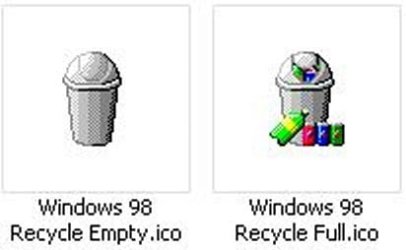
If some don't remember, this was a tapered round can with a fliptop type lid that when it is in its full state, showed several brightly colors cans at its base.
In Win7 I have tried the icons I have saved since 98 and they work sorta but the problem is, during a empty, the icon will not refresh to empty unless I refresh the screen.
From Google searches I see this is a common problem an I have tried just about ever fix I have found but nothing has worked.
As far as the stock Win7 Icon that works just fine so I'm just guessing here, as I seemed to have researched this enough, that the Win 98 one is just not compatible and so I don't think there is any more point in trying to fix it.
Basically I was hoping that someone may have a updated version that while it comes from what ever works now, still "looks" and most importantly, "acts" like the old Win 98 bin icons.
So does anyone know of such a set of icons?
Thanks for any help
I just got Win7 Ult 64 up and running and have pretty much completely got it looking like 98.
For some time now I have been using the default Win 98 Recycle Bin icons thru several OS's as since I use small icons, this icons colors are very easy to see with my background and very recognizable to my eye.
If some don't remember, this was a tapered round can with a fliptop type lid that when it is in its full state, showed several brightly colors cans at its base.
In Win7 I have tried the icons I have saved since 98 and they work sorta but the problem is, during a empty, the icon will not refresh to empty unless I refresh the screen.
From Google searches I see this is a common problem an I have tried just about ever fix I have found but nothing has worked.
As far as the stock Win7 Icon that works just fine so I'm just guessing here, as I seemed to have researched this enough, that the Win 98 one is just not compatible and so I don't think there is any more point in trying to fix it.
Basically I was hoping that someone may have a updated version that while it comes from what ever works now, still "looks" and most importantly, "acts" like the old Win 98 bin icons.
So does anyone know of such a set of icons?
Thanks for any help
My Computer
At a glance
Windows 7 Ultimate 64 bit (Full)AMD Phenom II X4 9658G Corsair DDR3 CMD4GX3M2B1600C8EVGA 896-P3-1257-AR GeForce GTX 260 Core 216 ...
- Computer Manufacturer/Model Number
- Homebuilt
- OS
- Windows 7 Ultimate 64 bit (Full)
- CPU
- AMD Phenom II X4 965
- Motherboard
- Asus M4A78T-E
- Memory
- 8G Corsair DDR3 CMD4GX3M2B1600C8
- Graphics Card(s)
- EVGA 896-P3-1257-AR GeForce GTX 260 Core 216 Superclocked Ed
- Sound Card
- Sound Blaster X-Fi XtremeGamer Fatal1ty Pro Series
- Monitor(s) Displays
- SAMSUNG 943BX Black 19" 5ms LCD
- Screen Resolution
- 1024 x 768, 75Hz
- Hard Drives
- (4) WD Raptor WD1500ADFD 150GB 10,000 RPM in 2 RAID
(2) WD 1 Tera's
- PSU
- Enermax Galaxy 1000w
- Case
- LianLi Full Alum.
- Cooling
- CPU: Artic-Cooling Freezer 46 Pro, Case: (6) 80mm
- Keyboard
- Microsoft Natural
- Mouse
- Microsoft Optical Wheel