older Word files showing as wps in Office 2010

Denise

New member
Local time
5:15 AM
Messages
2
Location
Singapore
I finally upgraded from MS Office 2002 to Office 2010, and all of my Word documents were automatically converted to wps files. In addition, when I download Word documents not created in Word 2010, they default to wps files. I can work around the problem manually to pull up older Word files in new Word, but it's incredibly annoying that any workaround is necessary. (Incidentally, when I try using the "open as" box with downloaded files, Word 2010 does not appear as one of the options.) I've been using Word for many years and have no need or desire to switch to MS Works. Please advise!
 

My Computer My Computer

At a glance

Windows Vista Home Basic1.00 GB
Computer Manufacturer/Model Number
Dell Vostro A860
OS
Windows Vista Home Basic
Memory
1.00 GB
Hi Denise, welcome to the forum. :D

This might do the trick - please let us know how you get on:
How to open a Works 6.0, a Works 7.0, a Works 8.0, or a Works 9.0 word processing document in Word

Method 2: If you do not have Microsoft Works installed on your computer

If you have a Works document (.wps) that you want to open and you do not have Works installed, you can still use Word to open the file. To do this, first use the Works 6-9 Converter in Word and then open the document directly in Word. Step 1: Download the Works 6-9 Converter

If you have previously installed Works on the same computer on which Word is installed, the Works 6-9 Converter is already installed and you can go on to step 2: "Open the Works document in Word."

If you have not previously installed Works on your computer, you must download the Works 6-9 Converter in order to open the document in Word. To download the Works 6-9 Converter, follow these steps:
  1. If it is open, close Microsoft Word.

    In your Web browser, visit the following Microsoft Web site: Download Details - Microsoft Download Center - Microsoft Works 6
  2. Click Download. The File Download dialog box opens.
  3. In the File Download dialog box, click Save file.
  4. Double-click the saved file to start the Works 6-9 Converter installer.
  5. Click I accept to accept the terms of the License Agreement, and then follow the instructions to install the Works 6-9 Converter.

    Note If you do not accept the terms of the License Agreement, the installation cannot continue.
  6. Click Install to install the file converter on your computer. The Works 6-9 Converter Setup now extracts the Works 6-9 File Converter and installs it on your computer. You can now open the Works file in Word.
Note If the file does not download or is installed incorrectly, you can go to the "Next Steps" section for more help.Step 2: Open the Works document in Word

You can use Word to open a Works document file (.wps), even if the file has not been converted to Word format (.doc) beforehand, by using the Works 6-9 Converter. Follow these steps to open the Works document by using the Works 6-9 Converter:
  1. Start Word.
  2. In Word 2000, Word 2002 or Word 2003, click the File menu, and then click Open. In Word 2007 or Word 2010, click Microsoft Office Button, and then click Open.
  3. In the Open dialog box, follow these steps:
    1. Change the Look in box to the location of your Works document.
    2. In the Files of type box, click All Files (*.*).
    3. Select the Works document (.wps) that you want to open, and then click Open.
  4. If the document opens correctly, click File, click Save As, and then change the file type to a Microsoft Word document (.doc).
  5. Save the document and you have successfully converted the file to a Word document.

 

My Computer My Computer

At a glance

Windows 7 Home Premium 64bitIntel(R) Core(TM) i3-2120 CPU @ 3.30GHz3.00 GB(1) Intel(R) HD Graphics (2) VNC Mirror Driver
Computer type
PC/Desktop
Computer Manufacturer/Model Number
Packard Bell
OS
Windows 7 Home Premium 64bit
CPU
Intel(R) Core(TM) i3-2120 CPU @ 3.30GHz
Motherboard
Packard Bell IPISB-AG
Memory
3.00 GB
Graphics Card(s)
(1) Intel(R) HD Graphics (2) VNC Mirror Driver
Sound Card
Realtek High Definition Audio
Monitor(s) Displays
AIO LCD
Screen Resolution
1920 x 1080
Hard Drives
WDC WD10EADX-22TDHB0 ATA Device
Fixed hard disk media
4 partitions
931.51 GB
Keyboard
Wireless
Mouse
Wireless
Antivirus
Microsoft Security Essentials
Browser
IE; Firefox
Other Info
Also:
Samsung N220 Plus Netbook - Windows 7 Home
HP laptop
iPad 5
Sounds like the default save is set to Works 6-9 files (wps). Set your default to *.docx (Word 2010) or one of the other Word versions.
 

My Computer My Computer

At a glance

Windows 7 Pro-x64i7-2600 3.4GHz - 3.8GHz Turbo8Gb - 2x4GB, Muskin 991770 PC3-1333Integrated Intel HD 2000
Computer type
PC/Desktop
Computer Manufacturer/Model Number
Built 2/11/2011
OS
Windows 7 Pro-x64
CPU
i7-2600 3.4GHz - 3.8GHz Turbo
Motherboard
Intel DH67BL-B3
Memory
8Gb - 2x4GB, Muskin 991770 PC3-1333
Graphics Card(s)
Integrated Intel HD 2000
Sound Card
Integrated Intel 10.1 HD, RealTek ALC892
Monitor(s) Displays
Asus LCD VH222H, Haier HL24XSL2a
Screen Resolution
1920x1080, 1920x1080
Hard Drives
Crucial SSD C300-128Gb,
Western Digital WD5002AALX - 500Gb,
Western Digital WD7501AALS - 750Gb
PSU
Seasonic 650W 80+ Gold Modular
Case
Rosewill Defender
Cooling
Stock CPU, Four 120mm case fans, PCH fan added
Keyboard
Logitech EX100 Y-RBH94 Wireless
Mouse
Logitech EX100 M-RCE95 Wireless
Internet Speed
3.0/1.5 Mbs
Antivirus
Microsoft Security Essentials
Browser
Microsoft Internet Explorer 11
Other Info
Antec Veris Premier-Multimedia IR Station,
Cyber Accoustics-3602 Speakers,
AFT XM-5U Card Reader,
Hauppauge TV-HVR-2250,
Sony LX300 USB Turntable
Word doesn't show up as a default option

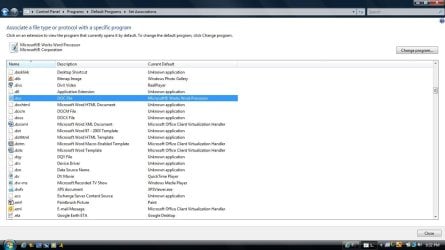
Carwiz, your answer came closer to solving my problem, but it seems to have uncovered another problem. Here's what my current defaults look like:

Open doc files 1.jpg

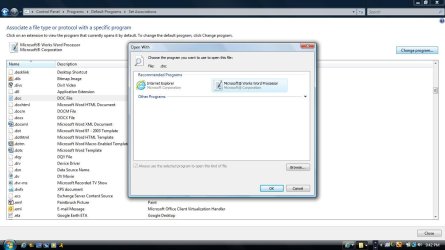
Seems straightforward enough. I attempt to switch from Works to Word, but get this screen:

Open doc files 2.jpg

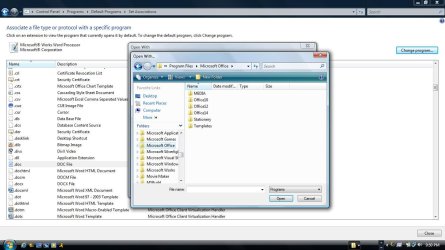
Mmmkay. So I browse and locate Microsoft Office, but where is Word? Where are any of my programs?

Open doc files 3.jpg

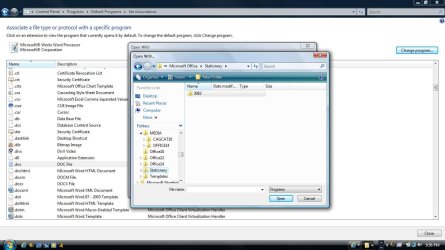
From here, I start messing around and quickly get in over my head:

Open doc files 3a.jpg

Open doc files 3b.jpg

Open doc files 3c.jpg

Should I uninstall and reinstall Office? Should any of this be happening?
 

My Computer My Computer

At a glance

Windows Vista Home Basic1.00 GB
Computer Manufacturer/Model Number
Dell Vostro A860
OS
Windows Vista Home Basic
Memory
1.00 GB
Take a snapshot of the Uninstall area for Microsoft Word. Include Works too. It appears you have three versions of Word and Works on your system. :shock: And... Word doesn't look like it installed. Did you just copy files to your HDD or was it an install from a Microsoft DVD?
 

My Computer My Computer

At a glance

Windows 7 Pro-x64i7-2600 3.4GHz - 3.8GHz Turbo8Gb - 2x4GB, Muskin 991770 PC3-1333Integrated Intel HD 2000
Computer type
PC/Desktop
Computer Manufacturer/Model Number
Built 2/11/2011
OS
Windows 7 Pro-x64
CPU
i7-2600 3.4GHz - 3.8GHz Turbo
Motherboard
Intel DH67BL-B3
Memory
8Gb - 2x4GB, Muskin 991770 PC3-1333
Graphics Card(s)
Integrated Intel HD 2000
Sound Card
Integrated Intel 10.1 HD, RealTek ALC892
Monitor(s) Displays
Asus LCD VH222H, Haier HL24XSL2a
Screen Resolution
1920x1080, 1920x1080
Hard Drives
Crucial SSD C300-128Gb,
Western Digital WD5002AALX - 500Gb,
Western Digital WD7501AALS - 750Gb
PSU
Seasonic 650W 80+ Gold Modular
Case
Rosewill Defender
Cooling
Stock CPU, Four 120mm case fans, PCH fan added
Keyboard
Logitech EX100 Y-RBH94 Wireless
Mouse
Logitech EX100 M-RCE95 Wireless
Internet Speed
3.0/1.5 Mbs
Antivirus
Microsoft Security Essentials
Browser
Microsoft Internet Explorer 11
Other Info
Antec Veris Premier-Multimedia IR Station,
Cyber Accoustics-3602 Speakers,
AFT XM-5U Card Reader,
Hauppauge TV-HVR-2250,
Sony LX300 USB Turntable
Back
Top