

Geesh. The on screen display for my volume control has disappeared. Previously when I used the volume control on the keyboard there was a bar that would pop up showing where the volume was. It has disappeared.
Other than a system restore any idea how to get it back? I have an HP desktop.
edit1: I probably wasn't clear enough. It wasn't the volume icon in the system tray that disappeared it was a bar that would appear center on the monitor showing the progress of the volume. The volume icon was still there and functioning, it was the display bar that disappeared.
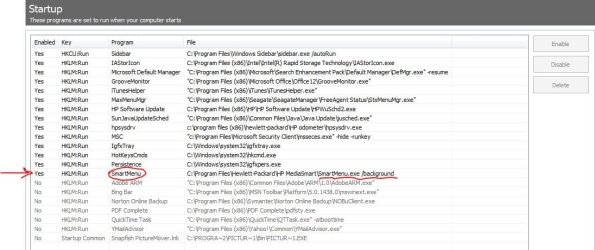
edit2: Solved it. It's related to HP Media Smart, HP's program for viewing DVDs, pictures, etc. I recently had disabled it at startup as part of this thread
http://www.sevenforums.com/performance-maintenance/180900-startup-programs-critique.html
Apparently it has to be running or at least initialized for the on screen volume control display to function. I would have thought the on screen display was independent of any program but I guess not. So I will have to keep it enabled at startup. I thought I was being smart by disabling some programs at startup but I guess if they serve a function it ends up backfiring.
I've included a screenshot of the startup entry. If anyone has an HP desktop and knows of another way to make this status bar display without having Media Smart running please let me know.
Other than a system restore any idea how to get it back? I have an HP desktop.
edit1: I probably wasn't clear enough. It wasn't the volume icon in the system tray that disappeared it was a bar that would appear center on the monitor showing the progress of the volume. The volume icon was still there and functioning, it was the display bar that disappeared.
edit2: Solved it. It's related to HP Media Smart, HP's program for viewing DVDs, pictures, etc. I recently had disabled it at startup as part of this thread
http://www.sevenforums.com/performance-maintenance/180900-startup-programs-critique.html
Apparently it has to be running or at least initialized for the on screen volume control display to function. I would have thought the on screen display was independent of any program but I guess not. So I will have to keep it enabled at startup. I thought I was being smart by disabling some programs at startup but I guess if they serve a function it ends up backfiring.
I've included a screenshot of the startup entry. If anyone has an HP desktop and knows of another way to make this status bar display without having Media Smart running please let me know.
Attachments
Last edited:
My Computer
- Computer Manufacturer/Model Number
- HP p6608f
- OS
- Win 7 Home Premium x64
- CPU
- Intel Core i3-540 3.07 GHz
- Motherboard
- MS-7613 (Iona-GL8E)
- Memory
- 4 GB (2 X 2) Dual-Channel PC-10600 DDR3 @ 665MHz (9-9-9-24)
- Graphics Card(s)
- Integrated Intel H57
- Sound Card
- Integrated Realtek ALC888S Audio
- Monitor(s) Displays
- 17" SDM-HS73 (a vestige from my old computer)
- Screen Resolution
- 1280 X 1024
- Hard Drives
- 750GB SATA 7200 RPM
- PSU
- 250W
- Keyboard
- HP USB keyboard
- Mouse
- HP USB optical mouse
- Internet Speed
- 15Mbps/1Mbps
