Onboard Sound Issues

MrWixx

New member
Local time
9:15 PM
Messages
6
Hey again guys,
Im back with another problem
(Part two from broken laptop)

Right, so I broke my laptop a few days ago and I needed a kind of.. "Get-me-by" computer while I give up and send it off to be fixed.

I've used all the pieces of computer laying around my house to construct franken-computer, upgraded it to Windows 7, and gotten it up and running.

The issue I am having is with the sound area.
(I can put it together, but when it comes to sound and how it works, I am a bit lost)

First, Windows 7 told me I had nothing installed for Audio
I went to Device Manager / Sound, Video, and Game Controllers and found something to the sound of "Macromedia Audio Device" with an exclamation point.

I went on to update drivers, it download the newest Realtek AC'97 driver

Now the audio says its working, but I am still not getting any sound output

I've used a couple different sets of headphones, to no avail

Any ideas?
Need more info?
Im here!

Thanks!
Mr.Wixx
 

My Computer

Computer Manufacturer/Model Number
Dell Studio 1537
OS
Windows 7
CPU
Intel Pentium 4 - 2.80 GHz
Motherboard
Shuttle Inc, Mainboard FB61
Memory
1G DIMM Sync SDRAM
Graphics Card(s)
NVIDIA GeForce 6200
Sound Card
Shuttle (Holco) 82801EB/ER (ICh5/ICH5R) AC'97
Monitor(s) Displays
Flat Screen Monitor
Screen Resolution
1280 x 1024
Hard Drives
120GB, SATA150, 3.5', NCQ, 8MB Cache
Cooling
2 Fans
Keyboard
Standard Ps/2 Keyboard
Mouse
Logitech Wireless Mouse
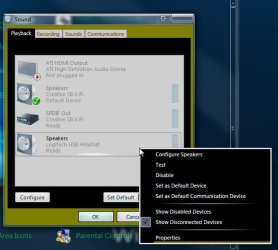
Headsets have to configured as well as sound cards in the Control Panel>Sound>Playback tab. When seeing the headset listed there right click on that to select the configure option and even set as the default playback device unless you run speakers as well.

When using the headset more extensively set that as the default playback device there. You can select the test option at any time to make sure both channels are seeing the normal output.
 

Attachments

  • Playback Device Settings.jpg
    Playback Device Settings.jpg
    39.9 KB · Views: 5

My Computers

System One System Two

  • Computer type
    PC/Desktop
    Computer Manufacturer/Model Number
    Custom builds = 2
    OS
    W7 Ultimate x64/W10 Pro x64/W11 Pro Triple Boot - Main PC W7 Remote PC Micro ATX W7 Pro x64/W11 Pro
    CPU
    AMD Phenom II X4 975 Deneb 3.6ghz - 965 2nd remote pc
    Motherboard
    Gigabyte GA-790XTA-UD4-Gigabyte GA-880GM-D2H remote pc
    Memory
    Kingston Hyper X DDR3 1600 1.5v 16gb - Hyper X Fury 8gb 2nd
    Graphics Card(s)
    MSI HD Radeon 5750 1gb - MSI HD Radeon 6450 on mini tower
    Sound Card
    Creative Labs X-Fi Xtreme Audio P - Realtek onooard 2nd case
    Monitor(s) Displays
    ASUS VW199T-P 19" HP 2082a Main-HP 2082a 20" remote pc
    Screen Resolution
    Asus 1440x900 - HP 1600x900
    Hard Drives
    WD Black 1TB HD per OS W7, W10, and pending W11 presently on 500gb OS Drive - Pending Triple 1TB HDs for Spanned Storage/backup volume
    Single 2TB external USB enclosure, single 1TB System 7 Host/Boot drive, Pending 8TB external HD for system image b
    PSU
    Corsair 750TX - primary / Corsair CX600 - second
    Case
    Antec 900-2 - SSD compatible / NZXT Vulcan mini tower
    Cooling
    Zalman CNPS9900A
    Keyboard
    AZIO L70 Backlit Letters Gaming - ONN Cordless/USB
    Mouse
    MSI DS200 Programmable, Logitech Cordless
    Internet Speed
    30mbps upgrade - primary hard wired - mini tower usb WiFi
    Antivirus
    GFI VIPRE Internet Security 2014 on W7 2016 beta on W10,
    Browser
    Cyberfox, WaterFox 64bit FF variants, FireFox x64, Pale Moon
    Other Info
    Accomdata fan cooled usb 2.0 PIDE/Sata II, III external enclosure.
    Sambient usb/eSata PATA/Sata II, III external enclosure.
  • Computer type
    PC/Desktop
    System Manufacturer/Model Number
    CUSTOM ASSEMBLY
    OS
    W7 Pro x64/W11 Pro
    CPU
    AMD Deneb 3.6ghz - 965
    Motherboard
    Gigabyte GA-880GM-D2H remote pc
    Memory
    Kingston Hyper X Fury 8gb
    Graphics Card(s)
    MSI HD Radeon 6450 DVI Output
    Sound Card
    Realtek onooard Creative or Other separate PENDING
    Monitor(s) Displays
    VIZIO 32" LCD TV Separate LCD Pending
    Screen Resolution
    1600x1080
    Hard Drives
    WD 500GB OS Host/Boot WD Green 1TB Storage/Backup
    PSU
    Corsair 600W - THERMALTAKE 600W spare case
    Case
    NZXT Vulcan mini tower
    Cooling
    Twin 120mm Top Fans - 240mm Side Cover
    Keyboard
    ONN Cordless/USB Logitech Cordless
    Mouse
    ONN USB/Cordless - Logitech Cordless
    Internet Speed
    DSL 5G
    Browser
    MS Edge, FireFox, WaterFox x64, FireFox Nightly
    Other Info
    OS Testing-Remote Access to Main TeamViewer
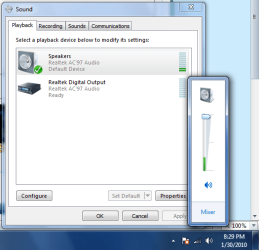
Alright, i checked that, configured the headset
This is what I get.

Still no audio output, but you can see that it.. thinks.. its out-putting audio

I gave you a picture though, should the "Speakers" option read Realtek and Default Device?
 

Attachments

  • Untitled.png
    Untitled.png
    24.6 KB · Views: 3

My Computer

Computer Manufacturer/Model Number
Dell Studio 1537
OS
Windows 7
CPU
Intel Pentium 4 - 2.80 GHz
Motherboard
Shuttle Inc, Mainboard FB61
Memory
1G DIMM Sync SDRAM
Graphics Card(s)
NVIDIA GeForce 6200
Sound Card
Shuttle (Holco) 82801EB/ER (ICh5/ICH5R) AC'97
Monitor(s) Displays
Flat Screen Monitor
Screen Resolution
1280 x 1024
Hard Drives
120GB, SATA150, 3.5', NCQ, 8MB Cache
Cooling
2 Fans
Keyboard
Standard Ps/2 Keyboard
Mouse
Logitech Wireless Mouse
A hah
Just fixed it, there was a loose cable on the Mobo.
Thanks for the help!
 

My Computer

Computer Manufacturer/Model Number
Dell Studio 1537
OS
Windows 7
CPU
Intel Pentium 4 - 2.80 GHz
Motherboard
Shuttle Inc, Mainboard FB61
Memory
1G DIMM Sync SDRAM
Graphics Card(s)
NVIDIA GeForce 6200
Sound Card
Shuttle (Holco) 82801EB/ER (ICh5/ICH5R) AC'97
Monitor(s) Displays
Flat Screen Monitor
Screen Resolution
1280 x 1024
Hard Drives
120GB, SATA150, 3.5', NCQ, 8MB Cache
Cooling
2 Fans
Keyboard
Standard Ps/2 Keyboard
Mouse
Logitech Wireless Mouse
If you are hearing sound from the laptop's built in speakers then the last item to consider when more then one pair lacks any sound would be a look at the mini jack you plug those into. From repeated plugging and replugging in of headsets the main lead contacts tend to get pushed in and loss the spring after so long.

What that would mean there is that the contacts are no longer touching the plug's left and right bands inside the jack itself while everything is working normally. You may have to go with a usb headset if you are now using the 1/8" mini jack where those will then be detected and shown in the playback list there.

The dual listing of speakers plus suggests that's how Windows is seeing the headsets as speakers if you are using the mini jack. Another item is volume control on the headsets themselves since the jacks are not typically preamplified. Do you have any external speakers to try to see if the jack is still good?

Well! That was solved since we just missed each other there. Glad to hear you have solved! ;)
 

My Computers

System One System Two

  • Computer type
    PC/Desktop
    Computer Manufacturer/Model Number
    Custom builds = 2
    OS
    W7 Ultimate x64/W10 Pro x64/W11 Pro Triple Boot - Main PC W7 Remote PC Micro ATX W7 Pro x64/W11 Pro
    CPU
    AMD Phenom II X4 975 Deneb 3.6ghz - 965 2nd remote pc
    Motherboard
    Gigabyte GA-790XTA-UD4-Gigabyte GA-880GM-D2H remote pc
    Memory
    Kingston Hyper X DDR3 1600 1.5v 16gb - Hyper X Fury 8gb 2nd
    Graphics Card(s)
    MSI HD Radeon 5750 1gb - MSI HD Radeon 6450 on mini tower
    Sound Card
    Creative Labs X-Fi Xtreme Audio P - Realtek onooard 2nd case
    Monitor(s) Displays
    ASUS VW199T-P 19" HP 2082a Main-HP 2082a 20" remote pc
    Screen Resolution
    Asus 1440x900 - HP 1600x900
    Hard Drives
    WD Black 1TB HD per OS W7, W10, and pending W11 presently on 500gb OS Drive - Pending Triple 1TB HDs for Spanned Storage/backup volume
    Single 2TB external USB enclosure, single 1TB System 7 Host/Boot drive, Pending 8TB external HD for system image b
    PSU
    Corsair 750TX - primary / Corsair CX600 - second
    Case
    Antec 900-2 - SSD compatible / NZXT Vulcan mini tower
    Cooling
    Zalman CNPS9900A
    Keyboard
    AZIO L70 Backlit Letters Gaming - ONN Cordless/USB
    Mouse
    MSI DS200 Programmable, Logitech Cordless
    Internet Speed
    30mbps upgrade - primary hard wired - mini tower usb WiFi
    Antivirus
    GFI VIPRE Internet Security 2014 on W7 2016 beta on W10,
    Browser
    Cyberfox, WaterFox 64bit FF variants, FireFox x64, Pale Moon
    Other Info
    Accomdata fan cooled usb 2.0 PIDE/Sata II, III external enclosure.
    Sambient usb/eSata PATA/Sata II, III external enclosure.
  • Computer type
    PC/Desktop
    System Manufacturer/Model Number
    CUSTOM ASSEMBLY
    OS
    W7 Pro x64/W11 Pro
    CPU
    AMD Deneb 3.6ghz - 965
    Motherboard
    Gigabyte GA-880GM-D2H remote pc
    Memory
    Kingston Hyper X Fury 8gb
    Graphics Card(s)
    MSI HD Radeon 6450 DVI Output
    Sound Card
    Realtek onooard Creative or Other separate PENDING
    Monitor(s) Displays
    VIZIO 32" LCD TV Separate LCD Pending
    Screen Resolution
    1600x1080
    Hard Drives
    WD 500GB OS Host/Boot WD Green 1TB Storage/Backup
    PSU
    Corsair 600W - THERMALTAKE 600W spare case
    Case
    NZXT Vulcan mini tower
    Cooling
    Twin 120mm Top Fans - 240mm Side Cover
    Keyboard
    ONN Cordless/USB Logitech Cordless
    Mouse
    ONN USB/Cordless - Logitech Cordless
    Internet Speed
    DSL 5G
    Browser
    MS Edge, FireFox, WaterFox x64, FireFox Nightly
    Other Info
    OS Testing-Remote Access to Main TeamViewer
Back
Top