One ANNOYING feature with W7

jimbo45

New member
Guru
Gold Member
VIP
Local time
2:59 PM
Messages
5,941
Location
Hafnarfjörður IS
Hi there
This feature I find REALLY ANNOYING -- the Message flag at the right of the screen sometimes says SOLVE PC Issues xx messages then messages about a problem with WINRAR or NERO or some other application program.

You cant get rid of these unless you ARCHIVE the messages.

Is there a way I can TURN OFF this "Feature" -- I Don't need it but there isn't any option to avoid this after Windows reports that program XXXX has stopped working.

Meaasges about Updates / Virus / Disk space low are fine but I don't need the rubbish for other programs -- especially when testing newly written applications which are likely to get several revisions before being made available.

Other than that I've found W7 excellent and the Best MS OS so far.

Cheers
jimbo
 
Last edited:

My Computer My Computer

Computer type
PC/Desktop
Computer Manufacturer/Model Number
Custom built, several laptops HP/ASUS
OS
Linux CENTOS 7 / various Windows OS'es and servers
CPU
Intel i7 Intel i5
Memory
8GB, 16GB
Graphics Card(s)
On Motherboard
Sound Card
Realtek HD audio
Monitor(s) Displays
Apple Cinema display, Samsung LCD
Screen Resolution
1920 X 1080
Hard Drives
4 X 1TB SATA
Mouse
Toshiba wireless laser
Internet Speed
> 20MB up
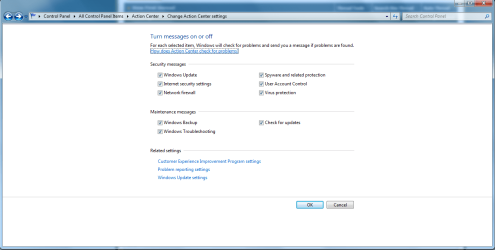
I would guess you could change the settings in the Action Center settings screen and turn off Windows troubleshooting in the maintenance messages section:

Action center settings screen.PNG
 

My Computer My Computer

Computer Manufacturer/Model Number
Systemax N2000 Gaming PC
OS
Windows 7 Ultimate x64
CPU
Q6600 @2.4ghz (G0 stepping)
Motherboard
XFX nforce 680i LT
Memory
8 gb OCZ vista essential sli PC-6400
Graphics Card(s)
Dual 9800gt in SLI mode
Sound Card
Integrated 8.1 High Definition Audio
Monitor(s) Displays
Dual Sceptre x246w 24 inch monitors
Screen Resolution
1920 x 1200 each monitor
Hard Drives
500 GB SATA II / 7500 rpm
PSU
Cooler Master Real Power Pro 1250W
Case
N2000 server tower
Cooling
Thermaltake Bigwater 760 is
Keyboard
MS Intelitype 6000 v2.0
Mouse
MS Intelipoint 6000
Internet Speed
Wi-power 1.5GB up / 512k down
Other Info
Windows 7 Ultimate x64, Windows 7 Pro x64, Windows Home Premium X86, Windows XP pro, Windows Home Server x86, Ubuntu 10.4 x86 and x64, Ubuntu server 10.4, SQL Server 2005, MySQL 5.0
What do the messages say? I have WinRar on my system and I've never seen an action center message about it.
 

My Computer My Computer

Computer Manufacturer/Model Number
Custom
OS
Windows 7 Ultimate RTM (Technet)
CPU
3.00 gigahertz Intel Core2 Duo E8400
Motherboard
ASUSTeK Computer INC. P5K/EPU Rev 1.xx
Memory
4GB
Graphics Card(s)
ATI Radeon X1950 Pro
Sound Card
Built in HD Audio
Monitor(s) Displays
22" Gateway LCD
Screen Resolution
1920 x 1200
Hard Drives
ST3160023A [Hard drive] (160.04 GB) -- drive 0, rev 8.01, ST3500630AS [Hard drive] (500.11 GB) -- drive 2, rev 3.AAK
ST3500630AS [Hard drive] (500.11 GB) -- drive 1, rev 3.AAK
Keyboard
Logitech G11
Mouse
Microsoft Wireless Laser Mouse 5000
Internet Speed
13.44 Mbps
Mac, he's referring to the fact that when an application crashes one too many times, the Action Center creates a message which suggests finding a solution online.
 

My Computer My Computer

Computer type
Laptop
Computer Manufacturer/Model Number
Custom
OS
Windows 7 Home Premium x64
CPU
Intel Core i5 2500K
Motherboard
MSI MS-7750
Memory
8GB DDR3
Graphics Card(s)
nVidia GeForce GTX650 Ti BOOST
Sound Card
Realtek
Monitor(s) Displays
21' Philips
Screen Resolution
Full HD
Hard Drives
1TB
PSU
500W
Always send Problem Reports to MS as it may well generate a return message with a solution. That solution will cue in the Action Center with a red X on the SysTray flag icon.

Sometimes I type "Problems" in Start Search box to track down the Problem reports which have already been auto-sent to MS, and am surprised to find solutions already cued which I don't remember appearing in the SysTray or never even sent to MS. These can pertain to Display driver, Cam software, incompatible programs, Direct X faiilures are some that I can remember.

There may be a completely separate set of issues cued at top on the Advanced Tools page accessed (hidden?) by clicking through the WEI score link at Computer>Properties.
 
Back
Top