One network card but two IP'S ?

Nelly

New member
Member
Local time
1:49 PM
Messages
40
Good morning,
I have one network card and are assigned two IP's by my router.
I have DHCP enabled and the adapter is set to obtain IP's automatically which then assigns two IP's.
This does not happen with any other PC's on the network.
Any suggestions / help ?
Thanks,Nelly
 

My Computer

OS
Windows 7 Home Premium

My Computer

Computer type
PC/Desktop
Computer Manufacturer/Model Number
Custom Built
OS
Windows 7 Professional x64 SP1 ; Windows Server 2012 R2 Standard
CPU
Intel Core i5 2400 @ 3.10GHz
Motherboard
Foxconn H67MP-S/-V/H67MP
Memory
8.0GB DDR3 @ 665MHz (2GBx4)
Graphics Card(s)
AMD Radeon HD 6870
Sound Card
Realtek High Definition Audio
Monitor(s) Displays
AOC 2243W & SMB1930NW
Screen Resolution
1440x900 & 1920x1080
Hard Drives
977GB Seagate ST31000524AS ATA Drive (SATA)
250GB WD iSCSI attached Drive
PSU
750W Gaming PSU
Case
Novatech Night
Cooling
Fan
Keyboard
Dell Standard PS/2 Keyboard
Mouse
R.A.T 07 Gaming Mouse
Internet Speed
Download: 10 Mbps Ping: 30ms Upload: 0.81 Mbps
Browser
Google Chrome
Other Info
Optiarc DVD RW AD-5260S ATA Device
Thanks for the quick reply and link to the guide.

1. Is this a wired or wireless connection issue? Wired

2. Who is your Internet Service Provider (ISP)? BT

3. What type of Broadband connection are you using? DSL


4. What is the exact Make and Model of your Modem, Router or Modem/Router Combo ? BT Home Hub v2

5. What is the Name of the Anti-Virus, Security or Firewall Software installed from the problematic computer ?
AVG anti-virus and Comodo Firewall

Result of ipconfig /all :
Microsoft Windows [Version 6.1.7601]
Copyright (c) 2009 Microsoft Corporation. All rights reserved.

C:\Windows\System32>ipconfig /all

Windows IP Configuration

Host Name . . . . . . . . . . . . : Nellys-PC
Primary Dns Suffix . . . . . . . :
Node Type . . . . . . . . . . . . : Hybrid
IP Routing Enabled. . . . . . . . : No
WINS Proxy Enabled. . . . . . . . : No
DNS Suffix Search List. . . . . . : home

Ethernet adapter Local Area Connection:

Connection-specific DNS Suffix . : home
Description . . . . . . . . . . . : Realtek PCI GBE Family Controller
Physical Address. . . . . . . . . : C8-3A-35-D7-70-91
DHCP Enabled. . . . . . . . . . . : Yes
Autoconfiguration Enabled . . . . : Yes
IPv4 Address. . . . . . . . . . . : 192.168.1.135(Preferred)
Subnet Mask . . . . . . . . . . . : 255.255.255.0
Lease Obtained. . . . . . . . . . : 06 September 2013 13:19:34
Lease Expires . . . . . . . . . . : 07 September 2013 13:19:34
Default Gateway . . . . . . . . . : 192.168.1.254
DHCP Server . . . . . . . . . . . : 192.168.1.254
DNS Servers . . . . . . . . . . . : 192.168.1.254
NetBIOS over Tcpip. . . . . . . . : Enabled

Tunnel adapter Teredo Tunneling Pseudo-Interface:

Connection-specific DNS Suffix . :
Description . . . . . . . . . . . : Teredo Tunneling Pseudo-Interface
Physical Address. . . . . . . . . : 00-00-00-00-00-00-00-E0
DHCP Enabled. . . . . . . . . . . : No
Autoconfiguration Enabled . . . . : Yes
IPv6 Address. . . . . . . . . . . : 2001:0:5ef5:79fb:3c80:27ec:3f57:fe78(Preferred)
Link-local IPv6 Address . . . . . : fe80::3c80:27ec:3f57:fe78%12(Preferred)
Default Gateway . . . . . . . . . : ::
NetBIOS over Tcpip. . . . . . . . : Disabled

Tunnel adapter isatap.home:

Media State . . . . . . . . . . . : Media disconnected
Connection-specific DNS Suffix . : home
Description . . . . . . . . . . . : Microsoft ISATAP Adapter
Physical Address. . . . . . . . . : 00-00-00-00-00-00-00-E0
DHCP Enabled. . . . . . . . . . . : No
Autoconfiguration Enabled . . . . : Yes

C:\Windows\System32>

Both addresses are IPv4 (XXX.XXX.XXX.XXX)

Thanks again, Nelly.
 

My Computer

OS
Windows 7 Home Premium
Your ethernet adapter has one IP address assigned to it. The second IPv4 Address is your router's IP address of your router so that you machine knows how to get off the network to the internet.

This is normal configuration :)

I did notice that you have an IPv6 address assigned to your tunnel adapter however this shouldn't cause any issues. If you wish I can offer a possible solution to remove the IPv6 address? The choice is yours.

Hope This Helps,
Josh :)
 
Last edited:

My Computer

Computer type
PC/Desktop
Computer Manufacturer/Model Number
Custom Built
OS
Windows 7 Professional x64 SP1 ; Windows Server 2012 R2 Standard
CPU
Intel Core i5 2400 @ 3.10GHz
Motherboard
Foxconn H67MP-S/-V/H67MP
Memory
8.0GB DDR3 @ 665MHz (2GBx4)
Graphics Card(s)
AMD Radeon HD 6870
Sound Card
Realtek High Definition Audio
Monitor(s) Displays
AOC 2243W & SMB1930NW
Screen Resolution
1440x900 & 1920x1080
Hard Drives
977GB Seagate ST31000524AS ATA Drive (SATA)
250GB WD iSCSI attached Drive
PSU
750W Gaming PSU
Case
Novatech Night
Cooling
Fan
Keyboard
Dell Standard PS/2 Keyboard
Mouse
R.A.T 07 Gaming Mouse
Internet Speed
Download: 10 Mbps Ping: 30ms Upload: 0.81 Mbps
Browser
Google Chrome
Other Info
Optiarc DVD RW AD-5260S ATA Device
Hello Josh,
Thanks for the assurance of normal operation. I believe I understand your reply : one IP is my PC and one is the "Gateway" to the Internet.
However, when two IP's are on the DHCP table and Network Map of the Hub. The MAC address of both IP's are the same showing that it's the same PC.
The "second" IP address does not end in 254.
Thanks again,Nelly.
p.s. Is it safe to show IP address's ? A bit late now I suppose. Would you delete my IP info please ?
 

My Computer

OS
Windows 7 Home Premium
Thanks for the assurance of normal operation. I believe I understand your reply : one IP is my PC and one is the "Gateway" to the Internet.

You are correct. :)

However, when two IP's are on the DHCP table and Network Map of the Hub. The MAC address of both IP's are the same showing that it's the same PC.
The "second" IP address does not end in 254.

Could be an old DHCP lease or it may be your tunnel adapter I do not know, will have to have see the DHCP table in order to better understand it.

p.s. Is it safe to show IP address's ? A bit late now I suppose. Would you delete my IP info please ?

Completely safe, You are using private IP addresses which are used by millions all over the world so no-one can locate you via IP address. ;)

Josh
 

My Computer

Computer type
PC/Desktop
Computer Manufacturer/Model Number
Custom Built
OS
Windows 7 Professional x64 SP1 ; Windows Server 2012 R2 Standard
CPU
Intel Core i5 2400 @ 3.10GHz
Motherboard
Foxconn H67MP-S/-V/H67MP
Memory
8.0GB DDR3 @ 665MHz (2GBx4)
Graphics Card(s)
AMD Radeon HD 6870
Sound Card
Realtek High Definition Audio
Monitor(s) Displays
AOC 2243W & SMB1930NW
Screen Resolution
1440x900 & 1920x1080
Hard Drives
977GB Seagate ST31000524AS ATA Drive (SATA)
250GB WD iSCSI attached Drive
PSU
750W Gaming PSU
Case
Novatech Night
Cooling
Fan
Keyboard
Dell Standard PS/2 Keyboard
Mouse
R.A.T 07 Gaming Mouse
Internet Speed
Download: 10 Mbps Ping: 30ms Upload: 0.81 Mbps
Browser
Google Chrome
Other Info
Optiarc DVD RW AD-5260S ATA Device
All appears normal from the perspective of your pc.

However if your router is showing two ips assigned to one mac then one of them might be an old lease. However I have never faced this situation where one mac was associated with two ip addresses .


Your router should reassign the same ip to your pc.

It's strange that your DHCP is holding a lease and not assigning it and rather creating a new lease.

Are you sure no one is spoofing the mac addresses in your network?


Try restarting your router to see if the issue is still there and also keep an eye on the tables for sometime.
 

My Computer

Computer type
PC/Desktop
Computer Manufacturer/Model Number
Dell Optiplex 755
OS
Windows 7 Ultimate x64 SP1 Dual Boot with Windows Serve 2012 R2
CPU
E6550
Motherboard
Q35
Memory
8GB
Graphics Card(s)
ATI Radeon 2400 Pro
Sound Card
Intel HD Audio Stereo
Monitor(s) Displays
1
Screen Resolution
1280 x 1024
Hard Drives
250GB SATAIII
PSU
Stock 280 Watt
Case
Stock Desktop Case
Cooling
Stock
Keyboard
Microsoft Ergonomic keyboard usb
Mouse
Microsoft Mouse
Internet Speed
1Mbps Down/ 256 Kbps up
Antivirus
None
Browser
Opera
If you do an ipconfig /renew the DHCP table will show a two leases for one MAC until one is expired.

Josh
 

My Computer

Computer type
PC/Desktop
Computer Manufacturer/Model Number
Custom Built
OS
Windows 7 Professional x64 SP1 ; Windows Server 2012 R2 Standard
CPU
Intel Core i5 2400 @ 3.10GHz
Motherboard
Foxconn H67MP-S/-V/H67MP
Memory
8.0GB DDR3 @ 665MHz (2GBx4)
Graphics Card(s)
AMD Radeon HD 6870
Sound Card
Realtek High Definition Audio
Monitor(s) Displays
AOC 2243W & SMB1930NW
Screen Resolution
1440x900 & 1920x1080
Hard Drives
977GB Seagate ST31000524AS ATA Drive (SATA)
250GB WD iSCSI attached Drive
PSU
750W Gaming PSU
Case
Novatech Night
Cooling
Fan
Keyboard
Dell Standard PS/2 Keyboard
Mouse
R.A.T 07 Gaming Mouse
Internet Speed
Download: 10 Mbps Ping: 30ms Upload: 0.81 Mbps
Browser
Google Chrome
Other Info
Optiarc DVD RW AD-5260S ATA Device
Thanks again for the reassurances.
I've checked the DHCP table and there is , at the moment, only 1 IP address for my PC. I'll check tomorrow when the lease will have expired and see what the situation is then.
Thanks again, Nelly
 

My Computer

OS
Windows 7 Home Premium
Hello All,
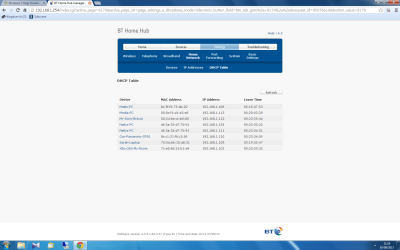
Just checked the DHCP table and it's back (please see screenshot below)

DHCP table.png

As you can see this does not occur with any other device on the network.
Thanks for any help,Nelly
 

My Computer

OS
Windows 7 Home Premium
Hmm, most bizarre... Both addresses are coming from your ethernet controller. Do you have any virtualisation software running at all since they can cause multiple addresses to one MAC?

Also, your tunnel adapter which is used to tunnel IPv6 over IPv4 may have required an IPv4 address which is most likely where this has come from.

Can you run the following program below to reset your TCP/IP settings and hopefully reset the tunnel adapter to see if that is the cause.

Please reboot the router as well in order to flush the DHCP table and get accurate results.

   Note
Your machine will reboot after it has completed!


Hope This Helps,
Josh :)
 

Attachments

My Computer

Computer type
PC/Desktop
Computer Manufacturer/Model Number
Custom Built
OS
Windows 7 Professional x64 SP1 ; Windows Server 2012 R2 Standard
CPU
Intel Core i5 2400 @ 3.10GHz
Motherboard
Foxconn H67MP-S/-V/H67MP
Memory
8.0GB DDR3 @ 665MHz (2GBx4)
Graphics Card(s)
AMD Radeon HD 6870
Sound Card
Realtek High Definition Audio
Monitor(s) Displays
AOC 2243W & SMB1930NW
Screen Resolution
1440x900 & 1920x1080
Hard Drives
977GB Seagate ST31000524AS ATA Drive (SATA)
250GB WD iSCSI attached Drive
PSU
750W Gaming PSU
Case
Novatech Night
Cooling
Fan
Keyboard
Dell Standard PS/2 Keyboard
Mouse
R.A.T 07 Gaming Mouse
Internet Speed
Download: 10 Mbps Ping: 30ms Upload: 0.81 Mbps
Browser
Google Chrome
Other Info
Optiarc DVD RW AD-5260S ATA Device
Hi Josh,
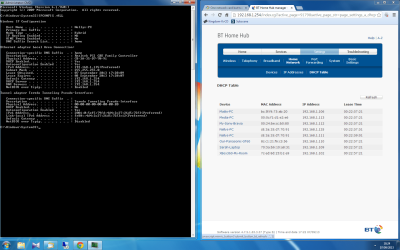
Done that and, as you can see, no luck. Although the lease time for all devices are now the same which shows me I carried out the method correctly (at least this time it's not operator error :-).
Earlier you mentioned a process to remove the IPv6 address. Is that still possible ? If so, I'll try it.
Thanks for your help.
Nelly

DHCP.png
 

My Computer

OS
Windows 7 Home Premium
To remove the tunnel interfaces please open an Elevated Command Prompt and type the following - http://www.sevenforums.com/tutorials/783-elevated-command-prompt.html:

Code:
netsh interface ipv6 isatap set state disabled

Press enter and then input the following:

Code:
netsh interface ipv6 teredo set state disabled

This should disable the tunnel interfaces.

Please then reboot the machine and router to clear any DHCP tables

Josh
 

My Computer

Computer type
PC/Desktop
Computer Manufacturer/Model Number
Custom Built
OS
Windows 7 Professional x64 SP1 ; Windows Server 2012 R2 Standard
CPU
Intel Core i5 2400 @ 3.10GHz
Motherboard
Foxconn H67MP-S/-V/H67MP
Memory
8.0GB DDR3 @ 665MHz (2GBx4)
Graphics Card(s)
AMD Radeon HD 6870
Sound Card
Realtek High Definition Audio
Monitor(s) Displays
AOC 2243W & SMB1930NW
Screen Resolution
1440x900 & 1920x1080
Hard Drives
977GB Seagate ST31000524AS ATA Drive (SATA)
250GB WD iSCSI attached Drive
PSU
750W Gaming PSU
Case
Novatech Night
Cooling
Fan
Keyboard
Dell Standard PS/2 Keyboard
Mouse
R.A.T 07 Gaming Mouse
Internet Speed
Download: 10 Mbps Ping: 30ms Upload: 0.81 Mbps
Browser
Google Chrome
Other Info
Optiarc DVD RW AD-5260S ATA Device
Hi Josh,
Sorry for delay in answering, got things on at home. I did that (see below)
Thanks, Nelly

DHCP CMD.png

p.s. When I entered the second netsh command I received the message :
the following command was not found : interface ipv6 teredo set state disabled.
 

My Computer

OS
Windows 7 Home Premium
My apologies the first part needs to be entered serperately:

technet said:
To Turn Off Teredo by Using the Netsh Command in Windows Vista
To open a command prompt as an administrator, click Start, click All Programs, click Accessories, right-click Command Prompt, and click Run as administrator.
If the User Account Control dialog box appears, confirm that the action it displays is what you want, and then click Continue.
At the command prompt, type the following lines (press ENTER after each line):
netsh
interface
teredo

At the netsh interface teredo command prompt, type:
set state disabled

More information - Internet Protocol Version 6, Teredo, and Related Technologies in Windows Vista
 

My Computer

Computer type
PC/Desktop
Computer Manufacturer/Model Number
Custom Built
OS
Windows 7 Professional x64 SP1 ; Windows Server 2012 R2 Standard
CPU
Intel Core i5 2400 @ 3.10GHz
Motherboard
Foxconn H67MP-S/-V/H67MP
Memory
8.0GB DDR3 @ 665MHz (2GBx4)
Graphics Card(s)
AMD Radeon HD 6870
Sound Card
Realtek High Definition Audio
Monitor(s) Displays
AOC 2243W & SMB1930NW
Screen Resolution
1440x900 & 1920x1080
Hard Drives
977GB Seagate ST31000524AS ATA Drive (SATA)
250GB WD iSCSI attached Drive
PSU
750W Gaming PSU
Case
Novatech Night
Cooling
Fan
Keyboard
Dell Standard PS/2 Keyboard
Mouse
R.A.T 07 Gaming Mouse
Internet Speed
Download: 10 Mbps Ping: 30ms Upload: 0.81 Mbps
Browser
Google Chrome
Other Info
Optiarc DVD RW AD-5260S ATA Device
Thanks for the link :apology not necessary. You've been so helpful.
I'm going to work on this more tomorrow. Thanks again, Nelly
 

My Computer

OS
Windows 7 Home Premium
No worries, take your time :) I hope this is the cause otherwise we may be looking at a different issue here

Josh! :cool:
 

My Computer

Computer type
PC/Desktop
Computer Manufacturer/Model Number
Custom Built
OS
Windows 7 Professional x64 SP1 ; Windows Server 2012 R2 Standard
CPU
Intel Core i5 2400 @ 3.10GHz
Motherboard
Foxconn H67MP-S/-V/H67MP
Memory
8.0GB DDR3 @ 665MHz (2GBx4)
Graphics Card(s)
AMD Radeon HD 6870
Sound Card
Realtek High Definition Audio
Monitor(s) Displays
AOC 2243W & SMB1930NW
Screen Resolution
1440x900 & 1920x1080
Hard Drives
977GB Seagate ST31000524AS ATA Drive (SATA)
250GB WD iSCSI attached Drive
PSU
750W Gaming PSU
Case
Novatech Night
Cooling
Fan
Keyboard
Dell Standard PS/2 Keyboard
Mouse
R.A.T 07 Gaming Mouse
Internet Speed
Download: 10 Mbps Ping: 30ms Upload: 0.81 Mbps
Browser
Google Chrome
Other Info
Optiarc DVD RW AD-5260S ATA Device
Back
Top