one of 4 machines gets lower bandwidth

msalton1

New member
Member
VIP
Local time
12:24 AM
Messages
325
I have several machines in my office, all wired. My main system gets around 20% less internet speed than my other systems (70 odd mbps compared to 104<> on the other machines). I've tried connecting the main system to another router. Still slow, and I've connected other machines to the router of the main system and it provides over 100 MBPS.

I also tried installing another NIC. Performance is the same...70+ MBPS.

This tells me my issue is in machine itself, likely configuration.

Any ideas on what I can try to get the bandwidth on this machine up to speed?

Pertinent Specs:

Asus TUF Z370 Plus Gaming
i5 8600K
32GB DDR4 RAM

I'm Using theonboard intel NW with latest driver for my setup (12.15.25.6, circa 2017)
Device Manager shows card as Intel Ethernet Connection (2) I219-V
The Diagnostics button runs and shows no issues.
Link status shows 1 Gbps (EEE: Not negotiated).

Any help appreciated.

Thanks.
 

My Computer My Computer

At a glance

windows 7 Pro 64 Biti5 4670K16GB DDR3@933mhzRadeon R9 390 8192mb
Computer type
PC/Desktop
Computer Manufacturer/Model Number
custom
OS
windows 7 Pro 64 Bit
CPU
i5 4670K
Motherboard
Asus Max Hero 1150 socket
Memory
16GB DDR3@933mhz
Graphics Card(s)
Radeon R9 390 8192mb
Monitor(s) Displays
Dell U2415 x3
Screen Resolution
1920 (5760) x 1200 x3
Hard Drives
System: Kingston 128GB SSD

Installing to Samsung 860 EVO 500GB
WD Black 2 TB & 1 TB
PSU
Corsair CX750M
Cooling
Hyper 312
Internet Speed
50mbps
Couple things Four points:

A) If the Intel NIC (Network Interface Controller) had its properties changed, that could do it. Like jumbo frames and whatnot. Those settings are found by right clicking the NIC in Network Adapters and under configuration. You probably have not one iota what all that stuff means, so to default it all back I'd just uninstall the NIC's driver and software (preferably with Revo Uninstaller) and reinstall the driver/software again AFTER a system reboot.

B) Software like a firewall or anti-virus could do it. Even a driver. Something software wise could be choking off the Internet connection bandwidth. To help rule this out try safe mode with networking. To get into safe mode reboot the PC and keep tapping the F8 key. Now chose safe mode WITH networking. See if you have your full Internet speed. If so, then it's most likely a software or driver issue which I can try to help with.

C) Sometimes it's very, very simple. Did you try a new Ethernet cable? A lot of Ethernet cables and the plating on the pins are not well manufactured and tarnish/erode/ Looking at the pins with a microscope will tell.

D) Check the ACPI settings (power settings). Control Panel | Power Options. Or type power options in Windows search. There are low power modes for the NIC, USB devices and even PCI-e devices. This can cause issues.
 

My Computer My Computer

At a glance

Windows 7 Ultimate x64
Computer type
PC/Desktop
OS
Windows 7 Ultimate x64
Hi Simpilot. Thanks for your response.

I only recently compared the speed on different machines and discovered the difference. The problem machine has always tapped out at 70 mbps <>, so it seems to have been an issue for at least quite sometime. I had chalked it up to my NW setup (several subnets on my NW), but that turns out not to be the case.

A. I didn't uninstall the NIC yet (i'ts been a busy week), but, as mentioned in the OP, I did install a different NIC. Speed remained the same. 70<>.

B. I tried turning off my firewalls previously. No change.

What's interesting is that when I started in Safe Mode, no change. Still 70 mbps <>. After this, I immediately plugged the cable into one of my other machines and achieved 104 mbps multiple times. Plugged back into problem machine...70 mbps again.

C. As mentioned in B, I used the same cable on another machine and got 104 MBPS.

D. I did try this, but no change. I also assume that these PM settings aren't 'loaded' in Safe Mode.

I'm more baffled now. It must be some sort of HW limitation, but two different NICs with no change.

I apprecaite any help.
 

My Computer My Computer

At a glance

windows 7 Pro 64 Biti5 4670K16GB DDR3@933mhzRadeon R9 390 8192mb
Computer type
PC/Desktop
Computer Manufacturer/Model Number
custom
OS
windows 7 Pro 64 Bit
CPU
i5 4670K
Motherboard
Asus Max Hero 1150 socket
Memory
16GB DDR3@933mhz
Graphics Card(s)
Radeon R9 390 8192mb
Monitor(s) Displays
Dell U2415 x3
Screen Resolution
1920 (5760) x 1200 x3
Hard Drives
System: Kingston 128GB SSD

Installing to Samsung 860 EVO 500GB
WD Black 2 TB & 1 TB
PSU
Corsair CX750M
Cooling
Hyper 312
Internet Speed
50mbps
Compare the nic setting from the 104 meg to the 70 mb whats different ie duplex
 

My Computer My Computer

At a glance

win 8 32 bit
Computer type
PC/Desktop
OS
win 8 32 bit
Anti-virus software can slow things down. So check that.

The nuclear option. tcp-ip-reset/source at main . 737simpilot/tcp-ip-reset . GitHub Enter those commands in an elevated CMD prompt.

I'm having doubts it'll fix it.

Have you rebooted the router? There could be an old stale router table that's doing it. Like a QoS setting or something tied to that machine's MAC address for the NIC. You should be able to give your NIC a new MAC address as well in its properties. A reboot may be required. MACs look like this. They are hexadecimal (0-1, A-F) and are 6 bytes long. As an example: 08:00:20:45:C3:A4

First three bytes are the OUI (Organizational Unique Identifier). This means this part 08:00:20 belongs to Oracle. The last 3 bytes are unique to the client. Now-a-days cellphones randomize this. Once upon a time you could track someone all over the world due to unique MACs assigned to a cellphone. LOL
 

My Computer My Computer

At a glance

Windows 7 Ultimate x64
Computer type
PC/Desktop
OS
Windows 7 Ultimate x64
Hi Simpilot and Samuria. Apologies for the delayed response, my business keeps me running this time of year.
@Simpilot:

Router reboot: Yes. In fact, I recently replaced the router on that subnet with an RT-AX86XU, Flashed to the latest Merlin FW.

I've looked, but don't see where to change the MAC in the properties of the NIC. Would the new router address the issue you mention?

@ Samuria:

I had a few issues finding the property sheet for the 104mbps machine (it's win 10), but all the values are exactly the same.

That was a good suggestion, especially given that both machines have the same motherboard/built-in NIC.


I also have checked the bios to see if there were any settings there that might somehow limit bandwidth, but didn't notice anything amiss.
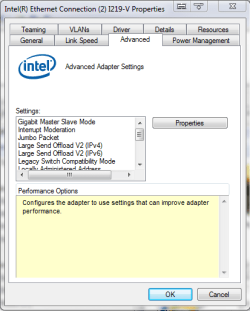
Below is a screenshot of the win7 property sheet with NIC model.


- - - Updated - - -
 

Attachments

  • WIn7 NIC.PNG
    WIn7 NIC.PNG
    15.9 KB · Views: 11

My Computer My Computer

At a glance

windows 7 Pro 64 Biti5 4670K16GB DDR3@933mhzRadeon R9 390 8192mb
Computer type
PC/Desktop
Computer Manufacturer/Model Number
custom
OS
windows 7 Pro 64 Bit
CPU
i5 4670K
Motherboard
Asus Max Hero 1150 socket
Memory
16GB DDR3@933mhz
Graphics Card(s)
Radeon R9 390 8192mb
Monitor(s) Displays
Dell U2415 x3
Screen Resolution
1920 (5760) x 1200 x3
Hard Drives
System: Kingston 128GB SSD

Installing to Samsung 860 EVO 500GB
WD Black 2 TB & 1 TB
PSU
Corsair CX750M
Cooling
Hyper 312
Internet Speed
50mbps
So, what does the router firmware look like? Is QoS on?

Is there more than one router connected in this network? You made sure there are no double NATs? WHat's the router firmware settings look like in the other routers if they exist?

To check for a double NAT condition, go into command and enter tracert 1.1.1.1

If you see the first two hops in the same CIDR, you have a double NAT condition.

The MAC address is changed in the option called Locally Administered Address. Advanced Settings for Intel(R) Ethernet Adapters

- - - Updated - - -

I only recently compared the speed on different machines and discovered the difference. The problem machine has always tapped out at 70 mbps

What are you using to measure the speed?

- - - Updated - - -

Have you tried the computer ---> router ----> modem? No other routers and whatnot in between?

The fact safe mode still exhibits this issue tells me it's hardware related. Unless there's a network related driver that's problematic being loaded in Safe Mode with Networking. We can see if that's the case with a program called Process Hacker. (It will trip anti-virus software). Click the Network tab. See anything out of character? Better yet, under the Network tab go to the top left under "Hacker" and Save the text file. Zip and upload that.
 

My Computer My Computer

At a glance

Windows 7 Ultimate x64
Computer type
PC/Desktop
OS
Windows 7 Ultimate x64
Sorry to drag this on. Very busy this year.
Simpilot:

So, what does the router firmware look like? Is QoS on?

FW: RT-AX86U_386.7_2_pureubi (merlin). QOS off. FW settings look fine, AFAICT. No different thatn any other router I've set up. My routers are 3 asus and 1 TP-Link,

Is there more than one router connected in this network? You made sure there are no double NATs? WHat's the router firmware settings look like in the other routers if they exist?
To check for a double NAT condition, go into command and enter tracert 1.1.1.1
If you see the first two hops in the same CIDR, you have a double NAT condition.

No double NAT.

Yes, more than one router. The system in question is on an AX86U, as is the 'shield' router. I have 3 machines in my office, all are on their own subnet with their own router, all behind the 'shield' router.

What are you using to measure the speed?

testmy.net

Have you tried the computer ---> router ----> modem? No other routers and whatnot in between?

Yes. I've tried directly from router and directly from shield router. Still stuck at between 70-80 mbps. When I take same NW cable from same router and plug it into one of the other machines, 100-104 mbps. It's got to be something with the machine.

The fact safe mode still exhibits this issue tells me it's hardware related. Unless there's a network related driver that's problematic being loaded in Safe Mode with Networking. We can see if that's the case with a program called Process Hacker. (It will trip anti-virus software). Click the Network tab. See anything out of character? Better yet, under the Network tab go to the top left under "Hacker" and Save the text file. Zip and upload that.

Oddly, the other machine I test (and is getting 104 mbps) is the exact same motherboard/NIC.

I'm not seeing anything unusual in process hacker. What would I be looking for?

Obviously, this isn't an urgent matter. More a matter of just thinking I should get the bandwidth I'm paying for.

This strikes me as a very odd problem.

Summary:

  • Machine gets only 70-80 mbps
  • connecting NW cable to other machines = other machines getting expected bandwidth
  • connecting machine directly to shield router (bypassing subnet router) still only gets 70-80 mbps (connecting to other machines results in expected bandwidth - 104 mbps)
  • restarting in safe mode doesn't solve problem.
  • using different NW card doesn't solve problem.

Again, thanks for any help.
 

My Computer My Computer

At a glance

windows 7 Pro 64 Biti5 4670K16GB DDR3@933mhzRadeon R9 390 8192mb
Computer type
PC/Desktop
Computer Manufacturer/Model Number
custom
OS
windows 7 Pro 64 Bit
CPU
i5 4670K
Motherboard
Asus Max Hero 1150 socket
Memory
16GB DDR3@933mhz
Graphics Card(s)
Radeon R9 390 8192mb
Monitor(s) Displays
Dell U2415 x3
Screen Resolution
1920 (5760) x 1200 x3
Hard Drives
System: Kingston 128GB SSD

Installing to Samsung 860 EVO 500GB
WD Black 2 TB & 1 TB
PSU
Corsair CX750M
Cooling
Hyper 312
Internet Speed
50mbps
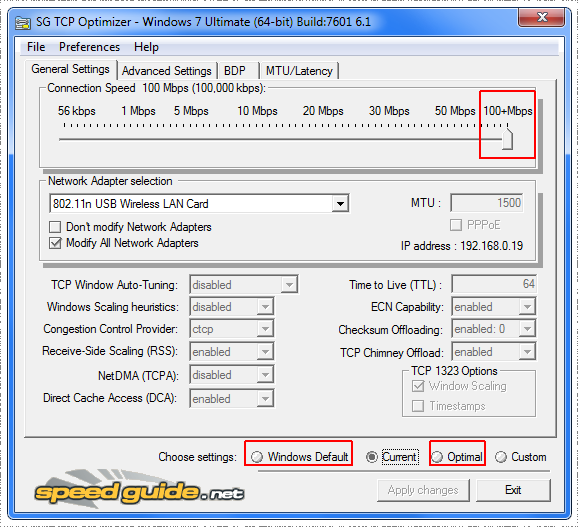
Try this program:

SpeedGuide.net :: TCP Optimizer / Downloads

O3JG5Dz.png


Try Optimized and Windows defaults, move the slider to the farthest right and just play with the values. If doesn't work, try uninstalling all the adapters you have. I notice that your adapter is ethernet connection (2), meaning there is or was an adapter with the same name before. A clean reinstall of the driver deleting all previous adapters from the registry wouldn't hurt.
 

My Computers My Computers

  • At a glance

    Windows 7 Ultimate 64-bit SP1Intel Core 2 Quad Q6700 @ 2.66GHz4.00GB Single-Channel DDR2 @ 399MHz2047MB NVIDIA GeForce GT 710 (ASUStek Compute...
    Computer type
    PC/Desktop
    OS
    Windows 7 Ultimate 64-bit SP1
    CPU
    Intel Core 2 Quad Q6700 @ 2.66GHz
    Motherboard
    ECS MCP73PVT-SM
    Memory
    4.00GB Single-Channel DDR2 @ 399MHz
    Graphics Card(s)
    2047MB NVIDIA GeForce GT 710 (ASUStek Computer Inc)
    Sound Card
    Realtek High Definition Audio
    Monitor(s) Displays
    HP 21kd
    Screen Resolution
    1920x1080@60Hz
    Hard Drives
    149GB Western Digital WDC WD1600AABS-61PRA0 ATA Device (SATA )
    4000GB Seagate ST4000DM004-2U9104 ATA Device (SATA )
    931GB TOSHIBA External USB 3.0 USB Device (USB (SATA) )
    Antivirus
    None. Don't Need it.
    Browser
    Librewolf Portable
    Other Info
    It's a very old system.
  • Computer type
    PC/Desktop
Hi Diz. The only other NIC I've ever had in this build is a pcie Intel NIC I installed when I realized I was having the issue (after several attempts to figure it out). I haven't taken it out of the machine yet.

I also have uninstalled and reinstalled the drivers for the onboard NW (screenshot above, which is an onboard NIC for the Asus Tuff board).

I'll download SpeedGuide utility you suggest tomorrow and post back. Thanks for the help.
 

My Computer My Computer

At a glance

windows 7 Pro 64 Biti5 4670K16GB DDR3@933mhzRadeon R9 390 8192mb
Computer type
PC/Desktop
Computer Manufacturer/Model Number
custom
OS
windows 7 Pro 64 Bit
CPU
i5 4670K
Motherboard
Asus Max Hero 1150 socket
Memory
16GB DDR3@933mhz
Graphics Card(s)
Radeon R9 390 8192mb
Monitor(s) Displays
Dell U2415 x3
Screen Resolution
1920 (5760) x 1200 x3
Hard Drives
System: Kingston 128GB SSD

Installing to Samsung 860 EVO 500GB
WD Black 2 TB & 1 TB
PSU
Corsair CX750M
Cooling
Hyper 312
Internet Speed
50mbps
That optimizer is in large part snake oil, sorry. Windows 7 already has an optimized TCP/IP stack and you may inadvertently mess up the stack. A program like that was more applicable to XP. Especially for tweaking the number of half open connections.

You're issue could just very will be browser side. Do EXACTLY this and tell me if you have the same issue.

Download Firefox portable and extract. (this is stand alone) In Firefox portable go to speed.cloudflare.com It'll take a good minute or so -- wait for the final results. What's the jitter by chance? What's the speed?

Go to your usual site of testmy.net in portable Firefox.
 

My Computer My Computer

At a glance

Windows 7 Ultimate x64
Computer type
PC/Desktop
OS
Windows 7 Ultimate x64
That optimizer is in large part snake oil, sorry. Windows 7 already has an optimized TCP/IP stack and you may inadvertently mess up the stack. A program like that was more applicable to XP. Especially for tweaking the number of half open connections.

You're issue could just very will be browser side. Do EXACTLY this and tell me if you have the same issue.

Download Firefox portable and extract. (this is stand alone) In Firefox portable go to speed.cloudflare.com It'll take a good minute or so -- wait for the final results. What's the jitter by chance? What's the speed?

Go to your usual site of testmy.net in portable Firefox.

I haven't/won't use the TCP optimizer.

To the bolded. I've used 3 different browsers (FF, Chrome & Brave). Do you still suggest FF portable (If I'm not mistaken, requires PortableApp?)
 

My Computer My Computer

At a glance

windows 7 Pro 64 Biti5 4670K16GB DDR3@933mhzRadeon R9 390 8192mb
Computer type
PC/Desktop
Computer Manufacturer/Model Number
custom
OS
windows 7 Pro 64 Bit
CPU
i5 4670K
Motherboard
Asus Max Hero 1150 socket
Memory
16GB DDR3@933mhz
Graphics Card(s)
Radeon R9 390 8192mb
Monitor(s) Displays
Dell U2415 x3
Screen Resolution
1920 (5760) x 1200 x3
Hard Drives
System: Kingston 128GB SSD

Installing to Samsung 860 EVO 500GB
WD Black 2 TB & 1 TB
PSU
Corsair CX750M
Cooling
Hyper 312
Internet Speed
50mbps
Does Internet Speed Test - Measure Network Performance | Cloudflare at least give you a different speed result?

Did you use my nuke option of resetting the TCP/IP stack with those commands in an elevated command prompt at Github?

I'm still of the opinion there's a routing table mess up. You can test for this by changing your MAC address as I talked about temporally and see if the router gives you the speed you should have. Or you could try another router. If that works you know it's in the router. In which case a hard reset is in order for the problematic router. Refer to the router's documentation.

I'm also wondering that you mentioned you have all these routers chained together, this router may not be liking the others. DHCP needs to be off when you connect more than one router. You create static IPs and use the LAN ports.

How To Connect Two Routers On One Home Network Using A Lan Cable Stock Router Netgear/TP-Link - YouTube


If you want to go nerdier, give a PE (Preboot Environment) a try. What we will do here is launch an independent PE version of Windows in a live environment and test your speed. If that works in that environment we can then blame the current running OS. Though, Safe Mode does this in a way, but in this test we bypass EVERYTHING in the current running OS. So if there's a problematic driver conflict in the network stack, registry entry, TCP/IP stack mess up, etc the PE environment bypasses all that for testing.

So, how do we do this, this PE live boot? Simple. Grab the ISO for Hiren's Boot CD. Grab Ventoy. Now write Ventoy to a blank USB drive. After that simple copy/paste the Hiren's Boot CD ISO file (around 3GB in size) to the formatted Ventoy USB stick. You don't extract the ISO or any of that. Now boot the USB stick like you would do if you were to install Windows. The Ventoy menu should load giving you the option to boot Hiren's Boot CD. Once Hiren's Boot CD loads its network stack, launch Firefox and go to your speed testing website and/or speed.cloudflare.com

What we have done is isolated the current running Windows OS environment to something new and fresh for testing as a control to see if this Internet speed issue is hardware related or software/OS related in the current running OS.

Hiren's Boot CD

Ventoy

- - - Updated - - -

Okay, to refresh my memory I reread over your posts. I need some clarification here on this statement.


Router reboot: Yes. In fact, I recently replaced the router on that subnet with an RT-AX86XU, Flashed to the latest Merlin FW.

Did the old router exhibit this problem?


What is this "shield" router? I guess what I really need to know is what your network topography looks like. How is everything connected? This could be the issue.

What does the hardware in the problematic computer look like? Are you using an NVMe drive, PCIe cards and whatnot? The NIC is a PCIe card? Bus speed can be limited in a PCIe slot when an NVMe drive is populating certain slots. You'd have to refer to the motherboard manual on that. Though, even at PCIe x1 it shouldn't be a factor. It could be a bandwidth issue or something else software side though. I'm not sure. Heck, motherboard or RAM could be to blame. Maybe even that specific PCIe slot.

A. I didn't uninstall the NIC yet (i'ts been a busy week), but, as mentioned in the OP, I did install a different NIC. Speed remained the same. 70<>.

This right here rules out a router table mess up due to the fact the new NIC would have a new MAC address. I'm assuming this also means a new local IP as well.


This is hard to help fix without constant testing this and that. If I was there I could probably find the root cause pretty quick.
 

My Computer My Computer

At a glance

Windows 7 Ultimate x64
Computer type
PC/Desktop
OS
Windows 7 Ultimate x64
Does Internet Speed Test - Measure Network Performance | Cloudflare at least give you a different speed result?

Did you use my nuke option of resetting the TCP/IP stack with those commands in an elevated command prompt at Github?

I'm still of the opinion there's a routing table mess up. You can test for this by changing your MAC address as I talked about temporally and see if the router gives you the speed you should have. Or you could try another router. If that works you know it's in the router. In which case a hard reset is in order for the problematic router. Refer to the router's documentation.

I'm also wondering that you mentioned you have all these routers chained together, this router may not be liking the others. DHCP needs to be off when you connect more than one router. You create static IPs and use the LAN ports.

How To Connect Two Routers On One Home Network Using A Lan Cable Stock Router Netgear/TP-Link - YouTube


If you want to go nerdier, give a PE (Preboot Environment) a try. What we will do here is launch an independent PE version of Windows in a live environment and test your speed. If that works in that environment we can then blame the current running OS. Though, Safe Mode does this in a way, but in this test we bypass EVERYTHING in the current running OS. So if there's a problematic driver conflict in the network stack, registry entry, TCP/IP stack mess up, etc the PE environment bypasses all that for testing.

So, how do we do this, this PE live boot? Simple. Grab the ISO for Hiren's Boot CD. Grab Ventoy. Now write Ventoy to a blank USB drive. After that simple copy/paste the Hiren's Boot CD ISO file (around 3GB in size) to the formatted Ventoy USB stick. You don't extract the ISO or any of that. Now boot the USB stick like you would do if you were to install Windows. The Ventoy menu should load giving you the option to boot Hiren's Boot CD. Once Hiren's Boot CD loads its network stack, launch Firefox and go to your speed testing website and/or speed.cloudflare.com

What we have done is isolated the current running Windows OS environment to something new and fresh for testing as a control to see if this Internet speed issue is hardware related or software/OS related in the current running OS.

Hiren's Boot CD

Ventoy

- - - Updated - - -

Okay, to refresh my memory I reread over your posts. I need some clarification here on this statement.


Did the old router exhibit this problem?


What is this "shield" router? I guess what I really need to know is what your network topography looks like. How is everything connected? This could be the issue.

What does the hardware in the problematic computer look like? Are you using an NVMe drive, PCIe cards and whatnot? The NIC is a PCIe card? Bus speed can be limited in a PCIe slot when an NVMe drive is populating certain slots. You'd have to refer to the motherboard manual on that. Though, even at PCIe x1 it shouldn't be a factor. It could be a bandwidth issue or something else software side though. I'm not sure. Heck, motherboard or RAM could be to blame. Maybe even that specific PCIe slot.


This right here rules out a router table mess up due to the fact the new NIC would have a new MAC address. I'm assuming this also means a new local IP as well.


This is hard to help fix without constant testing this and that. If I was there I could probably find the root cause pretty quick.

I appreciate all your efforts. I know my inability to post within a reasonable time is an issue, too.

That said, it has to be a driver issue. After reading your comments, I downloaded and ran a live version of Ubuntu and ran firefox. 104 mbps (I've been wanting to check out latest version of Linux anyway). So we know it's not a HW issue.

The drivers I have installed on this machine are the Asus drivers that came with the motherboard. I also have them on the other machine (where I've get 104 mbps and have gotten it even when connected to problem machine router).

I just looked into drivers for this (onboard) NIC. The specific driver available is for win 8.1 (which may be why the other machines tested (2 total, one Win 10, one win 8.1) did fine when hooked up to the problem machine router.

Intel makes an OS independent driver for this card (includes windows, Linux and VM ware). I've just downloaded that.

I suppose it's best to remove the existing driver first. I know I can remove it in device manager. Are any further processes (i.e., registry) recommended/required to remove the drivers?

- - - Updated - - -

I'm also wondering that you mentioned you have all these routers chained together, this router may not be liking the others. DHCP needs to be off when you connect more than one router. You create static IPs and use the LAN ports.

How To Connect Two Routers On One Home Network Using A Lan Cable Stock Router Netgear/TP-Link - YouTube

What is this "shield" router? I guess what I really need to know is what your network topography looks like. How is everything connected? This could be the issue.

Just to answer the question (which, given my comments above, becomes irrelevant to the solution), the shield router is an internet facing router. The 'subnet' routers are connected to the LAN jacks on the shield router. The subnet routers have different IP addresses. DHCP is enabled and using the subnet router gateway IP . You mentioned that DHCP should be disabled, but I've never had a problem with this configuration.

I had to jump through some hoops to get Win 7 on this motherboard (Asus Tuf Z370-Plus with onboard NIC). I used the update method from SIW2's update thread. Driver incompatibility due to win 7 on the board should have occurred to me as an issue.

I'll wait to hear your thoughts on uninstallation of the existing drivers before I proceed.

Again, thanks for your help.
 

My Computer My Computer

At a glance

windows 7 Pro 64 Biti5 4670K16GB DDR3@933mhzRadeon R9 390 8192mb
Computer type
PC/Desktop
Computer Manufacturer/Model Number
custom
OS
windows 7 Pro 64 Bit
CPU
i5 4670K
Motherboard
Asus Max Hero 1150 socket
Memory
16GB DDR3@933mhz
Graphics Card(s)
Radeon R9 390 8192mb
Monitor(s) Displays
Dell U2415 x3
Screen Resolution
1920 (5760) x 1200 x3
Hard Drives
System: Kingston 128GB SSD

Installing to Samsung 860 EVO 500GB
WD Black 2 TB & 1 TB
PSU
Corsair CX750M
Cooling
Hyper 312
Internet Speed
50mbps
I suppose it's best to remove the existing driver first. I know I can remove it in device manager. Are any further processes (i.e., registry) recommended/required to remove the drivers?

Not particularly. I would use safe mode WITHOUT networking when removing a driver. That goes for GPUs and all that rot. If used, the uninstaller should clean things up, but if you want to help make sure that happens then Revo Uninstaller can do that. Just make sure it creates a system restore point and make sure the registry entries (if any) that are removed relate to what ever it is you are uninstalling/removing.

You mentioned that DHCP should be disabled, but I've never had a problem with this configuration.

Yes, it'll work until you eventually end up with an IP conflict or double NAT situation. Watch this video and read the description. I'll post it here in case the video is removed as is what seems like "YouTube policy" for no good reason...

How To Connect 2 Routers On 1 Home Network - YouTube


YouTube Description said:
Identify your routers as MAIN router and SECONDARY router.

Connect the two routers with an Ethernet cable. This will be a permanent connection and this cable must always be plugged in if you want the secondary router to access the internet from the main router. This tutorial is for a wired connection, which is the most efficient way to do this.

It is very important that you plug the cable into the LAN ports on BOTH routers. On your secondary router, put a piece of tape over the WAN port because you will not be using it. The LAN ports are usually 4 ports that all are the same color and look the same. The WAN port is usually separated or a different color. DO NOT USE THIS PORT ON YOUR SECONDARY ROUTER. Only your MAIN router should have a cable in the WAN port that goes to your modem.

Your MAIN router is connected to the modem and has internet access.

On the MAIN router:
1. Ensure DHCP is enabled
2. Make a note of the IP address (usually 192.168.1.1 but whatever it is, make a note)
3. Make a note of the subnet mask (usually 255.255.255.0)
4. Change the DHCP pool of IP addresses to start at something higher than 2 (like 10)

On the SECONDARY router:
1. Disable DHCP (DO THIS FIRST BEFORE CHANGING IP ADDRESS!!)
2. Change IP address to the same as the IP address of the MAIN router except the last part should be .2 and same subnet mask of the MAIN router (usually 255.255.255.0)

IMPORTANT NOTE ABOUT IP ADDRESS
DO NOT CHANGE THE IP ADDRESS OF THE MAIN ROUTER
1. IP addresses must be the exact same on both routers except for the very last octet (the last number).
2. The subnet masks must match exactly the same on both routers. All numbers of the subnet mask must match exactly the same, even the last octet (the last number).
3. Copy the IP address from the MAIN router to the SECONDARY router. For example, if the MAIN router is 192.168.1.1 and the SECONDARY router is different like 192.168.0.1 you will see the third octet (the third number) is different. Copy the first three octets from the MAIN router so the SECONDARY matches the MAIN router. DO NOT CHANGE THE IP ADDRESS OF THE MAIN ROUTER.
4. If one router is 192.168.1.1 and the other is 192.168.0.2 THEN THIS WILL NOT WORK. The first three octets of the IP address must match on both routers. If one router is 192.168.1.1 and the other is 10.0.0.2 THEN THIS WILL NOT WORK. Again, the first 3 octets of the IP address must be the SAME on both routers. Only the last octet can be different.

|--SAME--| |--DIFFERENT--|
Router 1: 192.168.1 .1
Router 2: 192.168.1 .2

EXAMPLE SETTINGS
MAIN ROUTER
ip address: 192.168.1.1
subnet mask: 255.255.255.0
dhcp enabled
dhcp pool
-low dhcp address: 192.168.1.10
-high dhcp address: 192.168.1.254

SECONDARY ROUTER
ip address: 192.168.1.2
subnet mask: 255.255.255.0
dhcp disabled
dhcp pool doesnt matter because it's disabled

Optional:
Change the network names on each router so you know which network is located where. (For example, change the SECONDARY router network to "Erics Room" and the MAIN router to "MAIN" or "LIVINGROOM" or whatever you want). Don't name them the same thing!

Can this be done wirelessly?
Yes, but that is not the purpose of this video. Using 2 routers, turning one router into a WiFi Extender is going to degrade your WiFi. Yes it's a feature and you may be able to make it work that way. But connecting the routers with a cable is the most efficient way to connect the two routers. Maybe in the future I will do a video on this. But using the Ethernet cable between the routers is how I recommend doing it.

Does this address double NAT issue on Playstation or Xbox?
You should not have a double NAT issue as long as both ends of your Ethernet cable are plugged into LAN ports on both routers. If you were to plug your Ethernet cable into the WAN/Internet port on your secondary router, ONLY THEN will you have a double NAT issue. Put a piece of tape over that WAN port on your SECONDARY router and never use it!

Why do I need to disable DHCP on the second router?
It is true that if you do not disable DHCP on the second router that it can and may work temporarily and you may appear to have no issues. But eventually, one of those routers will assign an IP address to a client and then the other router will also assign the same IP address to another client and you will have an IP address conflict. The two routers do not share DHCP information between each other so they don't know what IP addresses the other is handing out. It may "work fine" at first, but eventually you will have an IP address conflict! The devices connected to your secondary router will magically know that they need to go to the main router to get an IP address assigned. Through the magic of networking :) This also requires the 2 routers are connected on the LAN ports on both!



You may also be interested in this video.

DO NOT design your network like this!! // FREE CCNA // EP 6 - YouTube


YouTube comments said:

RobbieFPV

2 years ago

Thanks to this video my home network is more expensive than my actual home.


HAHAHAHA!
 
Last edited:

My Computer My Computer

At a glance

Windows 7 Ultimate x64
Computer type
PC/Desktop
OS
Windows 7 Ultimate x64
Hi F22,
Just got around to attempting to install the drivers. Turns out that the "OS independent" drivers only support win*.1 and up (in addition to Linux, etc).

I think I've finally reached the point where I'm going to have to switch to win10 for this machine, but I'm going to peruse the win 10 forums to get info on how best to secure the OS, keep it from phoning home (inasmuch is possible), etc.

I knew it was coming, as there are apps and devices here that no longer support win 7. For my mission critical apps that won't run on win 10, I'll image my current install to a new offline SSD that I can switch to it when I need to use those apps. Or I may ned up moving on from thsoe to win 10 supported apps. From what I've read about win 11, think I'll pass.

I haven't read the info you posted on the network setup yet, but will after I get all this straightened out. I'll likely just go ahead and assign static IPs for the subnets, it's not a hassle to do and there's no reason not to and plenty of reason to.

Again, thanks for all the detailed info. Next step is to gather win 10 info.

Edit:

Just thinking...before all that nonsense, I think I'll try running Linux, switching back to Win 7 when I need to run unsupported apps (like my customer database).

That is, unless you think Win 10 is worth moving to?
 

My Computer My Computer

At a glance

windows 7 Pro 64 Biti5 4670K16GB DDR3@933mhzRadeon R9 390 8192mb
Computer type
PC/Desktop
Computer Manufacturer/Model Number
custom
OS
windows 7 Pro 64 Bit
CPU
i5 4670K
Motherboard
Asus Max Hero 1150 socket
Memory
16GB DDR3@933mhz
Graphics Card(s)
Radeon R9 390 8192mb
Monitor(s) Displays
Dell U2415 x3
Screen Resolution
1920 (5760) x 1200 x3
Hard Drives
System: Kingston 128GB SSD

Installing to Samsung 860 EVO 500GB
WD Black 2 TB & 1 TB
PSU
Corsair CX750M
Cooling
Hyper 312
Internet Speed
50mbps
Hi

have a look at your BIOS ..... there is a dedicated settings menu for your MB called Turbo LAN
 

My Computer My Computer

At a glance

W7 home premium 32bit/W7HP 64bit/w10 tp insid...E5300 dual core3gbNvidia Geforce 7100 Nforce 630i
Computer type
PC/Desktop
Computer Manufacturer/Model Number
medionl/Aspire 6930G/acer x55a
OS
W7 home premium 32bit/W7HP 64bit/w10 tp insider ring
CPU
E5300 dual core
Motherboard
medion MS7366
Memory
3gb
Graphics Card(s)
Nvidia Geforce 7100 Nforce 630i
Monitor(s) Displays
avixc
Internet Speed
n (isp resticted to 72)
Antivirus
mse/pands
Browser
palemoon
Other Info
Belkin Fd7050 n USB using Railink RT2870 drivers, more upto date
You can always use a virtual machine to do things if need be as well. There is VMware Workstation Player (version 15 is the highest that will work in Windows 7) or Virtualbox and there's Proxmox Virtual Environment. Aside from that look up Tiny10, someones pet project that strips out most of the nonsense. You'll need to furnish a key. There still is some telemetry, but most is gone. Especially the pre-installed App crap. There's also the ability to find a PCIe NIC that has Windows 7 drivers.

- - - Updated - - -

Here's a few.

IBM 39Y6128 PRO/1000 PT Dual-Port Server Adapter Network Interface Card PCI-e 640746728112 | eBay

HP NC360T 1Gb DUAL PORT Ethernet Adapter PCI-E EXPI9402PT 412646-001 412651-001 | eBay


Intel PRO1000 PT Dual Port Server Adapter Product Specifications


List of Discontinued Retail Intel(R) Ethernet Adapters


Windows 7 should automatically install a driver.
 

My Computer My Computer

At a glance

Windows 7 Ultimate x64
Computer type
PC/Desktop
OS
Windows 7 Ultimate x64
Hi

have a look at your BIOS ..... there is a dedicated settings menu for your MB called Turbo LAN


Not here. Turbo LAN appears to be an add on app for bandwidth allocation, which isn't my issue. There's only on system on this router.

- - - Updated - - -

You can always use a virtual machine to do things if need be as well. There is VMware Workstation Player (version 15 is the highest that will work in Windows 7) or Virtualbox and there's Proxmox Virtual Environment. Aside from that look up Tiny10, someones pet project that strips out most of the nonsense. You'll need to furnish a key. There still is some telemetry, but most is gone. Especially the pre-installed App crap. There's also the ability to find a PCIe NIC that has Windows 7 drivers.

- - - Updated - - -
Windows 7 should automatically install a driver.

I did try another NIC I had laying around with win 7 drivers. Same result. Baffling.

I haven't used a VM in years. At that time, they were kind of clunky. Is that still the case?
______________________________________________________________________________

Also, I had a read of the youtube description you posted here. Interesting, but doesn't apply in my situation. That primer seems to be for setting up routers on the same network, using the same IP addresses except for the last identifying number.

My network is set up so that each router is a separate subnet, with different IPs, i.e., 192.168. 42.1 on a internet facing router, 192.168.5.1 on a subnet router (not my actual IPs).
______________________________________________________________________________

The above said, I pondered switching to win 10 and posted in a win 10 forum asking if there were now ways to circumvent data collection. Many of the responses basically labeled me paranoid, and that the only way to avoid data collection is to stay off the grid. Not unexpected, but not helpful at all.

So I decided to start checking out some Linux distros, which have come a long way since my last forays into Linux. I live booted Zorin and the Manjaro KDE and xfce flavors. I'm impressed. The only caveats to Linux are the limited software compatibilities to windows software.

All thus far give me the expected bandwidth (>100mbps)

Frankly, there's going to come a time when Win 7 will be impractical to continue running, so maybe this is a good thing in that it's forced me to branch out. My bandwidth 'reduction' isn't that limiting...I'm still getting 70-80mbps on the machine in question. And it will be good to get away from windows.

For now, once I pick a distro I'm happy with, I'll install it to a separate SSD and use a SATA front panel to switch between the Windows and Linux boots. I'll play around with it for a while to get used to it and determine how I'll work around the incompatibility of my customer database. I'm not in it everyday, so for now, switching boot drives when necessary should be OK.

I'll also check out some VMs to run windows in from Linux. Given past experiences with VMs, however, expectations are low.

Have you tried VMs running windows from Linux?
 

My Computer My Computer

At a glance

windows 7 Pro 64 Biti5 4670K16GB DDR3@933mhzRadeon R9 390 8192mb
Computer type
PC/Desktop
Computer Manufacturer/Model Number
custom
OS
windows 7 Pro 64 Bit
CPU
i5 4670K
Motherboard
Asus Max Hero 1150 socket
Memory
16GB DDR3@933mhz
Graphics Card(s)
Radeon R9 390 8192mb
Monitor(s) Displays
Dell U2415 x3
Screen Resolution
1920 (5760) x 1200 x3
Hard Drives
System: Kingston 128GB SSD

Installing to Samsung 860 EVO 500GB
WD Black 2 TB & 1 TB
PSU
Corsair CX750M
Cooling
Hyper 312
Internet Speed
50mbps
Have you tried VMs running windows from Linux?

I have not. Something I was always going to try. I've always run Linux in the VM instead. Great thing about it is that you can right click copy/paste the new VM vmdk file and hold that over in case something happens to the other. I copied and paste ten VMs (The VMDK file) of XP this way for a project I had. So, I had ten instances of XP running at the same time on a laptop with only 4GB of RAM. Since XP could easily just use 128-256 MB of RAM it wasn't much of an issue.


I have no idea why Linux is working and not Windows. Maybe it's a Windows file sharing thing that uses SMB that's doing something in the network to slow you done over Linux. Linux does use SMB of course.

Is your customer database a CSV, SQLite, or SQL file? Linux alternatives do exist to read and manipulate that data.
 

My Computer My Computer

At a glance

Windows 7 Ultimate x64
Computer type
PC/Desktop
OS
Windows 7 Ultimate x64
Back
Top