Hello,
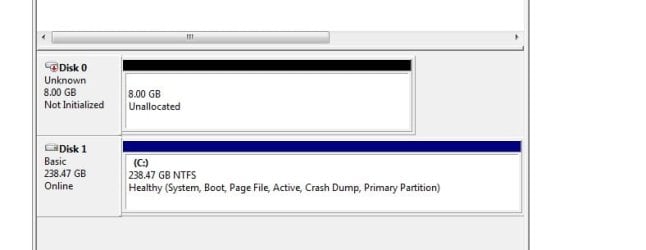
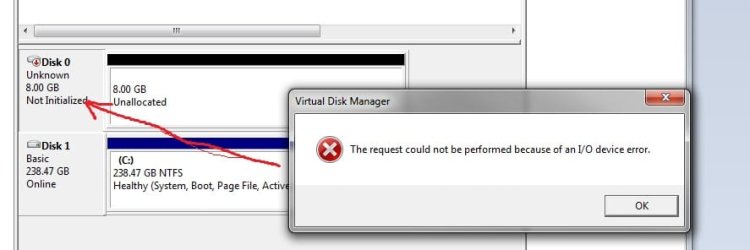
I have recently installed a 256GB SSD Hard Drive and installed a fresh copy of Windows 7 on it. After launching Disk Manager, it appears that Windows thinks this is two seperate physical hard drives (Disk 0 and Disk 1). Disk 0 is 238GB (containing Windows) and Disk 1 is 8.00GB. This disk is unallocated and cannot be initialized. An error message appears "The request could not be performed because of an I/O device error".
How can I reconfigure this SSD drive so that Windows 7 recognises it as one drive, in its entirety?
Thanks, Dan
I have recently installed a 256GB SSD Hard Drive and installed a fresh copy of Windows 7 on it. After launching Disk Manager, it appears that Windows thinks this is two seperate physical hard drives (Disk 0 and Disk 1). Disk 0 is 238GB (containing Windows) and Disk 1 is 8.00GB. This disk is unallocated and cannot be initialized. An error message appears "The request could not be performed because of an I/O device error".
How can I reconfigure this SSD drive so that Windows 7 recognises it as one drive, in its entirety?
Thanks, Dan
My Computer
At a glance
Windows 7Intel8GB KingstonGalaxy
- Computer type
- PC/Desktop
- Computer Manufacturer/Model Number
- Asus
- OS
- Windows 7
- CPU
- Intel
- Motherboard
- Asus P5Q-E
- Memory
- 8GB Kingston
- Graphics Card(s)
- Galaxy
- Monitor(s) Displays
- Acer V233H x2
- Hard Drives
- SSD 256GB
4x1TB HDD