One SSD Disk appearing as two physical drives (Drive 0 and Drive 1)

Danman78

New member
Local time
9:39 AM
Messages
2
Hello,

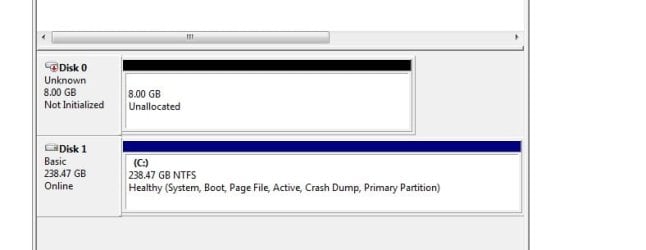
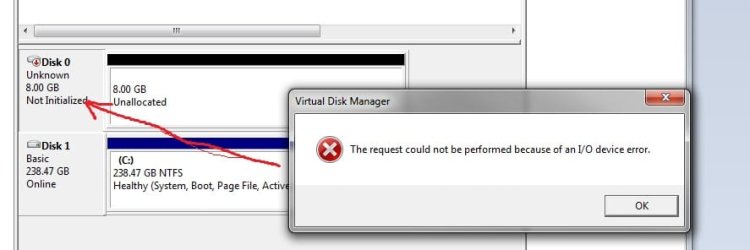
I have recently installed a 256GB SSD Hard Drive and installed a fresh copy of Windows 7 on it. After launching Disk Manager, it appears that Windows thinks this is two seperate physical hard drives (Disk 0 and Disk 1). Disk 0 is 238GB (containing Windows) and Disk 1 is 8.00GB. This disk is unallocated and cannot be initialized. An error message appears "The request could not be performed because of an I/O device error".

How can I reconfigure this SSD drive so that Windows 7 recognises it as one drive, in its entirety?

Thanks, Dan
 

My Computer My Computer

At a glance

Windows 7Intel8GB KingstonGalaxy
Computer type
PC/Desktop
Computer Manufacturer/Model Number
Asus
OS
Windows 7
CPU
Intel
Motherboard
Asus P5Q-E
Memory
8GB Kingston
Graphics Card(s)
Galaxy
Monitor(s) Displays
Acer V233H x2
Hard Drives
SSD 256GB
4x1TB HDD
Hmmm................peculiar.

Post a screen shot of Windows Disk Management.

Was this new SSD the ONLY drive connected at the time you installed Windows and is it the only physical disk currently in the PC?

Are your system specs correct? 7 GB of RAM (?), 1 SSD, 4 HDD?
 

My Computer My Computer

At a glance

Windows 7 Home Premium SP1, 64-bitIntel Skylake i5-6600K, not overclocked8 GB HyperX DDR4-2666 (2 x 4 GB)none; graphics are integrated on CPU
Computer type
PC/Desktop
Computer Manufacturer/Model Number
Ignatz Special; 4 speed manual gearbox; factory air conditioning; one of one
OS
Windows 7 Home Premium SP1, 64-bit
CPU
Intel Skylake i5-6600K, not overclocked
Motherboard
AsRock Z170M Extreme 4, micro ATX
Memory
8 GB HyperX DDR4-2666 (2 x 4 GB)
Graphics Card(s)
none; graphics are integrated on CPU
Sound Card
onboard: Realtek ALC1150; external: USB Behringer UF0-202
Monitor(s) Displays
Dell S2340M 23 inch IPS
Screen Resolution
1600 x 900
Hard Drives
System: Crucial MX100 series SSD, 128 GB;
Data: Samsung Spinpoint 103SJ, 1 TB;
Backup: WD Caviar Green WD30EZRX-00D8PB0, 3 TB
PSU
Rosewill SilentNight 500 watt fanless, semi-modular
Case
Antec Solo II
Cooling
Noctua NH-U12S; Noctua F12 intake, Noctua S12A exhaust
Keyboard
Microsoft 200 6JH-00001 USB
Mouse
Dell or Microsoft optical wired; USB
Antivirus
Microsoft Security Essentials and Malwarebytes Premium
Browser
Pale Moon
Other Info
All fans PWM; speeds at idle: CPU circa 500 rpm; intake circa 600 rpm; exhaust circa 600 rpm; CPU temps 27 idle and 47 C load in a warm room (27 C/81 F) when running Intel Extreme Tuning Utility stress test.
The SSD was the only disk connected at the time of installing Windows. I did however, install Windows XP as I only have a Windows 7 Upgrade Disk. The 4 HDD's are currently disconnected. The SSD is the only physical disk in the PC.

The system specs are correct. 8GB RAM (sorry).

Below is a screen shot.

Untitled.jpg

Untitled2.jpg
 

My Computer My Computer

At a glance

Windows 7Intel8GB KingstonGalaxy
Computer type
PC/Desktop
Computer Manufacturer/Model Number
Asus
OS
Windows 7
CPU
Intel
Motherboard
Asus P5Q-E
Memory
8GB Kingston
Graphics Card(s)
Galaxy
Monitor(s) Displays
Acer V233H x2
Hard Drives
SSD 256GB
4x1TB HDD
I'd expect a 256 GB drive to have about 93% of that available for use.

93% of 256 is 238.08.

Your disc 1 is very close to that: 238.47.

Which causes me to ask if you have any other drive of any type connected anywhere?

238 plus 8 is 246 and I would NOT expect a 256 GB drive to have that much usable capacity--unless this is some kind of oddball SSD that has a separate 8 GB segment.

What's the brand name and model?
 

My Computer My Computer

At a glance

Windows 7 Home Premium SP1, 64-bitIntel Skylake i5-6600K, not overclocked8 GB HyperX DDR4-2666 (2 x 4 GB)none; graphics are integrated on CPU
Computer type
PC/Desktop
Computer Manufacturer/Model Number
Ignatz Special; 4 speed manual gearbox; factory air conditioning; one of one
OS
Windows 7 Home Premium SP1, 64-bit
CPU
Intel Skylake i5-6600K, not overclocked
Motherboard
AsRock Z170M Extreme 4, micro ATX
Memory
8 GB HyperX DDR4-2666 (2 x 4 GB)
Graphics Card(s)
none; graphics are integrated on CPU
Sound Card
onboard: Realtek ALC1150; external: USB Behringer UF0-202
Monitor(s) Displays
Dell S2340M 23 inch IPS
Screen Resolution
1600 x 900
Hard Drives
System: Crucial MX100 series SSD, 128 GB;
Data: Samsung Spinpoint 103SJ, 1 TB;
Backup: WD Caviar Green WD30EZRX-00D8PB0, 3 TB
PSU
Rosewill SilentNight 500 watt fanless, semi-modular
Case
Antec Solo II
Cooling
Noctua NH-U12S; Noctua F12 intake, Noctua S12A exhaust
Keyboard
Microsoft 200 6JH-00001 USB
Mouse
Dell or Microsoft optical wired; USB
Antivirus
Microsoft Security Essentials and Malwarebytes Premium
Browser
Pale Moon
Other Info
All fans PWM; speeds at idle: CPU circa 500 rpm; intake circa 600 rpm; exhaust circa 600 rpm; CPU temps 27 idle and 47 C load in a warm room (27 C/81 F) when running Intel Extreme Tuning Utility stress test.
Back
Top