Hello SevenForums.
It's always great returning here for support so I thought I'd ask you guys.
I started using Office OneNote 2010 for writing notes as the teacher talks. OneNote does the job in my opinion.
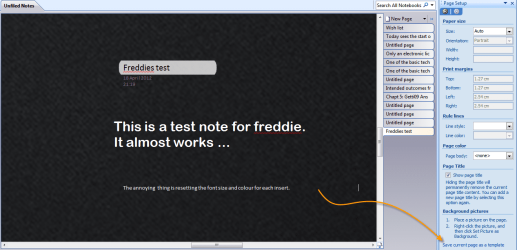
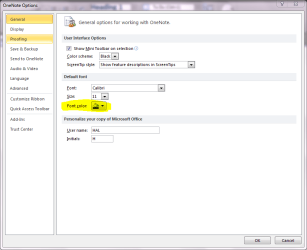
Question is, is it possible to make the background in OneNote, black instead of the default white? In File > Options, you can actually change the font to white which I want if I could get the background another color.
I searched on it but I couldn't get up valuable result.
Fred.
It's always great returning here for support so I thought I'd ask you guys.
I started using Office OneNote 2010 for writing notes as the teacher talks. OneNote does the job in my opinion.
Question is, is it possible to make the background in OneNote, black instead of the default white? In File > Options, you can actually change the font to white which I want if I could get the background another color.
I searched on it but I couldn't get up valuable result.
Fred.
My Computer
- Computer Manufacturer/Model Number
- Brewed
- OS
- Microsoft Windows 7 Ultimate: x64 (SP1)
- CPU
- Intel® Core™ i5-2500K Processor
- Motherboard
- ASUS P8Z68-V PRO
- Memory
- Kingston DDR3 HyperX 1600MHz 8GB
- Graphics Card(s)
- ASUS GTX 560 TI DirectCU II 900MHz
- Sound Card
- Realtek® ALC892 8-Channel High Definition Audio CODEC
- Monitor(s) Displays
- ACER LCD P246HBD 1920x1080 (24") - Dell 1280x800
- Screen Resolution
- ACER LCD P246HBD ~ [1920X1080] - DELL ~ [1280x800]
- Hard Drives
- 500 GB WD Caviar SE116 7200rpm SATA2
- PSU
- Corsair 750W Power Supply
- Case
- Coolermaster CM Scout
- Cooling
- Zalman FS-C77 Fatal1ty CPU Cooler
- Keyboard
- Logitech G15
- Mouse
- Coolermaster Sentinel Advanced
- Internet Speed
- [↓ 10 MB/s DL] [↑ 1 MB/s UL]
- Other Info
- - ROCCAT™ Kave – Solid 5.1 Surround Sound Gaming Headset
- Not overclocking