
Solved OneNote E-Mail Error

WeFish

New member
Local time
5:38 PM
Messages
7
On my desktop E-mail sending in onenote will work, but when I am on my laptop I get an error stateing OneNote cannot send E-mail. This could be caused by a network connection problem, an incorrectly configured default e-mail program, or a office installation problem.

Could someone please Help

Peace WeFish

Thank You
 

My Computer

OS
Microsoft Window 7 Home Premium X64
Hello WeFish, welcome to the forum. :)

Have you checked which mail program is selected as the default? :

Control Panel - Default Programs - from the list which populates on the left, ensure that the correct one is selected as default.

Which version of OneNote (Office) are you using? 2007, 2010....
 

My Computer

Computer type
PC/Desktop
Computer Manufacturer/Model Number
Packard Bell
OS
Windows 7 Home Premium 64bit
CPU
Intel(R) Core(TM) i3-2120 CPU @ 3.30GHz
Motherboard
Packard Bell IPISB-AG
Memory
3.00 GB
Graphics Card(s)
(1) Intel(R) HD Graphics (2) VNC Mirror Driver
Sound Card
Realtek High Definition Audio
Monitor(s) Displays
AIO LCD
Screen Resolution
1920 x 1080
Hard Drives
WDC WD10EADX-22TDHB0 ATA Device
Fixed hard disk media
4 partitions
931.51 GB
Keyboard
Wireless
Mouse
Wireless
Antivirus
Microsoft Security Essentials
Browser
IE; Firefox
Other Info
Also:
Samsung N220 Plus Netbook - Windows 7 Home
HP laptop
iPad 5
OneNote

Thank You For Your Reply,

Yes I have checked my E-mail program, I am running Onenote 2010 with windows Outlook E-mail.


Peace
WeFish
 

My Computer

OS
Microsoft Window 7 Home Premium X64
I have tried emailing from my OneNote and have no problem at all - in other words I am unable to replicate the problem.

Having searched extensively, I have not any positive results. So....

If you have not already tried, perhaps an Office Repair might help since the error message indicates a possible installation problem:

Repair your Office 2010 programs

Repair your Office 2010 programs by doing the following:

  1. Click Start, then click Control Panel.
  2. Click Programs and Features.
  3. Click the Office 2010 program that you want to repair, then click Change.
  4. Click Repair, then click Continue. You might need to restart your computer after the repair is complete
Please post back with any results. :)
 

My Computer

Computer type
PC/Desktop
Computer Manufacturer/Model Number
Packard Bell
OS
Windows 7 Home Premium 64bit
CPU
Intel(R) Core(TM) i3-2120 CPU @ 3.30GHz
Motherboard
Packard Bell IPISB-AG
Memory
3.00 GB
Graphics Card(s)
(1) Intel(R) HD Graphics (2) VNC Mirror Driver
Sound Card
Realtek High Definition Audio
Monitor(s) Displays
AIO LCD
Screen Resolution
1920 x 1080
Hard Drives
WDC WD10EADX-22TDHB0 ATA Device
Fixed hard disk media
4 partitions
931.51 GB
Keyboard
Wireless
Mouse
Wireless
Antivirus
Microsoft Security Essentials
Browser
IE; Firefox
Other Info
Also:
Samsung N220 Plus Netbook - Windows 7 Home
HP laptop
iPad 5
Still working on it

Ok,
On My desktop I have windows mail and everything works.On My laptop I have windows live mail could this be the problem? and how do I change it?

Peace
WeFish

O I did do a re install and that did not fix the problem
 

My Computer

OS
Microsoft Window 7 Home Premium X64
Ok,
On My desktop I have windows mail and everything works.On My laptop I have windows live mail could this be the problem? and how do I change it?
That could very well be the problem - good link below with explanations:
Windows Live Mail versus Windows Mail « How-To Geek Forums
Windows Mail and Outlook and Outlook Express are the desktop email programs Microsoft has offered us so far.

A desktop email program is a program that is installed on your computer and which stores the emails you have received and the ones you have send and concepts you have made ON YOUR COMPUTER.

Windows Live Mail has taken your program 'into the cloud'. That means it is a webbased application.
So the emails you've send, your concepts and your received mail are stored on a Microsoft server.
NOT ON YOUR COMPUTER.


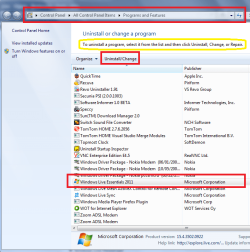
To remove Windows Live Mail:

How to remove and reinstall Windows Live Services
Click Start
VistaStartButton.jpg
,type programs and features in the Start Search box, and then press ENTER.

In the list of programs, select the name of the desired Windows Live Service that you want to remove, and then click Uninstall.
If you are prompted to confirm that you want to remove the program, click Yes. If you are prompted for an administrator password or for a confirmation, type the password, or click Allow.

Repeat steps b and c for each Windows Live Service that you want to remove.

Shut down and then start the computer.
You might wish to consider which email client to use in its' place before you begin.

Please post back with results or if you need any further help. :)
 

Attachments

  • uninstall WLM.PNG
    uninstall WLM.PNG
    47.5 KB · Views: 10

My Computer

Computer type
PC/Desktop
Computer Manufacturer/Model Number
Packard Bell
OS
Windows 7 Home Premium 64bit
CPU
Intel(R) Core(TM) i3-2120 CPU @ 3.30GHz
Motherboard
Packard Bell IPISB-AG
Memory
3.00 GB
Graphics Card(s)
(1) Intel(R) HD Graphics (2) VNC Mirror Driver
Sound Card
Realtek High Definition Audio
Monitor(s) Displays
AIO LCD
Screen Resolution
1920 x 1080
Hard Drives
WDC WD10EADX-22TDHB0 ATA Device
Fixed hard disk media
4 partitions
931.51 GB
Keyboard
Wireless
Mouse
Wireless
Antivirus
Microsoft Security Essentials
Browser
IE; Firefox
Other Info
Also:
Samsung N220 Plus Netbook - Windows 7 Home
HP laptop
iPad 5
Trying

Hello again,

It will not let Me remove the program.

Peace
WeFish
 

My Computer

OS
Microsoft Window 7 Home Premium X64

My Computer

Computer type
PC/Desktop
Computer Manufacturer/Model Number
Packard Bell
OS
Windows 7 Home Premium 64bit
CPU
Intel(R) Core(TM) i3-2120 CPU @ 3.30GHz
Motherboard
Packard Bell IPISB-AG
Memory
3.00 GB
Graphics Card(s)
(1) Intel(R) HD Graphics (2) VNC Mirror Driver
Sound Card
Realtek High Definition Audio
Monitor(s) Displays
AIO LCD
Screen Resolution
1920 x 1080
Hard Drives
WDC WD10EADX-22TDHB0 ATA Device
Fixed hard disk media
4 partitions
931.51 GB
Keyboard
Wireless
Mouse
Wireless
Antivirus
Microsoft Security Essentials
Browser
IE; Firefox
Other Info
Also:
Samsung N220 Plus Netbook - Windows 7 Home
HP laptop
iPad 5
Finally

Irene,

Everything is working in OneNote and E-Mailing is working fine, took a good day to get solved. What I did was Install Window live Family Safety to remove Window Mail Essential then I installed Window Live Mail only. It appears to me that I have to sign in to use anything else. I would like to thank you for all you help.

Peace
WeFish
 

My Computer

OS
Microsoft Window 7 Home Premium X64
Everything is working in OneNote and E-Mailing is working fine, took a good day to get solved. What I did was Install Window live Family Safety to remove Window Mail Essential then I installed Window Live Mail only. It appears to me that I have to sign in to use anything else. I would like to thank you for all you help.

You are very welcome, WeFish. I am pleased that you have finally found a solution. :)
 

My Computer

Computer type
PC/Desktop
Computer Manufacturer/Model Number
Packard Bell
OS
Windows 7 Home Premium 64bit
CPU
Intel(R) Core(TM) i3-2120 CPU @ 3.30GHz
Motherboard
Packard Bell IPISB-AG
Memory
3.00 GB
Graphics Card(s)
(1) Intel(R) HD Graphics (2) VNC Mirror Driver
Sound Card
Realtek High Definition Audio
Monitor(s) Displays
AIO LCD
Screen Resolution
1920 x 1080
Hard Drives
WDC WD10EADX-22TDHB0 ATA Device
Fixed hard disk media
4 partitions
931.51 GB
Keyboard
Wireless
Mouse
Wireless
Antivirus
Microsoft Security Essentials
Browser
IE; Firefox
Other Info
Also:
Samsung N220 Plus Netbook - Windows 7 Home
HP laptop
iPad 5
Back
Top