Only my external hard drive hits USB2.0 speeds

someidiot

New member
Local time
3:45 PM
Messages
11
In the past month I have added a new external hard drive, replaced my main hard drive, and replaced my power supply.

When I added the new external hard drive, I used a USB2.0 thumb drive to move some files also and I got normal speeds on it. A couple weeks after that (last week), I replaced my hard drive and PSU at the same time.

Last night I plugged in my USB2.0 thumb drive and was getting dismal speeds -- somewhere between 60kb/s and 5mb/s. Transferring the same file to my external hard drive got me 70-80mb/s. I moved the devices around to different ports with the same problem; the external hard drive got 70-80mb/s and the thumb drive got <5mb/s.
When I plugged the same thumb drive into my laptop (Win7 32-bit), I moved files at 25-30mb/s.

I updated my chipset drivers and saw no difference. Does anyone have any thoughts? Could I have done something wrong in relation to power to my USB ports?

As an aside, even just pressing "Cancel" on a slow file transfer takes FOREVER to stop. It will take probably 5 minutes for the file transfer to finally quit.
 

My Computer My Computer

At a glance

Win7 x64Intel E74004GB OCZ DDR2EVGA 9600GSO
OS
Win7 x64
CPU
Intel E7400
Motherboard
Asus P5Q SE/R
Memory
4GB OCZ DDR2
Graphics Card(s)
EVGA 9600GSO
Monitor(s) Displays
Asus 24"
Hard Drives
WD Digital Green - 640GB
PSU
OCZ MXSP600
Case
Xion something-or-other
Cooling
fanz, kid!
1. A thumb drive will not have the same transfer rate (read or write) as an external usb hard drive, depending on the quality of the flash memory what write/read speed the thumbdrive will actually have.

Not sure why it is slower on one PC compared to another.

What OS is it slow on?

I do notice usb works much better in W7 as compared to Vista or XP, at least in my case.


Put the old PSU in, see it anything changes.
.
 

My Computer My Computer

At a glance

XP-Vista-W7
OS
XP-Vista-W7
Are you 100% you're not using a USB 1.1 port?
 

My Computer My Computer

At a glance

Windows 7 Enterprise 64-bitAMD Phenom II X4 3.0GHz8GB G-Skill Ripjaws DDR3 1333PNY GeForce 460 GTX 1GB OC - Enthusiast Edition
OS
Windows 7 Enterprise 64-bit
CPU
AMD Phenom II X4 3.0GHz
Motherboard
ASUS M5A97
Memory
8GB G-Skill Ripjaws DDR3 1333
Graphics Card(s)
PNY GeForce 460 GTX 1GB OC - Enthusiast Edition
Sound Card
VIA High Definition Audio
Monitor(s) Displays
Dell 19"
Screen Resolution
1280x1024
Hard Drives
1TB - Primary
160GB - Secondary
250GB - External backup for important files
PSU
OCZ Fata1ty 700W Modular PSU
Case
ASUS
Keyboard
Microsoft Wireless Keyboard 2000
Mouse
Microsoft Wireless Mouse 2000
Internet Speed
3 Mbps/768 kbps
It's not 1.1 - I can plug the external hard drive into that port and get 70-80 mbps. If I put the thumb drive in the port the external hard drive is currently plugged into I still get <5mbps.

I know that I shouldn't expect speeds quite as fast as the external hard drive, but it's at least 4-5x faster on my laptop than my desktop, which is what the concern is.

My desktop (problem computer) is running Windows 7 Professional 64-bit. The laptop is running Windows 7 Ultimate 32-bit. I've had the same OS on this desktop since it came out and have always had good (20mbps+) speeds with this same thumb drive until I noticed the problem a few days ago.
 

My Computer My Computer

At a glance

Win7 x64Intel E74004GB OCZ DDR2EVGA 9600GSO
OS
Win7 x64
CPU
Intel E7400
Motherboard
Asus P5Q SE/R
Memory
4GB OCZ DDR2
Graphics Card(s)
EVGA 9600GSO
Monitor(s) Displays
Asus 24"
Hard Drives
WD Digital Green - 640GB
PSU
OCZ MXSP600
Case
Xion something-or-other
Cooling
fanz, kid!
What kind of thumb drive is it?
 

My Computer My Computer

At a glance

Windows 7 Enterprise 64-bitAMD Phenom II X4 3.0GHz8GB G-Skill Ripjaws DDR3 1333PNY GeForce 460 GTX 1GB OC - Enthusiast Edition
OS
Windows 7 Enterprise 64-bit
CPU
AMD Phenom II X4 3.0GHz
Motherboard
ASUS M5A97
Memory
8GB G-Skill Ripjaws DDR3 1333
Graphics Card(s)
PNY GeForce 460 GTX 1GB OC - Enthusiast Edition
Sound Card
VIA High Definition Audio
Monitor(s) Displays
Dell 19"
Screen Resolution
1280x1024
Hard Drives
1TB - Primary
160GB - Secondary
250GB - External backup for important files
PSU
OCZ Fata1ty 700W Modular PSU
Case
ASUS
Keyboard
Microsoft Wireless Keyboard 2000
Mouse
Microsoft Wireless Mouse 2000
Internet Speed
3 Mbps/768 kbps

My Computer My Computer

At a glance

Win7 x64Intel E74004GB OCZ DDR2EVGA 9600GSO
OS
Win7 x64
CPU
Intel E7400
Motherboard
Asus P5Q SE/R
Memory
4GB OCZ DDR2
Graphics Card(s)
EVGA 9600GSO
Monitor(s) Displays
Asus 24"
Hard Drives
WD Digital Green - 640GB
PSU
OCZ MXSP600
Case
Xion something-or-other
Cooling
fanz, kid!
If you have the intel chipset and AHCI enabled in the bios before installing the OS you may need to install the intel matrix storage manager software /driver

Download here :
Intel(R) Matrix Storage Manager

Latest Version :
RAID: Intel® Rapid Storage Technology Driver for Intel Desktop Boards

Im not sure this will work because you would think the problem would of been there before - seems to be related to the new hardware if so I would check your bios settings if they were somehow reset. However, if you have the intel chipset AHCI enabled and no matrix or rapid storage manager it fits the description for slow transfer rates, and no harm in trying.
 

My Computer My Computer

At a glance

XP, Vista, W7 64bit Home PremiumIntel Core Duo 6850 3.0 ghz @ 3.7 ghz4GB Corsair DDR 2 PC-6400Ati 4870 1ghz
OS
XP, Vista, W7 64bit Home Premium
CPU
Intel Core Duo 6850 3.0 ghz @ 3.7 ghz
Motherboard
Asus P5E
Memory
4GB Corsair DDR 2 PC-6400
Graphics Card(s)
Ati 4870 1ghz
Sound Card
Supreme FX 11
Monitor(s) Displays
View Sonic VX1962wm
Screen Resolution
1680 X1050
Hard Drives
3 Seagate Sata Drives 160gb 250gb 500gb
PSU
Thermaltake 600 watt
Case
NZXT Alpha
Cooling
3X120cm Fans
Keyboard
Microsoft Digital Media Pro Keyboard
Mouse
Microsoft Wheel Mouse Optical
Internet Speed
1.5Mb to 8Mb/384k
If you have the intel chipset and AHCI enabled in the bios before installing the OS you may need to install the intel matrix storage manager software /driver

Download here :
Intel(R) Matrix Storage Manager

Latest Version :
RAID: Intel® Rapid Storage Technology Driver for Intel Desktop Boards

Im not sure this will work because you would think the problem would of been there before - seems to be related to the new hardware if so I would check your bios settings if they were somehow reset. However, if you have the intel chipset AHCI enabled and no matrix or rapid storage manager it fits the description for slow transfer rates, and no harm in trying.
Both of those told me something about my hardware not meeting the minimum requirements or something like that.

I looked around my BIOS. I saw a setting about SATA stuff and it was set to "Enhanced IDE." The other options were RAID and AHCI. Choosing RAID got me a black screen telling me to add a bootable device. Choosing AHCI got me to the "Starting Windows" screen before it crashed & rebooted.


Something completely unrelated -- any time I change something in my BIOS, I have to completely power off my machine to get it to completely boot again. It will POST, then it just sits on my ASUS splash screen unless I unplug the computer. Is that normal?
 

My Computer My Computer

At a glance

Win7 x64Intel E74004GB OCZ DDR2EVGA 9600GSO
OS
Win7 x64
CPU
Intel E7400
Motherboard
Asus P5Q SE/R
Memory
4GB OCZ DDR2
Graphics Card(s)
EVGA 9600GSO
Monitor(s) Displays
Asus 24"
Hard Drives
WD Digital Green - 640GB
PSU
OCZ MXSP600
Case
Xion something-or-other
Cooling
fanz, kid!

My Computer My Computer

At a glance

XP, Vista, W7 64bit Home PremiumIntel Core Duo 6850 3.0 ghz @ 3.7 ghz4GB Corsair DDR 2 PC-6400Ati 4870 1ghz
OS
XP, Vista, W7 64bit Home Premium
CPU
Intel Core Duo 6850 3.0 ghz @ 3.7 ghz
Motherboard
Asus P5E
Memory
4GB Corsair DDR 2 PC-6400
Graphics Card(s)
Ati 4870 1ghz
Sound Card
Supreme FX 11
Monitor(s) Displays
View Sonic VX1962wm
Screen Resolution
1680 X1050
Hard Drives
3 Seagate Sata Drives 160gb 250gb 500gb
PSU
Thermaltake 600 watt
Case
NZXT Alpha
Cooling
3X120cm Fans
Keyboard
Microsoft Digital Media Pro Keyboard
Mouse
Microsoft Wheel Mouse Optical
Internet Speed
1.5Mb to 8Mb/384k
No its not normal - with mine as I have it overclocked when it powers up it starts and then restarts again automatically - this is because it needs to reset the parameters. You might need to update to the latest bios.
 

My Computer My Computer

At a glance

XP, Vista, W7 64bit Home PremiumIntel Core Duo 6850 3.0 ghz @ 3.7 ghz4GB Corsair DDR 2 PC-6400Ati 4870 1ghz
OS
XP, Vista, W7 64bit Home Premium
CPU
Intel Core Duo 6850 3.0 ghz @ 3.7 ghz
Motherboard
Asus P5E
Memory
4GB Corsair DDR 2 PC-6400
Graphics Card(s)
Ati 4870 1ghz
Sound Card
Supreme FX 11
Monitor(s) Displays
View Sonic VX1962wm
Screen Resolution
1680 X1050
Hard Drives
3 Seagate Sata Drives 160gb 250gb 500gb
PSU
Thermaltake 600 watt
Case
NZXT Alpha
Cooling
3X120cm Fans
Keyboard
Microsoft Digital Media Pro Keyboard
Mouse
Microsoft Wheel Mouse Optical
Internet Speed
1.5Mb to 8Mb/384k
I would also check to see you connected the power supply correctly ( double check ) and all the connections - I guess you already have done that. There is a setting in power options for usb - it might need disabling -selective suspend.
 

My Computer My Computer

At a glance

XP, Vista, W7 64bit Home PremiumIntel Core Duo 6850 3.0 ghz @ 3.7 ghz4GB Corsair DDR 2 PC-6400Ati 4870 1ghz
OS
XP, Vista, W7 64bit Home Premium
CPU
Intel Core Duo 6850 3.0 ghz @ 3.7 ghz
Motherboard
Asus P5E
Memory
4GB Corsair DDR 2 PC-6400
Graphics Card(s)
Ati 4870 1ghz
Sound Card
Supreme FX 11
Monitor(s) Displays
View Sonic VX1962wm
Screen Resolution
1680 X1050
Hard Drives
3 Seagate Sata Drives 160gb 250gb 500gb
PSU
Thermaltake 600 watt
Case
NZXT Alpha
Cooling
3X120cm Fans
Keyboard
Microsoft Digital Media Pro Keyboard
Mouse
Microsoft Wheel Mouse Optical
Internet Speed
1.5Mb to 8Mb/384k
I've got that Intel RST running and it's still slow. It's forever slow to even cancel.. I wonder if it has something to do with Windows mucking up the file transfer process.

I'll look at the BIOS again for the USB settings and mess around with it.

I do have the computer in AHCI now.
 

My Computer My Computer

At a glance

Win7 x64Intel E74004GB OCZ DDR2EVGA 9600GSO
OS
Win7 x64
CPU
Intel E7400
Motherboard
Asus P5Q SE/R
Memory
4GB OCZ DDR2
Graphics Card(s)
EVGA 9600GSO
Monitor(s) Displays
Asus 24"
Hard Drives
WD Digital Green - 640GB
PSU
OCZ MXSP600
Case
Xion something-or-other
Cooling
fanz, kid!
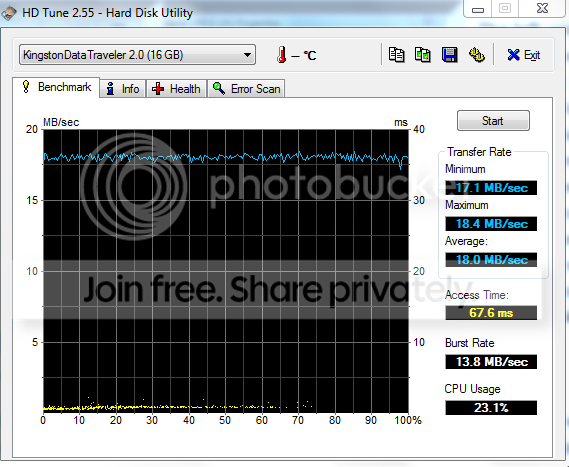
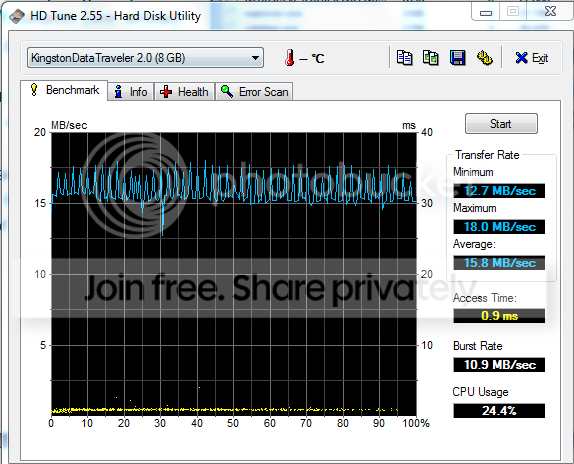
Those speeds of your flash drive are not normal. But it does not hurt to test the capabilities. Use HD Tune, but let it run to the end - else you do not get the Access Time. Have a look at my two Kingston data traveller and compare the huge difference in access time.

2usb.png


3usb.png
 

My Computer My Computer

At a glance

Vista, Windows7, Mint Mate, Zorin, Windows 8from 1.6GHz Duo to i7
Computer Manufacturer/Model Number
HP, Dell, Gateway, Toshiba - 4 laptops and 2 desktops
OS
Vista, Windows7, Mint Mate, Zorin, Windows 8
CPU
from 1.6GHz Duo to i7
Monitor(s) Displays
2x HP w2207
Hard Drives
5x HDD, 7x SSD, 12x Externals
Keyboard
with trackball - no mices
Mouse
Trackball mice
Internet Speed
DSL 6000
I have other USB2.0 devices that are equally as slow. It's not just that particular Kingston giving me problems.

So I went and looked at the USB BIOS.
USB Functions: Enabled
2.0 Controller: Enabled
Controller mode: HiSpeed (480mbps)
EHCI hand-off: Enabled
Legacy USB support: Auto

When rebooting out of the BIOS, I got the black screen telling me to insert a boot device. I had to revert back to Enhanced IDE to get Windows to start.

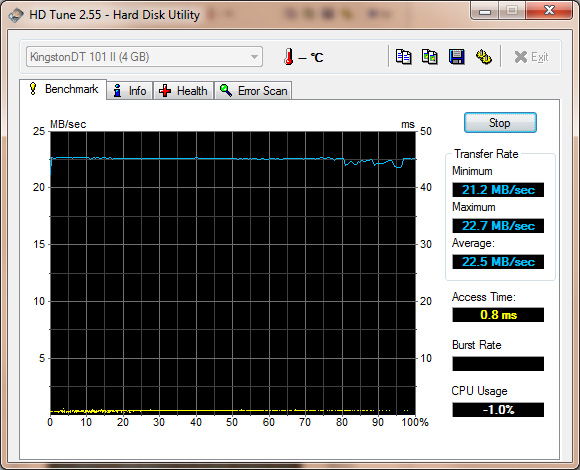
The HDTune results are interesting
hdtune.jpg


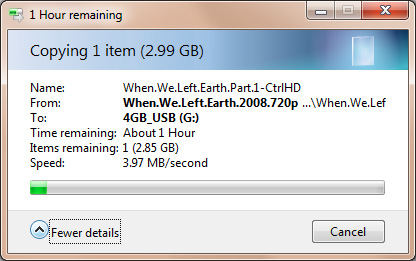
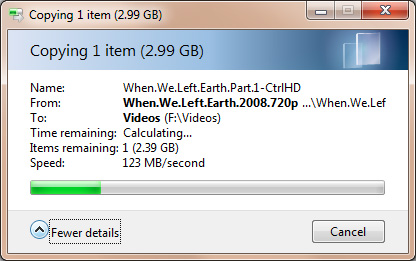
Here's what I get immediately after that, transferring a 2.99GB movie file from my hard drive to my USB drive
file_copy.jpg


Same file on the same USB port, going to my external hard drive:
file_copy2.jpg


Interestingly, the file transfer to the external hard drive started up over 100mbps and toward the end was just under 30mbps
 

My Computer My Computer

At a glance

Win7 x64Intel E74004GB OCZ DDR2EVGA 9600GSO
OS
Win7 x64
CPU
Intel E7400
Motherboard
Asus P5Q SE/R
Memory
4GB OCZ DDR2
Graphics Card(s)
EVGA 9600GSO
Monitor(s) Displays
Asus 24"
Hard Drives
WD Digital Green - 640GB
PSU
OCZ MXSP600
Case
Xion something-or-other
Cooling
fanz, kid!
Interestingly, the file transfer to the external hard drive started up over 100mbps and toward the end was just under 30mbps
This is probably a fragmentation effect on the disk. By the way, the numbers are in mBps, not mbps. The big difference between the stick and the disk is, however, mysterious - especially as the HD Tune numbers of your stick are quite good.
 

My Computer My Computer

At a glance

Vista, Windows7, Mint Mate, Zorin, Windows 8from 1.6GHz Duo to i7
Computer Manufacturer/Model Number
HP, Dell, Gateway, Toshiba - 4 laptops and 2 desktops
OS
Vista, Windows7, Mint Mate, Zorin, Windows 8
CPU
from 1.6GHz Duo to i7
Monitor(s) Displays
2x HP w2207
Hard Drives
5x HDD, 7x SSD, 12x Externals
Keyboard
with trackball - no mices
Mouse
Trackball mice
Internet Speed
DSL 6000
I don't know the difference between mBs and mbs, sorry. I'll claim ignorance.

So.. any thoughts on why Windows transfers files so slowly to it when it seems like everything else is just fine? I'm running defrag now. I'm wondering if I should have started with a clean installation of the OS instead of imaging my old hard drive onto my new one, especially since the old HDD was failing

Either way, thanks a lot for all of the help.
 

My Computer My Computer

At a glance

Win7 x64Intel E74004GB OCZ DDR2EVGA 9600GSO
OS
Win7 x64
CPU
Intel E7400
Motherboard
Asus P5Q SE/R
Memory
4GB OCZ DDR2
Graphics Card(s)
EVGA 9600GSO
Monitor(s) Displays
Asus 24"
Hard Drives
WD Digital Green - 640GB
PSU
OCZ MXSP600
Case
Xion something-or-other
Cooling
fanz, kid!
I don't know the difference between mBs and mbs, sorry. I'll claim ignorance.

So.. any thoughts on why Windows transfers files so slowly to it when it seems like everything else is just fine? I'm running defrag now. I'm wondering if I should have started with a clean installation of the OS instead of imaging my old hard drive onto my new one, especially since the old HDD was failing

Either way, thanks a lot for all of the help.

I am thinking. The problem is intriguing. When I come up with something (which is not sure), I'll let you know.

Mb = Megabits
MB = Megabytes (which is 9 times more) - 1 Byte = 8 data bits plus 1 checkbit
 

My Computer My Computer

At a glance

Vista, Windows7, Mint Mate, Zorin, Windows 8from 1.6GHz Duo to i7
Computer Manufacturer/Model Number
HP, Dell, Gateway, Toshiba - 4 laptops and 2 desktops
OS
Vista, Windows7, Mint Mate, Zorin, Windows 8
CPU
from 1.6GHz Duo to i7
Monitor(s) Displays
2x HP w2207
Hard Drives
5x HDD, 7x SSD, 12x Externals
Keyboard
with trackball - no mices
Mouse
Trackball mice
Internet Speed
DSL 6000
Bump :) Still having this problem
 

My Computer My Computer

At a glance

Win7 x64Intel E74004GB OCZ DDR2EVGA 9600GSO
OS
Win7 x64
CPU
Intel E7400
Motherboard
Asus P5Q SE/R
Memory
4GB OCZ DDR2
Graphics Card(s)
EVGA 9600GSO
Monitor(s) Displays
Asus 24"
Hard Drives
WD Digital Green - 640GB
PSU
OCZ MXSP600
Case
Xion something-or-other
Cooling
fanz, kid!
Back
Top