Only safe mode opens on reboot or startup

JamesEJ

New member
Member
VIP
Local time
3:48 PM
Messages
242
Yeah, Gads! Before going further, I am running on PC2 of 2 computers (PC1 & PC2) to avoid confusion.:confused:

In short (from what I gather), when trying to make a win7 right click context safe mode option (with registry change) on my desktop, this caused & I wound up with a perpetual reboot into safe mode.

To start, Any ideas on why this can happen & hopeful quicker fix (like maybe registry repair/regression)?

Thanks Guys, James
 

My Computer My Computer

Computer type
PC/Desktop
Computer Manufacturer/Model Number
gateway
OS
win7 Home Premium x64
Antivirus
avast
Browser
Firefox
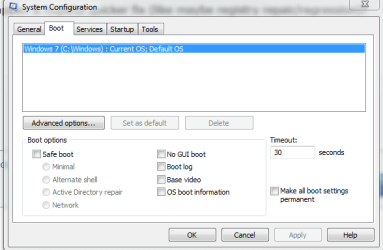
In safe mode if you open msconfig.exe what does the boot tab show, is the safe boot box checked where mine is not? if it is uncheck it and and then hit apply, ok, and reboot.
 

Attachments

  • safe mode.PNG
    safe mode.PNG
    12.9 KB · Views: 51

My Computer My Computer

Computer type
PC/Desktop
Computer Manufacturer/Model Number
Custom
OS
10 Pro x64
CPU
Ryzen 9 3900X
Motherboard
Asrock x370 Tachi
Memory
64GB(4x16GB) DDR4
Graphics Card(s)
EVGA 1080ti FTW3
Sound Card
ASUS Xonar Essence STX (V4 Bursons), ODAC rev B, NFB-11, O2
Monitor(s) Displays
3xASUS PB278Q/R, Optoma HD142X
Screen Resolution
3x1440p, 1080p
Hard Drives
512GB 850 EVO(OS, Programs)
4TB (Movies)
3TB (Downloads)
3TB (Programs)
1TB HDD (Games)
2x6TB R1 (videos)
PSU
AX760
Case
Fractal Define R5
Cooling
NH-D15S
Keyboard
Massdrop Ctrl with Box Navy's
Mouse
G903, Alioth XXL Mat
Internet Speed
280/40
Antivirus
MBAM, ESET
Browser
Canary 64 Bit
Other Info
I also own a Thinkpad P50 Xeon 4K, X220T, X1C5
Ok, thnks. That sounds like a different shortcut I was messing with too. Gotta shut down this PC2 tobe able to go to PC1 & check. Thanks much for a good reply, James:)
 

My Computer My Computer

Computer type
PC/Desktop
Computer Manufacturer/Model Number
gateway
OS
win7 Home Premium x64
Antivirus
avast
Browser
Firefox
Ok, thnks. That sounds like a different shortcut I was messing with too. Gotta shut down this PC2 tobe able to go to PC1 & check. Thanks much for a good reply, James:)

That context menu you added probably swapped that registry entry to on.
 

My Computer My Computer

Computer type
PC/Desktop
Computer Manufacturer/Model Number
Custom
OS
10 Pro x64
CPU
Ryzen 9 3900X
Motherboard
Asrock x370 Tachi
Memory
64GB(4x16GB) DDR4
Graphics Card(s)
EVGA 1080ti FTW3
Sound Card
ASUS Xonar Essence STX (V4 Bursons), ODAC rev B, NFB-11, O2
Monitor(s) Displays
3xASUS PB278Q/R, Optoma HD142X
Screen Resolution
3x1440p, 1080p
Hard Drives
512GB 850 EVO(OS, Programs)
4TB (Movies)
3TB (Downloads)
3TB (Programs)
1TB HDD (Games)
2x6TB R1 (videos)
PSU
AX760
Case
Fractal Define R5
Cooling
NH-D15S
Keyboard
Massdrop Ctrl with Box Navy's
Mouse
G903, Alioth XXL Mat
Internet Speed
280/40
Antivirus
MBAM, ESET
Browser
Canary 64 Bit
Other Info
I also own a Thinkpad P50 Xeon 4K, X220T, X1C5
On PC2 >> safe mode with networking. The "msconfig.exe" windows shows: Boot > selective startup > ALL 3 Options checked. What ya think rcvjew?
 

My Computer My Computer

Computer type
PC/Desktop
Computer Manufacturer/Model Number
gateway
OS
win7 Home Premium x64
Antivirus
avast
Browser
Firefox
On PC2 >> safe mode with networking. The "msconfig.exe" windows shows: Boot > selective startup > ALL 3 Options checked. What ya think rcvjew?

Unless you need to have it stop a service or startup item at boot I would make it normal then check the tab above called boot to see if the other box is checked as well. Make sure you apply before hitting ok and then restart. What link/guide did you use to make this context menu in the first place? This one lets you pick what you want. Safe Mode - Add to Desktop Context Menu in Windows
 

My Computer My Computer

Computer type
PC/Desktop
Computer Manufacturer/Model Number
Custom
OS
10 Pro x64
CPU
Ryzen 9 3900X
Motherboard
Asrock x370 Tachi
Memory
64GB(4x16GB) DDR4
Graphics Card(s)
EVGA 1080ti FTW3
Sound Card
ASUS Xonar Essence STX (V4 Bursons), ODAC rev B, NFB-11, O2
Monitor(s) Displays
3xASUS PB278Q/R, Optoma HD142X
Screen Resolution
3x1440p, 1080p
Hard Drives
512GB 850 EVO(OS, Programs)
4TB (Movies)
3TB (Downloads)
3TB (Programs)
1TB HDD (Games)
2x6TB R1 (videos)
PSU
AX760
Case
Fractal Define R5
Cooling
NH-D15S
Keyboard
Massdrop Ctrl with Box Navy's
Mouse
G903, Alioth XXL Mat
Internet Speed
280/40
Antivirus
MBAM, ESET
Browser
Canary 64 Bit
Other Info
I also own a Thinkpad P50 Xeon 4K, X220T, X1C5
Ooops, NOT on boot. Its on General > selective startup> all 3 options checked. Sorry guy!
 

My Computer My Computer

Computer type
PC/Desktop
Computer Manufacturer/Model Number
gateway
OS
win7 Home Premium x64
Antivirus
avast
Browser
Firefox
Ooops, NOT on boot. Its on General > selective startup> all 3 options checked. Sorry guy!

I know, I'm saying put the general tab to normal and the boot tab to no safe boot.
 

My Computer My Computer

Computer type
PC/Desktop
Computer Manufacturer/Model Number
Custom
OS
10 Pro x64
CPU
Ryzen 9 3900X
Motherboard
Asrock x370 Tachi
Memory
64GB(4x16GB) DDR4
Graphics Card(s)
EVGA 1080ti FTW3
Sound Card
ASUS Xonar Essence STX (V4 Bursons), ODAC rev B, NFB-11, O2
Monitor(s) Displays
3xASUS PB278Q/R, Optoma HD142X
Screen Resolution
3x1440p, 1080p
Hard Drives
512GB 850 EVO(OS, Programs)
4TB (Movies)
3TB (Downloads)
3TB (Programs)
1TB HDD (Games)
2x6TB R1 (videos)
PSU
AX760
Case
Fractal Define R5
Cooling
NH-D15S
Keyboard
Massdrop Ctrl with Box Navy's
Mouse
G903, Alioth XXL Mat
Internet Speed
280/40
Antivirus
MBAM, ESET
Browser
Canary 64 Bit
Other Info
I also own a Thinkpad P50 Xeon 4K, X220T, X1C5
Hey, didn't bug out but some problems. Got back into regular startup >> Yea!! but had done a sys-restore in safe mode so bunch programs messed up (like usual). e.g. using IE now not Fx. No firewall either.

But if I get the msconfig General set on Normal, I get boot on safe automatically. Not avoidable!
Not know if that cause some problems or not but its time to sleep after 16 hours.

Sure appreciate the help! Hope we can get back on track tom. Jim:D
 

My Computer My Computer

Computer type
PC/Desktop
Computer Manufacturer/Model Number
gateway
OS
win7 Home Premium x64
Antivirus
avast
Browser
Firefox
OK, got where I needed to, open windows. Could not set General tab to normal and also not have boot folder set to safe boot.

What worked was to set general tab to Selective start (load system services checked) plus (Load start up items checked) and a greyed out "use original boot configuration" 3rd item checked.

RCVJEW was most certainly correct on the source of this problem, notwithstanding. Thanks a bunch Guy!!!

One thing to note is that I now have web site connection probs timeouts. Not know if related ot not. will see I guess. James
 

My Computer My Computer

Computer type
PC/Desktop
Computer Manufacturer/Model Number
gateway
OS
win7 Home Premium x64
Antivirus
avast
Browser
Firefox
Can you give the URL to some sites that are timing out? You might want to check your date and time settings to make sure they are correct.
 

My Computer My Computer

Computer type
PC/Desktop
Computer Manufacturer/Model Number
Custom
OS
10 Pro x64
CPU
Ryzen 9 3900X
Motherboard
Asrock x370 Tachi
Memory
64GB(4x16GB) DDR4
Graphics Card(s)
EVGA 1080ti FTW3
Sound Card
ASUS Xonar Essence STX (V4 Bursons), ODAC rev B, NFB-11, O2
Monitor(s) Displays
3xASUS PB278Q/R, Optoma HD142X
Screen Resolution
3x1440p, 1080p
Hard Drives
512GB 850 EVO(OS, Programs)
4TB (Movies)
3TB (Downloads)
3TB (Programs)
1TB HDD (Games)
2x6TB R1 (videos)
PSU
AX760
Case
Fractal Define R5
Cooling
NH-D15S
Keyboard
Massdrop Ctrl with Box Navy's
Mouse
G903, Alioth XXL Mat
Internet Speed
280/40
Antivirus
MBAM, ESET
Browser
Canary 64 Bit
Other Info
I also own a Thinkpad P50 Xeon 4K, X220T, X1C5
ok, will take a look see and be back, tks. that might be easier than the connections setting I was looking at.
 

My Computer My Computer

Computer type
PC/Desktop
Computer Manufacturer/Model Number
gateway
OS
win7 Home Premium x64
Antivirus
avast
Browser
Firefox
Ok ,here goes. tried couple things to help with added info for solving hopefully.:eek:

In Fx I get a counterclockwise swirling circle that says “connecting” but never connects. Then I get:


The small case letter "i" inside a circle


The connection has timed out


The server at (examples below) is taking too long to respond.


The site could be temporarily unavailable or too busy. Try again in a few moments.
If you are unable to load any pages, check your computer's network connection.
If your computer or network is protected by a firewall or proxy, make sure that Firefox is permitted to access the Web.


“Try again” option button at lower left within a small rectangle


TRIED THESE FOUR (4) URLS TO START
(1) www.sevenforums.com
(2) Fox News - Breaking News Updates | Latest News Headlines | Photos & News Videos
(3) Breaking News, Daily News and Videos - CNN.com
(4) www.tweaking.com


FIREFOX RESULTS: 1, 2, 3, 4 NO GO
IE RESULTS:
First IE try: 1,2, 3 FINE; 4 NO GO
Second IE try after try's on other two servers: 1,2,3,4 no go
CHROME RESULTS: 1,2,3,4 NO GO


Also tried bing.com with these results:
IE , no go
Fx, no go
Chrome, no go

One of my observations is this: When the safe mode reboot problem first started I absolutely know that I was using Fx and had my google account open for searching. I mention this because Google search is the only search engine that will work, so its gotta be?: a PC1 based server/search related prob. My thought is all. any thoughts guys? RCVJEW Looks like you work days and do computer stuff after work?

Thanks bunches for help, James
 
Last edited:

My Computer My Computer

Computer type
PC/Desktop
Computer Manufacturer/Model Number
gateway
OS
win7 Home Premium x64
Antivirus
avast
Browser
Firefox
Update news: I recalled that when in the safe mode loop, I got onto the sevenforums web site (yes here where I am now) but then that same url would not open in IE, Fx or Chrome. So I did a reboot>F8 safe mode and VOILA HMMM!!! I easliy opened the four urls in Fx. Soo its some kind of windows OS glitch. Ok, thats the news for now. going back to regular mode (I haaope!) Jim

EDIT. Follow up from above safe mode post. Now on PC2. On PC1 went from safe mode (above msg) to regular mode and when there again could not connect to the 4 urls in FX. Now on PC2 regular mode the same 4 urls open just fine. Go Figure??:confused:
 
Last edited:

My Computer My Computer

Computer type
PC/Desktop
Computer Manufacturer/Model Number
gateway
OS
win7 Home Premium x64
Antivirus
avast
Browser
Firefox
Your internet for both pcs are though their own Lan wire correct, the pcs are not some how chained together? Or are they wireless? It sounds like you might just be having a dns issue, who is your isp and do you have your network connections on the pcs set to automatic for IP and dns lookup?
 

My Computer My Computer

Computer type
PC/Desktop
Computer Manufacturer/Model Number
Custom
OS
10 Pro x64
CPU
Ryzen 9 3900X
Motherboard
Asrock x370 Tachi
Memory
64GB(4x16GB) DDR4
Graphics Card(s)
EVGA 1080ti FTW3
Sound Card
ASUS Xonar Essence STX (V4 Bursons), ODAC rev B, NFB-11, O2
Monitor(s) Displays
3xASUS PB278Q/R, Optoma HD142X
Screen Resolution
3x1440p, 1080p
Hard Drives
512GB 850 EVO(OS, Programs)
4TB (Movies)
3TB (Downloads)
3TB (Programs)
1TB HDD (Games)
2x6TB R1 (videos)
PSU
AX760
Case
Fractal Define R5
Cooling
NH-D15S
Keyboard
Massdrop Ctrl with Box Navy's
Mouse
G903, Alioth XXL Mat
Internet Speed
280/40
Antivirus
MBAM, ESET
Browser
Canary 64 Bit
Other Info
I also own a Thinkpad P50 Xeon 4K, X220T, X1C5
PC1 & PC2 plug in completely separate to a main router to/from which a 3rd PC3 operates from.

So my PC1 is connected to PC3 until I want to run PC2. At that time I unplug all connections except ac power from PC1 and plug all those connections into PC2.

Nothing wireless except occasional mobile phone use.

Xfinity is the ISP.

Sorry, am a full nube on this one: "automatic for IP and dns lookup?" Please advise, tks Jim

But will say all PC's were working just fine until trying out the safe mode shortcut routines on just PC1. Now only PC 1 is acting up not PC2 or PC3. Appreciate you assistance guy! James :)
 

My Computer My Computer

Computer type
PC/Desktop
Computer Manufacturer/Model Number
gateway
OS
win7 Home Premium x64
Antivirus
avast
Browser
Firefox

My Computer My Computer

Computer type
PC/Desktop
Computer Manufacturer/Model Number
Custom
OS
10 Pro x64
CPU
Ryzen 9 3900X
Motherboard
Asrock x370 Tachi
Memory
64GB(4x16GB) DDR4
Graphics Card(s)
EVGA 1080ti FTW3
Sound Card
ASUS Xonar Essence STX (V4 Bursons), ODAC rev B, NFB-11, O2
Monitor(s) Displays
3xASUS PB278Q/R, Optoma HD142X
Screen Resolution
3x1440p, 1080p
Hard Drives
512GB 850 EVO(OS, Programs)
4TB (Movies)
3TB (Downloads)
3TB (Programs)
1TB HDD (Games)
2x6TB R1 (videos)
PSU
AX760
Case
Fractal Define R5
Cooling
NH-D15S
Keyboard
Massdrop Ctrl with Box Navy's
Mouse
G903, Alioth XXL Mat
Internet Speed
280/40
Antivirus
MBAM, ESET
Browser
Canary 64 Bit
Other Info
I also own a Thinkpad P50 Xeon 4K, X220T, X1C5
Ok, sure will give it a try!

Just FYI clarity: PC3 is the original PC setup on this Xfinity router in room 1. In room 2 (next to room 1) is PC1 and PC2. There is one sole PC connection cable between the room 1 router and room 2. That single connection cable once it is in room 2 is either connected to PC1 or PC2 (NOT BOTH, caps 4 emphases:)). Solely PC1 in room 2 has the connection problem in normal mode but not in safe mode.

Would you take a look at this stated fix please. I am being cautious because its new ground for me. See:

http://www.sevenforums.com/network-...ternet-except-when-safe-mode.html#post3088393

Thanks bunches for your continued efforts and time! James
 
Last edited:

My Computer My Computer

Computer type
PC/Desktop
Computer Manufacturer/Model Number
gateway
OS
win7 Home Premium x64
Antivirus
avast
Browser
Firefox
Ok, sure will give it a try!

Just FYI clarity: PC3 is the original PC setup on this Xfinity router in room 1. In room 2 (next to room 1) is PC1 and PC2. There is one sole PC connection cable between the room 1 router and room 2. That single connection cable once it is in room 2 is either connected to PC1 or PC2 (NOT BOTH, caps 4 emphases:)). Solely PC1 in room 2 has the connection problem in normal mode but not in safe mode.

Would you take a look at this stated fix please. I am being cautious because its new ground for me. See:

http://www.sevenforums.com/network-...ternet-except-when-safe-mode.html#post3088393

Thanks bunches for your continued efforts and time! James
You can try that if you want it will make it a clean boot state but not safe mode and if it does work then it is some kinda driver or piece of software you have that is messing with your internet. http://www.sevenforums.com/tutorial...ation-conflicts-performing-clean-startup.html
 

My Computer My Computer

Computer type
PC/Desktop
Computer Manufacturer/Model Number
Custom
OS
10 Pro x64
CPU
Ryzen 9 3900X
Motherboard
Asrock x370 Tachi
Memory
64GB(4x16GB) DDR4
Graphics Card(s)
EVGA 1080ti FTW3
Sound Card
ASUS Xonar Essence STX (V4 Bursons), ODAC rev B, NFB-11, O2
Monitor(s) Displays
3xASUS PB278Q/R, Optoma HD142X
Screen Resolution
3x1440p, 1080p
Hard Drives
512GB 850 EVO(OS, Programs)
4TB (Movies)
3TB (Downloads)
3TB (Programs)
1TB HDD (Games)
2x6TB R1 (videos)
PSU
AX760
Case
Fractal Define R5
Cooling
NH-D15S
Keyboard
Massdrop Ctrl with Box Navy's
Mouse
G903, Alioth XXL Mat
Internet Speed
280/40
Antivirus
MBAM, ESET
Browser
Canary 64 Bit
Other Info
I also own a Thinkpad P50 Xeon 4K, X220T, X1C5
Hi James, rvcjew,

Without changing anything else I would try uninstalling avast using avast's utility and running MSE in its place as a test to see if this problem clears up. Although avast is a good program, it just doesn't play well on some machines.

If it does clear up, but not entirely, you may want to do a Disk Cleanup and run SFC several times as stated in the blue Note Box in the Option Two section, you may even consider a Defrag if you haven't done one in awhile.
I say this because it troubles me that you are running this cmd: reboot>F*; This cmd effectively shuts down all programs including the operating system (OS) before they are properly closed, thus causing corrupted files.

reboot>F* = A reboot after >F forcing closed * any open programs including the OS. For a Windows based system you might as well use the power button to turn off and then back on for your reboot.

I do realize the F option on some server systems can mean a fast reboot, and it seems to be a much used cmd for Ubuntu Servers and linux distros for that reason, but you haven't mentioned any of those systems James, and would be better off using shutdown / r.
 

My Computer My Computer

Computer type
PC/Desktop
Computer Manufacturer/Model Number
Gateway DX4831-01e (Mid-Tower Desktop)
OS
Originally Win 7 Hm Prem x64 Ver 6.1.7600 Build 7601-SP1 | Upgraded to Windows 10 December 14, 2019
CPU
Intel i3 530 2.93GHz, 2933MHz 2 Cores 4 Logical Processors
Motherboard
Gateway H57M01 133 megahertz
Memory
6GB of 1,333MHz DDR3 SDRAM
Graphics Card(s)
32MB Intel Graphics Media Accelerator HD IGChip
Sound Card
Realtek High Definition Audio
Monitor(s) Displays
Gateway HX2000 20inch TFT active matrix TN
Screen Resolution
1600 x 900 x 59 hertz
Hard Drives
WDC WD10EADS-00M2B0 [HDD] (1000.20 GB) -- drive 0,
HL-DT-ST DVDRAM GH41N [CD-ROM dr]
Four card readers, and Four USB 2.0
PSU
300watts.
Case
Mid-Tower Desktop
Cooling
Stock from Gateway
Keyboard
Natural Ergonomic Keyboard 4000, see Other Info
Mouse
Orig. Gateway wore out now using Insignia USB wired optical
Internet Speed
Vz FIOS 10ms png 57.64Mbps down 65.53Mbps up Speedtest.org
Antivirus
Zamana Anti-logger with Anti-malware, MSE, Windows Firewall,
Browser
IE11.0.9600.19399-Upd ver11.0.135, Firefox 68.0.1 x64
Other Info
System Specs by Belarc.

BIOS: American Megatrends Inc. P01-A0 11/17/2009

Replaced the MS 'Natural' Standard PS/2 Enhanced 101-102 Keyboard with a new Natural Ergonomic Keyboard 4000 on August 1st 2014.

Canon Pixma MG3222 Printer.

Updated to IE11 on 12102015 | Fios Quantum Router g1100

Additional AV: SpywareBlaster, manual Mbam, SAS
Back
Top