Only the start button left

pmania

New member
Local time
4:06 AM
Messages
6
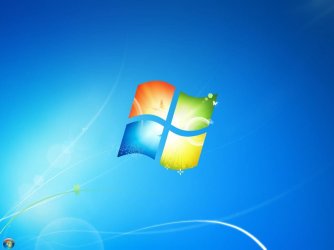
Here's a screenshot (I watched a video before and the player hung when going full screen, and then the task bar was gone. I can reboot and then it's back again, but I want to know if there is an option somewhere to get it back without rebooting?):
 

Attachments

  • Capture.JPG
    Capture.JPG
    39 KB · Views: 91

My Computer

Computer Manufacturer/Model Number
self built rig
OS
Windows 7 X64 Ultimate
CPU
Intel quad core Q9500
Motherboard
asrock 4core dual sata r2.0
Memory
2x1gig DDR Kingston valueram
Graphics Card(s)
asus x850 Platinum PE AGP
Sound Card
onboard realtek hd
Monitor(s) Displays
iiyama vision master 450
Hard Drives
seagate 1,5 tb 7200 RPM SATA
PSU
antec earthwatts 380
Case
antec 3 hundred
Cooling
standard case and cpy coolers

My Computer

Computer type
PC/Desktop
Computer Manufacturer/Model Number
Dell XPS 420
OS
Windows 10, Home Clean Install
CPU
Intel Core2 processsor Q8200(2.33Ghz 1333FSB) Quad Core Tech
Motherboard
Dell
Memory
6 gb
Graphics Card(s)
ATI Radeon 256MB HD3650
Sound Card
Intergrated 7.1 Channel Audio
Monitor(s) Displays
Dell SP2009W 20"
Hard Drives
640 GB Serial ATA Hard drive
Cooling
Fan
Keyboard
Dell USB Keyboard
Mouse
Dell Premium Optical USB
Internet Speed
DSL 2.85
I don't think I will find the answer on that page, it looks like it is invisible. I can still move the start button to the left right top and back to bottom.
 

My Computer

Computer Manufacturer/Model Number
self built rig
OS
Windows 7 X64 Ultimate
CPU
Intel quad core Q9500
Motherboard
asrock 4core dual sata r2.0
Memory
2x1gig DDR Kingston valueram
Graphics Card(s)
asus x850 Platinum PE AGP
Sound Card
onboard realtek hd
Monitor(s) Displays
iiyama vision master 450
Hard Drives
seagate 1,5 tb 7200 RPM SATA
PSU
antec earthwatts 380
Case
antec 3 hundred
Cooling
standard case and cpy coolers
Maybe it is a problem with my driver for my vidcard, then I have to be at ATi,AMD if they still support it.
 

My Computer

Computer Manufacturer/Model Number
self built rig
OS
Windows 7 X64 Ultimate
CPU
Intel quad core Q9500
Motherboard
asrock 4core dual sata r2.0
Memory
2x1gig DDR Kingston valueram
Graphics Card(s)
asus x850 Platinum PE AGP
Sound Card
onboard realtek hd
Monitor(s) Displays
iiyama vision master 450
Hard Drives
seagate 1,5 tb 7200 RPM SATA
PSU
antec earthwatts 380
Case
antec 3 hundred
Cooling
standard case and cpy coolers
Ill try again, then. In search type taskbar, there are ways to hide the task bar etc. Maybe one of those will help.Dont think it is the video card as things were working before the "incident"
 
Last edited:

My Computer

Computer type
PC/Desktop
Computer Manufacturer/Model Number
Dell XPS 420
OS
Windows 10, Home Clean Install
CPU
Intel Core2 processsor Q8200(2.33Ghz 1333FSB) Quad Core Tech
Motherboard
Dell
Memory
6 gb
Graphics Card(s)
ATI Radeon 256MB HD3650
Sound Card
Intergrated 7.1 Channel Audio
Monitor(s) Displays
Dell SP2009W 20"
Hard Drives
640 GB Serial ATA Hard drive
Cooling
Fan
Keyboard
Dell USB Keyboard
Mouse
Dell Premium Optical USB
Internet Speed
DSL 2.85
Here's a screenshot (I watched a video before and the player hung when going full screen, and then the task bar was gone. I can reboot and then it's back again, but I want to know if there is an option somewhere to get it back without rebooting?):
What player did you use and what format of the video was you wathcing (.MP4 etc.). Have you installed Codecs? Have you attempted to modify the System's theme?
 

My Computer

Computer Manufacturer/Model Number
Compal JFT02 (Custom Build Laptop)
OS
Windows 7 Home Premium x64 - Mac OS X 10.6.4 x64
CPU
Intel Core 2 Duo T9300 2.5 GHz
Motherboard
JFT02
Memory
4GB Kingston DDR2-800
Graphics Card(s)
NVIDIA Geforce 8600M GT (512MB Model)
Sound Card
Realtek HD Audio
Monitor(s) Displays
WUXGA Standard Laptop Display
Screen Resolution
1680*1050
Hard Drives
Toshiba 320GB 5400RPM Laptop HD
PSU
Standard Laptop Power Supply
Case
Standard Laptop Case
Cooling
Standard Laptop Cooling
Keyboard
Standard Laptop 105 Key-Keyboard
Mouse
Synaptics Touchpad
Internet Speed
Verizion Online DSL 3360/864 kbs (dl/up)
No need for a system restore, I can reboot and things are back to normal. But I just want to know if it's possible to get the taskbar back without rebooting, I want to know where the option is hidden!
 

My Computer

Computer Manufacturer/Model Number
self built rig
OS
Windows 7 X64 Ultimate
CPU
Intel quad core Q9500
Motherboard
asrock 4core dual sata r2.0
Memory
2x1gig DDR Kingston valueram
Graphics Card(s)
asus x850 Platinum PE AGP
Sound Card
onboard realtek hd
Monitor(s) Displays
iiyama vision master 450
Hard Drives
seagate 1,5 tb 7200 RPM SATA
PSU
antec earthwatts 380
Case
antec 3 hundred
Cooling
standard case and cpy coolers
I was using opensubtitles player, but used other players too. But it happened with the opensubtitles one, I don't know anymore if it happened with other players too. I was watching a HD serie, MPEG 4 Video (H264) 1280x720 23.98fps. The player is powered by ALLPlayer.
 

My Computer

Computer Manufacturer/Model Number
self built rig
OS
Windows 7 X64 Ultimate
CPU
Intel quad core Q9500
Motherboard
asrock 4core dual sata r2.0
Memory
2x1gig DDR Kingston valueram
Graphics Card(s)
asus x850 Platinum PE AGP
Sound Card
onboard realtek hd
Monitor(s) Displays
iiyama vision master 450
Hard Drives
seagate 1,5 tb 7200 RPM SATA
PSU
antec earthwatts 380
Case
antec 3 hundred
Cooling
standard case and cpy coolers
Can you do Ctrl-Alt-Delete? If you can Start Task Manger(Shortcut is Ctrl-Shift-Esc) Go to the processes tab and see if explorer.exe is in there..If it is not you can go to file (in task manger) and go to new task and type explorer.exe and hit enter...If it is there than you could end the process (You will get a warning) and start it again...That way you don't have to restart..

Hope this Helps...
 

My Computer

Computer Manufacturer/Model Number
HP Pavilion dv5 Notebook PC
OS
Windows Seven x64
CPU
2.2 GHz Dual Core
Motherboard
Quanta 3600
Memory
4GB
Graphics Card(s)
ATI Mobility RADEON HD 3470
Sound Card
ATI
Monitor(s) Displays
Laptop
Hard Drives
ATA Hitachi HTS543215 (5400RPM)
Case
Laptop
Cooling
Fan
Internet Speed
Basic DSL 1.5 up and Down
k that worked, damn I knew that already. It is still weird since it removes the start button first and then the taskbar reappears, I thought it must have been some new Windows 7 theme or smt. But thanks anyway.
 

My Computer

Computer Manufacturer/Model Number
self built rig
OS
Windows 7 X64 Ultimate
CPU
Intel quad core Q9500
Motherboard
asrock 4core dual sata r2.0
Memory
2x1gig DDR Kingston valueram
Graphics Card(s)
asus x850 Platinum PE AGP
Sound Card
onboard realtek hd
Monitor(s) Displays
iiyama vision master 450
Hard Drives
seagate 1,5 tb 7200 RPM SATA
PSU
antec earthwatts 380
Case
antec 3 hundred
Cooling
standard case and cpy coolers
Glad I could Help..:)
 

My Computer

Computer Manufacturer/Model Number
HP Pavilion dv5 Notebook PC
OS
Windows Seven x64
CPU
2.2 GHz Dual Core
Motherboard
Quanta 3600
Memory
4GB
Graphics Card(s)
ATI Mobility RADEON HD 3470
Sound Card
ATI
Monitor(s) Displays
Laptop
Hard Drives
ATA Hitachi HTS543215 (5400RPM)
Case
Laptop
Cooling
Fan
Internet Speed
Basic DSL 1.5 up and Down
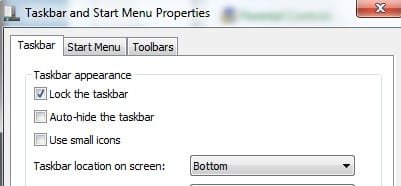
Make sure that "auto-Hide taskbar" isn't checked
 

Attachments

  • auto hide taskbar.jpg
    auto hide taskbar.jpg
    10.8 KB · Views: 4

My Computer

Computer type
PC/Desktop
Computer Manufacturer/Model Number
Bruce ... somewhere in his 40's
OS
Windows 7 Ultimate 32bit SP1
CPU
Intel(R) Core(TM)2 Quad CPU @ 2.40GHz, 2400 MHz
Motherboard
INTEL/D975XBX2
Memory
4 GB
Graphics Card(s)
ATI Radeon HD 2600 Pro
Monitor(s) Displays
Samsung SyncMaster 914v
Screen Resolution
1280 x 1024
Hard Drives
2/500GB each ... ST3500630AS ATA Device.
One is not connected
PSU
Rocketfish 700 W
Case
G.Skill Gigabyte Chassis
Keyboard
Standard PS/2 Keyboard
Mouse
Microsoft PS/2 Mouse
Internet Speed
DSL
Antivirus
Avira Internet Security
Browser
IE 11
Other Info
ATI HDMI Audio
Back
Top