Solved OOPS - complex possible failure

billm5

8+ year member
Member
Local time
9:38 AM
Messages
47
Location
Taxes... Dallas Taxes ;)
Came back here today planning to research disk space consumption and clean up any unnecessary stuff. prior to using Disk Cleanup. Machine has been stable for almost a year.

Got sidetracked. Found a thread that led me to run SFC/SCANNOW ... which seems to be consuming considerable resources. This is the ONLY machine I have access to; the only other thing I've done today is occasionally run Resource Monitor to see overall activity.

So far all I notice is a LOT of "pending renames" (in winsxs/Temp)

but the machine's using significant CPU (15-25%). all in:
explorer.exe /factory,{ceff45ee-c862-41de-aee2-a022c81eda92} -Embedding

(hand-typed and visually verified)

Have I hosed myself? Seems my only choice right now is to logoff here and hope things are OK... since I have no alternative access to this forum.
 

My Computer

Computer type
Laptop
Computer Manufacturer/Model Number
HP G56
OS
Windows 7 Home Premium 64-bit
CPU
Celeron 900
Memory
3GB
Mouse
Logitech M210 + K260 keyboard, cordless via USB
Internet Speed
Wi-fi constrained
Antivirus
MSSE (+ Malwarebytes)
Browser
Firefox 68, IE11, Chrome (in decreasing frequency of use)
Other Info
Fortunate enough to successfully apply monthly updates for several months... now VERY concerned about losing my device to 4515206 or 4474419. Advice??
Looks like I'm OK; successfully rebooted, all activity levels look normal.

Should I do anything about those "pending renames" or will they automagically flush themselves out?

They're all in c:\Windows\winsxs\Temp\PendingRenames ... all showing last-modified today; 1682 files totaling 35MB

I'm rather stunned at the size of winsxs itself... 78,184 files totalling 16.8GB; is that normal? (The vast majority are in winsxs\amd64_... probably related to having an an amd64 CPU)

(Thank God for a *stable* O/S!! :) )

Will follow-up with a question about what I should "clean up" manually before running Disk Cleanup. I recall that Disk Cleanup was kind-of a blunt object that should be used with caution rather than brute force.
 
Last edited:

My Computer

Computer type
Laptop
Computer Manufacturer/Model Number
HP G56
OS
Windows 7 Home Premium 64-bit
CPU
Celeron 900
Memory
3GB
Mouse
Logitech M210 + K260 keyboard, cordless via USB
Internet Speed
Wi-fi constrained
Antivirus
MSSE (+ Malwarebytes)
Browser
Firefox 68, IE11, Chrome (in decreasing frequency of use)
Other Info
Fortunate enough to successfully apply monthly updates for several months... now VERY concerned about losing my device to 4515206 or 4474419. Advice??
The machine's using significant CPU (15-25%). all in:
explorer.exe /factory,{ceff45ee-c862-41de-aee2-a022c81eda92} -Embedding

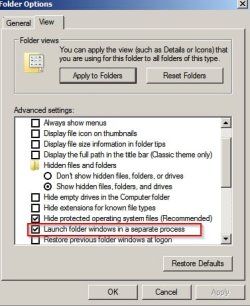
That is something to do with Folder Options if set like this:

Folder Options.jpg

Machine does use a little more memory if that option is set.

Recent log from my machine:

Code:
05/24/2017 00:04:02
Process: [1112] C:\Windows\explorer.exe
Username/Domain: Chris/PC
CommandLine: [B]C:\Windows\explorer.exe /factory,{ceff45ee-c862-41de-aee2-a022c81eda92} -Embedding[/B]
MD5 Hash: 38AE1B3C38FAEF56FE4907922F0385BA
Bitness: 64-bit
Publisher: Microsoft Corporation
Description: Windows Explorer
Version: 6.1.7601.23537
Integrity Level: High
System Process: False
Protected Process: False
Parent: [752] C:\Windows\System32\svchost.exe
Parent CommandLine: C:\Windows\system32\svchost.exe -k DcomLaunch


[Process Creation]

05/24/2017 00:04:14
Process: [2956] C:\Portable Apps\PaleMoon\Palemoon-Portable.exe
Username/Domain: Chris/PC
CommandLine: "C:\Portable Apps\PaleMoon\Palemoon-Portable.exe" 
MD5 Hash: 6159671D1D97140C7BDFD78F0C8554FD
Bitness: 32-bit
Integrity Level: High
Signer: Markus Straver
System Process: False
Protected Process: False
Parent: [1112] C:\Windows\explorer.exe
Parent CommandLine: [B]C:\Windows\explorer.exe /factory,{ceff45ee-c862-41de-aee2-a022c81eda92} -Embedding[/B]
 

My Computer

Computer type
Laptop
Computer Manufacturer/Model Number
ASUS
OS
Microsoft Windows 7 Home Premium 64-bit 7601 Multiprocessor Free Service Pack 1
CPU
AMD C-60 APU with Radeon(tm) HD Graphics
Motherboard
ASUSTeK COMPUTER INC. X501U
Memory
4.00 GB
Graphics Card(s)
AMD Radeon HD 6290 Graphics
Sound Card
(1) AMD High Definition Audio Device (2) Realtek High Defi
Screen Resolution
1366 x 768 x 32 bits (4294967296 colors) @ 60 Hz
Hard Drives
Hitachi HTS545050A7E380 SATA Disk Device
Antivirus
Comodo CIS & FW, SecureAplus App Whitelisting, Threatfire
Browser
Cyberfox 64bit, Opera 64bit, Airfox
Other Info
Spy-The-Spy, HitmanPro.Alert, Norton Connect Safe, MJRegWatcher, BitDefender TrafficLight, Voodoo Shield, Zemana AntiMalware
As for pending renames - I'd suggest leaving them alone and see if they get taken care of by trustedinstaller scavenge. Check the folder after a few more days have passed.

C:\Windows\winsxs\Temp\PendingRenames

Those pending remames are a bit of a mystery to me but can occur after SFC scan.
 

My Computer

Computer type
Laptop
Computer Manufacturer/Model Number
ASUS
OS
Microsoft Windows 7 Home Premium 64-bit 7601 Multiprocessor Free Service Pack 1
CPU
AMD C-60 APU with Radeon(tm) HD Graphics
Motherboard
ASUSTeK COMPUTER INC. X501U
Memory
4.00 GB
Graphics Card(s)
AMD Radeon HD 6290 Graphics
Sound Card
(1) AMD High Definition Audio Device (2) Realtek High Defi
Screen Resolution
1366 x 768 x 32 bits (4294967296 colors) @ 60 Hz
Hard Drives
Hitachi HTS545050A7E380 SATA Disk Device
Antivirus
Comodo CIS & FW, SecureAplus App Whitelisting, Threatfire
Browser
Cyberfox 64bit, Opera 64bit, Airfox
Other Info
Spy-The-Spy, HitmanPro.Alert, Norton Connect Safe, MJRegWatcher, BitDefender TrafficLight, Voodoo Shield, Zemana AntiMalware
Thanks! After the recent, long problem-free period, I'll start tracking this forum more regularly again!
(And I think I do have "Launch folder windows in a separate process" set ... out of an abundance of caution when multiple functions start sharing one process' address space.)
 

My Computer

Computer type
Laptop
Computer Manufacturer/Model Number
HP G56
OS
Windows 7 Home Premium 64-bit
CPU
Celeron 900
Memory
3GB
Mouse
Logitech M210 + K260 keyboard, cordless via USB
Internet Speed
Wi-fi constrained
Antivirus
MSSE (+ Malwarebytes)
Browser
Firefox 68, IE11, Chrome (in decreasing frequency of use)
Other Info
Fortunate enough to successfully apply monthly updates for several months... now VERY concerned about losing my device to 4515206 or 4474419. Advice??
Back
Top