
Open Command Window Here - Add or Remove

How to Add or Remove "Open Command Window Here" from Context Menu in Windows

   Information
This will show you how to add or remove Open Command Window Here from the context menu of the desktop, folders, and drives in Vista, Windows 7, and Windows 8.

You must be logged in as an administrator to be able to do the steps in this tutorial.


EXAMPLE: Open Command Window Here
NOTE: This is when you press and hold the Shift key and right click on a folder or drive, or right click on the desktop, to click on Open Command Window Here to open a command prompt with the focus at the folder or drive.
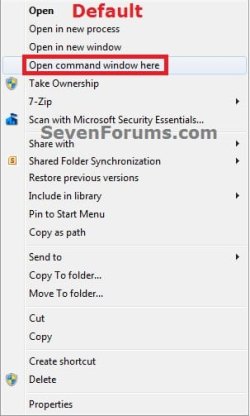
Default.jpgRemoved.jpg


Here's How:
1. To Add "Open Command Window Here" to Context Menu
NOTE: This is the default setting.
A) Click/tap on the Download button below to download the file below, and go to step 3 below.
Add_Open_Command_Window_Here.reg

Download


2. To Remove "Open Command Window Here" from Context Menu
A) Click/tap on the Download button below to download the file below, and go to step 3 below.
Remove_Open_Command_Window_Here.reg

Download


3. Save the .reg file to the desktop.

4. Double click/tap on the downloaded .reg file to merge it.

5. When prompted, click on Run, Yes (UAC-Windows 7/8) or Continue (UAC-Vista), Yes, and OK to approve merging the .reg file.

6. You can now delete the downloaded .reg file if you like.
That's it
Shawn


Attachments

Last edited:
IMO you should also include the

Code:
HKEY_CLASSES_ROOT\Directory\Background\shell
keys for a more complete solution.
 

My Computer

OS
Windows 7 Ultimate x64
Hello svnpenn,

It's not on the desktop context menu by default, but I added it just for you. :)
 

My Computer

Computer type
PC/Desktop
Computer Manufacturer/Model Number
Self built custom
OS
64-bit Windows 11 Pro for Workstations
CPU
Intel i7-8700K OC'd to 5 GHz
Motherboard
ASUS ROG Maximus XI Formula Z390
Memory
64 GB (4x16GB) G.SKILL TridentZ RGB DDR4 3600 MHz
Graphics Card(s)
ASUS ROG-STRIX-GTX1080TI-O11G-GAMING
Sound Card
Integrated
Monitor(s) Displays
2 x Samsung Odyssey G7 27"
Screen Resolution
2560x1440
Hard Drives
1TB Samsung 990 PRO M.2,
4TB Samsung 990 PRO PRO M.2,
TerraMaster F8 SSD Plus NAS
PSU
Seasonic Prime Titanium 850W
Case
Thermaltake Core P3
Cooling
Corsair Hydro H115i
Keyboard
Logitech wireless K800
Mouse
Logitech MX Master 4
Internet Speed
2 Gb/s Download and 100 Mb/s Upload
Antivirus
Malwarebyte Anti-Malware Premium
Browser
Google Chrome
Other Info
Logitech Z625 speaker system,
Logitech BRIO 4K Pro webcam,
HP Color LaserJet Pro MFP M477fdn,
APC SMART-UPS RT 1000 XL - SURT1000XLI,
Galaxy S23 Plus phone
Created SevenForums Account Just to Say "Thanks!"

Thanks for providing this extremely handy tool and guide!!
 

My Computer

Computer type
PC/Desktop
OS
Windows XP PRO, Windows 7 Ultimate, Ubuntu/Kubuntu Linux
You're most welcome. I'm glad it was helpful for you. :)
 

My Computer

Computer type
PC/Desktop
Computer Manufacturer/Model Number
Self built custom
OS
64-bit Windows 11 Pro for Workstations
CPU
Intel i7-8700K OC'd to 5 GHz
Motherboard
ASUS ROG Maximus XI Formula Z390
Memory
64 GB (4x16GB) G.SKILL TridentZ RGB DDR4 3600 MHz
Graphics Card(s)
ASUS ROG-STRIX-GTX1080TI-O11G-GAMING
Sound Card
Integrated
Monitor(s) Displays
2 x Samsung Odyssey G7 27"
Screen Resolution
2560x1440
Hard Drives
1TB Samsung 990 PRO M.2,
4TB Samsung 990 PRO PRO M.2,
TerraMaster F8 SSD Plus NAS
PSU
Seasonic Prime Titanium 850W
Case
Thermaltake Core P3
Cooling
Corsair Hydro H115i
Keyboard
Logitech wireless K800
Mouse
Logitech MX Master 4
Internet Speed
2 Gb/s Download and 100 Mb/s Upload
Antivirus
Malwarebyte Anti-Malware Premium
Browser
Google Chrome
Other Info
Logitech Z625 speaker system,
Logitech BRIO 4K Pro webcam,
HP Color LaserJet Pro MFP M477fdn,
APC SMART-UPS RT 1000 XL - SURT1000XLI,
Galaxy S23 Plus phone
Last edited by a moderator:

My Computer

Computer Manufacturer/Model Number
Custom
OS
Windows XP
CPU
Phenom X4 2.6GHz 140W
Motherboard
MSI K9A2 Platinum
Memory
Exceleram PC8500
Graphics Card(s)
ATI HD4350 + Zotac AMP 260
Sound Card
ALC888
Monitor(s) Displays
LG E2240
Hard Drives
Hitachi 500GB
Samsung 1.5TB
PSU
BQuiet 700W
Case
K400 3RSYS
Cooling
Fan CPU+NB+SB

My Computer

Computer type
PC/Desktop
Computer Manufacturer/Model Number
Self built custom
OS
64-bit Windows 11 Pro for Workstations
CPU
Intel i7-8700K OC'd to 5 GHz
Motherboard
ASUS ROG Maximus XI Formula Z390
Memory
64 GB (4x16GB) G.SKILL TridentZ RGB DDR4 3600 MHz
Graphics Card(s)
ASUS ROG-STRIX-GTX1080TI-O11G-GAMING
Sound Card
Integrated
Monitor(s) Displays
2 x Samsung Odyssey G7 27"
Screen Resolution
2560x1440
Hard Drives
1TB Samsung 990 PRO M.2,
4TB Samsung 990 PRO PRO M.2,
TerraMaster F8 SSD Plus NAS
PSU
Seasonic Prime Titanium 850W
Case
Thermaltake Core P3
Cooling
Corsair Hydro H115i
Keyboard
Logitech wireless K800
Mouse
Logitech MX Master 4
Internet Speed
2 Gb/s Download and 100 Mb/s Upload
Antivirus
Malwarebyte Anti-Malware Premium
Browser
Google Chrome
Other Info
Logitech Z625 speaker system,
Logitech BRIO 4K Pro webcam,
HP Color LaserJet Pro MFP M477fdn,
APC SMART-UPS RT 1000 XL - SURT1000XLI,
Galaxy S23 Plus phone
Something messed up this option on my computer, so I tried the .reg files here again, but they only partly helped. The menu now says "Open Command Window Here", whereas it used to just say "cmd", but choosing this item still shows an error box saying "This file does not have a program associated with it..."

I looked in the registry for relevant entries (before using these .reg files), and here's what I found:

Code:
[HKEY_CLASSES_ROOT\CLSID\{450D8FBA-AD25-11D0-98A8-0800361B1103}\shell\cmd]
@="@shell32.dll,-8506"
"Extended"=""
"NoWorkingDirectory"=""

[HKEY_CLASSES_ROOT\CLSID\{450D8FBA-AD25-11D0-98A8-0800361B1103}\shell\cmd\command]
@="cmd.exe /s /k pushd \"%V\""

[HKEY_CLASSES_ROOT\Drive\shell\cmd]
@="@shell32.dll,-8506"
"NoWorkingDirectory"=""

[HKEY_CLASSES_ROOT\Drive\shell\cmd\command]
@="cmd.exe /s /k pushd \"%V\""

[HKEY_CLASSES_ROOT\Wow6432Node\CLSID\{450D8FBA-AD25-11D0-98A8-0800361B1103}\shell\cmd]
@="@shell32.dll,-8506"
"Extended"=""
"NoWorkingDirectory"=""

[HKEY_CLASSES_ROOT\Wow6432Node\CLSID\{450D8FBA-AD25-11D0-98A8-0800361B1103}\shell\cmd\command]
@="cmd.exe /s /k pushd \"%V\""

[HKEY_LOCAL_MACHINE\SOFTWARE\Classes\CLSID\{450D8FBA-AD25-11D0-98A8-0800361B1103}\shell\cmd]
@="@shell32.dll,-8506"
"Extended"=""
"NoWorkingDirectory"=""

[HKEY_LOCAL_MACHINE\SOFTWARE\Classes\CLSID\{450D8FBA-AD25-11D0-98A8-0800361B1103}\shell\cmd\command]
@="cmd.exe /s /k pushd \"%V\""

[HKEY_LOCAL_MACHINE\SOFTWARE\Classes\Drive\shell\cmd]
@="@shell32.dll,-8506"
"NoWorkingDirectory"=""

[HKEY_LOCAL_MACHINE\SOFTWARE\Classes\Drive\shell\cmd\command]
@="cmd.exe /s /k pushd \"%V\""

[HKEY_LOCAL_MACHINE\SOFTWARE\Classes\Wow6432Node\CLSID\{450D8FBA-AD25-11D0-98A8-0800361B1103}\shell\cmd]
@="@shell32.dll,-8506"
"Extended"=""
"NoWorkingDirectory"=""

[HKEY_LOCAL_MACHINE\SOFTWARE\Classes\Wow6432Node\CLSID\{450D8FBA-AD25-11D0-98A8-0800361B1103}\shell\cmd\command]
@="cmd.exe /s /k pushd \"%V\""

[HKEY_LOCAL_MACHINE\SOFTWARE\Wow6432Node\Classes\CLSID\{450D8FBA-AD25-11D0-98A8-0800361B1103}\shell\cmd]
@="@shell32.dll,-8506"
"Extended"=""
"NoWorkingDirectory"=""

[HKEY_LOCAL_MACHINE\SOFTWARE\Wow6432Node\Classes\CLSID\{450D8FBA-AD25-11D0-98A8-0800361B1103}\shell\cmd\command]
@="cmd.exe /s /k pushd \"%V\""
What's wrong here?
 

My Computer

OS
Windows 7 Home Premium (64bit)
Hello TBugReporter, :)

Are you getting this "This file does not have a program associated with it..." for all .exe files?

As a test, you might see if downloading and merging the .reg file for the exe option in the tutorial below. It will restore the default associations for .exe files.

:ar: Default File Type Associations - Restore - Windows 7 Help Forums
 

My Computer

Computer type
PC/Desktop
Computer Manufacturer/Model Number
Self built custom
OS
64-bit Windows 11 Pro for Workstations
CPU
Intel i7-8700K OC'd to 5 GHz
Motherboard
ASUS ROG Maximus XI Formula Z390
Memory
64 GB (4x16GB) G.SKILL TridentZ RGB DDR4 3600 MHz
Graphics Card(s)
ASUS ROG-STRIX-GTX1080TI-O11G-GAMING
Sound Card
Integrated
Monitor(s) Displays
2 x Samsung Odyssey G7 27"
Screen Resolution
2560x1440
Hard Drives
1TB Samsung 990 PRO M.2,
4TB Samsung 990 PRO PRO M.2,
TerraMaster F8 SSD Plus NAS
PSU
Seasonic Prime Titanium 850W
Case
Thermaltake Core P3
Cooling
Corsair Hydro H115i
Keyboard
Logitech wireless K800
Mouse
Logitech MX Master 4
Internet Speed
2 Gb/s Download and 100 Mb/s Upload
Antivirus
Malwarebyte Anti-Malware Premium
Browser
Google Chrome
Other Info
Logitech Z625 speaker system,
Logitech BRIO 4K Pro webcam,
HP Color LaserJet Pro MFP M477fdn,
APC SMART-UPS RT 1000 XL - SURT1000XLI,
Galaxy S23 Plus phone
Are you getting this "This file does not have a program associated with it..." for all .exe files?

AFAICT, this has nothing to do with .exe files - or any files at all. When I right-click on a folder in the left pane of an Explorer window, I used to get a line that just said "cmd". After using the .reg file here, I now get "Open command window here" (in a different place in the menu than where "cmd" appeared before), but selecting that still gives the same ("file") error message as when I tried selecting "cmd" before. Another odd thing: I only get this option on the right-click menu for the left side of Explorer or for blank space on the desktop; right-clicking a folder in the right pane, or a folder on the desktop, doesn't show this option at all.
 

My Computer

OS
Windows 7 Home Premium (64bit)
Do you see the context menu when you press and hold the Shift key when you right click on a folder or desktop/folder background?

As a test, download and merge the .reg files for the Folder and Directory items in the tutorial below to see if that may help after restarting the computer.

:ar: Default File Type Associations - Restore - Windows 7 Help Forums
 

My Computer

Computer type
PC/Desktop
Computer Manufacturer/Model Number
Self built custom
OS
64-bit Windows 11 Pro for Workstations
CPU
Intel i7-8700K OC'd to 5 GHz
Motherboard
ASUS ROG Maximus XI Formula Z390
Memory
64 GB (4x16GB) G.SKILL TridentZ RGB DDR4 3600 MHz
Graphics Card(s)
ASUS ROG-STRIX-GTX1080TI-O11G-GAMING
Sound Card
Integrated
Monitor(s) Displays
2 x Samsung Odyssey G7 27"
Screen Resolution
2560x1440
Hard Drives
1TB Samsung 990 PRO M.2,
4TB Samsung 990 PRO PRO M.2,
TerraMaster F8 SSD Plus NAS
PSU
Seasonic Prime Titanium 850W
Case
Thermaltake Core P3
Cooling
Corsair Hydro H115i
Keyboard
Logitech wireless K800
Mouse
Logitech MX Master 4
Internet Speed
2 Gb/s Download and 100 Mb/s Upload
Antivirus
Malwarebyte Anti-Malware Premium
Browser
Google Chrome
Other Info
Logitech Z625 speaker system,
Logitech BRIO 4K Pro webcam,
HP Color LaserJet Pro MFP M477fdn,
APC SMART-UPS RT 1000 XL - SURT1000XLI,
Galaxy S23 Plus phone
Do you see the context menu when you press and hold the Shift key when you right click on a folder or desktop/folder background?

Oh, yeah, I forgot about that - soon after I got this computer, I did some other registry tweak (which I probably found here) so I wouldn't have to hit Shift to get to this, and because of that I forgot that it wasn't the normal way to do it.

And BTW, in the meantime, I installed some unrelated software that required a restart, and something about that seems to have re-enabled things. Thanks anyway, Shawn; I really appreciate the way you're always willing to dig into people's PC problems, no matter how strange or silly they might be; that's why I keep all your sites bookmarked.
 

My Computer

OS
Windows 7 Home Premium (64bit)
Great news. :party:
 

My Computer

Computer type
PC/Desktop
Computer Manufacturer/Model Number
Self built custom
OS
64-bit Windows 11 Pro for Workstations
CPU
Intel i7-8700K OC'd to 5 GHz
Motherboard
ASUS ROG Maximus XI Formula Z390
Memory
64 GB (4x16GB) G.SKILL TridentZ RGB DDR4 3600 MHz
Graphics Card(s)
ASUS ROG-STRIX-GTX1080TI-O11G-GAMING
Sound Card
Integrated
Monitor(s) Displays
2 x Samsung Odyssey G7 27"
Screen Resolution
2560x1440
Hard Drives
1TB Samsung 990 PRO M.2,
4TB Samsung 990 PRO PRO M.2,
TerraMaster F8 SSD Plus NAS
PSU
Seasonic Prime Titanium 850W
Case
Thermaltake Core P3
Cooling
Corsair Hydro H115i
Keyboard
Logitech wireless K800
Mouse
Logitech MX Master 4
Internet Speed
2 Gb/s Download and 100 Mb/s Upload
Antivirus
Malwarebyte Anti-Malware Premium
Browser
Google Chrome
Other Info
Logitech Z625 speaker system,
Logitech BRIO 4K Pro webcam,
HP Color LaserJet Pro MFP M477fdn,
APC SMART-UPS RT 1000 XL - SURT1000XLI,
Galaxy S23 Plus phone
Rather then all this, install "Ultimate Windows Tweaker V2.2.0.0" (I think V4 is for 64 bit.) There is a simple checkbox. under "Additional Tweaks:

I downloaded and installed the .reg files, they did not work.

The UWT did work.

Mark.
 

My Computer

Computer type
PC/Desktop
OS
Win7
Rather then all this, install "Ultimate Windows Tweaker V2.2.0.0" (I think V4 is for 64 bit.) There is a simple checkbox. under "Additional Tweaks:

I downloaded and installed the .reg files, they did not work.

The UWT did work.

Mark.

Hello Mark, :-)

No need to use a 3rd party program since this tutorial just makes a registry change for the context menu.
 

My Computer

Computer type
PC/Desktop
Computer Manufacturer/Model Number
Self built custom
OS
64-bit Windows 11 Pro for Workstations
CPU
Intel i7-8700K OC'd to 5 GHz
Motherboard
ASUS ROG Maximus XI Formula Z390
Memory
64 GB (4x16GB) G.SKILL TridentZ RGB DDR4 3600 MHz
Graphics Card(s)
ASUS ROG-STRIX-GTX1080TI-O11G-GAMING
Sound Card
Integrated
Monitor(s) Displays
2 x Samsung Odyssey G7 27"
Screen Resolution
2560x1440
Hard Drives
1TB Samsung 990 PRO M.2,
4TB Samsung 990 PRO PRO M.2,
TerraMaster F8 SSD Plus NAS
PSU
Seasonic Prime Titanium 850W
Case
Thermaltake Core P3
Cooling
Corsair Hydro H115i
Keyboard
Logitech wireless K800
Mouse
Logitech MX Master 4
Internet Speed
2 Gb/s Download and 100 Mb/s Upload
Antivirus
Malwarebyte Anti-Malware Premium
Browser
Google Chrome
Other Info
Logitech Z625 speaker system,
Logitech BRIO 4K Pro webcam,
HP Color LaserJet Pro MFP M477fdn,
APC SMART-UPS RT 1000 XL - SURT1000XLI,
Galaxy S23 Plus phone
I downloaded and installed the .reg files, they did not work.


Did you reboot after installing the registry edits? A log off may invoke the registry changes as well.
 

My Computer

Computer type
PC/Desktop
OS
Windows 7 Ultimate x64
Brink:
I leaned toward that registry solution first, I prefer doing it that way.
Of course there is always a risk of adding a registry entry downloaded from the internet, but I figured I am getting lazy in my old age.

The UWT is nice because it has a bunch of other little tweaks I like.

F22 Simpilot:
I did reboot to no avail.

Thanks both for the responses. People seem to snub their noses when asking for help with these older OS's like Win7. OMG you should hear the guys on the Ubuntu site when I ask for help with V16. It's only 5 years old.
 

My Computer

Computer type
PC/Desktop
OS
Win7
Brink:

Of course there is always a risk of adding a registry entry downloaded from the internet...


With a registry file you can rename it to a txt file and see what entries are added or deleted to the registry. Or you can install Notepad++, right click the registry file and open with Notepad++. I always do that with registry files and batch files to see what they do. For everything else I download I scan it at Virus Total. Depending on what it is, four hits and you toss.
 

My Computer

Computer type
PC/Desktop
OS
Windows 7 Ultimate x64
Back
Top