- Local time
- 3:28 PM
- Messages
- 275
how do u open MS Security essential in a window from command line?
My Computer
- Computer Manufacturer/Model Number
- MP Mini Netbook 110
- OS
- Win7 Starter 32 bits

To open the MSE window try this Command
"C:\Program Files\Microsoft Security Client\msseces.exe"
This file location is for Win 7 x64 / MSE ver 4

Hello fluidmotion,
You might see if the paths used in the shortcuts in the tutorials below will work for you as well.
(For just MSE itself)
%ProgramFiles%\Microsoft Security Client\msseces.exe
Hope this helps,
- http://www.sevenforums.com/tutorial...ssentials-cascading-desktop-context-menu.html
- http://www.sevenforums.com/tutorial...ity-essentials-full-scan-create-shortcut.html
- http://www.sevenforums.com/tutorial...rity-essentials-settings-create-shortcut.html
- http://www.sevenforums.com/tutorial...curity-essentials-update-create-shortcut.html
- http://www.sevenforums.com/tutorial...ntials-update-quick-scan-create-shortcut.html
- http://www.sevenforums.com/tutorial...ty-essentials-quick-scan-create-shortcut.html
Shawn
I don't have Starter, but you can search for msseces.exe to find the file location on your system.
You do need to wrap the command in the double quotes (as shown).
What version of MSE do you have? (Version 4 is the latest version.)
Do you have Real Time protection enabled? (MSE starts when Windows starts)
Please clarify what "That did not work" means.
What happens, what error message(s) do you get, can you post screen prints of the error(s) ... ?
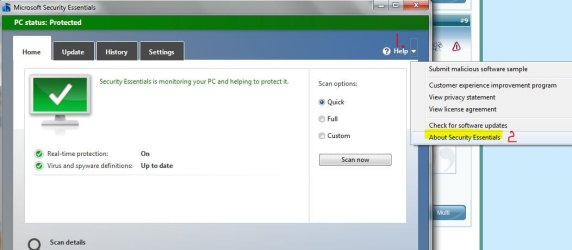
how do u find version of MSE?

thank u,
worked!
Hello fluidmotion,
You might see if the paths used in the shortcuts in the tutorials below will work for you as well.
(For just MSE itself)
%ProgramFiles%\Microsoft Security Client\msseces.exe
Hope this helps,
- http://www.sevenforums.com/tutorial...ssentials-cascading-desktop-context-menu.html
- http://www.sevenforums.com/tutorial...ity-essentials-full-scan-create-shortcut.html
- http://www.sevenforums.com/tutorial...rity-essentials-settings-create-shortcut.html
- http://www.sevenforums.com/tutorial...curity-essentials-update-create-shortcut.html
- http://www.sevenforums.com/tutorial...ntials-update-quick-scan-create-shortcut.html
- http://www.sevenforums.com/tutorial...ty-essentials-quick-scan-create-shortcut.html
Shawn
how do u find version of MSE?
Open MSE. Click on small down arrow next to Help > click on About Security Essentials. Another dialog box will open with current MSE info.
View attachment 221304 View attachment 221305

