Open Office?

DirtyElf

///M3
Power User
Local time
7:39 PM
Messages
556
Location
Orlando, FL
I don't need a full office suite, so I was considering going with the free open office for my small word processing and spreadsheet needs. What I would like it for it to be compatible with MS word in case I decide to upgrade one day, or if I need to transfer files from my computer to a friends' or family members' who has MS word.

Just wondering if anyone has any experience with the two.

Thanks.
 

My Computer

Computer type
PC/Desktop
Computer Manufacturer/Model Number
My First Build
OS
Windows 7 64-bit Home
CPU
Intel Core i7-870 Lynnfield 2.93 Ghz
Motherboard
Asus P7P55D-E Pro
Memory
8GB 4x2 A-Data 1333 Mhz
Graphics Card(s)
HIS Radeon HD 5850 1GB
Sound Card
Onboard
Monitor(s) Displays
Dell S2440L 24"
Screen Resolution
1080p
Hard Drives
120 GB Intel X25-M SATA Solid State Drive ///
1 TB Western Digital Caviar Black SATA 6gb/s 7200rpm Drive
PSU
Corsair 650TX 650 Watt
Case
Antec Three Hundred
Cooling
Stock Intel /// 4 Antec Case Fans /// NZXT Sentry-2
Keyboard
Logitech LX 710
Mouse
Logitech LX 710
Other Info
LG Blu-Ray Drive
Open office is suppose to be fully compatible with MS Word. It is a choice that is made by many here.
 

My Computer

Computer type
PC/Desktop
Computer Manufacturer/Model Number
Dell XPS 420
OS
Windows 10, Home Clean Install
CPU
Intel Core2 processsor Q8200(2.33Ghz 1333FSB) Quad Core Tech
Motherboard
Dell
Memory
6 gb
Graphics Card(s)
ATI Radeon 256MB HD3650
Sound Card
Intergrated 7.1 Channel Audio
Monitor(s) Displays
Dell SP2009W 20"
Hard Drives
640 GB Serial ATA Hard drive
Cooling
Fan
Keyboard
Dell USB Keyboard
Mouse
Dell Premium Optical USB
Internet Speed
DSL 2.85
I have both installed ( MS office on a trial) and Open Office full suite and have never had any problems switching documents between the two.

Danny
 

My Computer

Computer Manufacturer/Model Number
acer aspire 5935g
OS
Windows 7 Home Premium x64 SP1
CPU
intel(R)core(TM)2 duo CPU T6600 @ 2.20GHz
Motherboard
intel gm45/gm47 revision 07
Memory
3 gb ddr3
Graphics Card(s)
ati radeon hd4570/512mb
Monitor(s) Displays
lop156wh2-tle1 15.3 flat
Screen Resolution
1366x768
Hard Drives
OCZ-Agility3 60gig ssd
320gig external hdd
500gig external hdd
Mouse
Optical
Internet Speed
30Mbps Down/30Mbps Up
excellent, thanks guys. going to give open office a try and if i feel i need more, ill grab a copy of ms office
 

My Computer

Computer type
PC/Desktop
Computer Manufacturer/Model Number
My First Build
OS
Windows 7 64-bit Home
CPU
Intel Core i7-870 Lynnfield 2.93 Ghz
Motherboard
Asus P7P55D-E Pro
Memory
8GB 4x2 A-Data 1333 Mhz
Graphics Card(s)
HIS Radeon HD 5850 1GB
Sound Card
Onboard
Monitor(s) Displays
Dell S2440L 24"
Screen Resolution
1080p
Hard Drives
120 GB Intel X25-M SATA Solid State Drive ///
1 TB Western Digital Caviar Black SATA 6gb/s 7200rpm Drive
PSU
Corsair 650TX 650 Watt
Case
Antec Three Hundred
Cooling
Stock Intel /// 4 Antec Case Fans /// NZXT Sentry-2
Keyboard
Logitech LX 710
Mouse
Logitech LX 710
Other Info
LG Blu-Ray Drive
I have never seen any complaints about Open Office. I think that you will be very happy.
 

My Computer

Computer type
PC/Desktop
Computer Manufacturer/Model Number
Dell XPS 420
OS
Windows 10, Home Clean Install
CPU
Intel Core2 processsor Q8200(2.33Ghz 1333FSB) Quad Core Tech
Motherboard
Dell
Memory
6 gb
Graphics Card(s)
ATI Radeon 256MB HD3650
Sound Card
Intergrated 7.1 Channel Audio
Monitor(s) Displays
Dell SP2009W 20"
Hard Drives
640 GB Serial ATA Hard drive
Cooling
Fan
Keyboard
Dell USB Keyboard
Mouse
Dell Premium Optical USB
Internet Speed
DSL 2.85
excellent, thanks guys. going to give open office a try and if i feel i need more, ill grab a copy of ms office

I think alot of people here are using it more than even MS office.

Good Luck

Danny
 

My Computer

Computer Manufacturer/Model Number
acer aspire 5935g
OS
Windows 7 Home Premium x64 SP1
CPU
intel(R)core(TM)2 duo CPU T6600 @ 2.20GHz
Motherboard
intel gm45/gm47 revision 07
Memory
3 gb ddr3
Graphics Card(s)
ati radeon hd4570/512mb
Monitor(s) Displays
lop156wh2-tle1 15.3 flat
Screen Resolution
1366x768
Hard Drives
OCZ-Agility3 60gig ssd
320gig external hdd
500gig external hdd
Mouse
Optical
Internet Speed
30Mbps Down/30Mbps Up
I use OOo writer and calc.

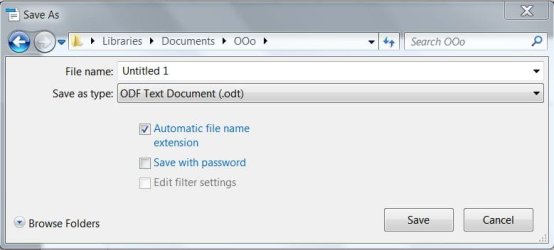
You can change to any "Save as Type" file, but leave the "Automatic file name extension" checked.

I unchecked it once, and found out on their forum that, that was the reason why MS Word and Xcel could not work with the OOo file.

I haven't had to visit the forum in a while, but they are current, reasonably quick to respond, and friendly. Forum at OOoForum.org
 

Attachments

  • 7fwriter.JPG
    7fwriter.JPG
    31.4 KB · Views: 6

My Computer

Computer type
PC/Desktop
Computer Manufacturer/Model Number
Gateway DX4831-01e (Mid-Tower Desktop)
OS
Originally Win 7 Hm Prem x64 Ver 6.1.7600 Build 7601-SP1 | Upgraded to Windows 10 December 14, 2019
CPU
Intel i3 530 2.93GHz, 2933MHz 2 Cores 4 Logical Processors
Motherboard
Gateway H57M01 133 megahertz
Memory
6GB of 1,333MHz DDR3 SDRAM
Graphics Card(s)
32MB Intel Graphics Media Accelerator HD IGChip
Sound Card
Realtek High Definition Audio
Monitor(s) Displays
Gateway HX2000 20inch TFT active matrix TN
Screen Resolution
1600 x 900 x 59 hertz
Hard Drives
WDC WD10EADS-00M2B0 [HDD] (1000.20 GB) -- drive 0,
HL-DT-ST DVDRAM GH41N [CD-ROM dr]
Four card readers, and Four USB 2.0
PSU
300watts.
Case
Mid-Tower Desktop
Cooling
Stock from Gateway
Keyboard
Natural Ergonomic Keyboard 4000, see Other Info
Mouse
Orig. Gateway wore out now using Insignia USB wired optical
Internet Speed
Vz FIOS 10ms png 57.64Mbps down 65.53Mbps up Speedtest.org
Antivirus
Zamana Anti-logger with Anti-malware, MSE, Windows Firewall,
Browser
IE11.0.9600.19399-Upd ver11.0.135, Firefox 68.0.1 x64
Other Info
System Specs by Belarc.

BIOS: American Megatrends Inc. P01-A0 11/17/2009

Replaced the MS 'Natural' Standard PS/2 Enhanced 101-102 Keyboard with a new Natural Ergonomic Keyboard 4000 on August 1st 2014.

Canon Pixma MG3222 Printer.

Updated to IE11 on 12102015 | Fios Quantum Router g1100

Additional AV: SpywareBlaster, manual Mbam, SAS
The only thing that is not compatible between the both (and probably never will be) is the scripting language (that you use for Macros )
It's because of licensing issues with VB that Open Office uses a different dialect.
So you might run into problems if you create extensive spreadsheets and want to switch at some point.
It is not really difficult to rewrite those macros in the other dialect but you have to be aware of the fact that those documents/spread sheets that include any kind of macros will not work as expected without manual intervention no matter what direction to switch to.
That being said , I used both for decades and never ran into anything that wasn't easily resolved.

-DG
 

My Computer

Computer Manufacturer/Model Number
HP m8000n
OS
Windows 7 Ultimate x86
CPU
DualCore AMD Athlon 64 X2, 2600 MHz 5200+
Motherboard
Asus M2N68-LA (Narra)
Memory
Samsung 2GB DDR2
Graphics Card(s)
Onboard NVIDIA GeForce 6150SE nForce 430
Sound Card
Onboard nVIDIA nForce 6100-430 (MCP61P)
Monitor(s) Displays
Westinghouse 19" LED
Screen Resolution
1280x1024
Hard Drives
SATA II Seagate Barracuda 500GB
USB II WD Elements 500GB
USB II WD My Book 1TB
USB II WD My Book 2TB
PSU
Stock (HP)
Case
Stock (HP)
Cooling
Stock
Keyboard
Logitech Classic KB 200
Mouse
Standard HP opticle USB mouse
There was a point, about a year or so ago for me when I had neither installed. Wanting to save some cash I installed OO. I used it to write up a report for one of my University classes. Took the file on a flash drive to class on Monday, opened the .doc file in Office 2007 (university only uses MS Office.) The formatting looked all out of joint, so I ended spending half an hour correcting it to the standard format required by the University. Admittedly this was over a year ago, maybe OO formatting perfectly converts between MS Office and OO itself now? I ended up buying MS Office :o

I have both installed ( MS office on a trial) and Open Office full suite and have never had any problems switching documents between the two.

Danny
 

My Computer

Computer Manufacturer/Model Number
HP DV6 1330sa
OS
Windows 7 Professional 64 Bit SP1
CPU
INTEL DUAL CORE 2.1Ghz
Motherboard
N/A
Memory
4GB DDR3
Graphics Card(s)
INTEL
Sound Card
LAPTOP
Monitor(s) Displays
2
Screen Resolution
3200x1080
Hard Drives
250GB
PSU
LAPTOP
Case
LAPTOP
Cooling
LAPTOP
Keyboard
SOLID YEAR 260U
Mouse
USB
Internet Speed
20 MB/S
You could also use the Office Web Apps that come free with any Windows Live account (also free). They might be a bit basic for your needs though, but maybe worth a look
 

My Computer

Computer Manufacturer/Model Number
Vostro
OS
Windows 7 Ultimate (SP1)
CPU
AMD Sempron 3600+
Graphics Card(s)
ATI Radeon Xpress 1150
Screen Resolution
1200 x 800
Hard Drives
WD Scorpio Blue 500 GB
You can even edit and revise any Microsoft Access database in Open Office base flawlessly....

1. From Microsoft Access export database into DBase format.

2. Open DBase format file with Open Office (it will be a calc file).

3. For database, connect to the Database as above. (May not see the file so create a directory for it and connect to that directory).

4. Click on table and the file should be there.

5. Open it and do what you will! The numbers add 3 zeros, but otherwise the same.

6. To print, must create Form or Report.
 

My Computer

Computer Manufacturer/Model Number
Acer Aspire AX3910-U3012 PT
OS
Windows 7 Home Premium 64 bit
CPU
Intel Pentium E5700
Memory
640GB HDD
Graphics Card(s)
Integrated Graphics
Sound Card
Integrated Audio
Monitor(s) Displays
Acer
I use Open Office on my Linux which often comes preinstalled with it anyway, though the only one I've exploited much is Open Office.org Word Processor, yes, its just fine as it would support formats from MS Word but on the version I had of Open Office (on a Linux), it is set to save your work to .odt format which is to my knowledge, is unsupported by MS Word but you can choose to save to another format like doc, docx, rtf. However if you worked on MS Word to put some designs, bullets and some other enhancement effects, you might find those things unsupported by Open Office.

So here's my verdict on Open Office:

The Good:


1. Its Free.
2. It has lots of features that you might just find useful.
3. It supports formats that you usually save your MS Office works with.
4. It also comes with a portable build that can be installed on a flashdrive then used on another computer which doesn't install as much components in your computer and its registry. (MS Office suite installs thousands of keys in the registry.)

The Bad:


1. It just look unpolished compared to MS Office that if you got yourself hooked with MS Office's ribbon interface, eye candy icons and visual effects, you might find working on Open Office to be uneasy and you might think it sucks.

2. Its just not as technically advanced as MS Office as some apps on MS Office would immediately present beautiful templates to work with. Of course MS Office users would need some time to adjust themselves to Open Office.

3. The portable build of Open Office that I got was very prone to crashes on Windows 7, that I decided to take it out and put it on my flashdrive instead.

But overall, its just fair to use but it remains your choice.
 

My Computer

Computer Manufacturer/Model Number
Custom Built
OS
Windows 7 Ultimate 32 Bit, Windows Developer Preview, Linux Mint 9 Gnome 32 Bit
CPU
Intel Pentium Dual CPU E2180@2GHz
Motherboard
Elitegroup 671T-M3
Graphics Card(s)
NVIDIA GeForce 7200 GS
Monitor(s) Displays
AOC TFT1560 15" LCD Monitor
Screen Resolution
1024x768
Keyboard
Logitech USB Keyboard
Hi. I'm Ken, and I'm a former OOo user.

I used OOo for years, but I had some problems with formatting in Word docs and Powerpoint presentations.

Grudgingly, I tried Office 2010. It was better than my 2007 trial. When MS brought out the Home & Student 3-pack, I thought the cost per license was reasonable, so I bought it.

Now that I think about it...I think the only reason I had to switch to MS is because I couldn't convince OTHER people to switch to OOo. :cry:
 

My Computer

Computer Manufacturer/Model Number
Woz Special (home-built)
OS
Windows 7 Ultimate 64 Steve Ballmer Signature (jealous???)
CPU
i7 920
Motherboard
Asus P6T
Memory
G.SKILL 6 GB DDR3 1600
Graphics Card(s)
GeForce GTS 250 1 GB
Sound Card
Realtek integrated
Monitor(s) Displays
Acer 23" LCD
Screen Resolution
1920x1080
Hard Drives
Not enough space to list 'em all.
PSU
Kingwin Mach 1 800 Watt
Case
Antec SX1030B (yes...it's old)
Cooling
Stock CPU and GPU, 2x 80mm and 1x 120mm case fans
Keyboard
Logitech illuminated slim
Mouse
Logitech MX518
Internet Speed
1.5 DSL
Back
Top