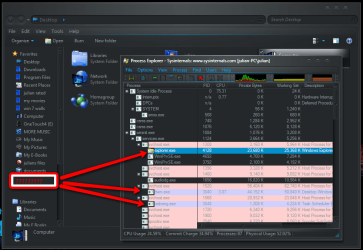
for the last few days i have been experiencing a strange occurrence when i boot my pc there is an open window called desktop ,its odd because i haven't set any windows to open on start up, anyone any ideas
My Computer
Computer Manufacturer/Model Number
Hewlett packard/p6512uk
OS
Microsoft Windows 7 Home Premium 64-bit 7600
CPU
IIx4 amd athelon 635 processor
Motherboard
FOXCONN 2AA9
Memory
2x2gb
Graphics Card(s)
ati radeon HD 5450
Sound Card
(1) Realtek High Definition Audio (2) AMD High Definition
Monitor(s) Displays
samsung lcd tv 32"
Screen Resolution
1360x 768
Hard Drives
(1) WDC WD10 01FAES-60Z2A0 SATA Disk Device (2) Maxtor OneTouch USB Device (3) ST310003 33AS USB Device (4) WD My Book 1111 USB Device
Navigate to any of the following path according to your requirement and then add a new “String key” and store path of the Program to be run in this key’s value.
For Local Machine-
HKEY_LOCAL_MACHINE\Software\Microsoft\Windows\Curr entVersion\Run
HKEY_LOCAL_MACHINE\Software\Microsoft\Windows\Curr entVersion\RunOnce
For Current User-
HKEY_CURRENT_USER\Software\Microsoft\Windows\Curre ntVersion\Run
HKEY_CURRENT_USER\Software\Microsoft\Windows\Curre ntVersion\RunOnce
thanks i tried the start up items list via control panel / administrative tools / system configuration/ start up tab.
but i couldn't see anything for desktop window the only thing related was microsoft operating system and i'm not sure i should disable that from startup
My Computer
Computer Manufacturer/Model Number
Hewlett packard/p6512uk
OS
Microsoft Windows 7 Home Premium 64-bit 7600
CPU
IIx4 amd athelon 635 processor
Motherboard
FOXCONN 2AA9
Memory
2x2gb
Graphics Card(s)
ati radeon HD 5450
Sound Card
(1) Realtek High Definition Audio (2) AMD High Definition
Monitor(s) Displays
samsung lcd tv 32"
Screen Resolution
1360x 768
Hard Drives
(1) WDC WD10 01FAES-60Z2A0 SATA Disk Device (2) Maxtor OneTouch USB Device (3) ST310003 33AS USB Device (4) WD My Book 1111 USB Device
If it's only a few days, the System Restore option would be the best option. Remember, by using a recent restore point, you won't loose any data. It only edits the system files.
Bill
My Computer
Computer type
PC/Desktop
Computer Manufacturer/Model Number
Custom Built
OS
Windows 7 Enterprise x64
CPU
i7-5820K
Motherboard
Asus X99 A
Memory
16GB DDR4
Graphics Card(s)
ASUS 2GB Nvidia 960GTX OC'd
Monitor(s) Displays
24"
Screen Resolution
1920x1080
Hard Drives
Samsung 1TB 840 SSD
Western Digital 1TB Black Drive
Seagate 2TB NAS Drive
bill thanks for the google advice however as a member of sevenforums i like to give my fellow windows 7 users the odd challenge now and then it also allows us to build a database of issues fixed / solved or otherwise for members and guests to search and hopefully help them ,
kucing13 do you mean the checkbox list in organise/folders and search options view tab if so my view hidden folders is set to off
My Computer
Computer Manufacturer/Model Number
Hewlett packard/p6512uk
OS
Microsoft Windows 7 Home Premium 64-bit 7600
CPU
IIx4 amd athelon 635 processor
Motherboard
FOXCONN 2AA9
Memory
2x2gb
Graphics Card(s)
ati radeon HD 5450
Sound Card
(1) Realtek High Definition Audio (2) AMD High Definition
Monitor(s) Displays
samsung lcd tv 32"
Screen Resolution
1360x 768
Hard Drives
(1) WDC WD10 01FAES-60Z2A0 SATA Disk Device (2) Maxtor OneTouch USB Device (3) ST310003 33AS USB Device (4) WD My Book 1111 USB Device
hello boohbah, I usually have Process Explorer installed on every computer I touch. One of its best features is a Target icon (looks like crosshairs) that can tell you what window is on the screen.
run it during startup and when you see the window pop up, click on the target Icon and then click on the window.
Process Explorer will then move to the line item in its list of what is creating or using that window.
My Computer
Computer type
Laptop
Computer Manufacturer/Model Number
ASUS G60-RBBX05
OS
Win7 Home Premium 64x
CPU
Intel Core 2 Duo P7450 / 2.13 GHz (2.29 with Extreme Turbo)
Memory
4 GB PC-6400 Hyundai (2X2) at 800Mhz
Graphics Card(s)
NVIDIA GeForce GTX 260M 1GB DDR3 VRAM
Monitor(s) Displays
16" LED Backlit
Screen Resolution
1366 x 768 on laptop 1600x1050 max res on 22" external mon
kucing13 ta scannow is a nuisance as i have my windows heavily themed and scannow repairs it back to basic windows forcing me to re hack my system files and themes folders etc but thanks for input
My Computer
Computer Manufacturer/Model Number
Hewlett packard/p6512uk
OS
Microsoft Windows 7 Home Premium 64-bit 7600
CPU
IIx4 amd athelon 635 processor
Motherboard
FOXCONN 2AA9
Memory
2x2gb
Graphics Card(s)
ati radeon HD 5450
Sound Card
(1) Realtek High Definition Audio (2) AMD High Definition
Monitor(s) Displays
samsung lcd tv 32"
Screen Resolution
1360x 768
Hard Drives
(1) WDC WD10 01FAES-60Z2A0 SATA Disk Device (2) Maxtor OneTouch USB Device (3) ST310003 33AS USB Device (4) WD My Book 1111 USB Device
Its also used to allow Aero so I dont think disabling it will help.
So you might be looking at this issue due to your use of themes. does this pop up in Safe mode or on any other user accounts. What theme are you using?
I dont know why this would cause a desktop window to open on startup though.
My Computer
Computer type
Laptop
Computer Manufacturer/Model Number
ASUS G60-RBBX05
OS
Win7 Home Premium 64x
CPU
Intel Core 2 Duo P7450 / 2.13 GHz (2.29 with Extreme Turbo)
Memory
4 GB PC-6400 Hyundai (2X2) at 800Mhz
Graphics Card(s)
NVIDIA GeForce GTX 260M 1GB DDR3 VRAM
Monitor(s) Displays
16" LED Backlit
Screen Resolution
1366 x 768 on laptop 1600x1050 max res on 22" external mon
Can you make sure this program is running from the System32 folder. I see you have two of them running.
Also,you can highlight the SCVhost that is running the explorer process and see what services it is calling. One of these services might be launching the window.
My Computer
Computer type
Laptop
Computer Manufacturer/Model Number
ASUS G60-RBBX05
OS
Win7 Home Premium 64x
CPU
Intel Core 2 Duo P7450 / 2.13 GHz (2.29 with Extreme Turbo)
Memory
4 GB PC-6400 Hyundai (2X2) at 800Mhz
Graphics Card(s)
NVIDIA GeForce GTX 260M 1GB DDR3 VRAM
Monitor(s) Displays
16" LED Backlit
Screen Resolution
1366 x 768 on laptop 1600x1050 max res on 22" external mon