Open With Context Menu Item - Add or Remove

How to Add or Remove the "Open with" Context Menu Item in Windows

   Information
This will show you how to add or remove the Open with right click context menu item of all files in Vista, Windows 7, and Windows 8.

You must be logged in as an administrator to be able to do the steps in this tutorial.

   Note
A default program is the program that Windows uses when you open a particular type of file extension. Open with allows you to change a file type to open with a different default program for just this one time or always using the context menu in Windows.

Removing Open with from the context menu can make it easier to prevent all users on the computer from accidentally have a file extension type assigned a wrong default program to be opened with by default.


EXAMPLE: Open with Context Menu Item for Files
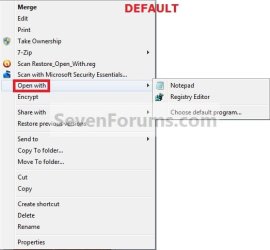
Open_with_Default.jpgOpen_with_Removed.jpg


Here's How:
1. To Remove "Open with" from the Context Menu
A) Click/tap on the Download button below to download the file below, and go to step 3 below.
Remove_Open_With.reg

Download


2. To Add "Open with" Back to the Context Menu
NOTE: This is the default setting.
A) Click/tap on the Download button below to download the file below, and go to step 3 below.
Restore_Open_With.reg

Download


3. Save the .reg file to the desktop.

4. Double click/tap on the downloaded .reg file to merge it.

5. When prompted, click/tap on Run, Yes (UAC-Windows 7/8) or Continue (UAC-Vista), Yes, and OK to approve merging the .reg file.

6. You can now delete the downloaded .reg file if you like.

That's it,
Shawn


Attachments

Last edited:
Restore 'Open With' Context Menu Item

My system: Win 7 Pro 64 bit. I'm the Administrator & the only user. I can't get Open With item into Context Menus (not with by The Shift process). I ran Restore_Open_With.reg (Merge), rebooted.
Still no Open With. Would appreciate help. Thank you.
 

My Computer

Computer Manufacturer/Model Number
Custom
OS
windows 7 Pro, 64 bit
CPU
Intel Core i5-750
Motherboard
Gigabyte GA-P55A-UD3P
Memory
Corsair Dominator 4GB
Graphics Card(s)
ATI Radeon HD 5750
Sound Card
On board
Monitor(s) Displays
DELL
Hard Drives
Western Digital Caviar 1TB
PSU
Corsair 750W
Case
Coolermaster Storm Sniper
Cooling
Case fans (4)
Hello Ivsunz37,

What file extension does the file have that you are trying to use Open With on?

Did you mean that you only have Open With if you press and hold Shift when you right click?
 

My Computer

Computer type
PC/Desktop
Computer Manufacturer/Model Number
Self built custom
OS
64-bit Windows 11 Pro for Workstations
CPU
Intel i7-8700K OC'd to 5 GHz
Motherboard
ASUS ROG Maximus XI Formula Z390
Memory
64 GB (4x16GB) G.SKILL TridentZ RGB DDR4 3600 MHz
Graphics Card(s)
ASUS ROG-STRIX-GTX1080TI-O11G-GAMING
Sound Card
Integrated
Monitor(s) Displays
2 x Samsung Odyssey G7 27"
Screen Resolution
2560x1440
Hard Drives
1TB Samsung 990 PRO M.2,
4TB Samsung 990 PRO PRO M.2,
TerraMaster F8 SSD Plus NAS
PSU
Seasonic Prime Titanium 850W
Case
Thermaltake Core P3
Cooling
Corsair Hydro H115i
Keyboard
Logitech wireless K800
Mouse
Logitech MX Master 4
Internet Speed
2 Gb/s Download and 100 Mb/s Upload
Antivirus
Malwarebyte Anti-Malware Premium
Browser
Google Chrome
Other Info
Logitech Z625 speaker system,
Logitech BRIO 4K Pro webcam,
HP Color LaserJet Pro MFP M477fdn,
APC SMART-UPS RT 1000 XL - SURT1000XLI,
Galaxy S23 Plus phone
Restore Context Menu Open With Item

Brink,
I got it to work- rebooted, uninstalled (via System Restore), then re-installed.
Was trying on .bin file extension.
Could not get Open With even when using Shift with rite click.

All seems OK now. Thanks much.
 

My Computer

Computer Manufacturer/Model Number
Custom
OS
windows 7 Pro, 64 bit
CPU
Intel Core i5-750
Motherboard
Gigabyte GA-P55A-UD3P
Memory
Corsair Dominator 4GB
Graphics Card(s)
ATI Radeon HD 5750
Sound Card
On board
Monitor(s) Displays
DELL
Hard Drives
Western Digital Caviar 1TB
PSU
Corsair 750W
Case
Coolermaster Storm Sniper
Cooling
Case fans (4)
That's great news Ivsunz. I'm happy to hear that you got it sorted. :)
 

My Computer

Computer type
PC/Desktop
Computer Manufacturer/Model Number
Self built custom
OS
64-bit Windows 11 Pro for Workstations
CPU
Intel i7-8700K OC'd to 5 GHz
Motherboard
ASUS ROG Maximus XI Formula Z390
Memory
64 GB (4x16GB) G.SKILL TridentZ RGB DDR4 3600 MHz
Graphics Card(s)
ASUS ROG-STRIX-GTX1080TI-O11G-GAMING
Sound Card
Integrated
Monitor(s) Displays
2 x Samsung Odyssey G7 27"
Screen Resolution
2560x1440
Hard Drives
1TB Samsung 990 PRO M.2,
4TB Samsung 990 PRO PRO M.2,
TerraMaster F8 SSD Plus NAS
PSU
Seasonic Prime Titanium 850W
Case
Thermaltake Core P3
Cooling
Corsair Hydro H115i
Keyboard
Logitech wireless K800
Mouse
Logitech MX Master 4
Internet Speed
2 Gb/s Download and 100 Mb/s Upload
Antivirus
Malwarebyte Anti-Malware Premium
Browser
Google Chrome
Other Info
Logitech Z625 speaker system,
Logitech BRIO 4K Pro webcam,
HP Color LaserJet Pro MFP M477fdn,
APC SMART-UPS RT 1000 XL - SURT1000XLI,
Galaxy S23 Plus phone
You're most welcome Sylvia. :)
 

My Computer

Computer type
PC/Desktop
Computer Manufacturer/Model Number
Self built custom
OS
64-bit Windows 11 Pro for Workstations
CPU
Intel i7-8700K OC'd to 5 GHz
Motherboard
ASUS ROG Maximus XI Formula Z390
Memory
64 GB (4x16GB) G.SKILL TridentZ RGB DDR4 3600 MHz
Graphics Card(s)
ASUS ROG-STRIX-GTX1080TI-O11G-GAMING
Sound Card
Integrated
Monitor(s) Displays
2 x Samsung Odyssey G7 27"
Screen Resolution
2560x1440
Hard Drives
1TB Samsung 990 PRO M.2,
4TB Samsung 990 PRO PRO M.2,
TerraMaster F8 SSD Plus NAS
PSU
Seasonic Prime Titanium 850W
Case
Thermaltake Core P3
Cooling
Corsair Hydro H115i
Keyboard
Logitech wireless K800
Mouse
Logitech MX Master 4
Internet Speed
2 Gb/s Download and 100 Mb/s Upload
Antivirus
Malwarebyte Anti-Malware Premium
Browser
Google Chrome
Other Info
Logitech Z625 speaker system,
Logitech BRIO 4K Pro webcam,
HP Color LaserJet Pro MFP M477fdn,
APC SMART-UPS RT 1000 XL - SURT1000XLI,
Galaxy S23 Plus phone
Dont have

hello. my site dont have the OPEN WITH. can you help me.
i m using win7.32bit
the key is original in system. and i do try to run the file. but dont right lick dont have.
i want the .url to have right click.
and i do edit the file to .url/shellex ...
after add. the right click not show also. Thanks
 

My Computer

OS
win 7 32
Last edited:

My Computer

Computer type
PC/Desktop
Computer Manufacturer/Model Number
Self built custom
OS
64-bit Windows 11 Pro for Workstations
CPU
Intel i7-8700K OC'd to 5 GHz
Motherboard
ASUS ROG Maximus XI Formula Z390
Memory
64 GB (4x16GB) G.SKILL TridentZ RGB DDR4 3600 MHz
Graphics Card(s)
ASUS ROG-STRIX-GTX1080TI-O11G-GAMING
Sound Card
Integrated
Monitor(s) Displays
2 x Samsung Odyssey G7 27"
Screen Resolution
2560x1440
Hard Drives
1TB Samsung 990 PRO M.2,
4TB Samsung 990 PRO PRO M.2,
TerraMaster F8 SSD Plus NAS
PSU
Seasonic Prime Titanium 850W
Case
Thermaltake Core P3
Cooling
Corsair Hydro H115i
Keyboard
Logitech wireless K800
Mouse
Logitech MX Master 4
Internet Speed
2 Gb/s Download and 100 Mb/s Upload
Antivirus
Malwarebyte Anti-Malware Premium
Browser
Google Chrome
Other Info
Logitech Z625 speaker system,
Logitech BRIO 4K Pro webcam,
HP Color LaserJet Pro MFP M477fdn,
APC SMART-UPS RT 1000 XL - SURT1000XLI,
Galaxy S23 Plus phone
How do I view that file?

That .reg file is non-human-readable, how can I decode it to be sure it is not going to harm my computer?
 

My Computer

OS
win 7 enterprise
Hello jthib, and welcome to Seven Forums.

You can right click on the REG file and click on Edit to see what entries it adds or removes from your registry.

I can guarantee that it will not harm your computer in any way. One REG file will undo the other.
 

My Computer

Computer type
PC/Desktop
Computer Manufacturer/Model Number
Self built custom
OS
64-bit Windows 11 Pro for Workstations
CPU
Intel i7-8700K OC'd to 5 GHz
Motherboard
ASUS ROG Maximus XI Formula Z390
Memory
64 GB (4x16GB) G.SKILL TridentZ RGB DDR4 3600 MHz
Graphics Card(s)
ASUS ROG-STRIX-GTX1080TI-O11G-GAMING
Sound Card
Integrated
Monitor(s) Displays
2 x Samsung Odyssey G7 27"
Screen Resolution
2560x1440
Hard Drives
1TB Samsung 990 PRO M.2,
4TB Samsung 990 PRO PRO M.2,
TerraMaster F8 SSD Plus NAS
PSU
Seasonic Prime Titanium 850W
Case
Thermaltake Core P3
Cooling
Corsair Hydro H115i
Keyboard
Logitech wireless K800
Mouse
Logitech MX Master 4
Internet Speed
2 Gb/s Download and 100 Mb/s Upload
Antivirus
Malwarebyte Anti-Malware Premium
Browser
Google Chrome
Other Info
Logitech Z625 speaker system,
Logitech BRIO 4K Pro webcam,
HP Color LaserJet Pro MFP M477fdn,
APC SMART-UPS RT 1000 XL - SURT1000XLI,
Galaxy S23 Plus phone
Right clicking that file doesn't give the option to edit. It has open with, and it wants to open it with Regedit, which in effect would be the same as running it right? I have looked into .reg files a bit, and they are encoded in utf-16LE. Do you know of any tools to read this format?
 

My Computer

OS
win 7 enterprise
Jthib,

It sounds like your .reg file associations are not correct. Double check in Default Programs to set the reg file extension to have it's Current Default program set as Registry Editor (C:\Windows\regedit.exe). Afterwards, see if you have a Merge and Edit option when you right click on a REG file.


REG files are nothing more than text files, and require no special tool to read it other than right clicking on it and clicking on Edit to see the contents in notepad.
 

My Computer

Computer type
PC/Desktop
Computer Manufacturer/Model Number
Self built custom
OS
64-bit Windows 11 Pro for Workstations
CPU
Intel i7-8700K OC'd to 5 GHz
Motherboard
ASUS ROG Maximus XI Formula Z390
Memory
64 GB (4x16GB) G.SKILL TridentZ RGB DDR4 3600 MHz
Graphics Card(s)
ASUS ROG-STRIX-GTX1080TI-O11G-GAMING
Sound Card
Integrated
Monitor(s) Displays
2 x Samsung Odyssey G7 27"
Screen Resolution
2560x1440
Hard Drives
1TB Samsung 990 PRO M.2,
4TB Samsung 990 PRO PRO M.2,
TerraMaster F8 SSD Plus NAS
PSU
Seasonic Prime Titanium 850W
Case
Thermaltake Core P3
Cooling
Corsair Hydro H115i
Keyboard
Logitech wireless K800
Mouse
Logitech MX Master 4
Internet Speed
2 Gb/s Download and 100 Mb/s Upload
Antivirus
Malwarebyte Anti-Malware Premium
Browser
Google Chrome
Other Info
Logitech Z625 speaker system,
Logitech BRIO 4K Pro webcam,
HP Color LaserJet Pro MFP M477fdn,
APC SMART-UPS RT 1000 XL - SURT1000XLI,
Galaxy S23 Plus phone
Thanks, I fixed the .reg file association to the registry editor, and it now gives me the option to merge or edit. Selecting edit still gives an "Open File - Security Warning Publisher could not be verified. Are you sure you want to run this software." warning. It is trying to run the file rather then edit or display it.

I am able to view other .reg files in the manner that you describe, however the Restore_Open_With.reg file downloaded has no readable text, its all unreadable hex or perhaps UTF-16LE encoding?
 

My Computer

OS
win 7 enterprise
It's normal to get the Open File - Security Warning like that when you download a file from the internet or external source. After clicking on Edit, click on Run to have it open in notepad.

Afterwards, you should see this in notepad for the Restore_Open_With.reg file.

Code:
Windows Registry Editor Version 5.00
 
[HKEY_CLASSES_ROOT\*\shellex\ContextMenuHandlers\Open With]
@="{09799AFB-AD67-11d1-ABCD-00C04FC30936}"
 
[HKEY_CLASSES_ROOT\*\shellex\ContextMenuHandlers\Open With EncryptionMenu]
@="{A470F8CF-A1E8-4f65-8335-227475AA5C46}"
 

My Computer

Computer type
PC/Desktop
Computer Manufacturer/Model Number
Self built custom
OS
64-bit Windows 11 Pro for Workstations
CPU
Intel i7-8700K OC'd to 5 GHz
Motherboard
ASUS ROG Maximus XI Formula Z390
Memory
64 GB (4x16GB) G.SKILL TridentZ RGB DDR4 3600 MHz
Graphics Card(s)
ASUS ROG-STRIX-GTX1080TI-O11G-GAMING
Sound Card
Integrated
Monitor(s) Displays
2 x Samsung Odyssey G7 27"
Screen Resolution
2560x1440
Hard Drives
1TB Samsung 990 PRO M.2,
4TB Samsung 990 PRO PRO M.2,
TerraMaster F8 SSD Plus NAS
PSU
Seasonic Prime Titanium 850W
Case
Thermaltake Core P3
Cooling
Corsair Hydro H115i
Keyboard
Logitech wireless K800
Mouse
Logitech MX Master 4
Internet Speed
2 Gb/s Download and 100 Mb/s Upload
Antivirus
Malwarebyte Anti-Malware Premium
Browser
Google Chrome
Other Info
Logitech Z625 speaker system,
Logitech BRIO 4K Pro webcam,
HP Color LaserJet Pro MFP M477fdn,
APC SMART-UPS RT 1000 XL - SURT1000XLI,
Galaxy S23 Plus phone
Thank you Brink.

It doesn't seem to add the "Open With" option for .bat files though, which is why I started looking into this problem in the first place.
 

My Computer

OS
win 7 enterprise

My Computer

Computer type
PC/Desktop
Computer Manufacturer/Model Number
Self built custom
OS
64-bit Windows 11 Pro for Workstations
CPU
Intel i7-8700K OC'd to 5 GHz
Motherboard
ASUS ROG Maximus XI Formula Z390
Memory
64 GB (4x16GB) G.SKILL TridentZ RGB DDR4 3600 MHz
Graphics Card(s)
ASUS ROG-STRIX-GTX1080TI-O11G-GAMING
Sound Card
Integrated
Monitor(s) Displays
2 x Samsung Odyssey G7 27"
Screen Resolution
2560x1440
Hard Drives
1TB Samsung 990 PRO M.2,
4TB Samsung 990 PRO PRO M.2,
TerraMaster F8 SSD Plus NAS
PSU
Seasonic Prime Titanium 850W
Case
Thermaltake Core P3
Cooling
Corsair Hydro H115i
Keyboard
Logitech wireless K800
Mouse
Logitech MX Master 4
Internet Speed
2 Gb/s Download and 100 Mb/s Upload
Antivirus
Malwarebyte Anti-Malware Premium
Browser
Google Chrome
Other Info
Logitech Z625 speaker system,
Logitech BRIO 4K Pro webcam,
HP Color LaserJet Pro MFP M477fdn,
APC SMART-UPS RT 1000 XL - SURT1000XLI,
Galaxy S23 Plus phone
Open with

If I follow your instructions:
(1) I right click and do not get a 'merge' option
 

My Computer

OS
Windows 7 32 bit
Hello Dav, and welcome to Seven Forums.

Double check in Default Programs to set the reg file extension to have it's Current Default program set as Registry Editor (C:\Windows\regedit.exe). Afterwards, try merging the REG file again. :)

Hope this helps,
Shawn
 

My Computer

Computer type
PC/Desktop
Computer Manufacturer/Model Number
Self built custom
OS
64-bit Windows 11 Pro for Workstations
CPU
Intel i7-8700K OC'd to 5 GHz
Motherboard
ASUS ROG Maximus XI Formula Z390
Memory
64 GB (4x16GB) G.SKILL TridentZ RGB DDR4 3600 MHz
Graphics Card(s)
ASUS ROG-STRIX-GTX1080TI-O11G-GAMING
Sound Card
Integrated
Monitor(s) Displays
2 x Samsung Odyssey G7 27"
Screen Resolution
2560x1440
Hard Drives
1TB Samsung 990 PRO M.2,
4TB Samsung 990 PRO PRO M.2,
TerraMaster F8 SSD Plus NAS
PSU
Seasonic Prime Titanium 850W
Case
Thermaltake Core P3
Cooling
Corsair Hydro H115i
Keyboard
Logitech wireless K800
Mouse
Logitech MX Master 4
Internet Speed
2 Gb/s Download and 100 Mb/s Upload
Antivirus
Malwarebyte Anti-Malware Premium
Browser
Google Chrome
Other Info
Logitech Z625 speaker system,
Logitech BRIO 4K Pro webcam,
HP Color LaserJet Pro MFP M477fdn,
APC SMART-UPS RT 1000 XL - SURT1000XLI,
Galaxy S23 Plus phone
Shawn I appreciated your reply. I dowloaded your file to remove Notepad and I followed the steps you
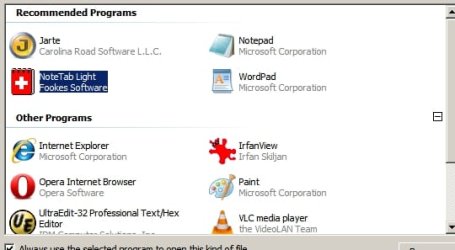
suggested - they seemed to work, including the merg. However when I went to open a text file with 'open with' menu, there was the Notepad option. I wish I could show you what the drop down menu offers me:
- there are 4 recommended programmes, including Notepad, and 9 other programmes. I would like to be able to delete or add to these! That's the problem. (I have Sys7 and generally it seems to work well - but this is definitely a impediment)
 

Attachments

  • OpenWProblem.jpg
    OpenWProblem.jpg
    88.9 KB · Views: 2,535

My Computer

OS
Windows 7 32 bit
Back
Top