Open With Menu Odd Behavior

guitarfiend

Banned
VIP
Local time
8:02 AM
Messages
114
I seem to have a very odd problem.For some reason,when I go to right click on a video file,sometimes,within the open with menu,windows media player is not showing up.As I said,this is not this way all the time.And,the files that I'm trying to open are indeed playable by wmp.At this moment,I'm currently looking at the open with menu within the registry editor under the .flv file extension and wmplayer.exe is indeed there.So,why is it not showing up (Sometimes) in the open with menu when I right click on a .flv file ?
 

My Computer

Computer type
Laptop
Computer Manufacturer/Model Number
Hewlet Packard Compaq Presario cq 57-229wm
OS
windows 7 home premium 64 64 bit
Antivirus
avast
Browser
Firefox,Internet Explorer,Google Chrome,Palemoon
Perhaps you are right clicking without first selecting the video file and context menu is opening for a different file in focus.

Try selecting the file first, then right clicking.
 

My Computer

Computer type
PC/Desktop
Computer Manufacturer/Model Number
Custom Build
OS
Windows 7 Ultimate x64 SP1
CPU
AMD Phenom 2 1090T
Motherboard
Gigabyte GA-890FXA-UD5
Memory
2x8GB Kingston HyperX Fury Black 1600Mhz Unganged
Graphics Card(s)
MSI GTX 970 Gaming 4G
Sound Card
Realtek On-Board HD 7.1 Audio / Logitech G35
Monitor(s) Displays
3xAcer GD245HQ
Screen Resolution
1920x1080
Hard Drives
Samsung 850 Pro 512GB SSD - OS /
WD Caviar Black SATA 3 - 1 TBx2 - Dynamic RAID 0 /
WD Caviar Green SATA 2 - 640GBx2 - Dynamic RAID 0 /
WD Caviar Green SATA 2 - 640GB - Internal Backup /
Seagate Barracude SATA 3 - 3TB - External Backup/ Sync
PSU
HighPower 1000W
Case
Cooler Master HAF 932
Cooling
Noctua NH-D14
Keyboard
Logitech G19
Mouse
Logitech G500
Internet Speed
100/4 Mbit Cable (100GB quota)
Antivirus
ZoneAlarm Extreme Security / MBAM Pro / MBAE Free / SAS Free
Browser
IE 11 - Firefox - Chrome
Other Info
Logitech F710/ G27/ G940/ Z5500 // TrackIR 5 // Nvidia 3D Surround Vision
Perhaps you are right clicking without first selecting the video file and context menu is opening for a different file in focus.

Try selecting the file first, then right clicking.

Doesn't right clicking directly on the file that you wish to open negate what you're saying ?
 

My Computer

Computer type
Laptop
Computer Manufacturer/Model Number
Hewlet Packard Compaq Presario cq 57-229wm
OS
windows 7 home premium 64 64 bit
Antivirus
avast
Browser
Firefox,Internet Explorer,Google Chrome,Palemoon
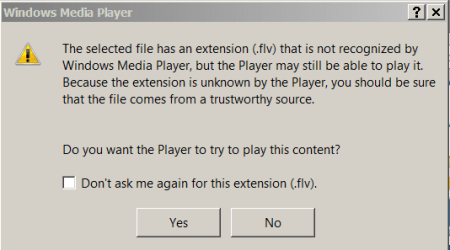
But Windows Media Player can't recognise a .flv file anyway. that's why the program doesn't show when you hit the Play with option. see here:

WMP.PNG

You can let WMP try to play it but It doesn't work on my system. I use VLC anyway, much the better player IMHO
 

My Computer

Computer type
PC/Desktop
OS
Microsoft Windows 7 Home Premium 64-bit 7601 Multiprocessor Free Service Pack 1
CPU
Intel(R) Core(TM) i7-3770 CPU @ 3.40GHz
Motherboard
ASUSTeK COMPUTER INC. P8H77-M
Memory
8.00 GB
Graphics Card(s)
Intel(R) HD Graphics 4000
Sound Card
On Board
Monitor(s) Displays
Dell 24"
Screen Resolution
1920 x 1080
Hard Drives
(1) INTEL SSDSC2CT180A3 ATA Device (2) ST500DM002-1BD142 ATA Device (3) WDC WD3200AAKS-75L9A0 ATA Device (4) Generic- Compact Flash USB Device (5) Generic- MS/MS-Pro USB Device (6) Generic- SD/MMC USB Device (7) Generic- SM/xD-Picture USB
PSU
500w Corsair
Case
Cooler Master
Cooling
3 Fans
Keyboard
Logitech MK300
Mouse
Logitech WOM
Internet Speed
75Mb
Antivirus
Norton 360
Browser
Firefox, Opera, IE
But Windows Media Player can't recognise a .flv file anyway. that's why the program doesn't show when you hit the Play with option. see here:

View attachment 364652

You can let WMP try to play it but It doesn't work on my system. I use VLC anyway, much the better player IMHO
Okay...so wmp doesn't recognize .flv files.It used to.I didn't used to have this problem.And,like I said,this doesn't seem to happen all the time.And,wouldn't having something like k-lite codec pack installed MAKE wmp recognize those files ? As I said...it used to.And,it does not do this all the time with these files.Hmmmmmm.
 

My Computer

Computer type
Laptop
Computer Manufacturer/Model Number
Hewlet Packard Compaq Presario cq 57-229wm
OS
windows 7 home premium 64 64 bit
Antivirus
avast
Browser
Firefox,Internet Explorer,Google Chrome,Palemoon
Are you saying that sometimes WMP will play a .flv file and at random other times it won't?
 

My Computer

Computer type
PC/Desktop
OS
Microsoft Windows 7 Home Premium 64-bit 7601 Multiprocessor Free Service Pack 1
CPU
Intel(R) Core(TM) i7-3770 CPU @ 3.40GHz
Motherboard
ASUSTeK COMPUTER INC. P8H77-M
Memory
8.00 GB
Graphics Card(s)
Intel(R) HD Graphics 4000
Sound Card
On Board
Monitor(s) Displays
Dell 24"
Screen Resolution
1920 x 1080
Hard Drives
(1) INTEL SSDSC2CT180A3 ATA Device (2) ST500DM002-1BD142 ATA Device (3) WDC WD3200AAKS-75L9A0 ATA Device (4) Generic- Compact Flash USB Device (5) Generic- MS/MS-Pro USB Device (6) Generic- SD/MMC USB Device (7) Generic- SM/xD-Picture USB
PSU
500w Corsair
Case
Cooler Master
Cooling
3 Fans
Keyboard
Logitech MK300
Mouse
Logitech WOM
Internet Speed
75Mb
Antivirus
Norton 360
Browser
Firefox, Opera, IE
But Windows Media Player can't recognise a .flv file anyway. that's why the program doesn't show when you hit the Play with option. see here:

You can let WMP try to play it but It doesn't work on my system. I use VLC anyway, much the better player IMHO
My Windows Media Player can play flv files. It is version 12.0.7601.18840
 

My Computer

Computer type
PC/Desktop
Computer Manufacturer/Model Number
Gigabyte ATX case with 500 W power supply GZ-M1
OS
Windows 7 Home Premium 64bit
CPU
Intel Pentium Edition G3220 3.0 GHz
Motherboard
Gigabyte Socket 1150 MicroATX Mot Ultra Durable, GA-H81M-S2H
Memory
8 GB DDR3 1600 MHz DIMM
Graphics Card(s)
Not Known
Sound Card
Not known
Monitor(s) Displays
Samsung LS24D590 23.6"
Screen Resolution
1920 x 1080
Hard Drives
256 GB Solid State Drive (C: on which Windows 7 is installed)-
1 TB internal conventional HD (X:)-
Two WD "Elements" " 2TB USB drives as backups
PSU
500 W
Case
Gigabyte ATX case
Cooling
Several fans!
Keyboard
Accuratus 301 USB Compact, white.
Mouse
Microsoft Basic Optical Mouse v2.0, two-button, tethered
Internet Speed
10 to 12 Mb per second
Antivirus
Kaspersky Internet Security 2016, Malwarebytes (paid)
Browser
Firefox (ocassionally Safari)
Other Info
The 256 GB SSD (C:) also has Adobe Photoshop CS6 and InDesign CS6, MS Office, Adobe Lightroom, and other small programs.
But Windows Media Player can't recognise a .flv file anyway. that's why the program doesn't show when you hit the Play with option. see here:

View attachment 364652

You can let WMP try to play it but It doesn't work on my system. I use VLC anyway, much the better player IMHO
Okay...so wmp doesn't recognize .flv files.It used to.I didn't used to have this problem.And,like I said,this doesn't seem to happen all the time.And,wouldn't having something like k-lite codec pack installed MAKE wmp recognize those files ? As I said...it used to.And,it does not do this all the time with these files.Hmmmmmm.
While recognize is the term that Microsoft uses in their popup message, it is not the best word that MS could have used. The term tends to make the user think that WMP is not capable of playing that file format. A popup telling the user that WMP is not currently configured to play FLV files would be better (IMO). Anyway, you are correct, installing a codec pack (like K-LITE) should offer to configure WMP to handle FLV files. In fact, I'll issue a challenge to anyone reading this: show me a link to a media file format* that you cannot get to play with WMP and the codecs from K-LITE mega. I've not come across one yet.

*a file format that you came across due to an actual need to play that file format. You can look at the list of file formats that K-LITE codecs does not currently support and present that as the answer to my challenge... but that is not what I'm talking about. I'm talking about a real life need to play a given file format.


Now, to address your issue of the Open with context menu:
Have you tried re-installing the codecs from K-LITE?

The reason that I ask is:
I have shortcuts on my desktop for WMP 32bit, WMP 64bit, MPC** 32bit, MPC 64bit, VLC and other players. I drag/drop the file of interest onto the desired shortcut. It is rare that I use WMP, but when I do, I'm sometimes greeted with the screen that you see the very first time that you use WMP (I'm guessing that this is due to an update of WMP - I've not bothered to confirm the cause). When I see that screen, I know to expect that Windows (or WMP) will remove both of my WMP desktop shortcuts without asking me and will make WMP the default player for all of my media file types. After I have played the file of interest via WMP, I download/install the latest K-LITE codec pack to fix the things that Windows (or WMP) broke.


**MPC 64bit (Media Player Classic) via K-LITE is my default app because I often step thru videos frame by frame.


While we are on the topic of the Open with context menu: by default, Windows 7 puts an exclusion on that context menu for MOV files. But WMP will play MOV files - if properly configured to do so.

WMP-open-with-exclude.PNG

This exclusion appears in a number of places in the registry. It is part of the reason why I don't use the Open with context menu. With enough effort, I could probably remove the exclusion, but the Open with context menu still does not lend itself to selecting WPM 64bit.


Having said all of that, let me try and head off any discussion about K-LITE codecs or which player is the best. Those type of discussions are like "which antivirus app is the best". I'm not a media expert. There are plenty of things that I don't have a clue about when it comes to media files. The K-LITE codecs (which some people hate) might not be the best codecs out there. They simply meet my needs and have never caused a problem (as far as I know).

 

My Computer

Computer type
Laptop
Computer Manufacturer/Model Number
Employer provided Dell Latitude
OS
W7 Pro SP1 64bit
CPU
i7
Memory
8GB
Graphics Card(s)
Intel HD Graphics
Hard Drives
crappy SSD
Antivirus
Employer mandated Symantec Endpoint Protection
Browser
Pale Moon 64bit, IE11 64bit & Chrome 64bit
I haven't had any problems with K-Lite Codec Pack.
I always install Mega and disable thumbnails.

I did have some problems a few years ago with certain files not playing, so I also have VLC installed.
If MPC-HC player had issues with a file, VLC didn't (and vice versa).

Things seem to have improved from a decade ago when I needed to have half a dozen players installed (in XP) to guarantee that at least one of them could play a file.
 

My Computer

Computer type
PC/Desktop
Computer Manufacturer/Model Number
n/a
OS
W7 Ultimate SP1, LM19.2 MATE, W10 Home 1703, W10 Pro 1703 VM, #All 64 bit
CPU
AMD Phenom II x6 1100T, 3.3 GHz
Motherboard
ASUS M4A88T-M/USB3 (AM3)
Memory
12GB DDR3 1333 G-Skill (4GB x 2), G-Skill (2GB x 2)
Graphics Card(s)
NVIDIA GeForce GTX 660
Sound Card
Realtek?
Monitor(s) Displays
Samsung S23B350
Screen Resolution
1920x1080
Hard Drives
WD Green 2TB (SATA), WD Green 3TB (SATA), WD Blue 4TB (SATA), WD Blue 6TB (SATA)
PSU
Cooler Master
Case
Antec GX300 Tower
Cooling
3x Antec TRICOOL 120mm Fans
Mouse
Wired Optical
Internet Speed
DSL
Antivirus
Avast
Browser
Pale Moon (64 bit)
Other Info
2018-12-27 Upgraded HDDs
2015-12-10 Upgraded case, graphics card, storage
2015-08-15 Upgraded motherboard & RAM
2015-07-15 Upgraded LM17.1 to LM17.2
Back
Top