
"Open with" program NOT remembered although checkbox ticked?

pstein

New member
Member
VIP
Local time
4:06 PM
Messages
244
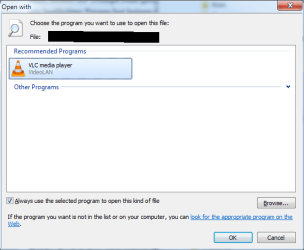
When I double click in WinExplorer on an *.mp4 video file a popup appears asking me if I want to play the video with a certain program (here with well known VLC video player).

As you can see in the attached snapshot I checked the checkbox to ALWAYS use VLC for opening the video.

BUT: When I double click later another *.mp4 video then the "Open With" dialog re-appears again.

Why is Win 7 not able to remember it really?

Peter
 

Attachments
  • Remember Open with not rememberd.png
    Remember Open with not rememberd.png
    12.3 KB · Views: 14

My Computer

Computer type
PC/Desktop
OS
win7pro 64bit
Are you running it via a third party browser, if so check the preferred program options there.

Roy
 

My Computer

Computer type
PC/Desktop
Computer Manufacturer/Model Number
medionl/Aspire 6930G/acer x55a
OS
W7 home premium 32bit/W7HP 64bit/w10 tp insider ring
CPU
E5300 dual core
Motherboard
medion MS7366
Memory
3gb
Graphics Card(s)
Nvidia Geforce 7100 Nforce 630i
Monitor(s) Displays
avixc
Internet Speed
n (isp resticted to 72)
Antivirus
mse/pands
Browser
palemoon
Other Info
Belkin Fd7050 n USB using Railink RT2870 drivers, more upto date
See if Option Two in this tutorial "floats your boat": http://www.sevenforums.com/tutorial...elected-program-always-checked-unchecked.html

But this might be better controlled if you check and make sure your Default Programs are set for VLC to open your mp4's: http://www.sevenforums.com/tutorials/2630-default-programs-set-programs-default-associations.html

Don't forget to check the bottom's of the tutorials for "Related Tutorials".
   Warning
A word of warning; Always check if the program you want is correct, because if it's not and you're in a hurry and you leave the "always use this program" box checked you can be stuck with a mismatched file opener, you will then have to look up the proper tutorial to correct that.
The Tutorial link is: http://www.sevenforums.com/tutorials/257-windows-7-tutorial-index.html, click on the "O" and scroll down to the Open with entries, and the same with the Default Program Tutorials.
 

My Computer

Computer type
PC/Desktop
Computer Manufacturer/Model Number
Gateway DX4831-01e (Mid-Tower Desktop)
OS
Originally Win 7 Hm Prem x64 Ver 6.1.7600 Build 7601-SP1 | Upgraded to Windows 10 December 14, 2019
CPU
Intel i3 530 2.93GHz, 2933MHz 2 Cores 4 Logical Processors
Motherboard
Gateway H57M01 133 megahertz
Memory
6GB of 1,333MHz DDR3 SDRAM
Graphics Card(s)
32MB Intel Graphics Media Accelerator HD IGChip
Sound Card
Realtek High Definition Audio
Monitor(s) Displays
Gateway HX2000 20inch TFT active matrix TN
Screen Resolution
1600 x 900 x 59 hertz
Hard Drives
WDC WD10EADS-00M2B0 [HDD] (1000.20 GB) -- drive 0,
HL-DT-ST DVDRAM GH41N [CD-ROM dr]
Four card readers, and Four USB 2.0
PSU
300watts.
Case
Mid-Tower Desktop
Cooling
Stock from Gateway
Keyboard
Natural Ergonomic Keyboard 4000, see Other Info
Mouse
Orig. Gateway wore out now using Insignia USB wired optical
Internet Speed
Vz FIOS 10ms png 57.64Mbps down 65.53Mbps up Speedtest.org
Antivirus
Zamana Anti-logger with Anti-malware, MSE, Windows Firewall,
Browser
IE11.0.9600.19399-Upd ver11.0.135, Firefox 68.0.1 x64
Other Info
System Specs by Belarc.

BIOS: American Megatrends Inc. P01-A0 11/17/2009

Replaced the MS 'Natural' Standard PS/2 Enhanced 101-102 Keyboard with a new Natural Ergonomic Keyboard 4000 on August 1st 2014.

Canon Pixma MG3222 Printer.

Updated to IE11 on 12102015 | Fios Quantum Router g1100

Additional AV: SpywareBlaster, manual Mbam, SAS
Back
Top