Solved "Open With" still around?

Ibby14

New member
Local time
10:38 PM
Messages
13
Use to be that when I would press shift + right click part of the screen I brought up would say "Open with" so I could open my file with any app I needed to. I don't see this when I pres on my Win7 desktop or anywhere else. Is there some way to do this or am I out of luck?


Also, what do I have to do when trying to search for file that when I search for something I actually find it. Hundreds of times when I do a search I come up with "No Files Found" which is crazy for me because I know the file is there. What crazy thing do I have to do to find something in a search?
You would think the simplest way would be best wouldn't you? Need something? Type it under "search" click "enter"; and there it is right where it should be. Isn't that the premise of a search? You would think so. Somebody was thinking much too hard on this one. But it still leaves me with a problem of not being able to find anything on a search, when XP or any earlier versions had the search priorities down. HELP! Thanks.
 

My Computer

OS
windows 7
Are you saying you don`t know where your files are ? Where did you put them ? What are you looking for exactly ?

Your files should be stored in Documents, Pictures in Pictures etc.

Or on another partition or another hard drive.......

The Open with option is still there, but as Brink says, you have to have the file or picture icon etc. in front of you.
 

My Computer

Computer type
PC/Desktop
Computer Manufacturer/Model Number
Skylake Special #666
OS
Windows 10 Pro x64
CPU
Intel Core i7 6700K
Motherboard
Asus Sabertooth Z170 Mark 1
Memory
GSkill TridentZ RGB 16GB 3600 16-16-16-36
Graphics Card(s)
EVGA GTX 980 Ti SC x2
Sound Card
Realtek High Definition
Monitor(s) Displays
AOC G2460PG
Screen Resolution
1920 x 1080 144Hz
Hard Drives
Samsung 860 Pro 256GB, Seagate Barracuda 4TB x2
PSU
EVGA 1000 P2, EVGA White Custom Braided Cables
Case
Corsair Vengeance C70 Gunmetal Black
Cooling
Corsair H100i v2, Corsair ML120 x2, Thermal Grizzly Kryonaut
Keyboard
Logitech G910 Orion Spectrum
Mouse
Logitech G700s
Internet Speed
Verizon Fios Quantum Gateway 75/75
Antivirus
Windows Defender, Malwarebytes Free 3.8.3
Browser
Chrome
Other Info
Corsair SP120 x4, LG Blu-ray Drive, Durabrand HT-395 100 Watt Dolby Digital Amp, Corsair H2100 Wireless 7.1 Headset
Hello Ibby,

The tutorial below can help show you more details about "Open with", but you would basically just right click on the file to see it.
For searching, I like to use the settings in the tutorials below to help get more accurate results.
Hope this helps, :)
Shawn
 

My Computer

Computer type
PC/Desktop
Computer Manufacturer/Model Number
Self built custom
OS
64-bit Windows 11 Pro for Workstations
CPU
Intel i7-8700K OC'd to 5 GHz
Motherboard
ASUS ROG Maximus XI Formula Z390
Memory
64 GB (4x16GB) G.SKILL TridentZ RGB DDR4 3600 MHz
Graphics Card(s)
ASUS ROG-STRIX-GTX1080TI-O11G-GAMING
Sound Card
Integrated
Monitor(s) Displays
2 x Samsung Odyssey G7 27"
Screen Resolution
2560x1440
Hard Drives
1TB Samsung 990 PRO M.2,
4TB Samsung 990 PRO PRO M.2,
TerraMaster F8 SSD Plus NAS
PSU
Seasonic Prime Titanium 850W
Case
Thermaltake Core P3
Cooling
Corsair Hydro H115i
Keyboard
Logitech wireless K800
Mouse
Logitech MX Master 4
Internet Speed
2 Gb/s Download and 100 Mb/s Upload
Antivirus
Malwarebyte Anti-Malware Premium
Browser
Google Chrome
Other Info
Logitech Z625 speaker system,
Logitech BRIO 4K Pro webcam,
HP Color LaserJet Pro MFP M477fdn,
APC SMART-UPS RT 1000 XL - SURT1000XLI,
Galaxy S23 Plus phone
Sometimes ...

I have noticed that sometimes "Open with" doesn't appear, even if you use "Shift + Right Click". :confused:

I think it happens if a File Type isn't "Associated" with any program.

Update
I've just checked and I think that I am right.
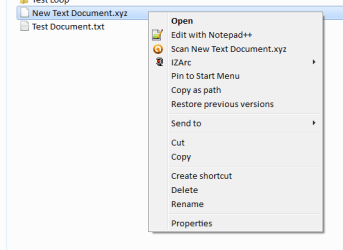
I just made a file and gave it a nonsense extension.
When I "Shift + Right Click" there is no "Open with" option (see picture).
Open With Not There.png
 
Last edited:

My Computer

Computer type
PC/Desktop
Computer Manufacturer/Model Number
n/a
OS
W7 Ultimate SP1, LM19.2 MATE, W10 Home 1703, W10 Pro 1703 VM, #All 64 bit
CPU
AMD Phenom II x6 1100T, 3.3 GHz
Motherboard
ASUS M4A88T-M/USB3 (AM3)
Memory
12GB DDR3 1333 G-Skill (4GB x 2), G-Skill (2GB x 2)
Graphics Card(s)
NVIDIA GeForce GTX 660
Sound Card
Realtek?
Monitor(s) Displays
Samsung S23B350
Screen Resolution
1920x1080
Hard Drives
WD Green 2TB (SATA), WD Green 3TB (SATA), WD Blue 4TB (SATA), WD Blue 6TB (SATA)
PSU
Cooler Master
Case
Antec GX300 Tower
Cooling
3x Antec TRICOOL 120mm Fans
Mouse
Wired Optical
Internet Speed
DSL
Antivirus
Avast
Browser
Pale Moon (64 bit)
Other Info
2018-12-27 Upgraded HDDs
2015-12-10 Upgraded case, graphics card, storage
2015-08-15 Upgraded motherboard & RAM
2015-07-15 Upgraded LM17.1 to LM17.2
Sorry, when I wrote last night I was tired, what I'm trying to say is that for some reason on my pc the "shift+right click" doesn't have the "open with" option, it just doesn't work. With or without using files with known associations. Is there ways to turn this off and on? My windows updates are all current.

It's probably not related but there's another thing that I want to mention. Every so often my right click turns off for no apparent reason, I mean I know how to go into Control Panel to turn it back on, but how it turns off in the first place I have no idea. Like I said it's probably not related but I figured I'd mention it.
 

My Computer

OS
windows 7

My Computer

Computer type
PC/Desktop
Computer Manufacturer/Model Number
Self built custom
OS
64-bit Windows 11 Pro for Workstations
CPU
Intel i7-8700K OC'd to 5 GHz
Motherboard
ASUS ROG Maximus XI Formula Z390
Memory
64 GB (4x16GB) G.SKILL TridentZ RGB DDR4 3600 MHz
Graphics Card(s)
ASUS ROG-STRIX-GTX1080TI-O11G-GAMING
Sound Card
Integrated
Monitor(s) Displays
2 x Samsung Odyssey G7 27"
Screen Resolution
2560x1440
Hard Drives
1TB Samsung 990 PRO M.2,
4TB Samsung 990 PRO PRO M.2,
TerraMaster F8 SSD Plus NAS
PSU
Seasonic Prime Titanium 850W
Case
Thermaltake Core P3
Cooling
Corsair Hydro H115i
Keyboard
Logitech wireless K800
Mouse
Logitech MX Master 4
Internet Speed
2 Gb/s Download and 100 Mb/s Upload
Antivirus
Malwarebyte Anti-Malware Premium
Browser
Google Chrome
Other Info
Logitech Z625 speaker system,
Logitech BRIO 4K Pro webcam,
HP Color LaserJet Pro MFP M477fdn,
APC SMART-UPS RT 1000 XL - SURT1000XLI,
Galaxy S23 Plus phone
Hello "Ibby"
When SEARCH does not work. (The backward step of Win7 from WinXP)
Do you mean "Search" on the start menu OR native search in Windows Explorer ?
I cannot help you with the Start/Search because I never have used it, preferring to use the "Search Companion" in WinXP, that always worked.

BUT in Win7 the Windows Explorer "Search" (Ctrl+F in WinExp) only finds some files and does not find file contents at all.
I had the frustration of over 400 TXT files that I use to store code-snippets and the native WinExp "Search" dialog does-not/cannot search for contents.

I discovered thru this forum "FileSearchEX" Classic Search for Windows a third party program that finds files and/or contents.
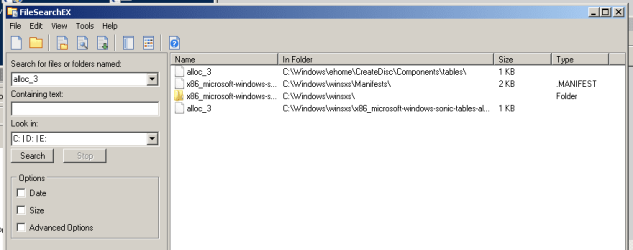
I have justed tested "FileSearchEX" to find an obscure file selected at random in "C:\Windows\eHome\CreateDisc\Components\tables".
Started the search at "Computer" in WinExp. -- "FileSearchEX" found it in less then 3 seconds

1_SearchResult.png

FileSearchEX is trial-ware (well worth the $20 for personal use) it has saved my bacon. I cannot work without being able to find what I need.
(I am not too sure (yet) how "FileSearcEX" performs with MS Applications to find contents, my Win7 PC is not (will not be) loaded with any MS-Apps)
The only criticism I have is the context menu item is enormous, so I changed it in the Registry to "Find..."

Now if I can find a way to make "FileSearchEX" the default (Ctrl+F) in Win7-Explorer I will be a very happy camper.
Hope this helps
 
Last edited:

My Computer

Computer type
PC/Desktop
Computer Manufacturer/Model Number
Toshiba, Lenovo (laptops) + 4 rigs
OS
XP Pro (x86) | 7 HP (x86) & (x64) | 7 Pro (x64)
Yes! Thank you! that was exactly what I needed. What ever happened to the "Open With" or if it was ever there in the first place I'm not sure, my computer is fairly new so I would have thought it was there when I took it out of the box.
Yes, to turn the right click back on I just used the mouse settings.
Thanks again for the help, Mike.
 

My Computer

OS
windows 7
file search

Yes, I have been frustrated with searching files since I first used Win7. Why anyone would make a new operating system with a file search that doesn't search the whole files database (OK, maybe what I just said isn't technically correct, I'm not even sure, but you know what I'm saying) is beyond me! They went from a totally competent system in XP to a real pain in the rump in Win7. Who made that call? Seems like they need decision makers that realize what's really important, not fancy nonsense that clogs up your system. Anyone have a Microsoft job application? Do they need retired cops? LOL!
 

My Computer

OS
windows 7
Ibby,

You don't need to Shift + right click on a file to see "Open with". You should be able to just right click instead.

What are you doing in the Control Panel to turn your right click back on? Mouse settings?

Since "Open with" is not there at all, you might see if this may help.

http://www.sevenforums.com/tutorials/52833-open-context-menu-item-add-remove.html

Yes! Thank you! that was exactly what I needed. What ever happened to the "Open With" or if it was ever there in the first place I'm not sure, my computer is fairly new so I would have thought it was there when I took it out of the box.
Yes, to turn the right click back on I just used the mouse settings.
Thanks again for the help, Mike.

You're welcome Mike. I'm happy to hear that got it sorted for you. :)

You might consider doing a full scan of your system with Malwarebytes Anti-Malware free just to help make sure your system is clean.
 

My Computer

Computer type
PC/Desktop
Computer Manufacturer/Model Number
Self built custom
OS
64-bit Windows 11 Pro for Workstations
CPU
Intel i7-8700K OC'd to 5 GHz
Motherboard
ASUS ROG Maximus XI Formula Z390
Memory
64 GB (4x16GB) G.SKILL TridentZ RGB DDR4 3600 MHz
Graphics Card(s)
ASUS ROG-STRIX-GTX1080TI-O11G-GAMING
Sound Card
Integrated
Monitor(s) Displays
2 x Samsung Odyssey G7 27"
Screen Resolution
2560x1440
Hard Drives
1TB Samsung 990 PRO M.2,
4TB Samsung 990 PRO PRO M.2,
TerraMaster F8 SSD Plus NAS
PSU
Seasonic Prime Titanium 850W
Case
Thermaltake Core P3
Cooling
Corsair Hydro H115i
Keyboard
Logitech wireless K800
Mouse
Logitech MX Master 4
Internet Speed
2 Gb/s Download and 100 Mb/s Upload
Antivirus
Malwarebyte Anti-Malware Premium
Browser
Google Chrome
Other Info
Logitech Z625 speaker system,
Logitech BRIO 4K Pro webcam,
HP Color LaserJet Pro MFP M477fdn,
APC SMART-UPS RT 1000 XL - SURT1000XLI,
Galaxy S23 Plus phone
Back
Top