Open With

Martin Dendev

Software Lover
Power User
Local time
2:51 AM
Messages
170
Location
Oostkamp
hi,
I have several types of ISO. Some are software CD's, some are movies (which i open with VLC Media Player).

I hate it that I have to "right click, open with, (vlc not listed!), select program, browse, program files, videolan, bla bla bla..." every time.

Is there some kind of app that if you double click on the file (so regular open with the standard program) wich is the standard program and let's you choose right away?
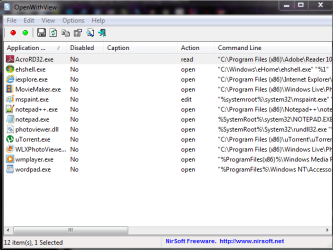
Like the screen attached.

So the standard program for a .iso file is set to "File Opener"
I double click the file.
The File Opener program appears
And I select the program for this time. Next time it's another program.

I hope I'm Clear....:rolleyes:
 

Attachments

  • open with.png
    open with.png
    16.6 KB · Views: 8

My Computer

Computer type
Laptop
Computer Manufacturer/Model Number
HP Probook 4710s
OS
Windows 7 Home Premium 32 bit
Hard Drives
Fujitsu
Mouse
Touchpad
there should be a small checkbox near the bottom when you do "open with" to "always use this program to open this file type".
 

My Computer

Computer Manufacturer/Model Number
Custom
OS
Ubuntu 10.10 64 bit/Window 7 VM
CPU
Core 2 Duo 2.2 Ghz
Motherboard
ECS g31 mATX
Memory
4 GB Kingston ValueRAM (DDR2 800)
Graphics Card(s)
nVidia 240 GT
Sound Card
Onboard
Monitor(s) Displays
19" Dell LCD
Hard Drives
500 GB Seagate Drive x 2
PSU
Antec 430 Watt
Case
Coolermaster
Keyboard
Microsoft Ergonomic Keyboard 4000
Mouse
Laser Mouse (Logitech)
well that's the thing.
every time it's another program. either VLC or Winrar
 

My Computer

Computer type
Laptop
Computer Manufacturer/Model Number
HP Probook 4710s
OS
Windows 7 Home Premium 32 bit
Hard Drives
Fujitsu
Mouse
Touchpad

My Computer

Computer Manufacturer/Model Number
acer aspire 5935g
OS
Windows 7 Home Premium x64 SP1
CPU
intel(R)core(TM)2 duo CPU T6600 @ 2.20GHz
Motherboard
intel gm45/gm47 revision 07
Memory
3 gb ddr3
Graphics Card(s)
ati radeon hd4570/512mb
Monitor(s) Displays
lop156wh2-tle1 15.3 flat
Screen Resolution
1366x768
Hard Drives
OCZ-Agility3 60gig ssd
320gig external hdd
500gig external hdd
Mouse
Optical
Internet Speed
30Mbps Down/30Mbps Up
Hi Martin

Have a look at this little app.It may be able too organize your open with options how you want them.The Portable Freeware Collection - OpenWithView

Danny

Good suggestion, but I'm wondering if this app will work in Windows 7. Under System Requirements, the website lists XP, Vista, and Windows 7, but then it doesn't list Windows 7 here: "This utility works under Windows XP, Windows 2003 Server, and Windows Vista."
 

My Computer

Computer Manufacturer/Model Number
HP Pavillion dv5t (generation 1)
OS
Vista 64 bit and 32 bit (SP2)
CPU
Intel(R) Core(TM)2 Duo Processor T9400 (2.53 GHz
Memory
4GB DDR2 System Memory (2 Dimm)
Graphics Card(s)
512 MB NVIDIA GeForce 9600M GT
Monitor(s) Displays
15.4" diagonal WSXGA+ High-Definition HP BrightView Widescre
Screen Resolution
1680 x 1050
Hard Drives
320GB 5400RPM SATA Hard Drive with HP ProtectSmart Hard Drive Protection
Keyboard
Built-in HP
Mouse
Built in - Synaptics TouchPad V6.5 on PS/2 Port
Internet Speed
Max
Other Info
~ Intel Next-Gen Wireless-N Mini-card w/Bluetooth ~ Blu-Ray ROM DVD+/-R/RW ~ Integ. HDTV Hybrid Tuner ~ 12 Cell Battery ~ MS Office (Home Premium) 2007 ~
Hi Martin

Have a look at this little app.It may be able too organize your open with options how you want them.The Portable Freeware Collection - OpenWithView

Danny

Good suggestion, but I'm wondering if this app will work in Windows 7. Under System Requirements, the website lists XP, Vista, and Windows 7, but then it doesn't list Windows 7 here: "This utility works under Windows XP, Windows 2003 Server, and Windows Vista."

Yes it works fine under windows 7, Ive used it many times.

Danny
 

Attachments

  • Capture.PNG
    Capture.PNG
    21.2 KB · Views: 7

My Computer

Computer Manufacturer/Model Number
acer aspire 5935g
OS
Windows 7 Home Premium x64 SP1
CPU
intel(R)core(TM)2 duo CPU T6600 @ 2.20GHz
Motherboard
intel gm45/gm47 revision 07
Memory
3 gb ddr3
Graphics Card(s)
ati radeon hd4570/512mb
Monitor(s) Displays
lop156wh2-tle1 15.3 flat
Screen Resolution
1366x768
Hard Drives
OCZ-Agility3 60gig ssd
320gig external hdd
500gig external hdd
Mouse
Optical
Internet Speed
30Mbps Down/30Mbps Up
hi,
I have several types of ISO. Some are software CD's, some are movies (which i open with VLC Media Player).

I hate it that I have to "right click, open with, (vlc not listed!), select program, browse, program files, videolan, bla bla bla..." every time.

Is there some kind of app that if you double click on the file (so regular open with the standard program) wich is the standard program and let's you choose right away?
Like the screen attached.

So the standard program for a .iso file is set to "File Opener"
I double click the file.
The File Opener program appears
And I select the program for this time. Next time it's another program.

I hope I'm Clear....:rolleyes:

You might want to try using Alcohol 52 Free Edition, which allows you to mount your ISO files to a virtual CD/DVD drive. From there, Autoplay will take care of the rest. Data ISOs will open in Explorer, and DVD ISOs will play in your default player.

Nothing could be simpler.
 

My Computer

Computer type
PC/Desktop
Computer Manufacturer/Model Number
Virtual Machine
OS
Windows 7 Professional 32-bit SP1
CPU
AMD A4/A6
Motherboard
Intel Corporation 440BX Desktop Reference Platform
Memory
3.00GB EDO
Graphics Card(s)
VMware SVGA 3D
Sound Card
High Definition Audio Device
Monitor(s) Displays
Generic Non-PnP Monitor on VMware SVGA 3D
Screen Resolution
1440x900
Hard Drives
1 x 60GB VMware Virtual SATA Hard Drive ATA Device
Antivirus
Kaspersky Total Security
Hi,
I'll just go with open with, or dragging it onto my desktop.
Thx for your help
Please close this thread.
Martin
 

My Computer

Computer type
Laptop
Computer Manufacturer/Model Number
HP Probook 4710s
OS
Windows 7 Home Premium 32 bit
Hard Drives
Fujitsu
Mouse
Touchpad
simple!!! just go to start>Default Programs>Set Default Programs and then select your app and make it default.
 

My Computer

OS
Windows 7 Home Premium 32bit
CPU
intel e5400 2.7ghz fsb 800mhz
Motherboard
asus p5kpl am/ps
Memory
2*1 gb 800mhz
Graphics Card(s)
not installed, using internal(g31 chipset)
Sound Card
realtek
Monitor(s) Displays
acer (1366*768)
Screen Resolution
1366*768
Hard Drives
seagate bracuda 250gb 7200rpm
PSU
450 watt
Case
foxin
Cooling
intel package with processor
Keyboard
microsoft ps/2
Mouse
microsoft usb
Internet Speed
mobile dail-up connection
Other Info
frontech headfone, creative 2.0 speaker,
@suman6792
not really, i want to choose every time between winrar and vlc
 

My Computer

Computer type
Laptop
Computer Manufacturer/Model Number
HP Probook 4710s
OS
Windows 7 Home Premium 32 bit
Hard Drives
Fujitsu
Mouse
Touchpad
You can not set a DEFAULT open with to more than ONE program by definition.
How is the computer supposed to know if the ISO is an image of a movie disk or some mountable Install disk.
I hate it that I have to "right click, open with, (vlc not listed!), select program, browse, program files, videolan, bla bla bla..." every time.

If vlc is not listed then you haven't set it correctly yet. Rightclick, open with, chose default, browse to VLC and check the box at the bottom right where it says "Always use the selected program to open..."
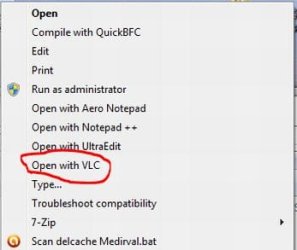
Or How would you like THIS in your context menu (just right click any file and you get this:)

Capture1.JPG

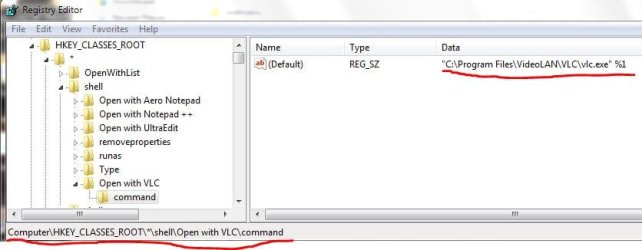
To get this context menu entry you need to start regedit.exe as Administrator and navigate to

Capture.JPG

HKEY_CLASSES_ROOT\*\shell
right click on shell and go to NEW / Key and call it Open with VLC
now right click on the just created key, create another key and call it command
now left click on the just created command key and double click on Default in the right window.
In the now opening dialog box you paste the path to your vlc.exe followed by 1 space and a %1 like in the picture above.
That's it...close regedit and enjoy :D

Now you can set the default for (Data-) ISOs to say WinRar, 7zip UltraISO etc. and just start movie ISOs with one click from the context menu.

If even that doesn't tickle your fancy, just pin VLC to your Taskbar, open it and drag/Drop Movie ISOs on it

-DG
 

My Computer

Computer Manufacturer/Model Number
HP m8000n
OS
Windows 7 Ultimate x86
CPU
DualCore AMD Athlon 64 X2, 2600 MHz 5200+
Motherboard
Asus M2N68-LA (Narra)
Memory
Samsung 2GB DDR2
Graphics Card(s)
Onboard NVIDIA GeForce 6150SE nForce 430
Sound Card
Onboard nVIDIA nForce 6100-430 (MCP61P)
Monitor(s) Displays
Westinghouse 19" LED
Screen Resolution
1280x1024
Hard Drives
SATA II Seagate Barracuda 500GB
USB II WD Elements 500GB
USB II WD My Book 1TB
USB II WD My Book 2TB
PSU
Stock (HP)
Case
Stock (HP)
Cooling
Stock
Keyboard
Logitech Classic KB 200
Mouse
Standard HP opticle USB mouse
Back
Top