Open

Riptorn

Windows 7 Guru
Power User
VIP
Local time
8:51 AM
Messages
120
Location
Brisbane
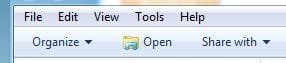
hi,can anyone please tell me how to fix this open to another icon,as you can see it is not normal?:confused: its up there in there next to organize..
 

Attachments

  • open.PNG
    open.PNG
    8.4 KB · Views: 8

My Computer

Computer Manufacturer/Model Number
Dell Inspiron 1525
OS
Windows 7 - 32 Bit
Memory
4 GB
Hard Drives
320 GB
Internet Speed
Broadband
Very interesting. When I look at mine exp. I see same missing icon and it wasn`t like that before few days. I`m trying few things now to fix it.
 

My Computer

Computer type
PC/Desktop
OS
Windows 7 Professional x64 sp1
CPU
Intel® Core™ i7-4790К@4600MHz/1.26V
Motherboard
ASRock Z97 PRO 4
Memory
16GB ADATA@1800Mhz
Graphics Card(s)
Gigabyte GTX 660 WF OC
Sound Card
Realtek ALC892
Monitor(s) Displays
Toshiba 32HL833 [32" S-IPS FULL LED]
Screen Resolution
1920x1080
Hard Drives
Samsung 840 Pro 128GB; 0,5TB WD + 2TB WD; 3TB SG|
PSU
Seasonic X-650 SS-650KM3 Gold
Case
Fractal Design 3000 USB3
Cooling
Noctua NH-D14
Keyboard
CM Storm QuickFire Ultimate
Mouse
Mionix Naos 7000
Internet Speed
100Mbps
Antivirus
Eset NOD32
Browser
Firefox
Other Info
+ ASUS DRW-1814BLT
+ Trust Dual Stick Gamepad (GM-1520)
+ Repotec 1000VA Line interactive UPS
Very interesting. When I look at mine exp. I see same missing icon and it wasn`t like that before few days. I`m trying few things now to fix it.
yes,it is very strange?,i do not know where it went,and why it is like this now?..:confused:
 

My Computer

Computer Manufacturer/Model Number
Dell Inspiron 1525
OS
Windows 7 - 32 Bit
Memory
4 GB
Hard Drives
320 GB
Internet Speed
Broadband
So, I tried clearing thumbnail and icon cache, nothing change. I find MicrosoftFixit.WinFileFolder.Run.exe, try that too without success. I rebooted, loaded winxp livecd and delete these .db again just to be sure. Again nothing change.
The strange thing is that icon is change to normal when I point whatever other file different from .exe. And only for .exe stay broken. But all my .exe files works ok and have their respective icons.
I`ll research further tomorrow ;)
 

My Computer

Computer type
PC/Desktop
OS
Windows 7 Professional x64 sp1
CPU
Intel® Core™ i7-4790К@4600MHz/1.26V
Motherboard
ASRock Z97 PRO 4
Memory
16GB ADATA@1800Mhz
Graphics Card(s)
Gigabyte GTX 660 WF OC
Sound Card
Realtek ALC892
Monitor(s) Displays
Toshiba 32HL833 [32" S-IPS FULL LED]
Screen Resolution
1920x1080
Hard Drives
Samsung 840 Pro 128GB; 0,5TB WD + 2TB WD; 3TB SG|
PSU
Seasonic X-650 SS-650KM3 Gold
Case
Fractal Design 3000 USB3
Cooling
Noctua NH-D14
Keyboard
CM Storm QuickFire Ultimate
Mouse
Mionix Naos 7000
Internet Speed
100Mbps
Antivirus
Eset NOD32
Browser
Firefox
Other Info
+ ASUS DRW-1814BLT
+ Trust Dual Stick Gamepad (GM-1520)
+ Repotec 1000VA Line interactive UPS
So, I tried clearing thumbnail and icon cache, nothing change. I find MicrosoftFixit.WinFileFolder.Run.exe, try that too without success. I rebooted, loaded winxp livecd and delete these .db again just to be sure. Again nothing change.
The strange thing is that icon is change to normal when I point whatever other file different from .exe. And only for .exe stay broken. But all my .exe files works ok and have their respective icons.
I`ll research further tomorrow ;)
ok,i tried those also, i do not know how to fix it??:cry:
 

My Computer

Computer Manufacturer/Model Number
Dell Inspiron 1525
OS
Windows 7 - 32 Bit
Memory
4 GB
Hard Drives
320 GB
Internet Speed
Broadband
I think it's the normal default icon Windows uses for .exe files when the whatever.exe program isn't supplying its own icon. It's shell32.dll icongroup 1.


What icon would you like to use to replace it? This? 15.jpg
I took this out of imageres.dll icongroup 15.

You could replace the shell32 icon with whatever icon you want, then your programs will still use their own icons, and the default for when a program does not supply the icon will be what you chose.

Note: You need to be confident in your recovery options to do this. It's possible to make Windows unstartable with a mistake. This is a fairly easy hack, but it's on your head! Also, you have to use an Administrator account, put UAC to "Never Notify" and reboot before editing .dll files. You can change UAC back later.

First decide on the icon you want to use and get it ready. If you want to make your own, do the research, otherwise extract a system icon you like to a convenient directory. Do this by opening the .dll in Resource Hacker, right click on the chosen 1033 item and select "Save [Icon group : xx (the number) : 1033].

Then backup shell32.dll, take ownership and full control, and open it in Resource Hacker. Go to Icon Group > 1 > 1033. Right click on 1033 and select "Replace Resource". Click on the "Open file with new icon" bar, then browse to your new icon and click Open. Now look on the right pane, make sure under "Select icon to replace" that the "1" line is selected, then click the "Replace" bar at the bottom.
File > Save.
Exit Resource Hacker.
Reboot.
 

My Computer

OS
Windows 7
This Capture.JPG Is the default icon for "Open".
 

My Computer

Computer type
PC/Desktop
Computer Manufacturer/Model Number
Home Built Desktop By DataTech
OS
Windows 7 Ultimate X64 SP1
CPU
Intel i5-2550K, Differing ~4.4-4.8GHz No built in GPU
Motherboard
ASUS P8Z68-V PRO/GEN3
Memory
16GB G.Skill Sniper 1866MHz @ 2133MHz 2x8GB
Graphics Card(s)
ASUS GTX650TIB-DC2OC-2GD5, (650TI Boost)
Sound Card
Onboard Realtek 5-1
Monitor(s) Displays
Samsung P2570HD
Screen Resolution
1920x1080
Hard Drives
Samsung 840 Pro 256GB SSD for OS, 500GB Seagate Constellation (Enterprise drive) for Data
PSU
Corsair HX650W
Case
Inwin Dragon Rider
Cooling
Hyper 212 EVO w/two Noctua fans, push-pull, @1300 RPM
Keyboard
E-Z Eyes, bright yellow keys with large characters
Mouse
steelseries SENSEI Laser Pro Gaming
Internet Speed
48-51Mbs Mbs down, 11 Mbs up Xfinity Cable
Antivirus
Norton Internet Security 2013
Browser
IE 10, Opera, Pale Moon if needed
Other Info
4 case fans, LG BluRay-RE, ASUS DVD-RW, Mr. Fusion power supply, 1.21 gigawatts.
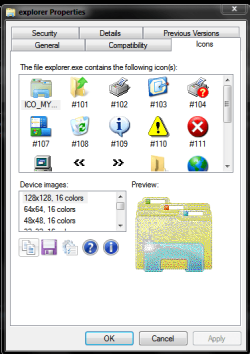
As Britton30 said that is the icon for open for a folder in that location. Its located in C:\Windows\Explorer as the first icon in the list.Have a look to see if the icon is present.

Capture 1.PNG

For an .exe file that doesnt have it own icon the icon is as debugged suggested.Shawn created a tutorial to fix this icon if its broken here - http://www.sevenforums.com/tutorials/41363-open-application-toolbar-context-menu-icon-fix.html or use an icon of your choice but name it as in the tutorial:)

I think this is what you need Riptorn judging by your screenshot.

Hope this helps

Danny
 

My Computer

Computer Manufacturer/Model Number
acer aspire 5935g
OS
Windows 7 Home Premium x64 SP1
CPU
intel(R)core(TM)2 duo CPU T6600 @ 2.20GHz
Motherboard
intel gm45/gm47 revision 07
Memory
3 gb ddr3
Graphics Card(s)
ati radeon hd4570/512mb
Monitor(s) Displays
lop156wh2-tle1 15.3 flat
Screen Resolution
1366x768
Hard Drives
OCZ-Agility3 60gig ssd
320gig external hdd
500gig external hdd
Mouse
Optical
Internet Speed
30Mbps Down/30Mbps Up

My Computer

Computer Manufacturer/Model Number
HP Pavilion Elite 495UK
OS
Windows 7 Ultimate SP1 64-Bit
CPU
Intel Core i7 870 @ 2.93GHz
Motherboard
MSI 2A9C (CPU1)
Memory
8Gb Dual-Channel DDR3 @ 664MHz
Graphics Card(s)
nVidia GeForce GTX 460 1024MB dedicated RAM
Sound Card
Realtek HD Audio
Monitor(s) Displays
HP2310i
Screen Resolution
1920 x 1080
Hard Drives
1x1954GB Hitachi HDS22020ALA 330 (RAID), 1x1954GB Hitachi External for backup and storage
PSU
460W
Case
HP Elite
Cooling
Air cooled
Keyboard
Logitech K750 solar-powered keyboard
Mouse
Logitech Wireless M180 mouse
Internet Speed
2Mb
Other Info
Pure Avanti Flow Internet Radio with iPod Dock, 64Gb iPod, HP USB Speakers, Sony MDR-V500 Headphones, Sony Vaio F-Series Laptop
For an .exe file that doesnt have it own icon the icon is as debugged suggested.Shawn created a tutorial to fix this icon if its broken here - http://www.sevenforums.com/tutorials/41363-open-application-toolbar-context-menu-icon-fix.html
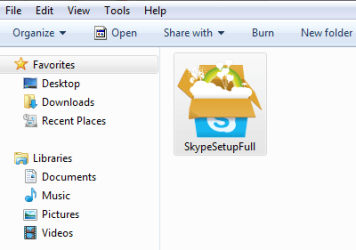
Yes, that's better - the tutorial gives the same result way easier than the shell32.dll hack - I thought it was there but couldn't find it, hence the sledgehammer to crack a nut. SkypeSetupFull.exe is a setup .exe that's why it doesnt have its own icon.
 

My Computer

OS
Windows 7
Glad you got it sorted debugged

Danny
 

My Computer

Computer Manufacturer/Model Number
acer aspire 5935g
OS
Windows 7 Home Premium x64 SP1
CPU
intel(R)core(TM)2 duo CPU T6600 @ 2.20GHz
Motherboard
intel gm45/gm47 revision 07
Memory
3 gb ddr3
Graphics Card(s)
ati radeon hd4570/512mb
Monitor(s) Displays
lop156wh2-tle1 15.3 flat
Screen Resolution
1366x768
Hard Drives
OCZ-Agility3 60gig ssd
320gig external hdd
500gig external hdd
Mouse
Optical
Internet Speed
30Mbps Down/30Mbps Up
Glad you got it sorted
As for me, I have noticed that with the tutorial's method you end up with the icon in the context menu, which I don't want. With the shell32.dll replacement hack you don't get that, so I prefer that method.
But this is Riptorn's thread, let's wait to hear from him before calling it sorted!
 

My Computer

OS
Windows 7
As Britton30 said that is the icon for open for a folder in that location. Its located in C:\Windows\Explorer as the first icon in the list.Have a look to see if the icon is present.

View attachment 170139

For an .exe file that doesnt have it own icon the icon is as debugged suggested.Shawn created a tutorial to fix this icon if its broken here - http://www.sevenforums.com/tutorials/41363-open-application-toolbar-context-menu-icon-fix.html or use an icon of your choice but name it as in the tutorial:)

I think this is what you need Riptorn judging by your screenshot.

Hope this helps

Danny
hi xxxdannyxxx, i checked my explorer properties but the icons tab is not there?,everything else is though,i wonder where it went?:p
 

My Computer

Computer Manufacturer/Model Number
Dell Inspiron 1525
OS
Windows 7 - 32 Bit
Memory
4 GB
Hard Drives
320 GB
Internet Speed
Broadband
As Britton30 said that is the icon for open for a folder in that location. Its located in C:\Windows\Explorer as the first icon in the list.Have a look to see if the icon is present.

View attachment 170139

For an .exe file that doesnt have it own icon the icon is as debugged suggested.Shawn created a tutorial to fix this icon if its broken here - http://www.sevenforums.com/tutorials/41363-open-application-toolbar-context-menu-icon-fix.html or use an icon of your choice but name it as in the tutorial:)

I think this is what you need Riptorn judging by your screenshot.

Hope this helps

Danny
danny, its in my download folder,all other folders are ok:p
 

My Computer

Computer Manufacturer/Model Number
Dell Inspiron 1525
OS
Windows 7 - 32 Bit
Memory
4 GB
Hard Drives
320 GB
Internet Speed
Broadband
As Britton30 said that is the icon for open for a folder in that location. Its located in C:\Windows\Explorer as the first icon in the list.Have a look to see if the icon is present.

View attachment 170139

For an .exe file that doesnt have it own icon the icon is as debugged suggested.Shawn created a tutorial to fix this icon if its broken here - http://www.sevenforums.com/tutorials/41363-open-application-toolbar-context-menu-icon-fix.html or use an icon of your choice but name it as in the tutorial:)

I think this is what you need Riptorn judging by your screenshot.

Hope this helps

Danny
hi xxxdannyxxx, i checked my explorer properties but the icons tab is not there?,everything else is though,i wonder where it went?:p

Hi Ripton

Sorry should have explained that better.The icon tab in properties isnt there by default, if you install this- Download IconViewer it will add the icon tab to any files that contain icons to allow you to view what icons are stored there.

Danny
 

My Computer

Computer Manufacturer/Model Number
acer aspire 5935g
OS
Windows 7 Home Premium x64 SP1
CPU
intel(R)core(TM)2 duo CPU T6600 @ 2.20GHz
Motherboard
intel gm45/gm47 revision 07
Memory
3 gb ddr3
Graphics Card(s)
ati radeon hd4570/512mb
Monitor(s) Displays
lop156wh2-tle1 15.3 flat
Screen Resolution
1366x768
Hard Drives
OCZ-Agility3 60gig ssd
320gig external hdd
500gig external hdd
Mouse
Optical
Internet Speed
30Mbps Down/30Mbps Up
As Britton30 said that is the icon for open for a folder in that location. Its located in C:\Windows\Explorer as the first icon in the list.Have a look to see if the icon is present.

View attachment 170139

For an .exe file that doesnt have it own icon the icon is as debugged suggested.Shawn created a tutorial to fix this icon if its broken here - http://www.sevenforums.com/tutorials/41363-open-application-toolbar-context-menu-icon-fix.html or use an icon of your choice but name it as in the tutorial:)

I think this is what you need Riptorn judging by your screenshot.

Hope this helps

Danny
hi xxxdannyxxx, i checked my explorer properties but the icons tab is not there?,everything else is though,i wonder where it went?:p

Hi Ripton

Sorry should have explained that better.The icon tab in properties isnt there by default, if you install this- Download IconViewer it will add the icon tab to any files that contain icons to allow you to view what icons are stored there.

Danny
ok thank you danny.
 

My Computer

Computer Manufacturer/Model Number
Dell Inspiron 1525
OS
Windows 7 - 32 Bit
Memory
4 GB
Hard Drives
320 GB
Internet Speed
Broadband
That Icon Viewer is great! now I have a whole new library of icons to play with.:party:

Did you get your issues handled Riptorn?
 

My Computer

Computer type
PC/Desktop
Computer Manufacturer/Model Number
Home Built Desktop By DataTech
OS
Windows 7 Ultimate X64 SP1
CPU
Intel i5-2550K, Differing ~4.4-4.8GHz No built in GPU
Motherboard
ASUS P8Z68-V PRO/GEN3
Memory
16GB G.Skill Sniper 1866MHz @ 2133MHz 2x8GB
Graphics Card(s)
ASUS GTX650TIB-DC2OC-2GD5, (650TI Boost)
Sound Card
Onboard Realtek 5-1
Monitor(s) Displays
Samsung P2570HD
Screen Resolution
1920x1080
Hard Drives
Samsung 840 Pro 256GB SSD for OS, 500GB Seagate Constellation (Enterprise drive) for Data
PSU
Corsair HX650W
Case
Inwin Dragon Rider
Cooling
Hyper 212 EVO w/two Noctua fans, push-pull, @1300 RPM
Keyboard
E-Z Eyes, bright yellow keys with large characters
Mouse
steelseries SENSEI Laser Pro Gaming
Internet Speed
48-51Mbs Mbs down, 11 Mbs up Xfinity Cable
Antivirus
Norton Internet Security 2013
Browser
IE 10, Opera, Pale Moon if needed
Other Info
4 case fans, LG BluRay-RE, ASUS DVD-RW, Mr. Fusion power supply, 1.21 gigawatts.
Back
Top