OpenDNS and encryption issues, cannot access certain websites

nofttss

New member
Local time
11:50 AM
Messages
13
Apologies if this is in the wrong section.

I stopped by my Dad's place yesterday for a few minutes and he's having these issues on his old Dell laptop, win7, not sure of any other specs as I just stopped in.

When he tries to access certain sites like Facebook he gets an error saying OpenDNS is blocking this site, contact the network administrator. However he hasn't installed or set up OpenDNS, and he is the only person who has access to his internet connection.

Also, when he tries visiting sites like Gmail, he gets an error message saying this site isn't encrypted, someone may be trying to hijack his details or something like this.

Both of these issues pretty much popped up overnight about a week ago.

He's restarted the router to no avail, not sure what it could be. He has a free version of AVG installed and that's about it.

Any help would be greatly appreciated. I couldn't find much on the OpenDNS forums about this. I think the main issue is he hasn't set this up himself.

Thanks!
 

My Computer

OS
windows 7 home 64bit
Assuming no one else has access to the computer and changed some settings, I think I'd run a full scan with the free Malwarebytes for a second opinion.

https://www.malwarebytes.org/products/

If the full scan comes back clean I'd take a look at the Network settings in Control Panel.
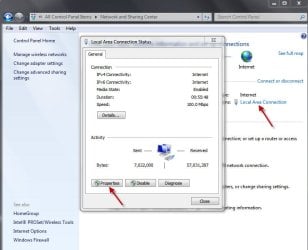
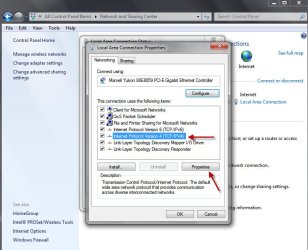
Control Panel > Network & Sharing > Local Area Connection > Properties > TCP/IP > Properties
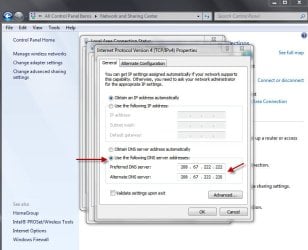
Here are a couple of screenshots from my computer after opening Network & Sharing and checking TCP/IPv4:

network1.jpg

network2.jpg

network3.jpg

I use OpenDNS so the final screenshot shows the preferred and alternate IP addresses for them. If the IP addresses are showing then someone/something added them. You can delete them and make sure the radio button for "Obtain DNS server address automatically" is selected. Follow the same steps to check TCP/IPv6.
 

My Computer

Computer type
Laptop
Computer Manufacturer/Model Number
Sony Vaio VPCEB47GM Laptop
OS
Win 7 Pro 64-bit
CPU
Intel i5 2.4 Ghz
Memory
8GB DDR3
Graphics Card(s)
Intel HD 3000
Sound Card
IDT High Definition
Monitor(s) Displays
15.6 WGXA Anti-Glare LED
Screen Resolution
1280x800
Hard Drives
640Gb 7200rpm
Antivirus
MSE
Browser
Opera (primary) with IE9 backup
Assuming no one else has access to the computer and changed some settings, I think I'd run a full scan with the free Malwarebytes for a second opinion.

https://www.malwarebytes.org/products/

If the full scan comes back clean I'd take a look at the Network settings in Control Panel.
Control Panel > Network & Sharing > Local Area Connection > Properties > TCP/IP > Properties
Here are a couple of screenshots from my computer after opening Network & Sharing and checking TCP/IPv4:

View attachment 362638

View attachment 362639

View attachment 362640

I use OpenDNS so the final screenshot shows the preferred and alternate IP addresses for them. If the IP addresses are showing then someone/something added them. You can delete them and make sure the radio button for "Obtain DNS server address automatically" is selected. Follow the same steps to check TCP/IPv6.

Oh wow great, thanks for your response! I'm going to my Dad's place later today and I'll see if this works.

Thanks again!
 

My Computer

OS
windows 7 home 64bit
Hope it helps. If the TCP/IP settings don't show a preferred/alternate IP address for OpenDNS then I think I'd be leaning towards some kind of malware and additional scans may be in order.

Long shot but another possibility is some kind of computer glitch or hiccup. Since the problem started about a week ago, perhaps the computer has a restore point dated prior to the problem. You could try rolling back the computer to that earlier date.

http://www.sevenforums.com/tutorials/700-system-restore.html
 

My Computer

Computer type
Laptop
Computer Manufacturer/Model Number
Sony Vaio VPCEB47GM Laptop
OS
Win 7 Pro 64-bit
CPU
Intel i5 2.4 Ghz
Memory
8GB DDR3
Graphics Card(s)
Intel HD 3000
Sound Card
IDT High Definition
Monitor(s) Displays
15.6 WGXA Anti-Glare LED
Screen Resolution
1280x800
Hard Drives
640Gb 7200rpm
Antivirus
MSE
Browser
Opera (primary) with IE9 backup

My Computer

Computer type
Laptop
Computer Manufacturer/Model Number
Employer provided Dell Latitude
OS
W7 Pro SP1 64bit
CPU
i7
Memory
8GB
Graphics Card(s)
Intel HD Graphics
Hard Drives
crappy SSD
Antivirus
Employer mandated Symantec Endpoint Protection
Browser
Pale Moon 64bit, IE11 64bit & Chrome 64bit
Hope it helps. If the TCP/IP settings don't show a preferred/alternate IP address for OpenDNS then I think I'd be leaning towards some kind of malware and additional scans may be in order.

Long shot but another possibility is some kind of computer glitch or hiccup. Since the problem started about a week ago, perhaps the computer has a restore point dated prior to the problem. You could try rolling back the computer to that earlier date.

http://www.sevenforums.com/tutorials/700-system-restore.html

Hi! Just an update in case anyone stumbles upon this thread in the future.

It worked! DNS was being pulled from a custom IP, I switched it to pull them automatically, I can't remember the option, but basically what you said.

I downloaded and ran malwarebytes but it got stuck on heuristic analysis for an hour, I think it may be interfering with his AVG. I will sort that this weekend.

Thanks again!

...I stopped by my Dad's place...

...I'm going to my Dad's place...

You might want to look into installing TeamViewer on his computer and yours.

Great idea, will also do this. Not sure why I didn't think of this. Thanks!
 

My Computer

OS
windows 7 home 64bit
Glad to hear the OpenDNS problem has (hopefully) been sorted out. Just a personal thought about AVG. I used to use it a long time ago but it caused a lot of issues on my computers. I switched to the free Microsoft Security Essentials and Malwarebytes back in 2009. That combo has worked outstandingly well for me. Point is, your dad may want to try something other than AVG. Not necessarily MSE but there are several free products like Avast, Avira, Comodo, etc that may work better. If he decides to change to something else, here's a list of official uninstallers that should remove all traces of previously installed AV programs.

https://singularlabs.com/uninstallers/security-software/

Thanks for the update.
 

My Computer

Computer type
Laptop
Computer Manufacturer/Model Number
Sony Vaio VPCEB47GM Laptop
OS
Win 7 Pro 64-bit
CPU
Intel i5 2.4 Ghz
Memory
8GB DDR3
Graphics Card(s)
Intel HD 3000
Sound Card
IDT High Definition
Monitor(s) Displays
15.6 WGXA Anti-Glare LED
Screen Resolution
1280x800
Hard Drives
640Gb 7200rpm
Antivirus
MSE
Browser
Opera (primary) with IE9 backup
~~~
It worked! DNS was being pulled from a custom IP, I switched it to pull them automatically,
~~~
I realize that this thread started because of websites being blocked by OpenDNS, but I'm going to suggest that you change the DNS settings to make use of OpenDNS. Follow the excellent info in post #2. OpenDNS protects the user from many things. It is a good security layer. If there is a problem with it, post back here or in their forums.

The folks at OpenDNS suggest changing the router's DNS entries so that every device on the network will be protected (e.g. visitors with smartphones). Some routers do not allow for such changes. In those cases, changing the settings shown in post #2 should work. Those settings are also good for laptops that leave the protection of the home network.

If you want to add even more protection, get a free account from OpenDNS and select categories to be blocked. If you opt to do that, then install a tiny app that tells OpenDNS when your internet facing IP address has changed (the IP address that is dynamically assigned by your ISP).

https://support.opendns.com/forums/21242740-Getting-Started-with-OpenDNS


I too would suggest moving away from AVG. They used to (perhaps still do) load their virus signature file (database) into Windows' System process. This is tolerated by some computers, but it causes slow downs on other computers.

As to the Malwarebytes scan hanging:
Even if you opt to stick with AVG, I would temporarily uninstall AVG, restart the computer and run a custom scan with Malwarebytes.

Scan > Custom Scan > Custom Scan Configuration
Place a check by Scan for Rootkits.
Select the drive(s) of interest.

That custom scan might run all night... depending on the number of files being checked and the size of the hard drives being scanned.

Then get a second opinion with TDSSKiller.

And if you still suspect something, try an offline scanner like WDO. I use (and reuse) a USB flash drive instead of burning a CD/DVD.
.
 

My Computer

Computer type
Laptop
Computer Manufacturer/Model Number
Employer provided Dell Latitude
OS
W7 Pro SP1 64bit
CPU
i7
Memory
8GB
Graphics Card(s)
Intel HD Graphics
Hard Drives
crappy SSD
Antivirus
Employer mandated Symantec Endpoint Protection
Browser
Pale Moon 64bit, IE11 64bit & Chrome 64bit
Back
Top