Opera 11.10 build 2005 snapshot out

yowanvista

New member
Guru
Gold Member
VIP
Local time
12:08 PM
Messages
6,557
Location
Mauritius
We are proud to announce that the first snapshot of Opera 11.10, codename “Barracuda,” has finally arrived! Everyone here has worked hard to get this new shiny build out to you.

In this build, Core has been upgraded from version 2.7.62 to 2.8.99, which is a pretty big step forward. With this Core upgrade comes the implementation of the Web Open Font Format (WOFF).

In addition, a batch of changes to network compatibility has been implemented. The purpose of these changes is to modify our network behaviour so that we are more compatible with other web browsers.

These changes include:

  • Disable Cookie2 by default, with an option to enable it again
  • Send more compatible Accept* headers
  • Disable TLS 1.1 and 1.2 by default
  • Make sure redirects from http to https are labelled secure
  • Remove the use of master password for client certificates
  • Added a preference to disable cross-network protection


Apart from that, frequent crashes for Mac users on Facebook, Live Mail/Hotmail, and Google Docs are finally resolved.

This build is the first step towards the 11.10 release, but there's more stuff to come, so stay tuned!

Happy testing!

Download link: Opera 11.10 Build 2005

http://my.opera.com/desktopteam/blog/2011/02/17/a-first-glimpse-at-barracuda
 

My Computer My Computer

At a glance

Windows 10 Pro x64, Arch LinuxIntel Core 2 Quad Q8200 OC'd 3.08GHz8GB DDR2 900MhzMSI GT730 2GB GDDR5 (Kepler)
Computer type
PC/Desktop
Computer Manufacturer/Model Number
Custom Build
OS
Windows 10 Pro x64, Arch Linux
CPU
Intel Core 2 Quad Q8200 OC'd 3.08GHz
Motherboard
Asus Rampage formula LGA775
Memory
8GB DDR2 900Mhz
Graphics Card(s)
MSI GT730 2GB GDDR5 (Kepler)
Sound Card
Supreme FX2
Monitor(s) Displays
Samsung LS22F350 LED
Screen Resolution
1080P
Hard Drives
Kingston SSDNow UV400 120GB, 500GB Hitachi, 2TB Samsung, 500GB Seagate FreeAgent, 640GB Samsung, 160GB Toshiba (Arch)
PSU
AeroCool 500W Bronze
Cooling
Cooler Master V6 + 3X fans
Keyboard
Prolink keyboard
Mouse
Logitech M705
Internet Speed
1MiB/s
Browser
Chrome Beta
Thanks for the post its been 3 weeks without a snapshot but they have been busy its a huge Changelog .:)
 

My Computer My Computer

At a glance

Windows 7 Ultimate 64 bitIntel Core i7 4770K overclocked to 4.7GHz Qua...16GB Team Group Vulcan Gold 2133MHzATI Radeon HD 7880 Series Display adapter
Computer type
PC/Desktop
Computer Manufacturer/Model Number
self build
OS
Windows 7 Ultimate 64 bit
CPU
Intel Core i7 4770K overclocked to 4.7GHz Quad Core Haswell
Motherboard
Asus Z87 Pro (Socket 1150) ATX Motherboard
Memory
16GB Team Group Vulcan Gold 2133MHz
Graphics Card(s)
ATI Radeon HD 7880 Series Display adapter
Monitor(s) Displays
NEC LCD2690WUXi2
Screen Resolution
26" 1920 x 1200
Hard Drives
Samsung 500GB SSD 840 EVO SATA 6Gb/s
Samsung 250GB SSD 840 EVO SATA 6Gb/s
PSU
Corsair AX760 Platinum
Case
Cooler Master HAF X Gaming Tower
Cooling
XSPC RayStorm 750 RS360 Water cooling
Mouse
Razer Death Adder left handed
Internet Speed
126Mb download 11.5Mb up
Antivirus
Avast free
Browser
Opera
Other Info
Main Browser is Opera
Favorite software Adobe Lightroom & Photoshop
best plugins Nik software
Firewall : Private firewall 7
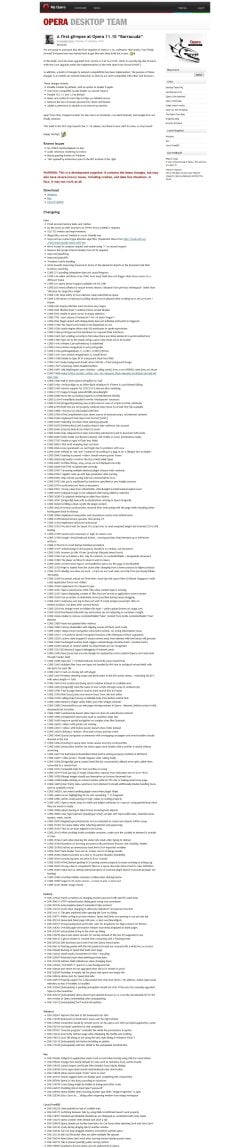
I reduced the size of the massive Opera Barracuda Changelog screen shot down from 2.5 MB to just under 1 MB to post so here it goes...

~Maxx~

OperaGold_60.png
 

Attachments

  • Opera 11_10 Barracuda Changelog_.jpg
    Opera 11_10 Barracuda Changelog_.jpg
    771.8 KB · Views: 23

My Computer My Computer

At a glance

Windows 7 x64 Home PremiumIntel Core i7 930 @ 2.8 Ghz Socket 1366 LGA8 GB 1366 Mhz DDR3 (PC3-10700) RAMATI Radeon 5770 1 GB DDR5 RAM
Computer Manufacturer/Model Number
HP HPE 270f
OS
Windows 7 x64 Home Premium
CPU
Intel Core i7 930 @ 2.8 Ghz Socket 1366 LGA
Motherboard
Pegatron Truckee v1.04E41
Memory
8 GB 1366 Mhz DDR3 (PC3-10700) RAM
Graphics Card(s)
ATI Radeon 5770 1 GB DDR5 RAM
Sound Card
Realtech High Definition
Monitor(s) Displays
32" Sony Bravia
Screen Resolution
1366 X 768
Hard Drives
Intel 25nm 120 GB Series 320 SSD HD Tune- 265 MBps Read/ 130 MBps Write

LaCie 1TB + 1TB RAID 0 eSATA Drive HD Tune- 160 MBps Read/ 90 MBps Write
Keyboard
Logitech Illuminated
Mouse
Logitech MX Revolution
Internet Speed
36.4 Mbps Maximum on a 37 Mbps Motorola SB501 Modem
The raw changelog was actually several times larger than the one that was published for the snapshot. This is fairly common when we produce public changelogs, because not everything is fit for public consumption. There may be things like internal architecture changes and preparations for things that are in the pipeline that can't be made public (yet). We also had to do things like merge lots of crash fixes into a single changelog item, just to keep the changelog down to a more manageable size.

So while the changelog you are seeing seems large (and I doubt that most people will even read most of it), it was even bigger before it was prepared for the public snapshot.

When it comes to new functionality, we have yet to announce what we will be adding to Barracuda. The initial announcement did contain a small hint, but as I mentioned, the first Barracuda snapshot is focused mostly on bug fixes. You can expect more of them in future builds.

New versions do need to strike a balance between new functionality and bug fixes, as it's important to stay competitive in the cutthroat browser market. We can't work exclusively on new functionality at the expense of fixing bugs, or vice versa. We need to do both.

Haavard - Anatomy of a Barracuda

I've been using using several extensions since it came out & they seem much more stable now.
A couple of extensions are broken including my favorite Slim Scrollbar, hope its only temporary.
 

My Computer My Computer

At a glance

Windows 7 Ultimate 64 bitIntel Core i7 4770K overclocked to 4.7GHz Qua...16GB Team Group Vulcan Gold 2133MHzATI Radeon HD 7880 Series Display adapter
Computer type
PC/Desktop
Computer Manufacturer/Model Number
self build
OS
Windows 7 Ultimate 64 bit
CPU
Intel Core i7 4770K overclocked to 4.7GHz Quad Core Haswell
Motherboard
Asus Z87 Pro (Socket 1150) ATX Motherboard
Memory
16GB Team Group Vulcan Gold 2133MHz
Graphics Card(s)
ATI Radeon HD 7880 Series Display adapter
Monitor(s) Displays
NEC LCD2690WUXi2
Screen Resolution
26" 1920 x 1200
Hard Drives
Samsung 500GB SSD 840 EVO SATA 6Gb/s
Samsung 250GB SSD 840 EVO SATA 6Gb/s
PSU
Corsair AX760 Platinum
Case
Cooler Master HAF X Gaming Tower
Cooling
XSPC RayStorm 750 RS360 Water cooling
Mouse
Razer Death Adder left handed
Internet Speed
126Mb download 11.5Mb up
Antivirus
Avast free
Browser
Opera
Other Info
Main Browser is Opera
Favorite software Adobe Lightroom & Photoshop
best plugins Nik software
Firewall : Private firewall 7
Back
Top