Opera 11.50 Released

Commodore Pet

Time Lord

My Computer

Computer type
PC/Desktop
Computer Manufacturer/Model Number
Custom Build
OS
Windows 7 Home Premium 64 bit SP1
CPU
Intel i7 4790k
Motherboard
MSI Z97-G55 SLI
Memory
16 GB Corsair 2400 MHz DDR3
Graphics Card(s)
Visiontek Radeon R9 285
Sound Card
None
Monitor(s) Displays
Gateway FHX2402L
Screen Resolution
1920 X 1080
Hard Drives
Samsung 840 EVO 500GB
PSU
Corsair 750 TX
Case
Fractal Design
Cooling
Stock fans
Keyboard
Logitech K800
Mouse
Logitech M510
Internet Speed
60.88 Mbps download 10.47 Mbps upload (Speedtest.net)
Antivirus
Norton
Browser
Opera
Other Info
First Computer used: A Commodore Pet of course
Love using Manjaro KDE Linux 64 bit and Windows 7/10 64 bit
The only thing that I'm particularly interested in with this version is Voice. However, while the plugin installs, I'm not getting any response through the speakers. Since Voice only worked with particular versions that have been released, before I start digging for any solutions, I would like to know if it is working properly for anyone else?
 

My Computer

Computer Manufacturer/Model Number
DIY
OS
W7x64 Pro, SuSe 12.1/** W7 x64 Pro, XP MCE
CPU
Phenom II 1090T w/Noctua NH-D14 /**4400+ X2 w/CM Hyper TX 3
Motherboard
ASRock 890FX Deluxe 4/**A8N-SLI
Memory
2 x 2GB Patriot PGS34g1600LLKA/**4x1GB Corsair VS
Graphics Card(s)
EVGA GTX460 SC/**EVGA 8800GTS
Sound Card
Asus Xonar D2X/**Xonar D1
Monitor(s) Displays
Acer X233H, Dell E152FPc /**LG M237-WD
Screen Resolution
1920x1080 & 1024x768/**1980x1080
Hard Drives
WDC 2TB, 1.5TB, 1TB, 500GB,Seagate 500GB , Maxtor 80GB /**500GB Seagate & WDC 1TB Black
PSU
CM RS600 w/ APC BX1000G/**Antec 500 TP w/ APC BX1000
Case
HAF922/**Antec 1040IIB
Cooling
3x200mm, 1x140 and 1x120mm/**5x80mm fans
Keyboard
Logitech Media USB/**Saitek Eclipse
Mouse
Cordless Trackman Wheel/**Ditto
Internet Speed
3.3Mbps
Other Info
SB 560 5.1 w/ Sennheiser RS140/**Creative T20 speakers, Dvico FusionHDTV7 Gold RT, Cisco E3000, HP 5510V AIO, Linksys E3000, Belkin F5U237 hub and **F5D8055 adapter
(** = 2nd rig)
thank for info,
I liked the browser too but have a little problem with Hebrew sites. he don't displayed very well.
 

My Computer

Computer Manufacturer/Model Number
H55M-D2H
OS
Windows 7 Ultimate x64
CPU
DualCore Intel Core i3 530, 2933 MHz (22 x 133)
Memory
6 GB DDR3
Graphics Card(s)
Nvidia GT430 1GB DDR3
Sound Card
Intel HDMI @ Intel Ibex Peak PCH - High Definition Audio Con
Monitor(s) Displays
CMC 22 W
Screen Resolution
1152 X 864
Hard Drives
Drive #1 - 500 GB
Drive #2 - 1 TB
Keyboard
Microsoft Wired Keyboard 600
Mouse
Microsoft Basic Optical Mouse
Internet Speed
20 mb download 1MB upload
Other Info
Microsoft® LifeCam HD-3000
The only thing that I'm particularly interested in with this version is Voice. However, while the plugin installs, I'm not getting any response through the speakers. Since Voice only worked with particular versions that have been released, before I start digging for any solutions, I would like to know if it is working properly for anyone else?

I enabled voice in preferences but I did not get any prompt to install voice.
Voice has never worked for me I've probably tried to install it a dozen times over the years with new versions of Opera.
Found this in the Opera Dev forum

By chrismills Wednesday, 13. April 2011, 13:40:44
By jax Tuesday, 25. September 2007, 09:33:40
You mean with voice/text to speech, or in general using Opera Mail?
Unfortunately we are not really supporting this technology any more, as such. It didn't really take off or come into popular use. I hope the article is still somewhat helpful to you.
Chris Mills
Developer Relations Manager
Editor, dev.opera.com and labs.opera.com

I suppose Opera voice does work for some so they leave the option in preferences.

If Voice is important to you Google Chrome have recently released Voice controlled searches, only on Chrome but maybe they will add support for other browsers in the future.
Google Voice Search offers natural user input | Digital Media - CNET News
Inside Google Search · Voice Search
 

My Computer

Computer type
PC/Desktop
Computer Manufacturer/Model Number
self build
OS
Windows 7 Ultimate 64 bit
CPU
Intel Core i7 4770K overclocked to 4.7GHz Quad Core Haswell
Motherboard
Asus Z87 Pro (Socket 1150) ATX Motherboard
Memory
16GB Team Group Vulcan Gold 2133MHz
Graphics Card(s)
ATI Radeon HD 7880 Series Display adapter
Monitor(s) Displays
NEC LCD2690WUXi2
Screen Resolution
26" 1920 x 1200
Hard Drives
Samsung 500GB SSD 840 EVO SATA 6Gb/s
Samsung 250GB SSD 840 EVO SATA 6Gb/s
PSU
Corsair AX760 Platinum
Case
Cooler Master HAF X Gaming Tower
Cooling
XSPC RayStorm 750 RS360 Water cooling
Mouse
Razer Death Adder left handed
Internet Speed
126Mb download 11.5Mb up
Antivirus
Avast free
Browser
Opera
Other Info
Main Browser is Opera
Favorite software Adobe Lightroom & Photoshop
best plugins Nik software
Firewall : Private firewall 7
I guess that I shouldn't be too surprised, because it hasn't work right in a while, but I am still somewhat surprised that they would drop something that did set Opera apart from other browsers, just because it didn't catch on like wildfire.
 

My Computer

Computer Manufacturer/Model Number
DIY
OS
W7x64 Pro, SuSe 12.1/** W7 x64 Pro, XP MCE
CPU
Phenom II 1090T w/Noctua NH-D14 /**4400+ X2 w/CM Hyper TX 3
Motherboard
ASRock 890FX Deluxe 4/**A8N-SLI
Memory
2 x 2GB Patriot PGS34g1600LLKA/**4x1GB Corsair VS
Graphics Card(s)
EVGA GTX460 SC/**EVGA 8800GTS
Sound Card
Asus Xonar D2X/**Xonar D1
Monitor(s) Displays
Acer X233H, Dell E152FPc /**LG M237-WD
Screen Resolution
1920x1080 & 1024x768/**1980x1080
Hard Drives
WDC 2TB, 1.5TB, 1TB, 500GB,Seagate 500GB , Maxtor 80GB /**500GB Seagate & WDC 1TB Black
PSU
CM RS600 w/ APC BX1000G/**Antec 500 TP w/ APC BX1000
Case
HAF922/**Antec 1040IIB
Cooling
3x200mm, 1x140 and 1x120mm/**5x80mm fans
Keyboard
Logitech Media USB/**Saitek Eclipse
Mouse
Cordless Trackman Wheel/**Ditto
Internet Speed
3.3Mbps
Other Info
SB 560 5.1 w/ Sennheiser RS140/**Creative T20 speakers, Dvico FusionHDTV7 Gold RT, Cisco E3000, HP 5510V AIO, Linksys E3000, Belkin F5U237 hub and **F5D8055 adapter
(** = 2nd rig)
Guess Opera were a bit too ambitious when they introduced voice back in 2004
Opera is a small company with limited resources I'm amazed at what they do Support.
Operating Systems supported include Win XP ,Vista, & 7, Mac OSX ,Linux ,BSD,Unix,Cell phones, Nintendo DS / Wii, Symbian, Windows Mobile, iOS (Opera Mini - available from App Store)
Opera is supported on over 3,000 models of cell phones & its also on some TV's as well.
Comparison of web browsers - Wikipedia, the free encyclopedia
 

My Computer

Computer type
PC/Desktop
Computer Manufacturer/Model Number
self build
OS
Windows 7 Ultimate 64 bit
CPU
Intel Core i7 4770K overclocked to 4.7GHz Quad Core Haswell
Motherboard
Asus Z87 Pro (Socket 1150) ATX Motherboard
Memory
16GB Team Group Vulcan Gold 2133MHz
Graphics Card(s)
ATI Radeon HD 7880 Series Display adapter
Monitor(s) Displays
NEC LCD2690WUXi2
Screen Resolution
26" 1920 x 1200
Hard Drives
Samsung 500GB SSD 840 EVO SATA 6Gb/s
Samsung 250GB SSD 840 EVO SATA 6Gb/s
PSU
Corsair AX760 Platinum
Case
Cooler Master HAF X Gaming Tower
Cooling
XSPC RayStorm 750 RS360 Water cooling
Mouse
Razer Death Adder left handed
Internet Speed
126Mb download 11.5Mb up
Antivirus
Avast free
Browser
Opera
Other Info
Main Browser is Opera
Favorite software Adobe Lightroom & Photoshop
best plugins Nik software
Firewall : Private firewall 7
thank for info,
I liked the browser too but have a little problem with Hebrew sites. he don't displayed very well.

Have you tried the encoding option's >Menu> Page > Encoding > Hebrew ?
Maybe changing the options in Author Mode may help.
You can enable the View tool bar to access Author Mode or open Appearance Ctrl F12 > buttons tab > browser view & drag the Author mode button to the Address bar.
 

My Computer

Computer type
PC/Desktop
Computer Manufacturer/Model Number
self build
OS
Windows 7 Ultimate 64 bit
CPU
Intel Core i7 4770K overclocked to 4.7GHz Quad Core Haswell
Motherboard
Asus Z87 Pro (Socket 1150) ATX Motherboard
Memory
16GB Team Group Vulcan Gold 2133MHz
Graphics Card(s)
ATI Radeon HD 7880 Series Display adapter
Monitor(s) Displays
NEC LCD2690WUXi2
Screen Resolution
26" 1920 x 1200
Hard Drives
Samsung 500GB SSD 840 EVO SATA 6Gb/s
Samsung 250GB SSD 840 EVO SATA 6Gb/s
PSU
Corsair AX760 Platinum
Case
Cooler Master HAF X Gaming Tower
Cooling
XSPC RayStorm 750 RS360 Water cooling
Mouse
Razer Death Adder left handed
Internet Speed
126Mb download 11.5Mb up
Antivirus
Avast free
Browser
Opera
Other Info
Main Browser is Opera
Favorite software Adobe Lightroom & Photoshop
best plugins Nik software
Firewall : Private firewall 7
11.50 broke my favorite skin :( Been using it for years, sad. A Guy
 

My Computer

Computer type
PC/Desktop
OS
Windows 10 Home x64
CPU
INTEL Core i5-750 Quad-Core 3.37GHz
Motherboard
ASUS P7P55D
Memory
HyperX Fury Black Series 8GB (2 x 4GB) 1866Mhz
Graphics Card(s)
EVGA GeForce GTX 750 Superclocked 1GB 128-Bit GDDR5
Monitor(s) Displays
LG 32MA68HY 32" IPS
Screen Resolution
1920 x 1080
Hard Drives
Samsung 840 Evo 120GB, SEAGATE 500GB Barracuda® 7200.12, SATA 3 Gb/s, 7200 RPM, 16MB cache
PSU
ANTEC TruePower New TP-550, 80 PLUS, 550W
Case
ANTEC Three Hundred Illusion
Cooling
COOLER MASTER Hyper 212 Plus, 4 x 120mm 1 x 140mm Noctua's
Internet Speed
85 + Mbps
Antivirus
Avast
Browser
Vivaldi
thank for info,
I liked the browser too but have a little problem with Hebrew sites. he don't displayed very well.

Have you tried the encoding option's >Menu> Page > Encoding > Hebrew ?
Maybe changing the options in Author Mode may help.
You can enable the View tool bar to access Author Mode or open Appearance Ctrl F12 > buttons tab > browser view & drag the Author mode button to the Address bar.

i think the problem is not in Opera however the problem is on Israel site,they not built to opera. but i take a chance and try it again.
 

My Computer

Computer Manufacturer/Model Number
H55M-D2H
OS
Windows 7 Ultimate x64
CPU
DualCore Intel Core i3 530, 2933 MHz (22 x 133)
Memory
6 GB DDR3
Graphics Card(s)
Nvidia GT430 1GB DDR3
Sound Card
Intel HDMI @ Intel Ibex Peak PCH - High Definition Audio Con
Monitor(s) Displays
CMC 22 W
Screen Resolution
1152 X 864
Hard Drives
Drive #1 - 500 GB
Drive #2 - 1 TB
Keyboard
Microsoft Wired Keyboard 600
Mouse
Microsoft Basic Optical Mouse
Internet Speed
20 mb download 1MB upload
Other Info
Microsoft® LifeCam HD-3000
Opera's a good browser I like the interface I wish it were a bit more user friendly in the options as It seems to keep a lot of people from using it..I do wish it would confine the widgets into a folder instead of my start menu.,I used Opera back when it was a Pay browser..It's come a long way !
 

My Computer

Computer Manufacturer/Model Number
Dell Inspiron 570
OS
Windows 7 Professional 64 Bit Service Pk 1
CPU
AMD Athlon II X3 435 processor 2.90 GHz
Motherboard
Dell Inc ( Cant find any information other then this)
Memory
6.00 GB Type DDR3
Graphics Card(s)
Integrated ATI Radeon HD4200 Graphics
Sound Card
Realtek High Definition Audio
Monitor(s) Displays
Samsung SyncMaster on ATI Radeon HD 4200
Screen Resolution
1920x1032 pixels
Hard Drives
1TB Serial ATA 2 Hard Drive 7200RPM
Keyboard
Deck
Mouse
Logitech
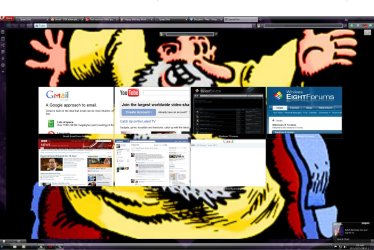
The only other complaint that I have about this release, is the changes that they made in SpeedDial. It no longer lets you browse to a thumbnail to use for a particular website. I haven't done it yet, but I'm sure that it can still be done manually, but it was nice not to have to do so, even though it only lasted for one release. Maybe they are trying to discourage the use of custom thumbnails, because if the size of the thumbnail wasn't just exactly the right size, it would be displayed in unpredictable sizes, and whatever remained of the space in the thumbnail window, was filled with variegated colored stripes.

Another problem that I'm having with thumbnails is that when opening SpeedDial to add a website, at first it just listed the open tabs, with the last one first on the list, and it would automatically load it. For some reason, that changed, and a window with a bunch of extensions appear instead, and I have to manually type in the url of the website that I want. One step forward, two back.
 

My Computer

Computer Manufacturer/Model Number
DIY
OS
W7x64 Pro, SuSe 12.1/** W7 x64 Pro, XP MCE
CPU
Phenom II 1090T w/Noctua NH-D14 /**4400+ X2 w/CM Hyper TX 3
Motherboard
ASRock 890FX Deluxe 4/**A8N-SLI
Memory
2 x 2GB Patriot PGS34g1600LLKA/**4x1GB Corsair VS
Graphics Card(s)
EVGA GTX460 SC/**EVGA 8800GTS
Sound Card
Asus Xonar D2X/**Xonar D1
Monitor(s) Displays
Acer X233H, Dell E152FPc /**LG M237-WD
Screen Resolution
1920x1080 & 1024x768/**1980x1080
Hard Drives
WDC 2TB, 1.5TB, 1TB, 500GB,Seagate 500GB , Maxtor 80GB /**500GB Seagate & WDC 1TB Black
PSU
CM RS600 w/ APC BX1000G/**Antec 500 TP w/ APC BX1000
Case
HAF922/**Antec 1040IIB
Cooling
3x200mm, 1x140 and 1x120mm/**5x80mm fans
Keyboard
Logitech Media USB/**Saitek Eclipse
Mouse
Cordless Trackman Wheel/**Ditto
Internet Speed
3.3Mbps
Other Info
SB 560 5.1 w/ Sennheiser RS140/**Creative T20 speakers, Dvico FusionHDTV7 Gold RT, Cisco E3000, HP 5510V AIO, Linksys E3000, Belkin F5U237 hub and **F5D8055 adapter
(** = 2nd rig)
My take is one step forward & one step sideways regarding the Speed Dials.
Another problem that I'm having with thumbnails is that when opening SpeedDial to add a website, at first it just listed the open tabs, with the last one first on the list, and it would automatically load it. For some reason, that changed, and a window with a bunch of extensions appear instead, and I have to manually type in the url of the website that I want
That stumped me for a bit as well, all you have to do is mouse right click hold & drag the tab to the speed dial + & tap the enter key briefly at some point before you drop it to the speed dial +.
There is a Speed Dial Extension that my help.
https://addons.opera.com/addons/extensions/details/forcespeeddiallogos/1.3.2/?display=en
You probably can add your own logo's if you know how & if you can't at the moment I'm sure you will be able to soon, Opera has always been very good at giving Users options.
One improvement to the Speed Dial I like is that web sites can design their own Speed dial logo's.
 

My Computer

Computer type
PC/Desktop
Computer Manufacturer/Model Number
self build
OS
Windows 7 Ultimate 64 bit
CPU
Intel Core i7 4770K overclocked to 4.7GHz Quad Core Haswell
Motherboard
Asus Z87 Pro (Socket 1150) ATX Motherboard
Memory
16GB Team Group Vulcan Gold 2133MHz
Graphics Card(s)
ATI Radeon HD 7880 Series Display adapter
Monitor(s) Displays
NEC LCD2690WUXi2
Screen Resolution
26" 1920 x 1200
Hard Drives
Samsung 500GB SSD 840 EVO SATA 6Gb/s
Samsung 250GB SSD 840 EVO SATA 6Gb/s
PSU
Corsair AX760 Platinum
Case
Cooler Master HAF X Gaming Tower
Cooling
XSPC RayStorm 750 RS360 Water cooling
Mouse
Razer Death Adder left handed
Internet Speed
126Mb download 11.5Mb up
Antivirus
Avast free
Browser
Opera
Other Info
Main Browser is Opera
Favorite software Adobe Lightroom & Photoshop
best plugins Nik software
Firewall : Private firewall 7
My problem is that I don't like changes, once I get used to doing something one way, but it is good to know how to anyway. I just tried the right click drag and drop, without tapping the enter key, and it seemed to work fine. What is that enter key part about? I think that when the SpeedDial tab window changed, is when I selected the weather extension for testing, and now I can't revert it back to the way that it was.

EDIT: As I mentioned, I do know how to manually add my own images to SpeedDial, but it is not always predictable as to the resulting SD display. I would prefer to use my own images, but don't want to experiment on and on with each image to make it work.
 

My Computer

Computer Manufacturer/Model Number
DIY
OS
W7x64 Pro, SuSe 12.1/** W7 x64 Pro, XP MCE
CPU
Phenom II 1090T w/Noctua NH-D14 /**4400+ X2 w/CM Hyper TX 3
Motherboard
ASRock 890FX Deluxe 4/**A8N-SLI
Memory
2 x 2GB Patriot PGS34g1600LLKA/**4x1GB Corsair VS
Graphics Card(s)
EVGA GTX460 SC/**EVGA 8800GTS
Sound Card
Asus Xonar D2X/**Xonar D1
Monitor(s) Displays
Acer X233H, Dell E152FPc /**LG M237-WD
Screen Resolution
1920x1080 & 1024x768/**1980x1080
Hard Drives
WDC 2TB, 1.5TB, 1TB, 500GB,Seagate 500GB , Maxtor 80GB /**500GB Seagate & WDC 1TB Black
PSU
CM RS600 w/ APC BX1000G/**Antec 500 TP w/ APC BX1000
Case
HAF922/**Antec 1040IIB
Cooling
3x200mm, 1x140 and 1x120mm/**5x80mm fans
Keyboard
Logitech Media USB/**Saitek Eclipse
Mouse
Cordless Trackman Wheel/**Ditto
Internet Speed
3.3Mbps
Other Info
SB 560 5.1 w/ Sennheiser RS140/**Creative T20 speakers, Dvico FusionHDTV7 Gold RT, Cisco E3000, HP 5510V AIO, Linksys E3000, Belkin F5U237 hub and **F5D8055 adapter
(** = 2nd rig)
What is that enter key part about?
Might be something to do with my Mouse/keyboard setup I have a Razor Death adder left hand mouse & unlike every other mouse I've had I have to reverse the left & right buttons in Windows mouse settings. When I stumbled on how to do it I did wonder why the enter key was needed at the time.
 

My Computer

Computer type
PC/Desktop
Computer Manufacturer/Model Number
self build
OS
Windows 7 Ultimate 64 bit
CPU
Intel Core i7 4770K overclocked to 4.7GHz Quad Core Haswell
Motherboard
Asus Z87 Pro (Socket 1150) ATX Motherboard
Memory
16GB Team Group Vulcan Gold 2133MHz
Graphics Card(s)
ATI Radeon HD 7880 Series Display adapter
Monitor(s) Displays
NEC LCD2690WUXi2
Screen Resolution
26" 1920 x 1200
Hard Drives
Samsung 500GB SSD 840 EVO SATA 6Gb/s
Samsung 250GB SSD 840 EVO SATA 6Gb/s
PSU
Corsair AX760 Platinum
Case
Cooler Master HAF X Gaming Tower
Cooling
XSPC RayStorm 750 RS360 Water cooling
Mouse
Razer Death Adder left handed
Internet Speed
126Mb download 11.5Mb up
Antivirus
Avast free
Browser
Opera
Other Info
Main Browser is Opera
Favorite software Adobe Lightroom & Photoshop
best plugins Nik software
Firewall : Private firewall 7
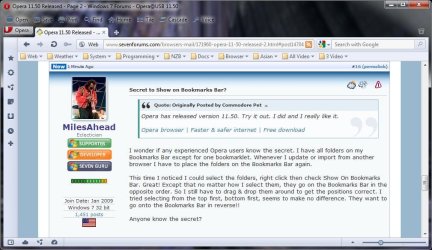
Secret to Show on Bookmarks Bar?

Opera has released version 11.50. Try it out. I did and I really like it.

Opera browser | Faster & safer internet | Free download

I wonder if any experienced Opera users know the secret. I have all folders on my Bookmarks Bar except for one bookmarklet. Whenever I update or import from another browser I have to place the folders on the Bookmarks Bar again.

This time I noticed I could select the folders, right click then check Show On Bookmarks Bar. Great! Except that no matter how I select them, they go on the Bookmarks Bar in the opposite order. So I still have to drag & drop them around to get the positions correct. I tried selecting from the top first, bottom first, seems to make no difference. They want to go onto the Bookmarks Bar in reverse!!

Anyone know the secret?

Edit: to show what I mean see the screen shot.
What I want is Web Weather System going from Right to Left on Bookmarks Bar. Not the way Opera puts them.

OperaShot.jpg
 

My Computer

Computer Manufacturer/Model Number
HP Media Center
OS
Windows 7 32 bit
CPU
AMD 5200+ dual core
Memory
2 GB
Graphics Card(s)
NVidia GeForce 6150SE 128 MB
Monitor(s) Displays
CRT
Screen Resolution
1280x1024
Hard Drives
500 GB Sata internal :

SIIG USB 3.0 docking stations w/WD Caviar Black 6 Gb/s drives
Keyboard
PS/2
Mouse
PS/2 Wheel Mouse
Other Info
SIIG USB 3.0 PCIexpress card.

My Computer

Computer type
PC/Desktop
OS
Windows 10 Home x64
CPU
INTEL Core i5-750 Quad-Core 3.37GHz
Motherboard
ASUS P7P55D
Memory
HyperX Fury Black Series 8GB (2 x 4GB) 1866Mhz
Graphics Card(s)
EVGA GeForce GTX 750 Superclocked 1GB 128-Bit GDDR5
Monitor(s) Displays
LG 32MA68HY 32" IPS
Screen Resolution
1920 x 1080
Hard Drives
Samsung 840 Evo 120GB, SEAGATE 500GB Barracuda® 7200.12, SATA 3 Gb/s, 7200 RPM, 16MB cache
PSU
ANTEC TruePower New TP-550, 80 PLUS, 550W
Case
ANTEC Three Hundred Illusion
Cooling
COOLER MASTER Hyper 212 Plus, 4 x 120mm 1 x 140mm Noctua's
Internet Speed
85 + Mbps
Antivirus
Avast
Browser
Vivaldi
See if this works for the bookmarks bar...I don't use one myself.

Tamil - How to sort bookmarks in Opera?

A Guy

That worked. Sorted in reverse order then clicked Show On Bookmarks Bar. I only had to move the bookmarklet from the right end to the left end to get it right.

6.gif
 

My Computer

Computer Manufacturer/Model Number
HP Media Center
OS
Windows 7 32 bit
CPU
AMD 5200+ dual core
Memory
2 GB
Graphics Card(s)
NVidia GeForce 6150SE 128 MB
Monitor(s) Displays
CRT
Screen Resolution
1280x1024
Hard Drives
500 GB Sata internal :

SIIG USB 3.0 docking stations w/WD Caviar Black 6 Gb/s drives
Keyboard
PS/2
Mouse
PS/2 Wheel Mouse
Other Info
SIIG USB 3.0 PCIexpress card.
Great :)

A Guy
 

My Computer

Computer type
PC/Desktop
OS
Windows 10 Home x64
CPU
INTEL Core i5-750 Quad-Core 3.37GHz
Motherboard
ASUS P7P55D
Memory
HyperX Fury Black Series 8GB (2 x 4GB) 1866Mhz
Graphics Card(s)
EVGA GeForce GTX 750 Superclocked 1GB 128-Bit GDDR5
Monitor(s) Displays
LG 32MA68HY 32" IPS
Screen Resolution
1920 x 1080
Hard Drives
Samsung 840 Evo 120GB, SEAGATE 500GB Barracuda® 7200.12, SATA 3 Gb/s, 7200 RPM, 16MB cache
PSU
ANTEC TruePower New TP-550, 80 PLUS, 550W
Case
ANTEC Three Hundred Illusion
Cooling
COOLER MASTER Hyper 212 Plus, 4 x 120mm 1 x 140mm Noctua's
Internet Speed
85 + Mbps
Antivirus
Avast
Browser
Vivaldi
I'm quite impressed by the functionality and the look.
Google Chrome Dev and Nightly make it feel noticeably slow, however.
I can't see any improvement in speed with turbo enabled. In fact I just got a pop up telling me to disable it.
Things like this forum or gmail take longer to load than in the other two browsers, noticeably longer.
 

Attachments

  • opera11.50.2.jpg
    opera11.50.2.jpg
    262.4 KB · Views: 8

My Computer

Computer Manufacturer/Model Number
The Monolith. 3.1
OS
Windows 7 Home Premium 64 bit
CPU
i7 [email protected]
Motherboard
Gigabyte Z77-D3H
Memory
2x4GB Corsair Vegeance DDR3
Graphics Card(s)
XFX GTX 260 Black Edition
Sound Card
none-through large stereo hi fi
Monitor(s) Displays
Croosover 27MDP LED IPS Dell 2408 WFP
Screen Resolution
2560x1440 1920x1200
Hard Drives
1x Samsung 840Pro 128GB SSD
1x Samsung Spinpoint F1 1TB
PSU
Corsair AX 850 Watt
Case
Cooler Master ACTS 840
Cooling
Be Quiet! Dark Rock Pro
Keyboard
Enermax Aurora
Mouse
Logitech Ballmouse
Internet Speed
20MBPS
I'm quite impressed by the functionality and the look.
Google Chrome Dev and Nightly make it feel noticeably slow, however.
I can't see any improvement in speed with turbo enabled. In fact I just got a pop up telling me to disable it.
Things like this forum or gmail take longer to load than in the other two browsers, noticeably longer.

That is strange, with Opera everything seems much snappier to me than Nightly 64 bit. Can we get some other opinions?
 

My Computer

Computer type
PC/Desktop
Computer Manufacturer/Model Number
Custom Build
OS
Windows 7 Home Premium 64 bit SP1
CPU
Intel i7 4790k
Motherboard
MSI Z97-G55 SLI
Memory
16 GB Corsair 2400 MHz DDR3
Graphics Card(s)
Visiontek Radeon R9 285
Sound Card
None
Monitor(s) Displays
Gateway FHX2402L
Screen Resolution
1920 X 1080
Hard Drives
Samsung 840 EVO 500GB
PSU
Corsair 750 TX
Case
Fractal Design
Cooling
Stock fans
Keyboard
Logitech K800
Mouse
Logitech M510
Internet Speed
60.88 Mbps download 10.47 Mbps upload (Speedtest.net)
Antivirus
Norton
Browser
Opera
Other Info
First Computer used: A Commodore Pet of course
Love using Manjaro KDE Linux 64 bit and Windows 7/10 64 bit
Back
Top