
Solved Opera 18 Standalone Browser - configuration?

Callender

New member
Guru
Gold Member
VIP
Local time
8:39 PM
Messages
4,776
Location
United Kingdom
Hi,

I've long been a fan of Opera-USB (portable) browser as it was highly customizable and left no trace on the host machine. It's been out of date for a while now but it's replacement has arrived. If anyone is using Opera 18 Standalone version (64bit) I have a couple of questions.

Is there any way to import Opera bookmarks other than by downloading and installing the "bookmark manager" extension.

Is there a way to add "Opera Dragonfly" as I've found this very useful in the past.

Can you find a way to "block referrer header" like you could in the old version?

I've tried:

opera:config
opera:settings
opera:plugins
opera:about

No luck so far!

(I don't wish to install the full desktop version of Opera).

EDIT: Part solved.... Block Referrer has been enabled by installing yet another add on!
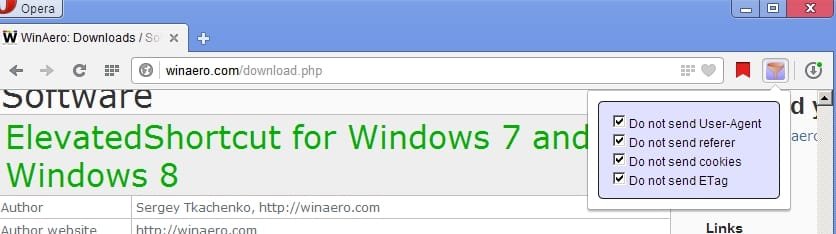
Block Referrer.jpg

Now can anybody help me figure out how to disable DOM storage?
 
Last edited:

My Computer My Computer

At a glance

Microsoft Windows 7 Home Premium 64-bit 7601 ...AMD C-60 APU with Radeon(tm) HD Graphics4.00 GBAMD Radeon HD 6290 Graphics
Computer type
Laptop
Computer Manufacturer/Model Number
ASUS
OS
Microsoft Windows 7 Home Premium 64-bit 7601 Multiprocessor Free Service Pack 1
CPU
AMD C-60 APU with Radeon(tm) HD Graphics
Motherboard
ASUSTeK COMPUTER INC. X501U
Memory
4.00 GB
Graphics Card(s)
AMD Radeon HD 6290 Graphics
Sound Card
(1) AMD High Definition Audio Device (2) Realtek High Defi
Screen Resolution
1366 x 768 x 32 bits (4294967296 colors) @ 60 Hz
Hard Drives
Hitachi HTS545050A7E380 SATA Disk Device
Antivirus
Comodo CIS & FW, SecureAplus App Whitelisting, Threatfire
Browser
Cyberfox 64bit, Opera 64bit, Airfox
Other Info
Spy-The-Spy, HitmanPro.Alert, Norton Connect Safe, MJRegWatcher, BitDefender TrafficLight, Voodoo Shield, Zemana AntiMalware
I have stayed with Ver 12 due to the bookmarks idiocy. The Quick Access Bar is not my idea of a bookmarks function, grrr.

That said, I found a method by using Chrome (oh boy). If you have Chrome you could try, doubt that is easier then using the extension

1. Launch the O12, open the Bookmarks Manager (Ctrl+Shift+B), from the "File" menu, select "Export as HTML",

2. Launch the Chrome, open the Bookmark Manager (Ctrl+Shift+O), and from the "Organize" menu, select "Import bookmarks from HTML file",

3. Copy the "Bookmarks" file, from the Chrome's profile folder, e.g. "...Google\Chrome\User Data\Default", to the Opera 18's profile directory, e.g. "...Developer Opera\profile\data" (overwrite existing file).

Before you start copy/paste, be sure to close both: the Chrome, and the Opera.

Source

Since Opera 18 uses WebKit instead of Presto, currently it has no Dragonfly. Google uses something called Chrome Inspector. Unsure whether Opera will eventually have that, or they are working on a new Dragonfly.

https://twitter.com/runeh/status/301616059729969152

A Guy
 

My Computer My Computer

At a glance

Windows 10 Home x64INTEL Core i5-750 Quad-Core 3.37GHzHyperX Fury Black Series 8GB (2 x 4GB) 1866MhzEVGA GeForce GTX 750 Superclocked 1GB 128-Bit...
Computer type
PC/Desktop
OS
Windows 10 Home x64
CPU
INTEL Core i5-750 Quad-Core 3.37GHz
Motherboard
ASUS P7P55D
Memory
HyperX Fury Black Series 8GB (2 x 4GB) 1866Mhz
Graphics Card(s)
EVGA GeForce GTX 750 Superclocked 1GB 128-Bit GDDR5
Monitor(s) Displays
LG 32MA68HY 32" IPS
Screen Resolution
1920 x 1080
Hard Drives
Samsung 840 Evo 120GB, SEAGATE 500GB Barracuda® 7200.12, SATA 3 Gb/s, 7200 RPM, 16MB cache
PSU
ANTEC TruePower New TP-550, 80 PLUS, 550W
Case
ANTEC Three Hundred Illusion
Cooling
COOLER MASTER Hyper 212 Plus, 4 x 120mm 1 x 140mm Noctua's
Internet Speed
85 + Mbps
Antivirus
Avast
Browser
Vivaldi
Thanks

Thanks very much for your solution. I don't use Chrome but sometimes use SRWare Iron and that's pretty much the same thing. Also thanks to your help I managed to discover WebKit or in the version of Opera 18 that I'm using it's shown as Web Inspector.

Best,

Chris.
 

My Computer My Computer

At a glance

Microsoft Windows 7 Home Premium 64-bit 7601 ...AMD C-60 APU with Radeon(tm) HD Graphics4.00 GBAMD Radeon HD 6290 Graphics
Computer type
Laptop
Computer Manufacturer/Model Number
ASUS
OS
Microsoft Windows 7 Home Premium 64-bit 7601 Multiprocessor Free Service Pack 1
CPU
AMD C-60 APU with Radeon(tm) HD Graphics
Motherboard
ASUSTeK COMPUTER INC. X501U
Memory
4.00 GB
Graphics Card(s)
AMD Radeon HD 6290 Graphics
Sound Card
(1) AMD High Definition Audio Device (2) Realtek High Defi
Screen Resolution
1366 x 768 x 32 bits (4294967296 colors) @ 60 Hz
Hard Drives
Hitachi HTS545050A7E380 SATA Disk Device
Antivirus
Comodo CIS & FW, SecureAplus App Whitelisting, Threatfire
Browser
Cyberfox 64bit, Opera 64bit, Airfox
Other Info
Spy-The-Spy, HitmanPro.Alert, Norton Connect Safe, MJRegWatcher, BitDefender TrafficLight, Voodoo Shield, Zemana AntiMalware
Good you got it sorted. Been using Opera since it became a free browser. Still waiting to see where they go with it. A Guy
 

My Computer My Computer

At a glance

Windows 10 Home x64INTEL Core i5-750 Quad-Core 3.37GHzHyperX Fury Black Series 8GB (2 x 4GB) 1866MhzEVGA GeForce GTX 750 Superclocked 1GB 128-Bit...
Computer type
PC/Desktop
OS
Windows 10 Home x64
CPU
INTEL Core i5-750 Quad-Core 3.37GHz
Motherboard
ASUS P7P55D
Memory
HyperX Fury Black Series 8GB (2 x 4GB) 1866Mhz
Graphics Card(s)
EVGA GeForce GTX 750 Superclocked 1GB 128-Bit GDDR5
Monitor(s) Displays
LG 32MA68HY 32" IPS
Screen Resolution
1920 x 1080
Hard Drives
Samsung 840 Evo 120GB, SEAGATE 500GB Barracuda® 7200.12, SATA 3 Gb/s, 7200 RPM, 16MB cache
PSU
ANTEC TruePower New TP-550, 80 PLUS, 550W
Case
ANTEC Three Hundred Illusion
Cooling
COOLER MASTER Hyper 212 Plus, 4 x 120mm 1 x 140mm Noctua's
Internet Speed
85 + Mbps
Antivirus
Avast
Browser
Vivaldi
Back
Top