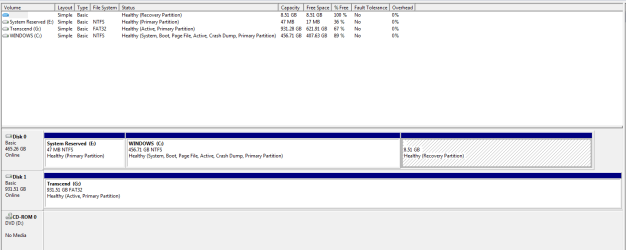
It seems one mystery just leads to another....
Our newest computer, DELL Optiplex 780m tower, Windows 7 Pro; after a minor glitch or two, this unit had been shut down and later started, and restarted, a number of times and all was running smoothly.
The only thing I changed, and I somehow don't really think that it has any bearing on the situation, is that, in the wee hours of last night, I installed Photoshop Elements 12.
Upon installing E12, I clicked the button that said "restart now"; the computer restarted without a hitch; I played around a bit with both sections of E12, the Editor and the Organizer, and then I shut the computer down for the night.
Then, this morning, I turn the computer on and it stops at a black screen with the message "operating system is missing"
It did not say anywhere to do this, but I pressed Ctl-Alt-Del, and it then proceeded to boot right up.
I thought this might just have been a freak occurrence, so I shut it down, waited a bit, and turned the power on again; it stopped at the same black "operating system is missing" screen; ctl-alt-del got it to start again.
History: this unit was new just days ago with a clean install of Windows 7 Pro.
Due to getting the error 0x80780119 when trying to create a system image, I used EasyBCD to relocate the boot manager to the C:\ drive after which on the next restart it said "bootmgr is missing"; I used my Windows system repair disc and it booted and didn't have that problem again.
Once the boot manager was relocated, I used Windows to create a system image of it's mostly pristine state.
I installed several programs and then created a second image with the programs included. (I renamed these images so that they would not get overwritten.)
Computer was restarted several times during all of this with nary a problem.
How do I fix this ?
Will using the system repair disc when it stops at the "operating system is missing" screen fix this problem ?
Thanks for reading.
Our newest computer, DELL Optiplex 780m tower, Windows 7 Pro; after a minor glitch or two, this unit had been shut down and later started, and restarted, a number of times and all was running smoothly.
The only thing I changed, and I somehow don't really think that it has any bearing on the situation, is that, in the wee hours of last night, I installed Photoshop Elements 12.
Upon installing E12, I clicked the button that said "restart now"; the computer restarted without a hitch; I played around a bit with both sections of E12, the Editor and the Organizer, and then I shut the computer down for the night.
Then, this morning, I turn the computer on and it stops at a black screen with the message "operating system is missing"
It did not say anywhere to do this, but I pressed Ctl-Alt-Del, and it then proceeded to boot right up.
I thought this might just have been a freak occurrence, so I shut it down, waited a bit, and turned the power on again; it stopped at the same black "operating system is missing" screen; ctl-alt-del got it to start again.
History: this unit was new just days ago with a clean install of Windows 7 Pro.
Due to getting the error 0x80780119 when trying to create a system image, I used EasyBCD to relocate the boot manager to the C:\ drive after which on the next restart it said "bootmgr is missing"; I used my Windows system repair disc and it booted and didn't have that problem again.
Once the boot manager was relocated, I used Windows to create a system image of it's mostly pristine state.
I installed several programs and then created a second image with the programs included. (I renamed these images so that they would not get overwritten.)
Computer was restarted several times during all of this with nary a problem.
How do I fix this ?
Will using the system repair disc when it stops at the "operating system is missing" screen fix this problem ?
Thanks for reading.
My Computer
- Computer type
- PC/Desktop
- Computer Manufacturer/Model Number
- Dell Optiplex 780m "mini-tower"
- OS
- Windows 7 Pro x64
- CPU
- Intel Core Two Duo E8600 3.33 ghz
- Motherboard
- Whatever DELL put in it
- Memory
- 8GB
- Graphics Card(s)
- Gigabyte Radeon R7 240
- Monitor(s) Displays
- HP 2159m
- PSU
- 750 Watt Corsair CX750
- Keyboard
- Logitech Wireless
- Mouse
- Logitech Wireless
- Browser
- Chrome, Firefox, IE