operating system not found - recovery

kr651129

New member
Local time
3:18 AM
Messages
7
Location
Overland Park, KS
I shrinked my hdd today because I was going to setup a 3rd os on my new dell laptop. After rebooting it said that the os was not found which is fine because my dell has a recovery partition. I tried to boot to that but couldn't because what Im finding out is that the MBR needs to be in tact to be able to boot to the recovery. I don't have a windows 7 disc and I don't have access to another PC that isnt at work. Is there anyway to fix this? Possibly booting to a live copy of linux?
 

My Computer

OS
Windows 7 and Ubuntu 9.10
Plenty of ways to write a new mbr - they all require you to d/l and burn a bootable .iso - so you need access to another pc.

Sadly, they won't restore the F key function that was specially created by the manufacturer.

It is likely the active marker has gone astray.

You need some kind of bootable app.

Try Gparted 3.9.4 - it stops a few times during load asking about keyboard and language , just press Enter each time.

Rt click the 100 mb partition ( if you have one ) and select Flag on. Apply.

If you don't have 100mb partition , Flag on the 7 partition - see if you can boot in then.
gparted-live-0.3.9-4.iso
 

My Computers

System One System Two

  • Computer type
    PC/Desktop
    OS
    7 X64
    CPU
    i5 8400
    Motherboard
    gigabyte b365m ds3h
    Memory
    2x8gb 3200mhz
    Hard Drives
    various
    PSU
    pure power 11 400w cm
    Case
    Coolermaster
    Cooling
    cryorig m9i
  • Computer type
    PC/Desktop
    OS
    7x64
    CPU
    g5400
    Motherboard
    ga b365m ds3h
    Memory
    8gb ddr4 2400
    PSU
    xfx pro 450w
thanks for the relpy. I was thinking it over durring lunch and heres what I was thinking. WHAT IF....I reinstalled ubuntu over its own partition forcing it to reload the grub? Would that have any effect?
 

My Computer

OS
Windows 7 and Ubuntu 9.10
What three OS are you installing.
 
Last edited:

My Computer

OS
ME/XP/Vista/Win7
I had 7 x64 and ubuntu 9.10 x64 on there....and for grins I was putting leopard 10.0.5 on there because I wanna mess around with making an app for iphones without actually buying a whole new system
 

My Computer

OS
Windows 7 and Ubuntu 9.10
thanks for the relpy. I was thinking it over durring lunch and heres what I was thinking. WHAT IF....I reinstalled ubuntu over its own partition forcing it to reload the grub? Would that have any effect?
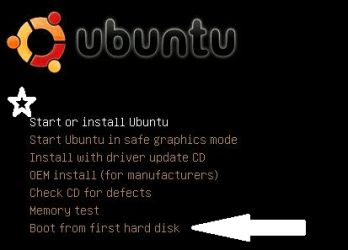
This is the splash screen for a Ubuntu CD:

boot_first_hd_01.png

Notice * you can use the CD "live", start a Ubuntu OS without installing anything

or, <- you can boot to a partition on the hard drive with this utility: "Boot from first hard disk". Once you have booted to your Ubuntu OS you can just reinstall Grub or you can download the utilities SIW2 recommends and make Windows repairs.
 

My Computer

OS
...
thanks for the relpy. I was thinking it over durring lunch and heres what I was thinking. WHAT IF....I reinstalled ubuntu over its own partition forcing it to reload the grub? Would that have any effect?
This is the splash screen for a Ubuntu CD:

View attachment 48941

Notice * you can use the CD "live", start a Ubuntu OS without installing anything

or, <- you can boot to a partition on the hard drive with this utility: "Boot from first hard disk". Once you have booted to your Ubuntu OS you can just reinstall Grub or you can download the utilities SIW2 recommends and make Windows repairs.

Now correct me if Im wrong in my thinking here, once I reinstall the grub I should be able to go right into my windows 7 correct?
 

My Computer

OS
Windows 7 and Ubuntu 9.10
thanks for the relpy. I was thinking it over durring lunch and heres what I was thinking. WHAT IF....I reinstalled ubuntu over its own partition forcing it to reload the grub? Would that have any effect?
This is the splash screen for a Ubuntu CD:

View attachment 48941

Notice * you can use the CD "live", start a Ubuntu OS without installing anything

or, <- you can boot to a partition on the hard drive with this utility: "Boot from first hard disk". Once you have booted to your Ubuntu OS you can just reinstall Grub or you can download the utilities SIW2 recommends and make Windows repairs.

Now correct me if Im wrong in my thinking here, once I reinstall the grub I should be able to go right into my windows 7 correct?
That depends on the reason you are not able to boot to your OSs. The Ubuntu CD 'should' be able to find Ubuntu so you can boot there. Once you are in Ubuntu, you can reinstall / update Grub. I have Ubuntu 9.04 on a test computer with 7, XP, and 98. Grub is able to find them all and put them in the boot menu. So IF windows is bootable, Grub 'should' find it and add it to the boot menu. Other problems might exist ...
 

My Computer

OS
...
This is the splash screen for a Ubuntu CD:

View attachment 48941

Notice * you can use the CD "live", start a Ubuntu OS without installing anything

or, <- you can boot to a partition on the hard drive with this utility: "Boot from first hard disk". Once you have booted to your Ubuntu OS you can just reinstall Grub or you can download the utilities SIW2 recommends and make Windows repairs.

Now correct me if Im wrong in my thinking here, once I reinstall the grub I should be able to go right into my windows 7 correct?
That depends on the reason you are not able to boot to your OSs. The Ubuntu CD 'should' be able to find Ubuntu so you can boot there. Once you are in Ubuntu, you can reinstall / update Grub. I have Ubuntu 9.04 on a test computer with 7, XP, and 98. Grub is able to find them all and put them in the boot menu. So IF windows is bootable, Grub 'should' find it and add it to the boot menu. Other problems might exist ...

Well I am fairly confident that Ubuntu will see them all. And if nothing else I think once I'm in there I can at least create a boot disk to the recovery as well as backup any data I have. What kind of machine are you running with thoes systems?
 

My Computer

OS
Windows 7 and Ubuntu 9.10
Kristopher, this is a test computer. ASRock, AMD 754, 32 bit Sempron 2800, VIA K8M800, with one 1GB and 1 512MB DDR 400 memory. At the moment I have three OS on three different hard drives using Grub for booting. I am in the middle of puting 5 OS including Ubuntu 9.10 on one hard drive.

If you have Ubuntu 9.10, don't forget you have Grub2 not the "legacy grub". The update command for Grub2 is update-grub2. Let us know how it goes.

Cheers!
Robert
 

My Computer

OS
...
okay, so here's where I am. I am online on my dell from a live ubuntu 8.10

here's what I have done from the term
Code:
ubuntu@ubuntu:~$ sudo update-grub
Searching for GRUB installation directory ... 
No GRUB directory found. To create a template run 'mkdir /boot/grub' first. To install grub, install it manually or try the 'grub

sugestions?
 

My Computer

OS
Windows 7 and Ubuntu 9.10
okay, so here's where I am. I am online on my dell from a live ubuntu 8.10

here's what I have done from the term
Code:
ubuntu@ubuntu:~$ sudo update-grub
Searching for GRUB installation directory ... 
No GRUB directory found. To create a template run 'mkdir /boot/grub' first. To install grub, install it manually or try the 'grub
sugestions?
You need to understand ... If you are using the live Ubuntu, you must treat it as another partition on a hard drive. The Ubuntu on the live CD does not have Grub installed. You need to get to the Ubuntu on the hard drive to make it easier. If you cannot, look at this link for reparing Grub.

https://help.ubuntu.com/community/Grub2#Upgrading

You could install the "legacy" Grub from the 8.10 version just to get you going. I wouldn't.

HOWTO: Restore GRUB (if your MBR is messed up) - Ubuntu Forums

Hope this helps?
 

My Computer

OS
...
okay, so here's where I am. I am online on my dell from a live ubuntu 8.10

here's what I have done from the term
Code:
ubuntu@ubuntu:~$ sudo update-grub
Searching for GRUB installation directory ... 
No GRUB directory found. To create a template run 'mkdir /boot/grub' first. To install grub, install it manually or try the 'grub
sugestions?
I just booted to my Ubuntu 9.10 CD. I had to select a language, then I selected the "Boot from first hard disk". On my test computer it found my Grub menu, on my Sun Virtualbox it found my Windows 7 bootmgr. What happens when you try "Boot to the first hard drive?"

Cheers!
 

My Computer

OS
...
Back
Top