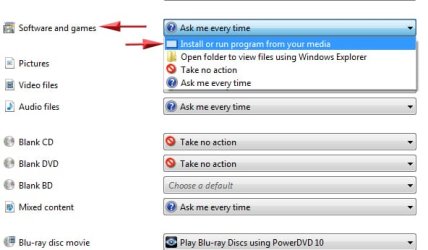
i want to be able to put in a cd or game to install and have it start automatically or start when i double click the cd drive. all it will do now is explore the contents when i click the cd drive forcing me to look for the .exe to get things going. ive tried the instructions here but none seem to work.
yes, over and over. i just popped in a red book music cd and the os popped up the option to play with wmp or another app so looks like the cd's work but non of my games i installed nor did norton 2011 did anything. i had to click my computer, d: drive and instead of executing the autorun it would open the disk. i would then have to click on setup in order to run.
all i have tried, originals. FEAR wont load at all, gives error i assume its due to OS or something. but none of the software disk that i put in the drive autorun.
You may need to navigate to the Setup.exe and in properties change it to:
"Always run as Admin", and Compatability mode "Windows Vista" ---posssibly XP.
Then try to install.
Some older games will need to have the same thing done to the Autorun or the Setup.exe itself.
This is likely all that is wrong.
You may even be able to right click the CD/DVD drive and choose run admin
My Computer
At a glance
Windows 7 Home Premium 64bitIntel Core i7 2700k8GB Mushkin Redline Ridgebacks @1866EVGA GTX570 SC
Computer Manufacturer/Model Number
Custom (Self Build)
OS
Windows 7 Home Premium 64bit
CPU
Intel Core i7 2700k
Motherboard
eVGA P67 SLI
Memory
8GB Mushkin Redline Ridgebacks @1866
Graphics Card(s)
EVGA GTX570 SC
Sound Card
XiFi Titanium HD
Monitor(s) Displays
LG W2453V
Screen Resolution
1920x1080
Hard Drives
Intel 320 80GB -- Intel X25-V 40GB --WD Black 1TB x2 -- WD Blue 640GB
thx wishmaster, was going to try what you said and i noticed i was missing disk 5 of 5..... how about getting my brother mfc-420cn printer to work completely? i somehow got it to print but i cant scan. any tricks for this? oh, and the brother software disk autoruns just fine!



 how about getting my brother mfc-420cn printer to work completely? i somehow got it to print but i cant scan. any tricks for this? oh, and the brother software disk autoruns just fine!