Solved Options for moving XP to Win7/8; considering VM

dianedebuda

New member
Member
Local time
7:18 PM
Messages
73
Posted this over in the EightForums with different title that didn't make it clear enough that I'm asking about VM concepts, not about fixing my Automation problem(s). Sorry if you've read both.

----

2 person office. Very small LAN with a single XP "server" (no direct user usage, no Web; not to be replaced) and 2 user machines that can access Web (both to be replaced - undecided yet Win7 or Windows 8).

Have an Access97 app that runs on XP user machine. Conversion to another MS Office is not an option. This app runs fine under Win7 (or Windows 8) except Automation. Access tries to run Word97 Mail-Merge = "Macro Storage not found" which seems to be a (CLSID + others) permission problem. May be other problems TBD.

I've rejected the first option: add a separate standalone XP user machine for the app. A second option is to add a separate XP user machine for this app that is on the LAN but block its Web access. A third option is to test if the app runs using the Administrator account, but I'm not really wanting to do this "for real". Another possibility is XP as a VM (XP mode?). I have never actually run a VM yet, so it'll all be new to me. I know there is a lot of web help for this available, so I'll google for details.

But before diving in, are there any major gotchas?

How hard would it be to switch between the XP app and Win7/8 web activities? Actually, what do you do to switch?

I understand I could disable the virtual network driver for security, but the data for the app is on the XP server. Will I be able to use that data using XP Mode (or another VM)? What I'm aiming for is limiting my security exposure via the web for the XP machine after April 8.

Suggestions/thoughts?
 

My Computer My Computer

At a glance

Windows 7 Pro 64bit
Computer type
PC/Desktop
OS
Windows 7 Pro 64bit
Have you tried yet installing the program in XP Compatibility Mode which tricks the program into thinking it's being installed to XP or whatever OS was concurrent with it's release?

As old as XP is now, going virtual is your best option. Good virtual freeware includes VMWare, Virtual Player and XP Mode in Ultimate or Pro.
 
As well as Greg said above also look at virtualbox
 

My Computer My Computer

At a glance

Windows 10 Pro X64Intel(R) Core(TM) i5-3570K CPU OC@ 4.5GHZ Turbo8.00 GB DDR3 1600MhzMSI Gaming X GTX 1070
Computer type
PC/Desktop
Computer Manufacturer/Model Number
Dude Build
OS
Windows 10 Pro X64
CPU
Intel(R) Core(TM) i5-3570K CPU OC@ 4.5GHZ Turbo
Motherboard
MSI Z77A-G45 Gaming
Memory
8.00 GB DDR3 1600Mhz
Graphics Card(s)
MSI Gaming X GTX 1070
Sound Card
Realtek High Definition
Monitor(s) Displays
Dell S23O9W, HP L1710
Screen Resolution
DELL-1920 x 1080 HP-1280 x1024
Hard Drives
Crucial m4 256 SSD, WD 7200RPM 500GB WD 1TB
PSU
Seasonic X650 GOLD
Case
Zalman Z12
Cooling
Antec Kuhler 920
Keyboard
Logitech
Mouse
MSI DS100 Interceptor
Internet Speed
50 down and 5 up
Antivirus
MSE
Browser
Chrome, IE 11
Other Info
Logitech X-620 Speakers
Have you tried yet installing the program in XP Compatibility Mode which tricks the program into thinking it's being installed to XP or whatever OS was concurrent with it's release?

As old as XP is now, going virtual is your best option. Good virtual freeware includes VMWare, Virtual Player and XP Mode in Ultimate or Pro.


Hi there.

Forget XP compatibility mode - it's fiddly, a poor performer and won't run on Windows 8 / 8.1 should you decide to install these OS'es.


Run it as a full blown VM in its own right using VMPLAYER -- free and good performer. If you don't have an XP system then you can convert the XPMODE system into a VMware VHD and run it from VMware player.

The other advantage is that you can run this on Home Premium versions too -- XM Mode only runs on PRO and above.


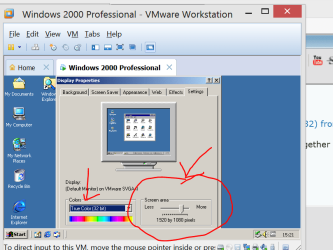
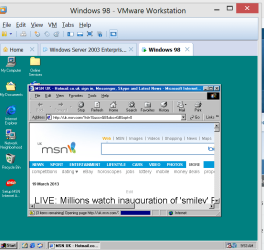
Here's W2000, Windows 98 and Icelandic XP all running as VM's

Cheers
jimbo
 

Attachments

  • vm.png
    vm.png
    298.5 KB · Views: 3
  • w2000.png
    w2000.png
    26.1 KB · Views: 1
  • w98vm.png
    w98vm.png
    33.9 KB · Views: 1

My Computer My Computer

At a glance

Linux CENTOS 7 / various Windows OS'es and se...Intel i7 Intel i58GB, 16GBOn Motherboard
Computer type
PC/Desktop
Computer Manufacturer/Model Number
Custom built, several laptops HP/ASUS
OS
Linux CENTOS 7 / various Windows OS'es and servers
CPU
Intel i7 Intel i5
Memory
8GB, 16GB
Graphics Card(s)
On Motherboard
Sound Card
Realtek HD audio
Monitor(s) Displays
Apple Cinema display, Samsung LCD
Screen Resolution
1920 X 1080
Hard Drives
4 X 1TB SATA
Mouse
Toshiba wireless laser
Internet Speed
> 20MB up
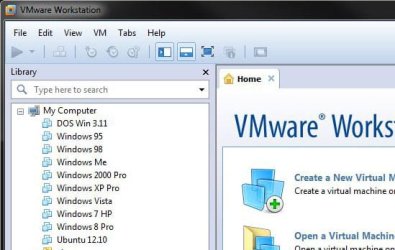
jimbo - my VM goes back to Windows for Workgroups 3.11 see snip. Its nice to listen to the old 95/98 start up sounds.

vm_snip.jpg
 

My Computer My Computer

At a glance

Windows 7 pro x64 SP1Intel i7-2600k o/c to 4.6GHz8GB Mushkin 1866MHzNvidia GTX 750 Ti 2GB
Computer type
PC/Desktop
Computer Manufacturer/Model Number
self build
OS
Windows 7 pro x64 SP1
CPU
Intel i7-2600k o/c to 4.6GHz
Motherboard
MSI Z68-GD80
Memory
8GB Mushkin 1866MHz
Graphics Card(s)
Nvidia GTX 750 Ti 2GB
Sound Card
integrated
Monitor(s) Displays
Liyama ProLite 27"
Screen Resolution
1920*1080 px
Hard Drives
Seagate 2TB
PSU
Coolermaster GX 750W
Case
Antec 300 case + 5 fans
Cooling
Dark Rock Pro
Internet Speed
62Mbit down 18Mbit up
Antivirus
MSE
Browser
Firefox
Other Info
Blackgold BGT3650 Quad HD TV card. Also have various 3770 + 4770K render boxes.
Good virtual freeware includes VMWare, Virtual Player and XP Mode in Ultimate or Pro.

Is VMware Player what is meant by "VMware"? Is "Virtual Player" something else? Have downloaded XP Mode, (MS) Virtual PC, VMware Player & VirtualBox. Will try Virtual PC/XP Mode first. Officially this is a business, so VMware Player would not be free, so I'll try VirtualBox next since it looks like it can be used both Win7 & Win8.
 

My Computer My Computer

At a glance

Windows 7 Pro 64bit
Computer type
PC/Desktop
OS
Windows 7 Pro 64bit
My two cents:

I agree with fellow geeks here, virtualization is IMO the best shot for you. As you mentioned that Windows 8 is also an option, my recommendation is to go Pro as Windows 8 Pro includes the Hyper-V virtualization so no third party programs are needed for you to install XP on a virtual machine.

Also, although you might find on the net information that says that Hyper-V on Windows 8 Pro cannot use all devices of the host system, this was completely changed on Windows 8.1 Pro. It's now capable to use all devices connected to host.

My vote goes for combination Windows 8.1 Pro and its built-in, native Hyper-V virtualization.

Additional reading: Using Windows 8 Client Hyper-V

Kari
 

My Computer My Computer

At a glance

Windows 10 Pro x64 EN-GB1.6 GHz Intel Core i7-720QM Processor6 GBATI Mobility Radeon HD 5850 Graphics
Computer type
Laptop
Computer Manufacturer/Model Number
HP ENVY 17-1150eg
OS
Windows 10 Pro x64 EN-GB
CPU
1.6 GHz Intel Core i7-720QM Processor
Memory
6 GB
Graphics Card(s)
ATI Mobility Radeon HD 5850 Graphics
Sound Card
Beats sound system with integrated subwoofer
Monitor(s) Displays
17" laptop display, 22" LED and 32" Full HD TV through HDMI
Screen Resolution
1600*900 (1), 1920*1080 (2&3)
Hard Drives
Internal: 2 x 500 GB SATA Hard Disk Drive 7200 rpm
External: 2TB for backups, 3TB USB3 network drive for media
Cooling
As Envy runs a bit warm, I have it on a Cooler Master pad
Keyboard
Logitech diNovo Media Desktop Laser (bluetooth)
Mouse
Logitech Performance Mouse MX
Internet Speed
50/10 Mbps VDSL
Antivirus
Windows Defender 4.3.9431.0
Browser
Maxthon 3.5.2., IE11
Thanks. I have 8.1 Preview loaded on a box, so I can try it there. Have a laptop that I bought last year preloaded with Win8 + the Pro upgrade that I had purchased for a "real" trial (after the 8.1 update, of course). Running W7 Pro on that laptop now. Those should give me a idea what to tell my friends (former clients that I wrote the software for 15 years ago) what o/s to get. Sure hope the VM takes care of my problems; pretty much retired as a programmer for hire now & don't relish spending a lot of time on this.
 

My Computer My Computer

At a glance

Windows 7 Pro 64bit
Computer type
PC/Desktop
OS
Windows 7 Pro 64bit
Have finally watched the MS XP Mode video. Guessing I'm going to have to uninstall Office 97 from W7 before I can install in via XP Mode since it adds to the W7 Start Menu.
 

My Computer My Computer

At a glance

Windows 7 Pro 64bit
Computer type
PC/Desktop
OS
Windows 7 Pro 64bit
I use VMware Player and found it more convenient than Virtual Box which I had used for years. The beauty is that you can run the virtual system side by side with the host system and go back and forth with 1 click. You can also share e.g. the clipboard which allows you to copy something in the virtual system and paste it in the host system (or vice versa)

Here is a demo I made running windows 8 in VMware Player. It would be the same with XP. You just have to choose XP during the installation. And this is the tutorial you need to understand the installation steps - just choose XP in lieu of Windows 8.
 

My Computer My Computer

At a glance

Vista, Windows7, Mint Mate, Zorin, Windows 8from 1.6GHz Duo to i7
Computer Manufacturer/Model Number
HP, Dell, Gateway, Toshiba - 4 laptops and 2 desktops
OS
Vista, Windows7, Mint Mate, Zorin, Windows 8
CPU
from 1.6GHz Duo to i7
Monitor(s) Displays
2x HP w2207
Hard Drives
5x HDD, 7x SSD, 12x Externals
Keyboard
with trackball - no mices
Mouse
Trackball mice
Internet Speed
DSL 6000
Initial test of Virtual PC + XP Mode worked for this puppy. No automation problems. And didn't have to uninstall Office97 from Win7 - got confused about the embedded links added to Win7 Start Menu. Have some shortcut & permission issues to work out later, but I'm a happy camper. Will definitely look at VirtualBox/VMware for myself to try some Linux that I've been curious about.


Thanks!
 

My Computer My Computer

At a glance

Windows 7 Pro 64bit
Computer type
PC/Desktop
OS
Windows 7 Pro 64bit
Here is some of my diddling with Linux.

http://www.sevenforums.com/tutorials/278957-vmware-player-install-setup-zorin.html

http://www.sevenforums.com/chillout-room/276418-having-fun-zorin.html#post2275421

Zorin is nice although I now use Mint Mate most of the time. Here is a set of 9 tutorials. The download is a PDF control sheet for accessing the individual tutorials.

https://skydrive.live.com/?cid=475a0a48ca6d4035&provision=1&ref=3&wa=wsignin1.0&sa=412485191#cid=475A0A48CA6D4035&id=475A0A48CA6D4035%211856
 

My Computer My Computer

At a glance

Vista, Windows7, Mint Mate, Zorin, Windows 8from 1.6GHz Duo to i7
Computer Manufacturer/Model Number
HP, Dell, Gateway, Toshiba - 4 laptops and 2 desktops
OS
Vista, Windows7, Mint Mate, Zorin, Windows 8
CPU
from 1.6GHz Duo to i7
Monitor(s) Displays
2x HP w2207
Hard Drives
5x HDD, 7x SSD, 12x Externals
Keyboard
with trackball - no mices
Mouse
Trackball mice
Internet Speed
DSL 6000
Thanks. I had downloaded Mint & Zorin a couple of weeks ago, but been too busy to mess with it yet. Been fooling with Easy2Boot & now need a mini Linux for Explorer-type usage when using Partition Wizard/Acronis. Kind folks there told me about Puppy & another to try, so I'll be busy. Weird. Started out as a firmware programmer years and years ago entering code by hand into hardware front panels to boot - and now I look for a gui instead of dir lists.
 

My Computer My Computer

At a glance

Windows 7 Pro 64bit
Computer type
PC/Desktop
OS
Windows 7 Pro 64bit
It's fun to experimemt with those systems in VMware Player. Especially Mint Mate is so nice to customize.
 

My Computer My Computer

At a glance

Vista, Windows7, Mint Mate, Zorin, Windows 8from 1.6GHz Duo to i7
Computer Manufacturer/Model Number
HP, Dell, Gateway, Toshiba - 4 laptops and 2 desktops
OS
Vista, Windows7, Mint Mate, Zorin, Windows 8
CPU
from 1.6GHz Duo to i7
Monitor(s) Displays
2x HP w2207
Hard Drives
5x HDD, 7x SSD, 12x Externals
Keyboard
with trackball - no mices
Mouse
Trackball mice
Internet Speed
DSL 6000
Back
Top