
Solved Options for setting up a wireless printer

Slammer

Destroyer of Tyranny
Power User
Local time
4:54 PM
Messages
118
Location
New Mexico, USA!
I recently picked up a old HP psc 2510 photosmart all-in-one printer at a yard sale for 10 bucks in great condition. Problem is, it was missing all documentation and driver CD. Fortunately, HP included "in-OS" drivers for Win 7, so I was able to set it up over USB very easily. But now I'm trying to get it up and running with wireless printing, which it supports on XP, but isn't perfectly ported to 7.

Following the advice from the 4th comment on Re: HP PSC 2510 Photostmart drivers for WIndows 7 - Page 4 - HP Support Forum, I was able to connect to it via my wifi network when I plug an Ethernet cable into the printer.

Now, this works, but being a huge nerd, I think it'd be even better if I could set the printer up to be completely wireless. I'm not much of an expert on the finer workings of wireless connections, but I think it's possible to do this with an ad hoc netwrok. But I can't find any instructions for doing this on 7. Closest thing I found was this page with instructionsfor XP, which I was unable to follow on 7.

Since the printer has an on-screen option to enable or disable the "wireless radio" which can only be turned on when the ethernet cable is unplugged, I assume this functionality is to broadcast the "hpsetup" ad hoc network from the printer without it being connected to a router (since I don't think it can connect to an actual wifi network wirelessly; but if it can, it'd be great to know how to do that too!). But even when I do see the hpsetup network in my wifi list, I can never connect to it from my laptop.

I have a feeling I'm probably missing some important concept of how ad hoc networks work, and that that pack of knowledge is the cause of all my problems If anyone could help me out here I'd really appreciate it. If worse comes to worse, I'll just be happy printing over wifi with the printer connected via ethernet to my router. But I'm sure theres a way to set it up totally wirelessly. thanks!

P.S. I'm the same Slammer from over at vista64 forums, and I'll update all my profile stuff sometime tomorrow :) so hi to anyone I know from over there!
 

My Computer

Computer Manufacturer/Model Number
Dell Inspiron 1545
OS
MS Windows 7 Ultimate 64-bit SP1
CPU
Intel Mobile Core 2 Duo T6400 @ 2.00GHz, Penryn 45nm
Motherboard
Dell Inc. 0G848F (Microprocessor)
Memory
4.00 GB Dual-Channel DDR2 @ 399MHz (6-6-6-18)
Graphics Card(s)
Mobile Intel(R) 4 Series Express Chipset Family (Integrated)
Sound Card
IDT High Definition Audio CODEC
Monitor(s) Displays
Generic PnP Monitor (DPMS) (1366x768@60Hz)
Screen Resolution
1366x768 (16:9)
Hard Drives
2TB External, with ~1TB partition booting OS
PSU
Laptop
Case
Laptop
Cooling
Laptop vent
Keyboard
Laptop
Mouse
Touchpad, and Logitech wireless USB mouse.
Internet Speed
~150 kb/s
Other Info
I'm running Windows COMPLETELY off a 2TB portable hard drive (since my 300GB internal drive just isn't big enough). It works exactly the same as it would normally, only it has to be constantly connected to my USB port. Obviously. I'll show you how to do it, if you ask! It's pretty cool.

Specs via Speccy
Instructions for creating an ad hoc network in Windows 7 can be found here:
Windows 7: How to Create an Ad Hoc Network | kombitz.com

I also wonder if maybe it has anything to do with encryption?
It seems that with the linkout you have provided with instructions
for setting this up in XP describes setting up WEP encryption connection
through the HP setup page. Wondering if the device you are making the
ethernet connection to is handing the printer an IP by checking that option in
the setup through Win7 (Automatically obtain IP address therefore it should) but check if the router is also using
WEP encyption which whilst reading the documentation seemed to be required for the printer.

Is that making sense! I'd start with that first :)
 

My Computer

OS
Windows 7 Home Premium 64 Bit OS
You should leave the network cable plugged in, then open IE or what ever web browser you use and enter the ip address of the printer, you will now be able to navigate through the printer and set up the wirless connection. Once you have setup the wirless connection you can then disconnect the the network cable and you should then be able to print wireless.
 

My Computer

Computer Manufacturer/Model Number
Home build
OS
Windows 7 Pro x64
CPU
AMD FX 4100 4 Core 3.6GHz AM3+
Motherboard
ASROCK 970 Extreme3
Memory
16GB G.Skill RipjawsX
Graphics Card(s)
Radeon 6850
Sound Card
ASUS Xonar D1
Monitor(s) Displays
ASUS 23" LCD
Hard Drives
SSD 120GB
WD 750GB Black series
WD 640GB Black series
PSU
700W
Case
Antec 100
Cooling
Hyper 212 Plus
Internet Speed
50MB

My Computer

Computer Manufacturer/Model Number
HAL-9000
OS
Windows 7 Ultimate 64bit
CPU
Intel i7 3770K
Motherboard
Asus Sabertooth Z77
Memory
16GB DDR3 1333 Corsair XMS3
Graphics Card(s)
XFX HD6950 2GB EyeFinity
Sound Card
Logitech G35 & Sennheiser PC135 & VIA HD
Monitor(s) Displays
23" HP 2310e, 23" Samsung B2230, 21.5" Viewsonic
Screen Resolution
5760x1080
Hard Drives
16TB of Storage
128GB & 256GB Crucial M4 SSD's, 2X 1TB WD Black, 3x 2TB WD, 3x 2TB Samsung F4, 1.5TB Seagate, WD 500GB,
PSU
Antec True Power New 650watt
Case
Cooler Master HAF-932
Cooling
Corsair H60 Hydro Cooler, 3x 230mm Fans, 2x120mm Fan
Keyboard
Logitech G15 and G13
Mouse
Logitech G700 Gaming Mouse
Internet Speed
50/10 Mbit
Other Info
Speakers : Alesis M1 Active Mk2 Studio Monitors , APC RS 1200 UPS, HP 4500DN Color Laser, HP P1006 mono Laser, Kodak 8500 Dye-Sub, Epson 1280 inkjet, Epson Worforce 610 MFC
Thanks for all your replies.

@AllOnTheBus- See I think this is part of what's confusing me. Is that setup page for joining a network, setting up an actual WLAN (wireless) network independent of my actual router wifi, setting up an independent ad hoc network, or all three? Because under "Select Network Name (SSID):" I have both "linksys" (the name of my normal wifi network) and "hpsetup" (I assume the name of the printers optional ad hoc network) options available. But I don't know which one to choose (or if I should make my own name instead). As for your WEP theory, I don't think it's required. My router is handing the printer an IP address (192.168.1.116) when I connect it via ethernet, and I can access that setup page easily though my browser. I just don't understand exactly what that page is for: setting up a connection, or connecting to my existing internet network.

Now, here's my understanding of how ad hoc works: it's similar to bluetooth in that it allows you to communicate with other devices in a limited range, without having to connect to an internet/wifi network, as long as all the devices support ad hoc. But instead of bluetooth, it's run similar to an actual wifi network, with one device broadcasting the SSID (and therefore "hosting" the ad hoc network) and then the rest of the devices connect to it. So it's effectively like hooking all the devices up with Ethernet cables, but doing so wirelessly. Is this right? Because I'm assuming that my printer should be able to "host" that ad hoc network, and that my laptop should be able to connect to it to printer. Anyway, that's what I'm trying to do based on my limited understanding of how these networks work. Please correct me if I'm wrong.

@mgp1964-
...navigate through the printer and set up the wirless connection.
Setting up the wireless connection is where I'm having trouble. :)

@Zepher- I was able to set it up by connecting it to my router via Ethernet, finding the IP address my router gave it, and then setting up a printer on my computer that looked at that IP address to find the printer. It works that way, but a) I don't know if that IP address is always going to be reserved for this printer, or if it might change and force me to re-set it up if/when it does change. And b) my ultimate goal is to set this printer up in a room in my house away from my router and on it's own separate (possibly encrypted) ad hoc network. That way other people who want to print from have to have access to that ad hoc network, and not just my wifi network (which for various reason is unencrypted, so literally anyone within range could print anything to it if it's hooked up directly to my wifi).

But to do have it in a different room means I won't be able to connect it to my router with an Ethernet cable, so I need to either figure out how to connect it wirelessly to my internet, or set up it's own ad hoc network that doesn't need any connection at all to my wifi/internet network. It's just that I prefer the ad hoc solution, even though I know it'll be harder. I'm willing to stick with this until I get it done :) Also, that link you gave seems to be dead. Not sure what the deal with that is.

Thanks for taking the time to read all this. I know it's a lot, but I'm bent and determined to get this working. :)
 

My Computer

Computer Manufacturer/Model Number
Dell Inspiron 1545
OS
MS Windows 7 Ultimate 64-bit SP1
CPU
Intel Mobile Core 2 Duo T6400 @ 2.00GHz, Penryn 45nm
Motherboard
Dell Inc. 0G848F (Microprocessor)
Memory
4.00 GB Dual-Channel DDR2 @ 399MHz (6-6-6-18)
Graphics Card(s)
Mobile Intel(R) 4 Series Express Chipset Family (Integrated)
Sound Card
IDT High Definition Audio CODEC
Monitor(s) Displays
Generic PnP Monitor (DPMS) (1366x768@60Hz)
Screen Resolution
1366x768 (16:9)
Hard Drives
2TB External, with ~1TB partition booting OS
PSU
Laptop
Case
Laptop
Cooling
Laptop vent
Keyboard
Laptop
Mouse
Touchpad, and Logitech wireless USB mouse.
Internet Speed
~150 kb/s
Other Info
I'm running Windows COMPLETELY off a 2TB portable hard drive (since my 300GB internal drive just isn't big enough). It works exactly the same as it would normally, only it has to be constantly connected to my USB port. Obviously. I'll show you how to do it, if you ask! It's pretty cool.

Specs via Speccy

My Computer

Computer Manufacturer/Model Number
HAL-9000
OS
Windows 7 Ultimate 64bit
CPU
Intel i7 3770K
Motherboard
Asus Sabertooth Z77
Memory
16GB DDR3 1333 Corsair XMS3
Graphics Card(s)
XFX HD6950 2GB EyeFinity
Sound Card
Logitech G35 & Sennheiser PC135 & VIA HD
Monitor(s) Displays
23" HP 2310e, 23" Samsung B2230, 21.5" Viewsonic
Screen Resolution
5760x1080
Hard Drives
16TB of Storage
128GB & 256GB Crucial M4 SSD's, 2X 1TB WD Black, 3x 2TB WD, 3x 2TB Samsung F4, 1.5TB Seagate, WD 500GB,
PSU
Antec True Power New 650watt
Case
Cooler Master HAF-932
Cooling
Corsair H60 Hydro Cooler, 3x 230mm Fans, 2x120mm Fan
Keyboard
Logitech G15 and G13
Mouse
Logitech G700 Gaming Mouse
Internet Speed
50/10 Mbit
Other Info
Speakers : Alesis M1 Active Mk2 Studio Monitors , APC RS 1200 UPS, HP 4500DN Color Laser, HP P1006 mono Laser, Kodak 8500 Dye-Sub, Epson 1280 inkjet, Epson Worforce 610 MFC
Hmm yeah the link seems to be working now. Weird.

I know the network should be secured, but sadly, I'm not in charge of it. Another family member is, and for some reason he just doesn't see the need to encrypt it and I haven't been able to convince him otherwise. I'm sure some day someone will finally use that to attack our network and then he'll add it, but until then I just have to deal with it. And I've been trying to follow those instructions on that page, but they're all for XP and can't find all the equivalent options in 7. But the biggest problem is that I don't know if that printer setup page (In step 4) is for setting up a network just for the printer, connecting to my wifi network, or both. And until I know which parts are for which, I don't know what information I'm supposed to be entering. It's all to ambiguous. For example, there is both an "Authentication" and "Encryption" header, and they both seem to be very similar in what they're asking. And I don't know if they're asking for the info for my wifi network, or for the network I'm trying to set up. Ugh, maybe I'll just contact HP support and ask them....
 

My Computer

Computer Manufacturer/Model Number
Dell Inspiron 1545
OS
MS Windows 7 Ultimate 64-bit SP1
CPU
Intel Mobile Core 2 Duo T6400 @ 2.00GHz, Penryn 45nm
Motherboard
Dell Inc. 0G848F (Microprocessor)
Memory
4.00 GB Dual-Channel DDR2 @ 399MHz (6-6-6-18)
Graphics Card(s)
Mobile Intel(R) 4 Series Express Chipset Family (Integrated)
Sound Card
IDT High Definition Audio CODEC
Monitor(s) Displays
Generic PnP Monitor (DPMS) (1366x768@60Hz)
Screen Resolution
1366x768 (16:9)
Hard Drives
2TB External, with ~1TB partition booting OS
PSU
Laptop
Case
Laptop
Cooling
Laptop vent
Keyboard
Laptop
Mouse
Touchpad, and Logitech wireless USB mouse.
Internet Speed
~150 kb/s
Other Info
I'm running Windows COMPLETELY off a 2TB portable hard drive (since my 300GB internal drive just isn't big enough). It works exactly the same as it would normally, only it has to be constantly connected to my USB port. Obviously. I'll show you how to do it, if you ask! It's pretty cool.

Specs via Speccy
Ok I think I've figured it out. Near as I can tell, if you chose "Select Network Name (SSID):" and pick your existing network name, then it will connect wirelessly to that network after you unplug the Ethernet cable and then enable the Wireless Radio in settings. I'm just not sure what selecting "hpsetup" does because that should be the network the printer makes, not one I can "connect" to. Maybe I'll check into it some other time.

But if you choose "Enter Network Name (SSID):" and select Ad hoc for Communication Method, it creates an ad hoc network from the printer. But from what I can tell, it won't create it's own Infrastructure network, even if you choose that option and enter a name. Which I suppose probably makes sense.

I actually found it much easier (with better explanations for the various options, too) to just choose the "Advanced Configuration" button and set it up that way, because it provided a kind of easy "setup wizard" to follow.

Also, I discovered that I can't be connected to the ad hoc network and my wifi at the same time, so that kind of ruined my plans for that. But I was able to connect it to my wifi without the Ethernet cable, so that's the next best thing. Now it really prints wirelessly, and I can set it up in another room just like I wanted. I wonder if I can set up a password for using it since it's on my open netowrk.... Anyway, thanks for everyone's input!
 

My Computer

Computer Manufacturer/Model Number
Dell Inspiron 1545
OS
MS Windows 7 Ultimate 64-bit SP1
CPU
Intel Mobile Core 2 Duo T6400 @ 2.00GHz, Penryn 45nm
Motherboard
Dell Inc. 0G848F (Microprocessor)
Memory
4.00 GB Dual-Channel DDR2 @ 399MHz (6-6-6-18)
Graphics Card(s)
Mobile Intel(R) 4 Series Express Chipset Family (Integrated)
Sound Card
IDT High Definition Audio CODEC
Monitor(s) Displays
Generic PnP Monitor (DPMS) (1366x768@60Hz)
Screen Resolution
1366x768 (16:9)
Hard Drives
2TB External, with ~1TB partition booting OS
PSU
Laptop
Case
Laptop
Cooling
Laptop vent
Keyboard
Laptop
Mouse
Touchpad, and Logitech wireless USB mouse.
Internet Speed
~150 kb/s
Other Info
I'm running Windows COMPLETELY off a 2TB portable hard drive (since my 300GB internal drive just isn't big enough). It works exactly the same as it would normally, only it has to be constantly connected to my USB port. Obviously. I'll show you how to do it, if you ask! It's pretty cool.

Specs via Speccy
I'm sure you probably came across this information during your search
for answers, but an ad hoc network is only a fast setup temporary network
connection unless you choose otherwise (ie: save the network/connection).

Obviously your printer is being allocated an IP address within the network range
therefore allowing it to communicate with other network devices, or at least allow
packets of information to be sent to it. From what I have read though, once the
ad hoc network is set up, the network connections do not need to rely upon
the router or access point to keep communicating or again, to at least be communicated TO.

I was wondering if you might be able to see if your family members machine is able to see
the printer once the ad hoc connection has been made or are you as the original "maker" of
the ad hoc network configuration responsible for then allowing access / share permissions
to the printer through homegroup and sharing options considering that the ad hoc network works
independantly of other networks (ie: the wireless access point connecting your machine to the wireless router).

Hmm - interesting. I gotta be honest and say that I haven't had to much to do with wireless
networking which more than likely is coming across here as plain as day but please let me know if you can gain access to your family members machine and provide some answers to the previously mentioned questions. I look forward to your response.

Anyways - glad to here that you have come to a conclusion which in part
has satisfied your requirements.
 

My Computer

OS
Windows 7 Home Premium 64 Bit OS
Maybe I'm missing something, but since you say you are a huge nerd, this should be a piece of cake. You should know your network name and passkey. If you don't have a passkey, set one now.

Then, follow the on printer instructions to enter the name and passkey. That's it. I've set up a dozen wireless printers for my home office employees, and the HP ones are the easiest to do.

You shouldn't be using an ad-hoc network at all, considering you have a router.
 

My Computer

OS
Windows 7 Ultimate x64 SP1
CPU
Intel Core i7-2600
Motherboard
Gigabyte GA-P67A-UD3P-B3
Memory
12 GB Patriot Extreme DDR3-1333
Graphics Card(s)
Nvidia GTX 470
Monitor(s) Displays
Dell UltraSharp 2209WA
Hard Drives
OCZ Agility3 240 GB, WD5001AALS, WD7501AALS
PSU
OCZ ModStream 700W
Case
CoolerMaster HAF 912 Advanced
Cooling
CoolerMaster Hyper 212 Plus
@AllOnTheBus- Would it still be getting an IP address for the ad-hoc network (even though it is in no way connected to my router or the internet)? Because I tried printing out the network configuration while it was connected to my computer over the ad-hoc network, but when I typed that (now different form the original 192.168.1.116) IP address into my browser, it couldn't find anything there.

And that's what I got out of ad-hoc networks too; they form their own network completely independent of any router. In fact, it seems that it's impossible to connect to more than one wireless network at all ad-hoc, wifi, or otherwise, unless you have multiple NIC cards. So it definitely functions independent of the router. Although I'm not clear on whether the machine that created the ad-hoc functions as the access point, or of all the devices take care of their own data routing. I think it's the latter, which would imply that the ad-hoc will remain active until the last device disconnects, regardless of whether the original device stay in it or not. Which I think makes sense.

Well, if I set the printer up on an ad-hoc instead of my normal wifi, then other computer would have to connect to that ad-hoc to use it. In theory, once they connect to the ad-hoc, the printer should accessible just like it normally would if it was hooked up to the same wifi network they were on instead. So if the ad-hoc had a passkey put on it, only people with access to the ad-hoc network (by having the passkey) would be able to print to it. So their computers could easily "see" the ad-hoc network, but without accessing it, they wouldn't be able to "see" the printer. I don't think I'd be able to independently allow or deny access to the printer once they're on the network, though. In fact, I'm not even sure how I would do that on a normal network... if you tell me how I'll try it out!


@DeaconFrost- Yeah, I thought it'd be a piece of cake too. Unfortunately, one of the few aspects of computing that I'm not overly familiar with is networking. Also, like I said, my network doesn't have a passkey, and I'm not the one in charge of it, so I can't set one up.

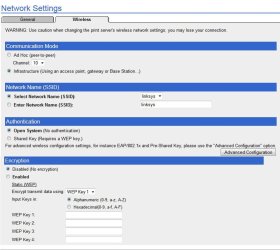
Actually, here's a screenshot of the printer's setup page:
Printer network.jpg
Now, what has me confused is that I don't know if this is for setting up a network, or connecting to one, or both. For instance, so far I have managed to accidentally create an "hpsetup" ad-hoc network from the printer, purposely create a "Printer" ad-hoc network (which while my computer would connect to it, I couldn't figure out how to access the printer from that network) and purposely connecting to my wifi network. But I don't quite know how it decides whether to try to connect to an existing network with the information I give it, or whether to create one. I think that's the root of my confusion. How does it decide that? When I bought it, it didn't include any kind of user manual. If you could clarify this stuff for me, that'd be great!

I originally wanted to use an ad-hoc network because I could secure it with a password, unlike my wifi network.
 

My Computer

Computer Manufacturer/Model Number
Dell Inspiron 1545
OS
MS Windows 7 Ultimate 64-bit SP1
CPU
Intel Mobile Core 2 Duo T6400 @ 2.00GHz, Penryn 45nm
Motherboard
Dell Inc. 0G848F (Microprocessor)
Memory
4.00 GB Dual-Channel DDR2 @ 399MHz (6-6-6-18)
Graphics Card(s)
Mobile Intel(R) 4 Series Express Chipset Family (Integrated)
Sound Card
IDT High Definition Audio CODEC
Monitor(s) Displays
Generic PnP Monitor (DPMS) (1366x768@60Hz)
Screen Resolution
1366x768 (16:9)
Hard Drives
2TB External, with ~1TB partition booting OS
PSU
Laptop
Case
Laptop
Cooling
Laptop vent
Keyboard
Laptop
Mouse
Touchpad, and Logitech wireless USB mouse.
Internet Speed
~150 kb/s
Other Info
I'm running Windows COMPLETELY off a 2TB portable hard drive (since my 300GB internal drive just isn't big enough). It works exactly the same as it would normally, only it has to be constantly connected to my USB port. Obviously. I'll show you how to do it, if you ask! It's pretty cool.

Specs via Speccy
Back
Top