Optiplex GX280 - Should I upgrade it to Win7?

Windows i7 920

New member
Pro User
Local time
12:01 PM
Messages
544
I have an old Optiplex GX280 with the following hardware:

Intel Pentium 4 HT @ 3.2 GHz (1 core, 2 threads)
2.5 GB of DDR2 (2x 1GB, 1x 512mb) (Supports up to 1GB x4)
PNY Nvidia Geforce 9400GT 1GB GDDR3 (PCI-Express)
Microsoft Windows XP Professional SP3

Obviously, I'd be putting on 32 bit if I were to upgrade it, but I'm not sure if I'd really gain anything performance-wise by putting on Windows 7. I've heard that it is faster than XP on machines that exceed the minimum system requirements and this PC obviously does. I bought it off eBay for $80, then put some upgrades in it. I added 2GB of RAM and the Nvidia card, which in total cost me $90 for those parts.
 

My Computer My Computer

At a glance

Windows 8 Pro x64Intel Core i7 92012GB (2GB x6) Triple Channel DDR3 1333 MHzATI Radeon HD 4870 X2 2GB GDDR5
Computer Manufacturer/Model Number
iBuyPower Chimera X58
OS
Windows 8 Pro x64
CPU
Intel Core i7 920
Motherboard
Asus P6T Deluxe V2
Memory
12GB (2GB x6) Triple Channel DDR3 1333 MHz
Graphics Card(s)
ATI Radeon HD 4870 X2 2GB GDDR5
Sound Card
Integrated Digital HD 7.1 Surround Sound
Monitor(s) Displays
24.6-inch ASUS VW246H 20000:1 Contrast, 2 ms response time,
Screen Resolution
1920x1080
Hard Drives
1 TB 7200 RPM SATA II 3 GBps 16MB cache
PSU
NZXT 800W Gaming Series
Case
Guardian Inferno (Custom Painted NZXT Guardian 921)
Cooling
Thermaltake V1 Fan Cooling System OC Proof
Keyboard
Razer Lycosa
Mouse
iBuyPower Ergonomical Internet Mouse
Internet Speed
11 MBps High-speed Cable
Let's just say, given the amount of memory, it wouldn't run any slower than XP. If it was me, I'd upgrade it if I had a license to spare. I don't know if I'd spend the money on Windows 7 for it, unless I got a great deal. You won't have any issues going to Windows 7, though.
 

My Computer My Computer

At a glance

Windows 7 Ultimate x64 SP1Intel Core i7-260012 GB Patriot Extreme DDR3-1333Nvidia GTX 470
OS
Windows 7 Ultimate x64 SP1
CPU
Intel Core i7-2600
Motherboard
Gigabyte GA-P67A-UD3P-B3
Memory
12 GB Patriot Extreme DDR3-1333
Graphics Card(s)
Nvidia GTX 470
Monitor(s) Displays
Dell UltraSharp 2209WA
Hard Drives
OCZ Agility3 240 GB, WD5001AALS, WD7501AALS
PSU
OCZ ModStream 700W
Case
CoolerMaster HAF 912 Advanced
Cooling
CoolerMaster Hyper 212 Plus
I would say depends on what you want to do with it. If you aren't planning on doing anything super serious with the computer and you don't have an extra Win 7 license, I would just leave it as is.
 

My Computer My Computer

At a glance

Windows 7 Ultimate x64 and Home Premium x64Intel i7 960 (3.2 GHz Quad Core)12 Gigs (Triple Channel)Alienware OEM nVidia GTX 560 Ti (1.25 Gig)
Computer Manufacturer/Model Number
Alienware Area 51 Desktop and Dell Inspirion 17R (N7010)
OS
Windows 7 Ultimate x64 and Home Premium x64
CPU
Intel i7 960 (3.2 GHz Quad Core)
Motherboard
Alienware Intel based X58
Memory
12 Gigs (Triple Channel)
Graphics Card(s)
Alienware OEM nVidia GTX 560 Ti (1.25 Gig)
Sound Card
Creative Labs X-Fi Titanium
Monitor(s) Displays
Samsung PX2370 LED 23" Monitor
Screen Resolution
1920x1080
Hard Drives
2 320 Gig SATA in Raid 1 Configuration (System/App)
1 1 Tera SATA (Games)
1 1 Tera SATA (Data/Music/Videos)
PSU
750 Watt Power Supply
Case
Alienware Area 51 Desktop
Cooling
Liquid Cooled
Keyboard
Logitech G510
Mouse
Microsoft Trackball Explorer
Internet Speed
Cable
It should run really well on the specs you posted. Dealers choice since you already have a paid for install of XP.

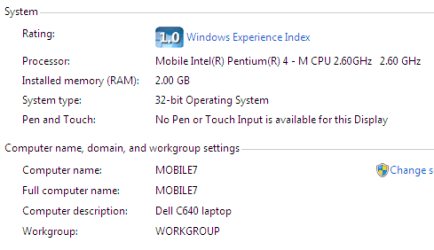
I probably would myself but it's a personal choice and I really like Windows 7 even on my older Dell C640 laptop which I upgraded from XP.
 

My Computer My Computer

At a glance

Windows 7 Ultimate x64Q6600 @2.4ghz (G0 stepping)8 gb OCZ vista essential sli PC-6400Dual 9800gt in SLI mode
Computer Manufacturer/Model Number
Systemax N2000 Gaming PC
OS
Windows 7 Ultimate x64
CPU
Q6600 @2.4ghz (G0 stepping)
Motherboard
XFX nforce 680i LT
Memory
8 gb OCZ vista essential sli PC-6400
Graphics Card(s)
Dual 9800gt in SLI mode
Sound Card
Integrated 8.1 High Definition Audio
Monitor(s) Displays
Dual Sceptre x246w 24 inch monitors
Screen Resolution
1920 x 1200 each monitor
Hard Drives
500 GB SATA II / 7500 rpm
PSU
Cooler Master Real Power Pro 1250W
Case
N2000 server tower
Cooling
Thermaltake Bigwater 760 is
Keyboard
MS Intelitype 6000 v2.0
Mouse
MS Intelipoint 6000
Internet Speed
Wi-power 1.5GB up / 512k down
Other Info
Windows 7 Ultimate x64, Windows 7 Pro x64, Windows Home Premium X86, Windows XP pro, Windows Home Server x86, Ubuntu 10.4 x86 and x64, Ubuntu server 10.4, SQL Server 2005, MySQL 5.0
It should run really well on the specs you posted. Dealers choice since you already have a paid for install of XP.

I probably would myself but it's a personal choice and I really like Windows 7 even on my older Dell C640 laptop which I upgraded from XP.

I have one of those. Latitude C640. It runs deathly slow on XP though with the 1.8 GHz Pentium 4, 512 MB of RAM. How could it run 7 when it only supports a maximum of 1GB of RAM? I didn't think Windows 7 would run very well if you only barely meet the minimum RAM requirement.
 

My Computer My Computer

At a glance

Windows 8 Pro x64Intel Core i7 92012GB (2GB x6) Triple Channel DDR3 1333 MHzATI Radeon HD 4870 X2 2GB GDDR5
Computer Manufacturer/Model Number
iBuyPower Chimera X58
OS
Windows 8 Pro x64
CPU
Intel Core i7 920
Motherboard
Asus P6T Deluxe V2
Memory
12GB (2GB x6) Triple Channel DDR3 1333 MHz
Graphics Card(s)
ATI Radeon HD 4870 X2 2GB GDDR5
Sound Card
Integrated Digital HD 7.1 Surround Sound
Monitor(s) Displays
24.6-inch ASUS VW246H 20000:1 Contrast, 2 ms response time,
Screen Resolution
1920x1080
Hard Drives
1 TB 7200 RPM SATA II 3 GBps 16MB cache
PSU
NZXT 800W Gaming Series
Case
Guardian Inferno (Custom Painted NZXT Guardian 921)
Cooling
Thermaltake V1 Fan Cooling System OC Proof
Keyboard
Razer Lycosa
Mouse
iBuyPower Ergonomical Internet Mouse
Internet Speed
11 MBps High-speed Cable
I have an old Optiplex GX280 with the following hardware:

Intel Pentium 4 HT @ 3.2 GHz (1 core, 2 threads)
2.5 GB of DDR2 (2x 1GB, 1x 512mb) (Supports up to 1GB x4)
PNY Nvidia Geforce 9400GT 1GB GDDR3 (PCI-Express)
Microsoft Windows XP Professional SP3

Obviously, I'd be putting on 32 bit if I were to upgrade it, but I'm not sure if I'd really gain anything performance-wise by putting on Windows 7. I've heard that it is faster than XP on machines that exceed the minimum system requirements and this PC obviously does. I bought it off eBay for $80, then put some upgrades in it. I added 2GB of RAM and the Nvidia card, which in total cost me $90 for those parts.

I have installed Windows 7 on many GX280's runs very well for business. I would not suggest it for games, video editing, CAD work, etc. -WS
 

My Computer My Computer

At a glance

Windows 7 Enterprise (x64); Windows Server 20...16GB
Computer type
PC/Desktop
Computer Manufacturer/Model Number
Dell OP7010
OS
Windows 7 Enterprise (x64); Windows Server 2008 R2 (x64)
Memory
16GB
Monitor(s) Displays
4 Dell 24" LCD
Screen Resolution
1280x1024
Keyboard
Dell
Mouse
Dell Optical
Internet Speed
40meg
Dell DOES NOT support Vista or Win 7 on this model. Thus there are no hardware drivers for any Dell proprietary hardware. You will be on your own to try and find drivers that will work for all the hardware. Dell only supports XP, NT4, Win 2000, DOS and Red Hat Linux 9.0.
 

My Computer My Computer

At a glance

Windows 10 64 bitIntel i7 6700K16GB Corsair DominatorIntel CPU Graphics
Computer type
PC/Desktop
Computer Manufacturer/Model Number
My Own Build
OS
Windows 10 64 bit
CPU
Intel i7 6700K
Motherboard
ASUS ROG Maximus VIII Hero
Memory
16GB Corsair Dominator
Graphics Card(s)
Intel CPU Graphics
Sound Card
RealTek
Monitor(s) Displays
27" Dell S2719dgf
Screen Resolution
2560X1440
Hard Drives
1 TB Samsung 850 EVO SSD for Win 10 Pro
500GB Samsung 850 EVO SSD for Win 10 Insider
2 TB drive for backup
PSU
EVGA Supernova 750G2
Case
BeQuiet Silent Base 600
Cooling
Deepcool Captain 120EX
Keyboard
Microsoft Wireless 2000
Mouse
Microsoft wireless
Internet Speed
100 MB/sec (Cable)
Antivirus
Microsoft Defender and Malwarebytes
Browser
Edge/Firefox
Other Info
Cakewalk (Sonar) by BandLab and Studio One 4.1 Pro recording studio software. MOTU 896Mk3 Hybrid recording interface, Frontier Tranzport wireless control unit, Behringer X-Touch Control Surface.
Five USB connected optical drives for CD Audio production using Nero BurningROM
Dell DOES NOT support Vista or Win 7 on this model. Thus there are no hardware drivers for any Dell proprietary hardware. You will be on your own to try and find drivers that will work for all the hardware. Dell only supports XP, NT4, Win 2000, DOS and Red Hat Linux 9.0.
That may be but generic drivers may more than make up for that. If anything, you can always try setting up a dual-boot to test 7 out before fully migrating to it.
 

My Computer My Computer

At a glance

Windows 7 Ultimate x64 SP1Intel Core i3 530 2.93 Ghz Clarkdale4 GB OCZ DDR3 1600 (PC12800) Low Voltage Desk...Nvidia GeForce GTX 550 Ti with 1 GB of RAM
OS
Windows 7 Ultimate x64 SP1
CPU
Intel Core i3 530 2.93 Ghz Clarkdale
Motherboard
ASRock P55 PRO/USB3 LGA 1156
Memory
4 GB OCZ DDR3 1600 (PC12800) Low Voltage Desktop Memory
Graphics Card(s)
Nvidia GeForce GTX 550 Ti with 1 GB of RAM
Sound Card
Realtek HD ALC892
Monitor(s) Displays
20'' eMachines E202HDbmd Glare Panel Widescreen
Screen Resolution
1600 x 900
Hard Drives
Western Digital 1 TB Caviar Black Edition (7200 RPM) SATA
Hitachi Deskstar 500 GB (7200 RPM) SATA
Samsung SpinPoint 400 GB (7200 RPM) SATA
PSU
Rosewill Xtreme Series RX750-D-B ATX12V v2.2 & EPS12V (750W)
Case
Cooler Master Centurion 534 RC-534-KKN2-GP Mid-Tower
Cooling
Standard Case Fans and Stock CPU Heatsink
Keyboard
Microsoft Wireless Optical Desktop Elite
Mouse
Microsoft Wireless Optical Desktop Elite
Internet Speed
7.1 Mbps Verizon DSL
It should run really well on the specs you posted. Dealers choice since you already have a paid for install of XP.

I probably would myself but it's a personal choice and I really like Windows 7 even on my older Dell C640 laptop which I upgraded from XP.

I have one of those. Latitude C640. It runs deathly slow on XP though with the 1.8 GHz Pentium 4, 512 MB of RAM. How could it run 7 when it only supports a maximum of 1GB of RAM? I didn't think Windows 7 would run very well if you only barely meet the minimum RAM requirement.

You need to upgrade the bios to A10 and it will then accept/use 2gb of ram (2 x 1gb). You can also upgrade the cpu to a max of 2.6 Ghz cpu P4m (SL6WZ - hard to find but worth it).

You can upgrade to any of these processors:

Pentium 4-M 1.9 1900 512 400
Pentium 4-M 2.0 2000 512 400
Pentium 4-M 2.1 2100 512 400
Pentium 4-M 2.2 2200 512 400
Pentium 4-M 2.3 2300 512 400
Pentium 4-M 2.4 2400 512 400
Pentium 4-M 2.5 2500 512 400
Pentium 4-M 2.6 2600 512 400

C640 upgrades.PNG
C640 upgrades2.PNG
 

My Computer My Computer

At a glance

Windows 7 Ultimate x64Q6600 @2.4ghz (G0 stepping)8 gb OCZ vista essential sli PC-6400Dual 9800gt in SLI mode
Computer Manufacturer/Model Number
Systemax N2000 Gaming PC
OS
Windows 7 Ultimate x64
CPU
Q6600 @2.4ghz (G0 stepping)
Motherboard
XFX nforce 680i LT
Memory
8 gb OCZ vista essential sli PC-6400
Graphics Card(s)
Dual 9800gt in SLI mode
Sound Card
Integrated 8.1 High Definition Audio
Monitor(s) Displays
Dual Sceptre x246w 24 inch monitors
Screen Resolution
1920 x 1200 each monitor
Hard Drives
500 GB SATA II / 7500 rpm
PSU
Cooler Master Real Power Pro 1250W
Case
N2000 server tower
Cooling
Thermaltake Bigwater 760 is
Keyboard
MS Intelitype 6000 v2.0
Mouse
MS Intelipoint 6000
Internet Speed
Wi-power 1.5GB up / 512k down
Other Info
Windows 7 Ultimate x64, Windows 7 Pro x64, Windows Home Premium X86, Windows XP pro, Windows Home Server x86, Ubuntu 10.4 x86 and x64, Ubuntu server 10.4, SQL Server 2005, MySQL 5.0
Dell DOES NOT support Vista or Win 7 on this model. Thus there are no hardware drivers for any Dell proprietary hardware. You will be on your own to try and find drivers that will work for all the hardware. Dell only supports XP, NT4, Win 2000, DOS and Red Hat Linux 9.0.

Actually, Dell wouldn't support it anyways. The Optiplex GX280 series computers are like 5 to 6 years old. Well outside their current support range unless you bought the extended warranty, but for the most part, they would urge you to a newer computer anyways.

As for drivers in general... Once a computer is off their normal support life, they tend not to update the drivers even for the supported OS they post as there is rarely a need to keep the drivers up to date on models they no longer support. The support page will be up, but that is as far as they will support it and you are still on your own with drivers and the like. The pro of it all, though, is the older drivers will at least give people an idea of the hardware used like the Ethernet, the sound and board chipset versus bumbling around trying to figure it out by looking at the system board.
 

My Computer My Computer

At a glance

Windows 7 Ultimate x64 and Home Premium x64Intel i7 960 (3.2 GHz Quad Core)12 Gigs (Triple Channel)Alienware OEM nVidia GTX 560 Ti (1.25 Gig)
Computer Manufacturer/Model Number
Alienware Area 51 Desktop and Dell Inspirion 17R (N7010)
OS
Windows 7 Ultimate x64 and Home Premium x64
CPU
Intel i7 960 (3.2 GHz Quad Core)
Motherboard
Alienware Intel based X58
Memory
12 Gigs (Triple Channel)
Graphics Card(s)
Alienware OEM nVidia GTX 560 Ti (1.25 Gig)
Sound Card
Creative Labs X-Fi Titanium
Monitor(s) Displays
Samsung PX2370 LED 23" Monitor
Screen Resolution
1920x1080
Hard Drives
2 320 Gig SATA in Raid 1 Configuration (System/App)
1 1 Tera SATA (Games)
1 1 Tera SATA (Data/Music/Videos)
PSU
750 Watt Power Supply
Case
Alienware Area 51 Desktop
Cooling
Liquid Cooled
Keyboard
Logitech G510
Mouse
Microsoft Trackball Explorer
Internet Speed
Cable
Dell DOES NOT support Vista or Win 7 on this model. Thus there are no hardware drivers for any Dell proprietary hardware. You will be on your own to try and find drivers that will work for all the hardware. Dell only supports XP, NT4, Win 2000, DOS and Red Hat Linux 9.0.

Actually, Dell wouldn't support it anyways. The Optiplex GX280 series computers are like 5 to 6 years old. Well outside their current support range unless you bought the extended warranty, but for the most part, they would urge you to a newer computer anyways.

As for drivers in general... Once a computer is off their normal support life, they tend not to update the drivers even for the supported OS they post as there is rarely a need to keep the drivers up to date on models they no longer support. The support page will be up, but that is as far as they will support it and you are still on your own with drivers and the like. The pro of it all, though, is the older drivers will at least give people an idea of the hardware used like the Ethernet, the sound and board chipset versus bumbling around trying to figure it out by looking at the system board.

Dell Support or not is really a moot point. Even if the machine still has valid support for some reason the machine is NOT on the Dell Windows 7 List or the Microsoft Windows 7 List. So the fact that someone wants to load Windows 7 on the machine they should know that they are going to be completely responsible for supporting the machine. :) :)

We have many GX280 machines running in the enterprise with Windows 7. As a business class machine they work very well. (Note: 1gig of ram or better, new 160 gig 7200 RPM drive or better is required). They will not run CAD, GFX software, Video software, etc. very well if at all and we do NOT recommend that you do. :)
 

My Computer My Computer

At a glance

Windows 7 Enterprise (x64); Windows Server 20...16GB
Computer type
PC/Desktop
Computer Manufacturer/Model Number
Dell OP7010
OS
Windows 7 Enterprise (x64); Windows Server 2008 R2 (x64)
Memory
16GB
Monitor(s) Displays
4 Dell 24" LCD
Screen Resolution
1280x1024
Keyboard
Dell
Mouse
Dell Optical
Internet Speed
40meg
Dell DOES NOT support Vista or Win 7 on this model. Thus there are no hardware drivers for any Dell proprietary hardware. You will be on your own to try and find drivers that will work for all the hardware. Dell only supports XP, NT4, Win 2000, DOS and Red Hat Linux 9.0.

Actually, Dell wouldn't support it anyways. The Optiplex GX280 series computers are like 5 to 6 years old. Well outside their current support range unless you bought the extended warranty, but for the most part, they would urge you to a newer computer anyways.

As for drivers in general... Once a computer is off their normal support life, they tend not to update the drivers even for the supported OS they post as there is rarely a need to keep the drivers up to date on models they no longer support. The support page will be up, but that is as far as they will support it and you are still on your own with drivers and the like. The pro of it all, though, is the older drivers will at least give people an idea of the hardware used like the Ethernet, the sound and board chipset versus bumbling around trying to figure it out by looking at the system board.

Dell Support or not is really a moot point. Even if the machine still has valid support for some reason the machine is NOT on the Dell Windows 7 List or the Microsoft Windows 7 List. So the fact that someone wants to load Windows 7 on the machine they should know that they are going to be completely responsible for supporting the machine. :) :)

We have many GX280 machines running in the enterprise with Windows 7. As a business class machine they work very well. (Note: 1gig of ram or better, new 160 gig 7200 RPM drive or better is required). They will not run CAD, GFX software, Video software, etc. very well if at all and we do NOT recommend that you do. :)

Not too sure on the not being able to run CAD software. Mine has an Nvidia 9400GT 1GB. Yes, this is not a very good card, but it has been good enough for running Cube 2: Sauerbraten. Also, I never use customer support unless it is for a reinstall issue with software I purchased (usually caused by anti-piracy measures in it)
 

My Computer My Computer

At a glance

Windows 8 Pro x64Intel Core i7 92012GB (2GB x6) Triple Channel DDR3 1333 MHzATI Radeon HD 4870 X2 2GB GDDR5
Computer Manufacturer/Model Number
iBuyPower Chimera X58
OS
Windows 8 Pro x64
CPU
Intel Core i7 920
Motherboard
Asus P6T Deluxe V2
Memory
12GB (2GB x6) Triple Channel DDR3 1333 MHz
Graphics Card(s)
ATI Radeon HD 4870 X2 2GB GDDR5
Sound Card
Integrated Digital HD 7.1 Surround Sound
Monitor(s) Displays
24.6-inch ASUS VW246H 20000:1 Contrast, 2 ms response time,
Screen Resolution
1920x1080
Hard Drives
1 TB 7200 RPM SATA II 3 GBps 16MB cache
PSU
NZXT 800W Gaming Series
Case
Guardian Inferno (Custom Painted NZXT Guardian 921)
Cooling
Thermaltake V1 Fan Cooling System OC Proof
Keyboard
Razer Lycosa
Mouse
iBuyPower Ergonomical Internet Mouse
Internet Speed
11 MBps High-speed Cable
i7, I both an HP at a yard sell ($35.00) with the same processor. Now I know it is not a Dell, however, I used the Vista drivers that HP had posted for this Model and they all worked just fine. Give it a try in a dual boot configuration and see how it goes. It you do please post back so we can all see how it goes. Thanks.
 

My Computer My Computer

At a glance

Win 7 Pro x64, VM Win XP, Win7 Pro Sandbox, K...AMD Athlon(tm) II X4 640 @ 3.0 Gbz12GB 1066MHz DDR3 SDRAM - 2x4GB, 2x2GBATI Radeon HD 4350 HD Graphics/Audio with 512MB
Computer Manufacturer/Model Number
HP Pavilion a4302f
OS
Win 7 Pro x64, VM Win XP, Win7 Pro Sandbox, Kubuntu 11
CPU
AMD Athlon(tm) II X4 640 @ 3.0 Gbz
Memory
12GB 1066MHz DDR3 SDRAM - 2x4GB, 2x2GB
Graphics Card(s)
ATI Radeon HD 4350 HD Graphics/Audio with 512MB
Sound Card
Realtek High Definition Audio
Monitor(s) Displays
1. Dell 23" SP2307, 2. Mitsublishi 40" HDTV, Hannspree 25"
Screen Resolution
1. 2048x1152, 2. 1920-1080, 3. 1920x1200
Hard Drives
Int: 1 120 Gig SSD i
1 - 2.5" 500 USB External HDD
1 -1 Tb USB External HDD
Case
Mid Tower
Cooling
Standard Fans - 5 fans (very quiet)
Keyboard
Microsoft Wireless 2000
Mouse
Microsoft Wireless Mouse 5000
Internet Speed
10 Mbit (realistically 500 Kbit - 1.2 Mbit)
Other Info
Speakers - Bose Desktop (Excellent Sound)
1 external CD|DVD\Blue-ray Recorders/Players (Sony)
Dell DOES NOT support Vista or Win 7 on this model.
It is an Intel proc on an Intel chipset board. You can always find drivers, or use the included ones for Windows 7. Not offering support, doesn't mean support doesn't exist.
 

My Computer My Computer

At a glance

Windows 7 Ultimate x64 SP1Intel Core i7-260012 GB Patriot Extreme DDR3-1333Nvidia GTX 470
OS
Windows 7 Ultimate x64 SP1
CPU
Intel Core i7-2600
Motherboard
Gigabyte GA-P67A-UD3P-B3
Memory
12 GB Patriot Extreme DDR3-1333
Graphics Card(s)
Nvidia GTX 470
Monitor(s) Displays
Dell UltraSharp 2209WA
Hard Drives
OCZ Agility3 240 GB, WD5001AALS, WD7501AALS
PSU
OCZ ModStream 700W
Case
CoolerMaster HAF 912 Advanced
Cooling
CoolerMaster Hyper 212 Plus
It is an Intel proc on an Intel chipset board. You can always find drivers, or use the included ones for Windows 7. Not offering support, doesn't mean support doesn't exist.

Going to be the ones that come with Windows only as that motherboard has the old Grantsdale (AKA Intel 915) chipset in it, which will work just fine for it. The problems start if it is the version with the Intel integrated graphics that do not have a Windows 7 driver, and people want Aero and whatnot.

Dell DOES NOT support Vista or Win 7 on this model.

Neither does Intel for that matter.
 

My Computer My Computer

At a glance

Win 7 Ultimate x64FX-8350 @ 4.6 GHz so farADATA XPG V1 Series Black 8GB DDR3 1600Sapphire R9 270x Dual-X
Computer type
PC/Desktop
Computer Manufacturer/Model Number
Me
OS
Win 7 Ultimate x64
CPU
FX-8350 @ 4.6 GHz so far
Motherboard
Asus M5A97 EVO
Memory
ADATA XPG V1 Series Black 8GB DDR3 1600
Graphics Card(s)
Sapphire R9 270x Dual-X
Sound Card
Xonar DGX w/ Corsair Vengence 1300
Monitor(s) Displays
Acer S232HL Abid
Screen Resolution
1920x1080
Hard Drives
120 GB OCZ Vertex 3
500 GB Seagate 7200.12
PSU
Antec Earthwatts 650W Green
Case
Antec Three Hundred
Cooling
Cooler Master 212 EVO
Keyboard
Logitech G510
Mouse
Logitech G500s
Internet Speed
35000/3000
Back
Top