Os 7 dvd install failure

Adrian

Microsoft Elevate America
Guru
VIP
Local time
12:21 PM
Messages
1,419
Location
Lake Buena Vista The Magic Kingdom
ISSUE: GRMCULXFRER_EN_DVD FAILED ON 64 BIT MACHINE USING DVD
  • ISO extracted on 64 bit machine burnt at 1X speed (No Joy)
  • ISO extracted on 32 bit machine burnt at 1X speed (No Joy)
  • Boot priority set as CD/DVD 1
  • Using ISO MAGIC and burning on Memorex DVD Media at 1X speed
  • See system Specs
  • Failure point is missing CD/DVD driver
  • BD ROM is Lite-On HD 101
  • Original install is OS 7 RC-1 7100 build
  • Attempting complete install
  • Attempted DVD and Virtual Drive w/Virtual_Clone
Narrative: I attempted to install the latest RTM release. I assumed that this would be easy as RC-1 was a breeze. Installing RC-1 I used the ISO extract to DVD at Slow Speed, did the same procedure here.
In BIOS I made the boot priority the CD/DVD drive as primary.
I inserted my media into the BD drive and saw the prompt: " Touch any Key to boot fromCD". Did that. The Media began to initialise but it was extremely slow, 3-4 minutes. The screen with company mast and working bars took a few minutes. After that the wallpaper came up with a mouse pointer. I was able to move the mouse around and after another few minutes I saw the Logo screen with Language and keyboard US.
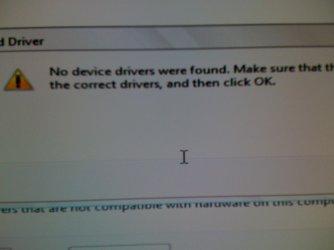
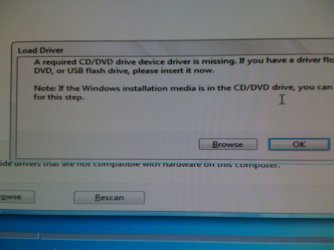
The Windows Install Prompt was next and I executed the install. After a few more minutes I see the "SET UP STARTING". After a few more minutes I get a new screen w/"Load Driver".Required driver for CD/DVD is missing.
The installer scanned the media disc but there was no driver to be found.
I uploaded 2 images for everyone to see.
Is any forum member here have a work around?
I attempted to install my drivers from my sys_32 folders from a thumb drive but no joy.
Since RC-7 was such a snap I assumed this install would be as easy also.
Best regards,
Adrian
 

Attachments
  • IMG_0245.JPG
    IMG_0245.JPG
    130.4 KB · Views: 26
  • IMG_0246.JPG
    IMG_0246.JPG
    109.3 KB · Views: 19

My Computer

Computer Manufacturer/Model Number
Custom Build
OS
Windows 7 7600 1 X64
CPU
AMD PHENOM II X 550 PROCESSOR 3.1 ghz
Motherboard
ASUS M4A78-TE
Memory
Corsair 4 gig ddr 3
Graphics Card(s)
ati radeon 3300
Sound Card
ati hd
Monitor(s) Displays
syncmaster 2033sw
Screen Resolution
1600X900 60 hz refresh
Hard Drives
twin_seagates SATA's 1 TB & 500 Gig, hitachi_slimline 160 gig
PSU
antec_550 watt
Case
cooler master GLite
Cooling
stock_heat sink
Internet Speed
20mbs up/ 1.5mbs down
Other Info
favorite child "stewie"
favorite dog "brian"
Adrian... try extracting the contents of the DVD to a spare partition/drive and run the setup.exe from there... Let us know how it comes out...
 

My Computer

Computer type
PC/Desktop
Computer Manufacturer/Model Number
LENOVO K450 @3.0GHZ
OS
64-bit Windows 8.1 Pro
CPU
Core(TM) i5 CPU 4330 Haswell @ 3.20GHz
Motherboard
LENOVO
Memory
12.00 GB
Graphics Card(s)
Intel(R) HD Graphics
Sound Card
Intel HD integtrated
Monitor(s) Displays
HP 25' ISP Monitor
Screen Resolution
1900/1020
Hard Drives
(1) ST1000DM003-1CH162 (2) Generic STORAGE DEVICE USB Device (3) Generic STORAGE DEVICE USB Device
Internet Speed
100mb down/10mb up
Adrian... try extracting the contents of the DVD to a spare partition/drive and run the setup.exe from there... Let us know how it comes out...
Hi Tews, I received the ISO via RDP from Ant,
I have the iso sitting on c drive.
Are you suggesting I use ISO MAGIC and extract it another partition/HD?
 

My Computer

Computer Manufacturer/Model Number
Custom Build
OS
Windows 7 7600 1 X64
CPU
AMD PHENOM II X 550 PROCESSOR 3.1 ghz
Motherboard
ASUS M4A78-TE
Memory
Corsair 4 gig ddr 3
Graphics Card(s)
ati radeon 3300
Sound Card
ati hd
Monitor(s) Displays
syncmaster 2033sw
Screen Resolution
1600X900 60 hz refresh
Hard Drives
twin_seagates SATA's 1 TB & 500 Gig, hitachi_slimline 160 gig
PSU
antec_550 watt
Case
cooler master GLite
Cooling
stock_heat sink
Internet Speed
20mbs up/ 1.5mbs down
Other Info
favorite child "stewie"
favorite dog "brian"
that, winrar is what I use... or you could just copy the files directly ... I havent used a DVD for years... works like a charm..
 

My Computer

Computer type
PC/Desktop
Computer Manufacturer/Model Number
LENOVO K450 @3.0GHZ
OS
64-bit Windows 8.1 Pro
CPU
Core(TM) i5 CPU 4330 Haswell @ 3.20GHz
Motherboard
LENOVO
Memory
12.00 GB
Graphics Card(s)
Intel(R) HD Graphics
Sound Card
Intel HD integtrated
Monitor(s) Displays
HP 25' ISP Monitor
Screen Resolution
1900/1020
Hard Drives
(1) ST1000DM003-1CH162 (2) Generic STORAGE DEVICE USB Device (3) Generic STORAGE DEVICE USB Device
Internet Speed
100mb down/10mb up
that, winrar is what I use... or you could just copy the files directly ... I havent used a DVD for years... works like a charm..
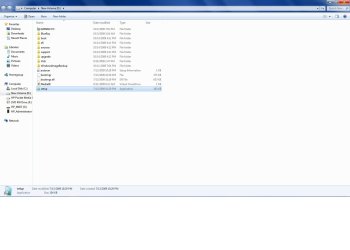
OK Tews, I used iso magic and extracted the iso to another hard drive.
I see the extracted files and I'm going use the setup.exe
 

My Computer

Computer Manufacturer/Model Number
Custom Build
OS
Windows 7 7600 1 X64
CPU
AMD PHENOM II X 550 PROCESSOR 3.1 ghz
Motherboard
ASUS M4A78-TE
Memory
Corsair 4 gig ddr 3
Graphics Card(s)
ati radeon 3300
Sound Card
ati hd
Monitor(s) Displays
syncmaster 2033sw
Screen Resolution
1600X900 60 hz refresh
Hard Drives
twin_seagates SATA's 1 TB & 500 Gig, hitachi_slimline 160 gig
PSU
antec_550 watt
Case
cooler master GLite
Cooling
stock_heat sink
Internet Speed
20mbs up/ 1.5mbs down
Other Info
favorite child "stewie"
favorite dog "brian"
Adrian... try extracting the contents of the DVD to a spare partition/drive and run the setup.exe from there... Let us know how it comes out...
Tews, no joy!
See attached.
 

Attachments

  • BAD_IMG.jpg
    BAD_IMG.jpg
    82.4 KB · Views: 53
  • NEW_DRIVE.jpg
    NEW_DRIVE.jpg
    69 KB · Views: 18

My Computer

Computer Manufacturer/Model Number
Custom Build
OS
Windows 7 7600 1 X64
CPU
AMD PHENOM II X 550 PROCESSOR 3.1 ghz
Motherboard
ASUS M4A78-TE
Memory
Corsair 4 gig ddr 3
Graphics Card(s)
ati radeon 3300
Sound Card
ati hd
Monitor(s) Displays
syncmaster 2033sw
Screen Resolution
1600X900 60 hz refresh
Hard Drives
twin_seagates SATA's 1 TB & 500 Gig, hitachi_slimline 160 gig
PSU
antec_550 watt
Case
cooler master GLite
Cooling
stock_heat sink
Internet Speed
20mbs up/ 1.5mbs down
Other Info
favorite child "stewie"
favorite dog "brian"
Adrien

The dvd is looking more like the cause. One way you can check is to get the hash values of the dvd and compare them to what is on mS.

Oe you could just download it again. 80%> of all install fails are bad dvd/burns


Ken
 

My Computer

Computer Manufacturer/Model Number
HP Pavillion dv-7 1005 Tx
OS
Win 8 Release candidate 8400
CPU
[email protected]
Memory
4 gigs
Graphics Card(s)
Nvidia 9600M
Sound Card
HD built-in
Monitor(s) Displays
17" Wxga
Screen Resolution
1440x900
Cooling
none
Internet Speed
45Mb down 5Mb up
Adrien

The dvd is looking more like the cause. One way you can check is to get the hash values of the dvd and compare them to what is on mS.

Oe you could just download it again. 80%> of all install fails are bad dvd/burns


Ken
Ken, I burned the iso on 2 different machines, 1 is the x64, the other was x86, I used the 1x setting.
Then I tried Tews's suggestion and extracted the iso.img that I got from ant, using magic iso and then winrar to a different HD.
No luck.

Adrian
 

My Computer

Computer Manufacturer/Model Number
Custom Build
OS
Windows 7 7600 1 X64
CPU
AMD PHENOM II X 550 PROCESSOR 3.1 ghz
Motherboard
ASUS M4A78-TE
Memory
Corsair 4 gig ddr 3
Graphics Card(s)
ati radeon 3300
Sound Card
ati hd
Monitor(s) Displays
syncmaster 2033sw
Screen Resolution
1600X900 60 hz refresh
Hard Drives
twin_seagates SATA's 1 TB & 500 Gig, hitachi_slimline 160 gig
PSU
antec_550 watt
Case
cooler master GLite
Cooling
stock_heat sink
Internet Speed
20mbs up/ 1.5mbs down
Other Info
favorite child "stewie"
favorite dog "brian"
A

yeah but isn't it from the same download, or dvd?
 

My Computer

Computer Manufacturer/Model Number
HP Pavillion dv-7 1005 Tx
OS
Win 8 Release candidate 8400
CPU
[email protected]
Memory
4 gigs
Graphics Card(s)
Nvidia 9600M
Sound Card
HD built-in
Monitor(s) Displays
17" Wxga
Screen Resolution
1440x900
Cooling
none
Internet Speed
45Mb down 5Mb up
Hmmm... The contents of the ISO look different than the stock ISO from MS, so the hash values wouldnt match.... brainstorming...
 

My Computer

Computer type
PC/Desktop
Computer Manufacturer/Model Number
LENOVO K450 @3.0GHZ
OS
64-bit Windows 8.1 Pro
CPU
Core(TM) i5 CPU 4330 Haswell @ 3.20GHz
Motherboard
LENOVO
Memory
12.00 GB
Graphics Card(s)
Intel(R) HD Graphics
Sound Card
Intel HD integtrated
Monitor(s) Displays
HP 25' ISP Monitor
Screen Resolution
1900/1020
Hard Drives
(1) ST1000DM003-1CH162 (2) Generic STORAGE DEVICE USB Device (3) Generic STORAGE DEVICE USB Device
Internet Speed
100mb down/10mb up

My Computer

Computer Manufacturer/Model Number
Custom Build
OS
Windows 7 7600 1 X64
CPU
AMD PHENOM II X 550 PROCESSOR 3.1 ghz
Motherboard
ASUS M4A78-TE
Memory
Corsair 4 gig ddr 3
Graphics Card(s)
ati radeon 3300
Sound Card
ati hd
Monitor(s) Displays
syncmaster 2033sw
Screen Resolution
1600X900 60 hz refresh
Hard Drives
twin_seagates SATA's 1 TB & 500 Gig, hitachi_slimline 160 gig
PSU
antec_550 watt
Case
cooler master GLite
Cooling
stock_heat sink
Internet Speed
20mbs up/ 1.5mbs down
Other Info
favorite child "stewie"
favorite dog "brian"
let me bang heads with Antman and see what we can come up with...will PM you with results....
 

My Computer

Computer type
PC/Desktop
Computer Manufacturer/Model Number
LENOVO K450 @3.0GHZ
OS
64-bit Windows 8.1 Pro
CPU
Core(TM) i5 CPU 4330 Haswell @ 3.20GHz
Motherboard
LENOVO
Memory
12.00 GB
Graphics Card(s)
Intel(R) HD Graphics
Sound Card
Intel HD integtrated
Monitor(s) Displays
HP 25' ISP Monitor
Screen Resolution
1900/1020
Hard Drives
(1) ST1000DM003-1CH162 (2) Generic STORAGE DEVICE USB Device (3) Generic STORAGE DEVICE USB Device
Internet Speed
100mb down/10mb up
let me bang heads with Antman and see what we can come up with...will PM you with results....
Sounds good, I talked w/him this AM and he was scratching his head.
 

My Computer

Computer Manufacturer/Model Number
Custom Build
OS
Windows 7 7600 1 X64
CPU
AMD PHENOM II X 550 PROCESSOR 3.1 ghz
Motherboard
ASUS M4A78-TE
Memory
Corsair 4 gig ddr 3
Graphics Card(s)
ati radeon 3300
Sound Card
ati hd
Monitor(s) Displays
syncmaster 2033sw
Screen Resolution
1600X900 60 hz refresh
Hard Drives
twin_seagates SATA's 1 TB & 500 Gig, hitachi_slimline 160 gig
PSU
antec_550 watt
Case
cooler master GLite
Cooling
stock_heat sink
Internet Speed
20mbs up/ 1.5mbs down
Other Info
favorite child "stewie"
favorite dog "brian"
adrien

Anything unusual about your system? no overclocking, no raid, internal HD's, dvd player is internal. How much ram? always good idea to leave abt 2gigs in yank the rest.

Ken
 

My Computer

Computer Manufacturer/Model Number
HP Pavillion dv-7 1005 Tx
OS
Win 8 Release candidate 8400
CPU
[email protected]
Memory
4 gigs
Graphics Card(s)
Nvidia 9600M
Sound Card
HD built-in
Monitor(s) Displays
17" Wxga
Screen Resolution
1440x900
Cooling
none
Internet Speed
45Mb down 5Mb up
adrien

Anything unusual about your system? no overclocking, no raid, internal HD's, dvd player is internal. How much ram? always good idea to leave abt 2gigs in yank the rest.

Ken
Hey Ken, no everything is stock.
Everything worked fine with RC-7
 

My Computer

Computer Manufacturer/Model Number
Custom Build
OS
Windows 7 7600 1 X64
CPU
AMD PHENOM II X 550 PROCESSOR 3.1 ghz
Motherboard
ASUS M4A78-TE
Memory
Corsair 4 gig ddr 3
Graphics Card(s)
ati radeon 3300
Sound Card
ati hd
Monitor(s) Displays
syncmaster 2033sw
Screen Resolution
1600X900 60 hz refresh
Hard Drives
twin_seagates SATA's 1 TB & 500 Gig, hitachi_slimline 160 gig
PSU
antec_550 watt
Case
cooler master GLite
Cooling
stock_heat sink
Internet Speed
20mbs up/ 1.5mbs down
Other Info
favorite child "stewie"
favorite dog "brian"
Let's RDP a new version of the ISO.
Anthony, its hitting 18:30 HRS I need to use my pc for about 15 minutes so how does 19:00HRS sound?
Also should I delete the old ISO out of Public Downloads?
 

My Computer

Computer Manufacturer/Model Number
Custom Build
OS
Windows 7 7600 1 X64
CPU
AMD PHENOM II X 550 PROCESSOR 3.1 ghz
Motherboard
ASUS M4A78-TE
Memory
Corsair 4 gig ddr 3
Graphics Card(s)
ati radeon 3300
Sound Card
ati hd
Monitor(s) Displays
syncmaster 2033sw
Screen Resolution
1600X900 60 hz refresh
Hard Drives
twin_seagates SATA's 1 TB & 500 Gig, hitachi_slimline 160 gig
PSU
antec_550 watt
Case
cooler master GLite
Cooling
stock_heat sink
Internet Speed
20mbs up/ 1.5mbs down
Other Info
favorite child "stewie"
favorite dog "brian"
This is a quote from the above link: This I did not Know.

Hi, just wanted to share my experience after reading lots of threads o
this issue and considering buying a new drive

In the end, I *simply turn off IDE emulation for SATA drives on m
motherboard and the problem was solved*
I guess it depends on each manufacturer and BIOS, but I guess this ca
be the problem for some people

In my Nvidia730i based Gigabyte GA-E7-AUM DS2H I can choose to us
Nvidia's SATA chip in IDE, RAID, or AHCI. I was getting the "drive
problem" when using "IDE" mode, but it disapeared when I put it back i
AHCI
I guess that using the SATA chipset on IDE was interferring with th
IDE channel for the DVD drive (my unit is IDE and rather old)

My BD drive is a SATA connection!
Allright I need to pull out the PC connect keyboard.
 

My Computer

Computer Manufacturer/Model Number
Custom Build
OS
Windows 7 7600 1 X64
CPU
AMD PHENOM II X 550 PROCESSOR 3.1 ghz
Motherboard
ASUS M4A78-TE
Memory
Corsair 4 gig ddr 3
Graphics Card(s)
ati radeon 3300
Sound Card
ati hd
Monitor(s) Displays
syncmaster 2033sw
Screen Resolution
1600X900 60 hz refresh
Hard Drives
twin_seagates SATA's 1 TB & 500 Gig, hitachi_slimline 160 gig
PSU
antec_550 watt
Case
cooler master GLite
Cooling
stock_heat sink
Internet Speed
20mbs up/ 1.5mbs down
Other Info
favorite child "stewie"
favorite dog "brian"
I do not suspect the ISO, but I did prep a new one.

I do not know where your quite begins and/or ends.

I think you are saying you have to ODDs - one IDE one SATA. If you have two ODDs, disconnect the Blu-Ray (SATA port) and try again.
 
Back
Top